
1. Introduction
This manual provides essential information for the proper use, programming, and maintenance of your Alliskeys Smart Key Fob. This key fob is designed as a replacement for specific Ford vehicle models equipped with a push-button start system. Please read these instructions carefully before attempting to use or program your new key fob.
2. Compatibility and Verification
This Alliskeys Smart Key Fob is compatible with the following vehicles:
- Ford Expedition: 2023, 2024
- Ford Explorer: 2024
Important: This key fob is only compatible with vehicles that feature a Push-Button Start ignition system.
To ensure proper functionality, verify that the following identification numbers match your original key fob:
- FCC ID: M3N-A3C108397
- Interchange Part Number: PL1T-15K601-AA
- Manufacturer Part Number: 164-R8354

Image 2.1: Key Fob with compatibility information and push-start button reference.

Image 2.2: Visual guide for verifying key fob compatibility.
3. Product Features
The Alliskeys Smart Key Fob is designed for reliable performance and convenience. Key features include:
- Pre-tested Quality: Each key fob undergoes professional testing before shipment to ensure functionality.
- Ready to Use: Comes with a pre-installed battery (Lithium 3V CR2450) and electronics.
- Keyless Entry: Allows for quick locking and unlocking of your vehicle doors.
- Panic Function: An integrated panic button for security alerts.
- Hatch Release: Dedicated button for remote hatch access.
- Extended Range: Offers a maximum transmission distance of up to 100 meters.
- Un-cut Key Blade: An un-cut emergency key blade is included for manual entry.
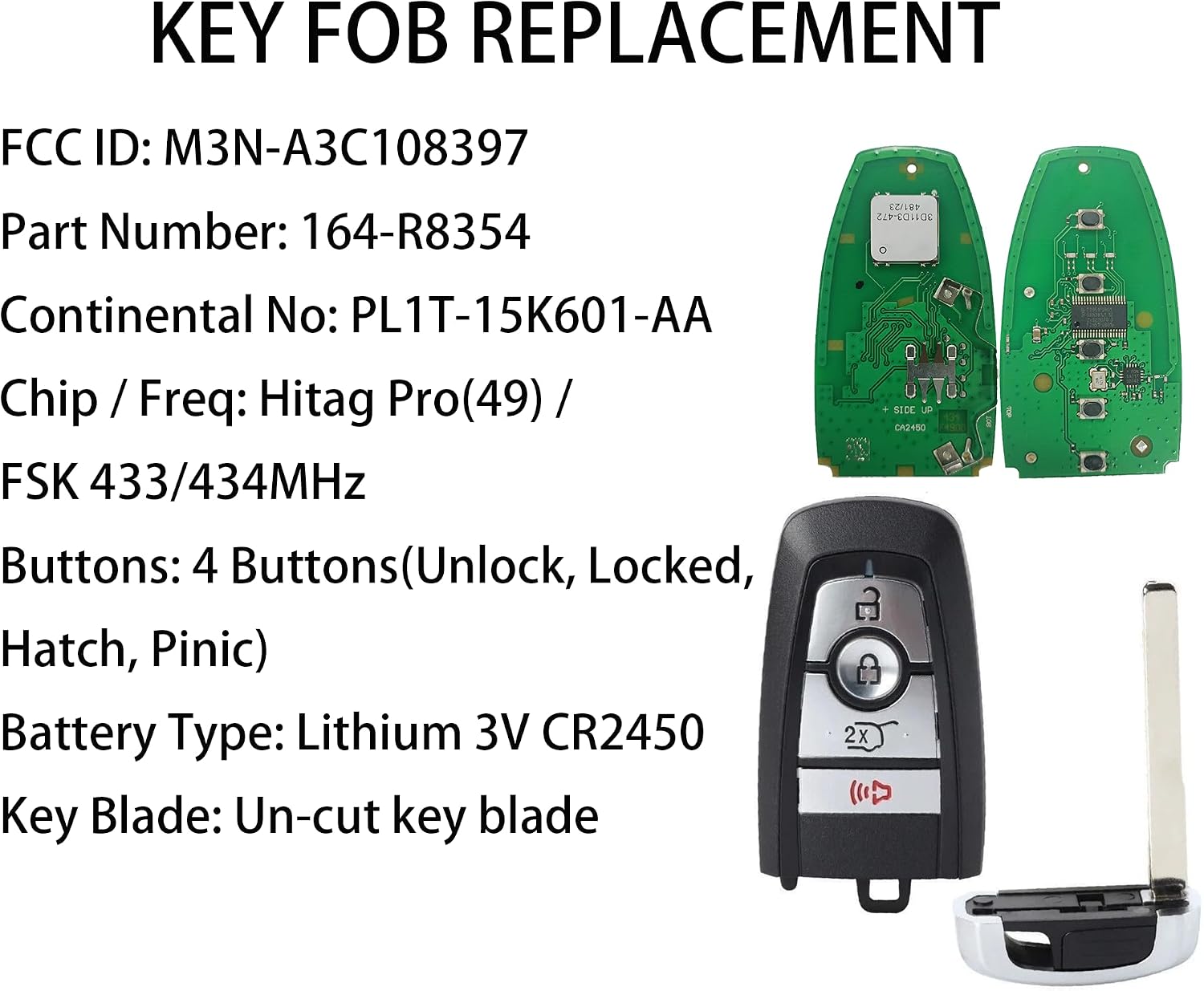
Image 3.1: Key Fob specifications including internal components and key blade.
4. Setup and Programming
Professional programming is required for this smart key fob. Self-programming is not available.
- Key Blade Cutting: The included un-cut key blade must be cut by a professional locksmith to match your vehicle's lock. This blade is for manual entry in case of battery failure.
- Fob Programming: Take your new smart key fob to a qualified automotive locksmith or an authorized dealership for programming. They have the specialized tools and software required to link the fob to your vehicle's immobilizer system.
- Verification: Before cutting the key blade or leaving the service center, ensure that all remote functions (lock, unlock, panic, hatch) and the vehicle start function work correctly.

Image 4.1: Instructions for professional key blade cutting and fob programming.
5. Operating Instructions
Once programmed, your Alliskeys Smart Key Fob provides convenient access and control over your vehicle. The fob features 4 buttons:
- Unlock Button: Press once to unlock the driver's door, press twice to unlock all doors.
- Lock Button: Press once to lock all doors.
- Hatch Button: Press and hold to open the vehicle's rear hatch.
- Panic Button: Press and hold to activate the vehicle's alarm system. Press again to deactivate.
To start your vehicle, ensure the key fob is inside the vehicle, then press the brake pedal and push the engine start/stop button.

Image 5.1: Key Fob button layout and functions.
6. Maintenance
Your Alliskeys Smart Key Fob is designed for durability, but proper care can extend its lifespan:
- Battery Replacement: The key fob uses a Lithium 3V CR2450 battery. When the battery is low, the remote range may decrease, or functions may become intermittent. To replace, carefully open the key fob casing (refer to your vehicle's owner's manual for specific instructions on opening the fob if needed) and replace the battery with a new CR2450.
- Cleaning: Wipe the key fob with a soft, dry cloth. Avoid using harsh chemicals or abrasive cleaners.
- Storage: Store the key fob in a dry place, away from extreme temperatures and direct sunlight. Avoid dropping the fob or exposing it to water.
7. Troubleshooting
If you experience issues with your Alliskeys Smart Key Fob, consider the following:
- Fob Not Working After Programming: Double-check that the FCC ID, Part Number, and vehicle compatibility (including push-button start) were correctly verified before programming. If all details match, contact the professional locksmith or dealership who performed the programming for assistance.
- Reduced Range or Intermittent Function: The battery may be low. Replace the CR2450 battery as described in the Maintenance section.
- Vehicle Not Starting: Ensure the key fob is inside the vehicle and the brake pedal is pressed firmly when attempting to start. If the issue persists, it may indicate a programming issue or a vehicle-related problem.
- Physical Damage: If the key fob has been dropped or exposed to water, internal components may be damaged. In such cases, a replacement may be necessary.
For persistent issues, please refer to the Warranty and Support section for contact information.
8. Specifications
| Feature | Detail |
|---|---|
| Model Number | M3N-A3C108397 |
| FCC ID | M3N-A3C108397 |
| Part Number | 164-R8354 |
| Interchange Part Number | PL1T-15K601-AA |
| Frequency | 433-434MHz |
| Chip Type | 49/Hitag Pro |
| Buttons | 4 (Unlock, Locked, Hatch, Panic) |
| Battery Type | Lithium 3V CR2450 (included) |
| Product Dimensions | 4.33 x 2.75 x 0.39 inches |
| Item Weight | 2.29 ounces |

Image 8.1: Electronic testing and quality assurance for the key fob.
9. Warranty and Support
Alliskeys stands behind the quality of its products. Your purchase includes a 90-day satisfaction guarantee. If your remote does not function as expected for any reason within this period, please contact Alliskeys customer support for a refund or replacement.
For support inquiries, please visit the Alliskeys Store on Amazon or contact their customer service directly through the platform where the product was purchased.