
1. Introduction
This manual provides essential information for the safe and efficient operation, installation, and maintenance of your Samsung Smart 4.7 Cu Ft Top Load Washer and 7.4 Cu Ft Electric Dryer bundle. Please read this manual thoroughly before using your appliances and retain it for future reference.
This bundle includes a 4.7 cu ft top-load washer with features like a built-in WaterJet faucet, Self Clean function, and Vibration Reduction Technology, alongside a 7.4 cu ft electric dryer equipped with Sensor Dry and a reversible door. Both units are Smart Wi-Fi enabled for convenient control via the SmartThings app.
2. Safety Information
Always follow basic safety precautions when using electrical appliances to reduce the risk of fire, electric shock, or injury to persons.
- Read all instructions before using the appliance.
- Do not wash or dry articles that have been previously cleaned in, washed in, soaked in, or spotted with gasoline, dry-cleaning solvents, or other flammable or explosive substances.
- Do not allow children to play on or in the appliance. Close supervision of children is necessary when the appliance is used near children.
- Before the appliance is removed from service or discarded, remove the door to the washing or drying compartment.
- Do not reach into the appliance if the tub or drum is moving.
- Do not install or store this appliance where it will be exposed to the weather.
- Do not tamper with controls.
- Do not repair or replace any part of the appliance or attempt any servicing unless specifically recommended in the user-maintenance instructions or in published user-repair instructions that you understand and have the skills to carry out.
3. What's in the Box
Your Samsung washer and dryer bundle includes the following components:
- Samsung 4.7 Cu Ft Top-Load Washer
- Samsung 7.4 Cu Ft Electric Dryer
- 3-Prong Dryer Cord
- 4-Prong Dryer Cord
- Hot & Cold Washer Hose Set
- 8-ft Aluminum Dryer Vent
- 1-Year CPS Warranty Information
- User Manual (this document)

Image: The Samsung washer and dryer units shown with the included installation accessories: 3-prong dryer cord, 4-prong dryer cord, hot and cold water hoses, and an 8-foot aluminum dryer vent.
4. Setup and Installation
Proper installation is crucial for the performance and safety of your appliances. It is recommended to have these appliances installed by a qualified technician.
4.1 Site Preparation
Ensure the installation area has adequate space, proper electrical outlets, and water connections. The floor must be level and capable of supporting the weight of both appliances when fully loaded.
4.2 Connecting the Washer
- Connect the hot and cold washer inlet hoses to the corresponding water supply valves and to the washer's dual 3/4" water inlets. Ensure connections are tight to prevent leaks.
- Position the drain hose into a standard drain outlet, ensuring it is securely fastened to prevent dislodging during operation.
- Plug the washer's power cord into a grounded electrical outlet.
4.3 Connecting the Dryer
- Determine whether your home uses a 3-prong or 4-prong 240V power outlet. Select the appropriate dryer power cord from the bundle and connect it to the dryer and the wall outlet.
- Attach the 8-ft flexible aluminum dryer vent duct to the dryer's 4" exhaust connection and to the external vent. Ensure the duct is not kinked or crushed to allow for proper airflow.
- For optimal drying performance and safety, ensure the vent duct is as short and straight as possible.
Image: A visual representation of the Samsung washer and dryer units, highlighting the included installation components such as power cords, water hoses, and the vent duct.
5. Operating Instructions
5.1 Washer Operation
- Loading the Washer: Open the top lid and load clothes loosely into the drum. Do not overload.
- Adding Detergent: Add appropriate detergent to the single-compartment dispenser.
- Using WaterJet: For pretreating stains, activate the built-in WaterJet faucet directly inside the tub. This allows for convenient spot treatment without needing a separate sink.
- Selecting a Cycle: Turn the cycle selector knob to choose a wash cycle (e.g., Normal, Heavy Duty, Delicates).
- Starting the Cycle: Press the Start/Pause button to begin the wash cycle. The Vibration Reduction Technology helps ensure a quieter wash.

Image: A close-up view of the Samsung top-load washer's drum with the Active WaterJet faucet dispensing water, demonstrating its use for pretreating stained clothes.

Image: An overhead view of the Samsung top-load washer with its lid open, showing the interior drum and control panel.
5.2 Dryer Operation
- Loading the Dryer: Open the dryer door and load clothes. Avoid overloading to ensure efficient drying.
- Selecting a Cycle: Turn the cycle selector knob to choose a drying cycle (e.g., Normal, Sensor Dry).
- Sensor Dry: This feature automatically detects moisture levels and stops the cycle when clothes are dry, preventing overdrying and saving energy.
- Special Features: Utilize cycles like 'Wrinkles Away' to reduce wrinkles, 'Odor Refresh' to freshen clothes, or the 'Anti Static' function for static reduction.
- Starting the Cycle: Press the Start/Pause button to begin the drying cycle.

Image: A close-up view of the Samsung electric dryer's interior, illustrating the Smart Sensor technology detecting moisture within the drum during a drying cycle.

Image: A graphic illustrating three key features of the Samsung dryer: Odor Refresh cycle, Wrinkles Away cycle, and Anti Static function, each with an icon indicating its purpose.
5.3 Smart Wi-Fi Connectivity
Both the washer and dryer are Smart Wi-Fi enabled, allowing you to control and monitor them remotely using the Samsung SmartThings app on your smartphone.
- Download the SmartThings app from your device's app store.
- Follow the in-app instructions to connect your washer and dryer to your home Wi-Fi network.
- Once connected, you can start/stop cycles, receive notifications, and link cycles between the washer and dryer for optimized performance.

Image: A smartphone screen displaying the SmartThings app interface, showing the 'Auto cycle link' feature enabled, which automatically sets the best drying cycle based on the washer cycle. The Samsung washer and dryer are visible in the background.
6. Maintenance
6.1 Washer Maintenance
Self Clean Function: Use the Self Clean cycle regularly to keep the washer tub fresh and free of dirt and bacteria buildup. This cycle uses hot water and high-speed spinning to clean the tub without the need for harsh chemicals.
6.2 Dryer Maintenance
Lint Filter Cleaning: Clean the lint filter before or after every load to maintain drying efficiency and prevent fire hazards. A clogged lint filter can significantly increase drying time and energy consumption.
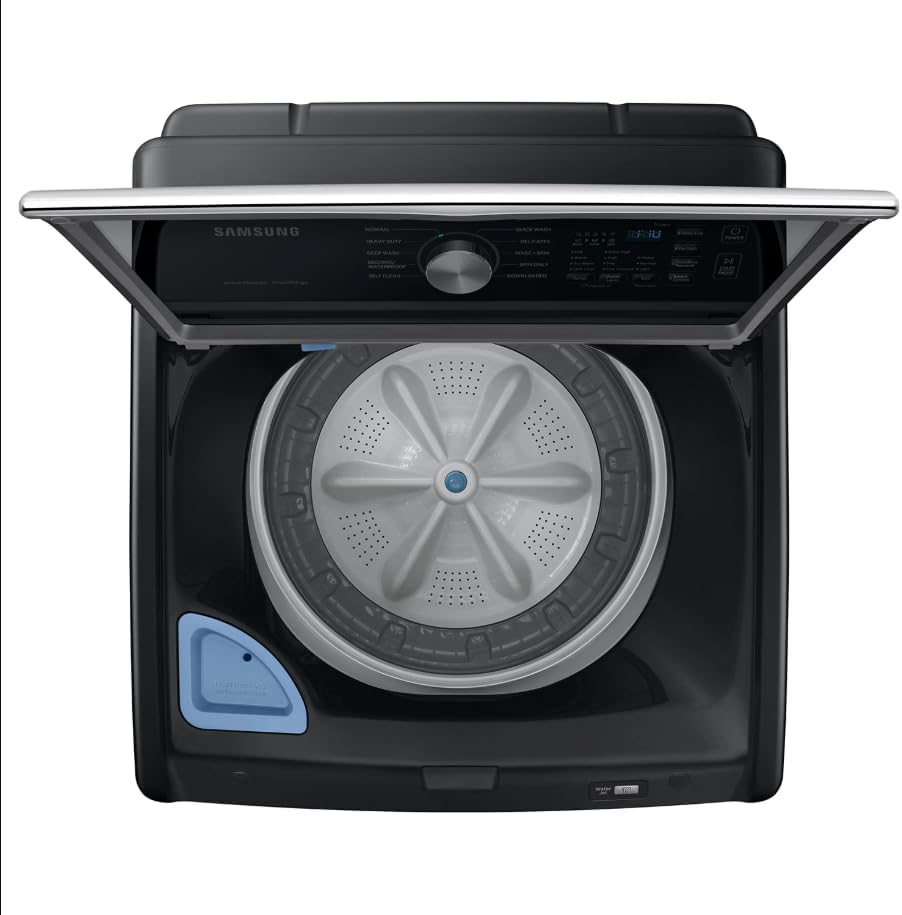
Image: A close-up of the Samsung dryer's control panel showing a lint filter indicator, alongside a detached lint filter, emphasizing the importance of regular cleaning.
6.3 General Care
- Wipe down the exterior surfaces of both appliances with a soft, damp cloth as needed.
- Periodically check water hoses for cracks or leaks and replace them if necessary.
- Inspect the dryer vent duct for lint buildup and clean it at least once a year to ensure proper airflow and prevent fire risks.
7. Troubleshooting
Before contacting service, review these common issues and solutions:
| Problem | Possible Cause | Solution |
|---|---|---|
| Appliance does not start | Power cord unplugged; circuit breaker tripped; door not closed properly. | Ensure power cord is securely plugged in; reset circuit breaker; close door firmly. |
| Washer vibrates excessively | Appliance not level; load unbalanced. | Adjust leveling feet; redistribute laundry evenly in the drum. |
| Dryer not drying effectively | Lint filter clogged; vent duct blocked; overloaded. | Clean lint filter; check and clear vent duct; reduce load size. |
| Water leaks from washer | Hose connections loose; drain hose improperly installed. | Tighten hose connections; ensure drain hose is secure and not kinked. |
8. Specifications
| Feature | Specification |
|---|---|
| Brand | Samsung |
| Washer Model Number | WA47CG3500K1 |
| Washer Capacity | 4.7 Cubic Feet |
| Washer Access Location | Top Load |
| Washer Cycles | Normal, Heavy Duty, Deep Wash, Waterproof, Delicates, Quick Wash, Self Clean, Downloaded |
| Washer Dispenser Options | Single-compartment (Detergent only) |
| Dryer Capacity | 7.4 Cubic Feet |
| Dryer Cycles | Normal, Sensor Dry, Wrinkles Away, Odor Refresh, Anti Static |
| Operation Mode | Automatic |
| Drum Material | Stainless Steel |
| Connectivity | Smart Wi-Fi Enabled (SmartThings App) |
| UPC | 850076465391 |
9. Warranty and Support
Your Samsung washer and dryer bundle includes a 1-Year CPS Major Appliance Protection Plan, covering parts and labor for both appliances. Additional protection plans, such as a 3-Year Protection Plan or a Complete Protect monthly plan, may be available for purchase.
For technical support, warranty claims, or service requests, please contact Samsung Customer Service. You can find contact information on the official Samsung website or through the SmartThings app.
For more information about Samsung products, visit the Samsung Store on Amazon.