Introduction
This manual provides instructions for the Kinetijy tablet case designed specifically for the Moxnice P63 10-inch tablet. This case offers comprehensive protection, 360-degree rotation for versatile viewing, and convenient storage features.
Setup: Installing Your Tablet
- Prepare the Case: Open the folio cover of the Kinetijy tablet case.
- Insert Tablet: Carefully align your Moxnice P63 10-inch tablet with the case's internal frame. Gently press the tablet into the case, ensuring all four corners are securely fitted into the protective holders.
- Verify Fit: Confirm that all tablet ports, speakers, and buttons are accessible and functional through the case's cutouts.

Image: Proper insertion of the Moxnice P63 10-inch tablet into the Kinetijy case, demonstrating compatibility and secure fit.
Operating Instructions
360-Degree Rotation and Multi-Viewing Stand
The Kinetijy tablet case features a rotating mechanism that allows you to switch between portrait and landscape orientations. The integrated stand utilizes anti-slip strips to provide multiple stable viewing angles.
- Rotate Tablet: Gently rotate the tablet within its frame to achieve your desired orientation (horizontal or vertical).
- Set Viewing Angle: Fold the front cover back to form a stand. Position the tablet's edge into one of the anti-slip grooves on the inside of the cover to secure your preferred viewing angle.

Image: The case's 360-degree rotation and adjustable stand positions for optimal viewing.
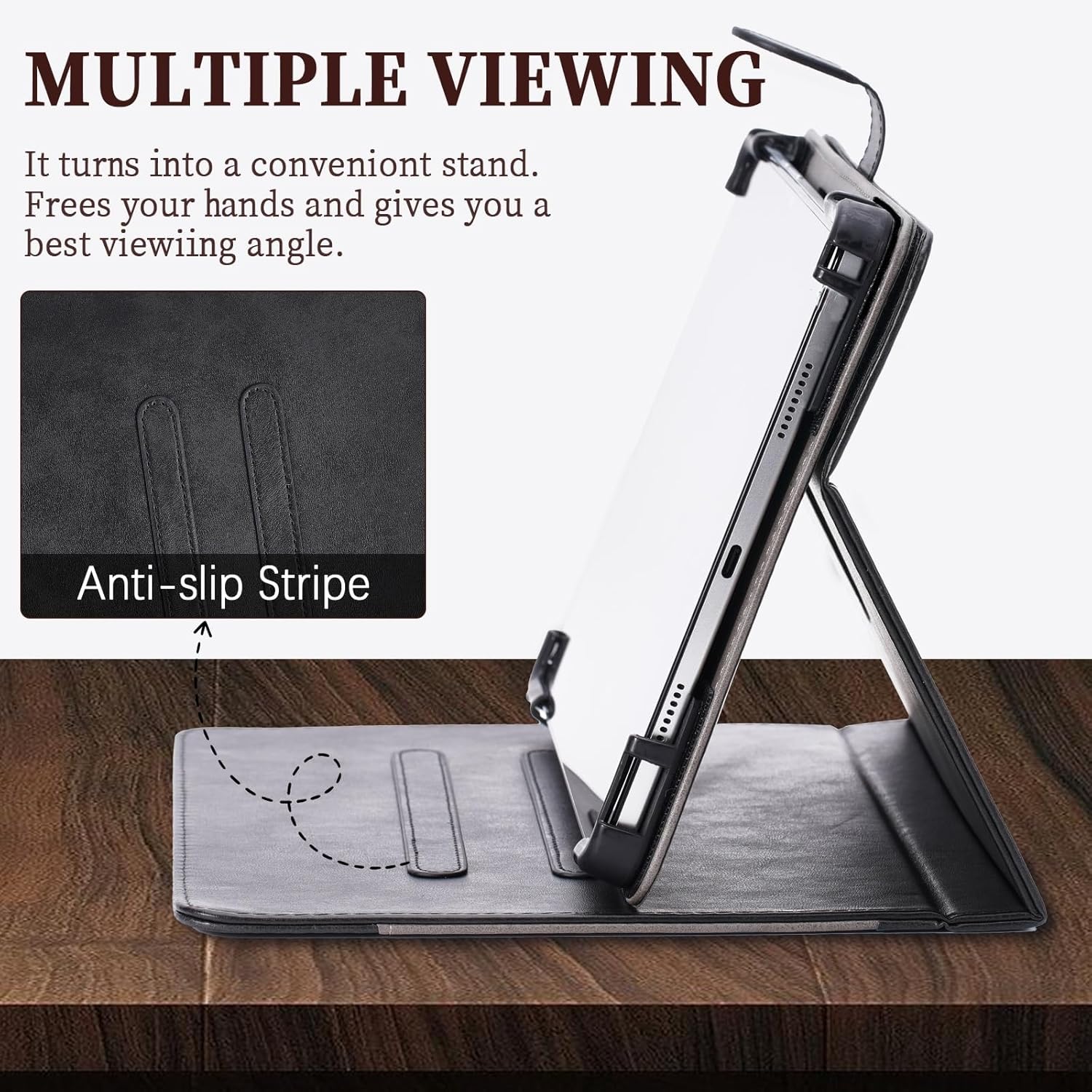
Image: Detail of the anti-slip stripe, which helps maintain stable viewing angles when the case is used as a stand.
Storage Pocket
The case includes a convenient storage pocket on the inside of the front cover. This pocket can be used to carry small items such as cards, documents, or cash.

Image: The integrated storage pocket, suitable for carrying small personal items.
Camera Access
The case features a reserved cutout on the back to allow access to your tablet's camera without needing to remove the device from the case.

Image: The case's camera cutouts, ensuring camera functionality while the tablet is protected.
Maintenance
To maintain the appearance and longevity of your Kinetijy tablet case:
- Cleaning: Wipe the PU leather exterior gently with a soft, slightly damp cloth. Avoid using harsh chemicals, abrasive cleaners, or excessive moisture.
- Drying: Ensure the case is completely dry before reinserting your tablet.
- Storage: Store the case in a cool, dry place away from direct sunlight when not in use.
Troubleshooting
- Tablet does not fit: Ensure your tablet is a Moxnice P63 10-inch model. This case is specifically designed for this model. Refer to the 'Setup' section and accompanying image for visual guidance on proper tablet insertion.
- Difficulty accessing ports or buttons: Verify the tablet is correctly seated within the case. Remove and reinsert the tablet if necessary, ensuring proper alignment with all cutouts.
- Stand instability: When using the stand feature, ensure the tablet's edge is firmly placed within one of the anti-slip strips on the inner cover. Adjust the angle as needed for stability.
Specifications
| Product Dimensions | 0.39 x 0.39 x 0.39 inches |
| Item Weight | 2.46 ounces |
| Special Features | Card insertion, Stash the change, Thickened anti-drop corner protector + folding stand |
| Form Factor | Flip Case |
| Color | Black |
| Manufacturer | KJY-SSPB-1639 |
What's in the Box
- 1 x Kinetijy Tablet Case for Moxnice P63 10-Inch
Warranty and Support
No specific warranty information is provided with this product. For product support or inquiries, please contact your retailer or the manufacturer directly.