Introduction
Thank you for choosing the Kinetijy Case for your Logicom Tab XL 14 Tablet. This manual provides detailed instructions on how to install, use, and maintain your new tablet case, ensuring optimal protection and functionality. Please read this manual carefully before use.
Product Overview

Figure 1: The Kinetijy Case for Logicom Tab XL 14 Tablet, illustrating its design and stand capabilities.
Key Features
- Designed specifically for the Logicom Tab XL 14 Tablet.
- 360-degree rotation for versatile multi-viewing angles.
- Constructed from premium durable synthetic PU leather with a soft anti-slip interior.
- Provides full body protection against scratches, shocks, fingerprints, and dust.
- Integrated anti-slip strip design for stable tablet positioning in stand mode.
- Reserved back camera opening, compatible with various camera positions.
- Features a storage pocket for cards, documents, or cash.
- Thickened anti-drop corner protector for enhanced durability.

Figure 2: Illustrates the case's adaptable camera cutouts for different tablet camera positions.
What's in the Box
- 1 x Kinetijy Tablet Case (Black)
Setup and Installation
Follow these steps to properly install your Logicom Tab XL 14 Tablet into the Kinetijy case:
- Open the Case: Lay the case flat on a clean surface with the interior facing up.
- Position the Tablet: Carefully align your Logicom Tab XL 14 Tablet with the protective frame inside the case. Ensure the tablet's edges fit snugly within the frame.
- Secure the Tablet: Gently press the tablet into the frame until it is securely seated. Verify that all ports, buttons, and the camera opening are accessible and unobstructed.
- Close the Case: Fold the cover over the tablet and secure it with the magnetic clasp.

Figure 3: Illustrates the process of inserting the tablet into the protective frame of the case.

Figure 4: Demonstrates the tablet fully installed, with all ports and buttons accessible and the case's slim profile.
Operating Instructions
Using the 360-Degree Rotation and Stand Function
The Kinetijy case features a unique 360-degree rotating mechanism and an integrated stand to provide multiple viewing angles for your tablet.
- Rotate the Tablet: With the tablet secured in the case, you can gently rotate the tablet within its frame to switch between portrait and landscape orientations without removing it from the case.
- Engage the Stand: Open the front cover of the case. Locate the anti-slip strips on the interior of the cover. Prop the tablet's edge into one of these grooves to create a stable viewing stand.
- Adjust Viewing Angle: The anti-slip strips allow for multiple viewing angles. Experiment with different grooves to find the most comfortable angle for typing, watching videos, or browsing.

Figure 5: Demonstrates the 360-degree rotation feature and multiple adjustable viewing angles.
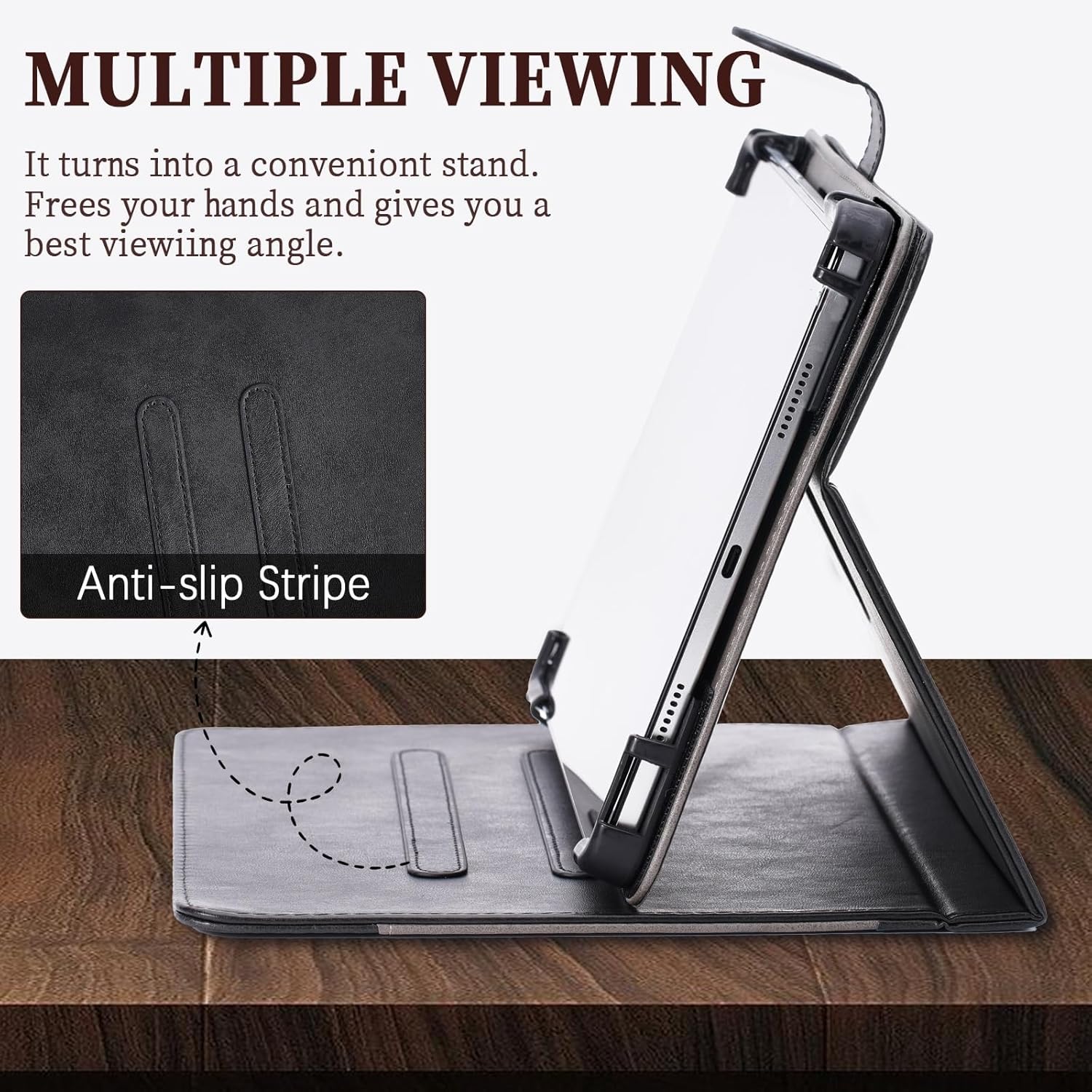
Figure 6: Close-up of the anti-slip stripe design, ensuring stable multi-angle viewing.
Using the Storage Pocket
The case includes a convenient storage pocket on the front cover.
- Accessing the Pocket: Simply lift the flap on the front cover to reveal the pocket.
- Storage: This pocket is suitable for carrying small items such as cards, notes, or a few bills. Avoid overfilling to prevent damage to the case or its contents.

Figure 7: Illustration of the storage pocket for carrying cards, documents, and cash.
Maintenance
To ensure the longevity and appearance of your Kinetijy tablet case, follow these maintenance guidelines:
- Cleaning: Wipe the exterior of the case with a soft, damp cloth. For stubborn dirt, a mild soap solution can be used, followed by wiping with a clean, damp cloth. Avoid harsh chemicals or abrasive cleaners.
- Drying: Allow the case to air dry completely. Do not expose it to direct sunlight or high heat, as this may damage the material.
- Storage: When not in use, store the case in a cool, dry place away from direct sunlight.
- Avoid Sharp Objects: Keep the case away from sharp objects to prevent scratches or punctures to the PU leather.
Troubleshooting
If you encounter any issues with your tablet case, consider the following common solutions:
- Tablet Not Fitting Properly: Ensure you have the correct model (Logicom Tab XL 14) and that the tablet is aligned correctly within the frame. Gently press all edges to ensure a snug fit.
- Stand Instability: Make sure the tablet's edge is firmly seated in one of the anti-slip grooves. Adjust the position until it feels stable.
- Camera Obstruction: Verify that the tablet is fully seated and aligned with the case's camera cutout.
If problems persist, please refer to the support information provided.
Specifications
| Feature | Detail |
|---|---|
| Product Dimensions | 0.39 x 0.39 x 0.39 inches |
| Item Weight | 2.46 ounces |
| ASIN | B0FDBH9ZGV |
| Special Features | Card insertion, Stash the change, Thickened anti-drop corner protector + folding stand |
| Form Factor | Flip Case |
| Color | Black |
| Manufacturer | KJY-SSPB-1508 |
| Date First Available | June 16, 2025 |
Warranty and Support
Kinetijy stands behind the quality of its products. For any questions, concerns, or support needs regarding your tablet case, please contact our customer service team.
- Customer Service: Please refer to the contact information provided with your purchase or visit the Kinetijy official website for support options.
- Warranty Information: Specific warranty details may vary. Please retain your proof of purchase for any warranty claims.