Introduction
This manual provides instructions for the proper setup, operation, and maintenance of your Kinetijy Inoi Inoipad Pro 10.1-Inch Tablet Case. Please read this guide thoroughly to ensure optimal use and protection for your device.
Setup
1. Unboxing
Carefully remove the tablet case from its packaging. Ensure the following item is present:
- 1 x Kinetijy Inoi Inoipad Pro 10.1-Inch Tablet Case
2. Installing Your Tablet
- Gently align your Inoi Inoipad Pro 10.1-Inch tablet with the case's interior frame.
- Press the tablet firmly into the protective frame until it is securely seated. Ensure all corners are properly engaged.
- Verify that all tablet ports, speakers, and buttons are accessible through the case's cutouts.
- The case features a reserved back camera opening. This design supports approximately 99% of tablet camera usage.
- Note: This tablet case does not support any tablet's auto-sleep/wake function.
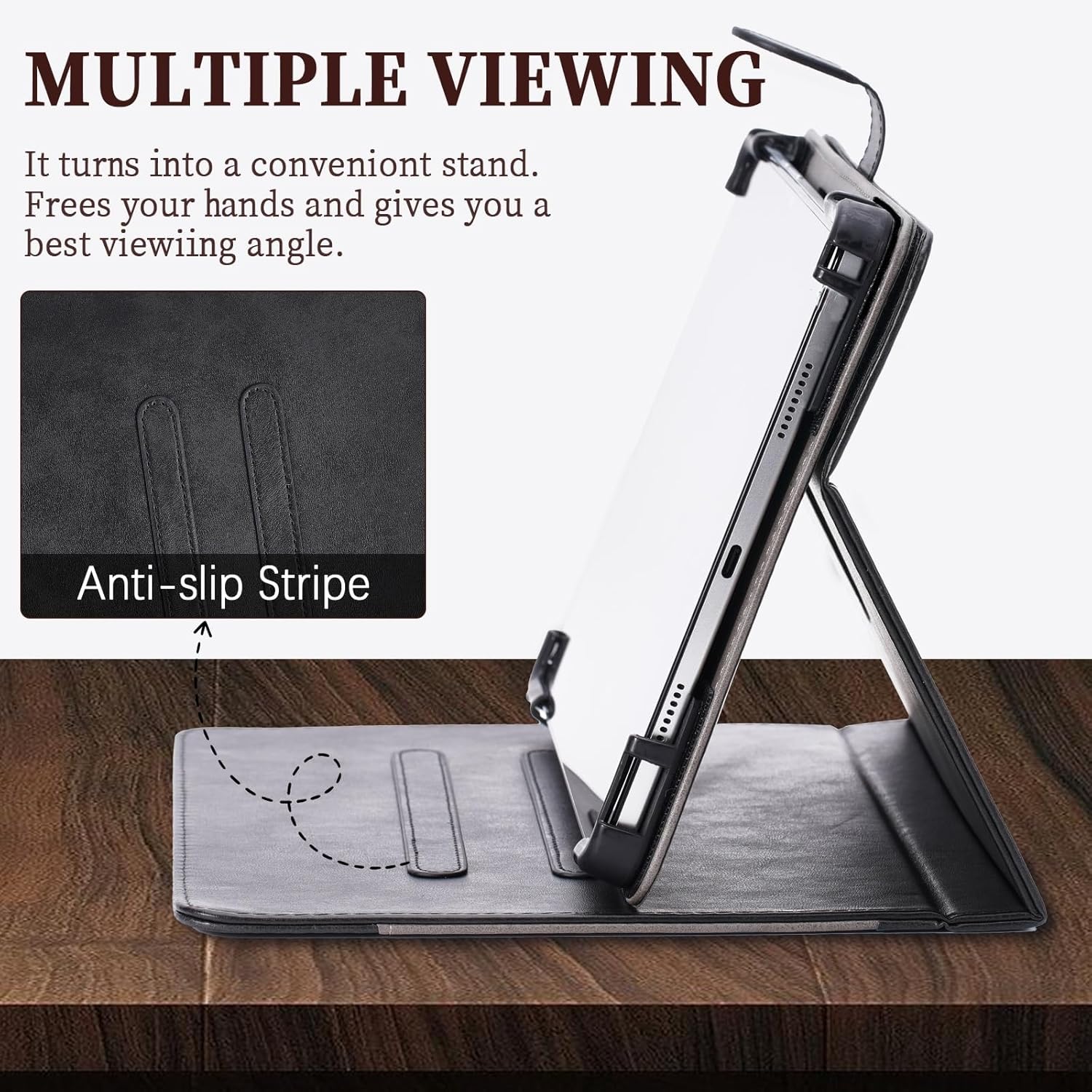
Image: Tablet securely fitted within the Kinetijy case, highlighting the precise cutouts for ports and buttons.
Operation
1. Utilizing the 360-Degree Rotation Stand
The case features a built-in 360-degree rotating mechanism, allowing for versatile viewing angles. To use the stand:
- Open the folio cover.
- Rotate the tablet within its frame to achieve either portrait or landscape orientation.
- Fold the cover back to form a triangular stand, utilizing the anti-slip strips for stability.
- Adjust the angle by positioning the tablet along the anti-slip strips on the inner cover.

Image: The tablet case showcasing its 360-degree rotation capability and various viewing angles for user convenience.
2. Using the Storage Pocket
The front cover of the case includes a storage pocket designed for carrying small items.
- Insert cards, documents, or cash into the designated pocket on the inside of the front cover.
- Ensure items are securely placed to prevent them from falling out when the case is moved.

Image: The tablet case displaying its integrated storage pocket, suitable for small personal items.
Maintenance
Cleaning Instructions
To maintain the appearance and longevity of your PU leather tablet case:
- Wipe the exterior surface with a soft, damp cloth.
- For stubborn dirt, use a mild soap solution on the cloth, then wipe with a clean, damp cloth to remove any residue.
- Avoid using harsh chemicals, abrasive cleaners, or solvents, as these can damage the PU leather.
- Allow the case to air dry completely before reinserting your tablet.
- Keep the case away from direct sunlight and extreme temperatures to prevent material degradation.
Troubleshooting
Tablet Does Not Fit
Ensure your tablet is an Inoi Inoipad Pro 10.1-Inch model. This case is specifically designed for this tablet size. Verify the tablet's dimensions against the product specifications.

Image: Visual guide for checking tablet compatibility with the case.
Stand Instability
Ensure the tablet is properly seated along the anti-slip strips on the inner cover. Adjust the angle to find a stable position. The anti-slip design is intended to provide firm support.
Specifications
| Product Name | Kinetijy Inoi Inoipad Pro 10.1-Inch Tablet Case |
| Model Compatibility | Inoi Inoipad Pro 10.1-Inch Tablet |
| Material | Premium Durable Synthetic PU Leather |
| Color | Black |
| Product Dimensions | 0.39 x 0.39 x 0.39 inches (approximate, for case thickness) |
| Item Weight | 2.46 ounces |
| Special Features | 360-Degree Rotation Stand, Multi-Viewing Angles, Anti-Slip Strip, Storage Pocket (Card insertion, Stash the change), Thickened Anti-Drop Corner Protector, Reserved Camera Opening |
| Protection | Full body protection against scratches, shocks, fingerprints, and dust. |

Image: Overview of the case's protective features, slim profile, and precise port access.
Warranty Information
Specific warranty details for this product are not provided in this manual. For information regarding warranty coverage, please refer to the product packaging or contact the seller directly. Keep your purchase receipt as proof of purchase.
Customer Support
If you encounter any issues or have questions about your Kinetijy Inoi Inoipad Pro 10.1-Inch Tablet Case, please contact the retailer or manufacturer for assistance. Provide your product model and purchase details when seeking support.