
Introduction
This manual provides detailed instructions for the installation, operation, and maintenance of your YUANWIN Smart Video Doorbell Intercom System. Please read this manual thoroughly before using the product to ensure proper function and safety. This system features a 7-inch touch screen monitor, a 2MP HD camera with night vision, two-way audio, RFID IC card access, and Wi-Fi connectivity for remote unlocking via the Tuya app.

Figure 1: YUANWIN Smart Video Doorbell Intercom System (Outdoor Station and Indoor Monitor)
Package Contents
Verify that all items listed below are included in your package. If any items are missing or damaged, please contact customer support.
- Outdoor Station (Doorbell Unit)
- Indoor Monitor (7-inch Touch Screen)
- Bracket for Indoor Monitor
- IC Cards
- Screws & Anchors
- Transfer Cables
- Power Adapter
- User Manual
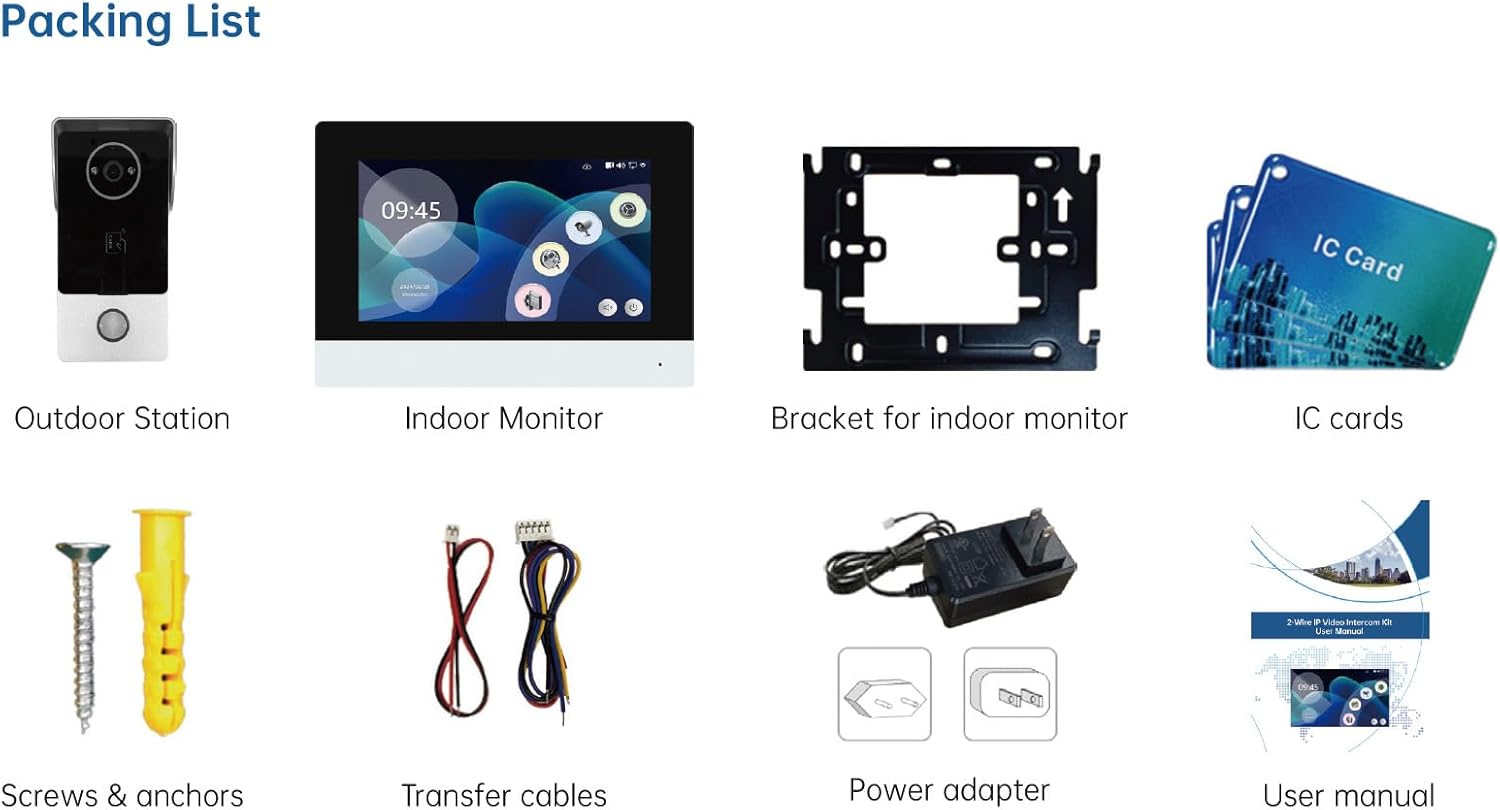
Figure 2: Package Contents
Product Overview
Outdoor Station (Doorbell Unit)
The outdoor station is equipped with a 2MP HD camera, infrared fill light for night vision, a microphone, speaker, RFID card reader, and a call button. It is designed for outdoor use with a rainproof cover.
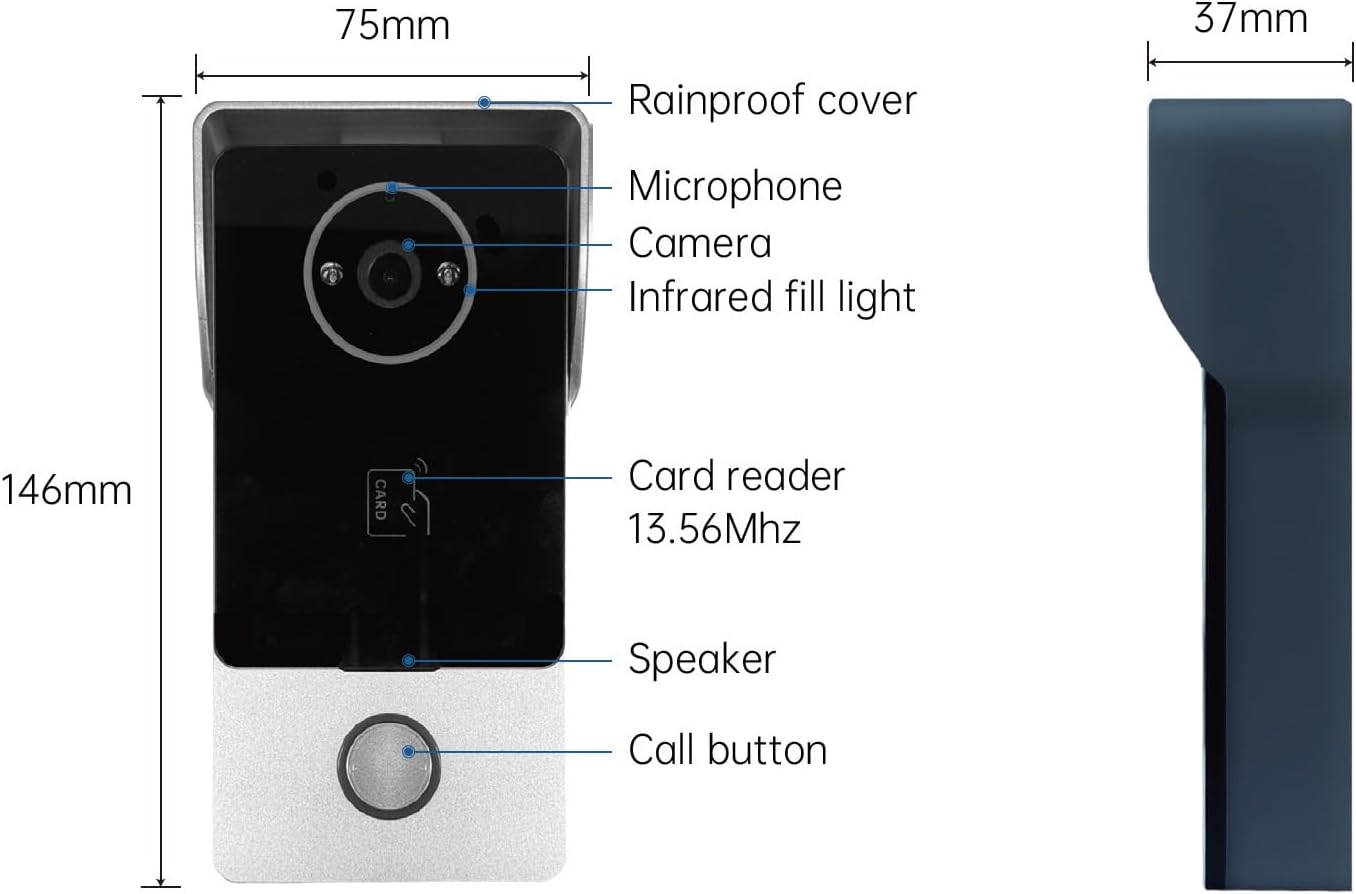
Figure 3: Outdoor Station Components and Dimensions
Indoor Monitor
The indoor monitor features a 7-inch IPS touch screen display, a speaker, microphone, and a TF card slot for local storage. It serves as the central control unit for the intercom system.
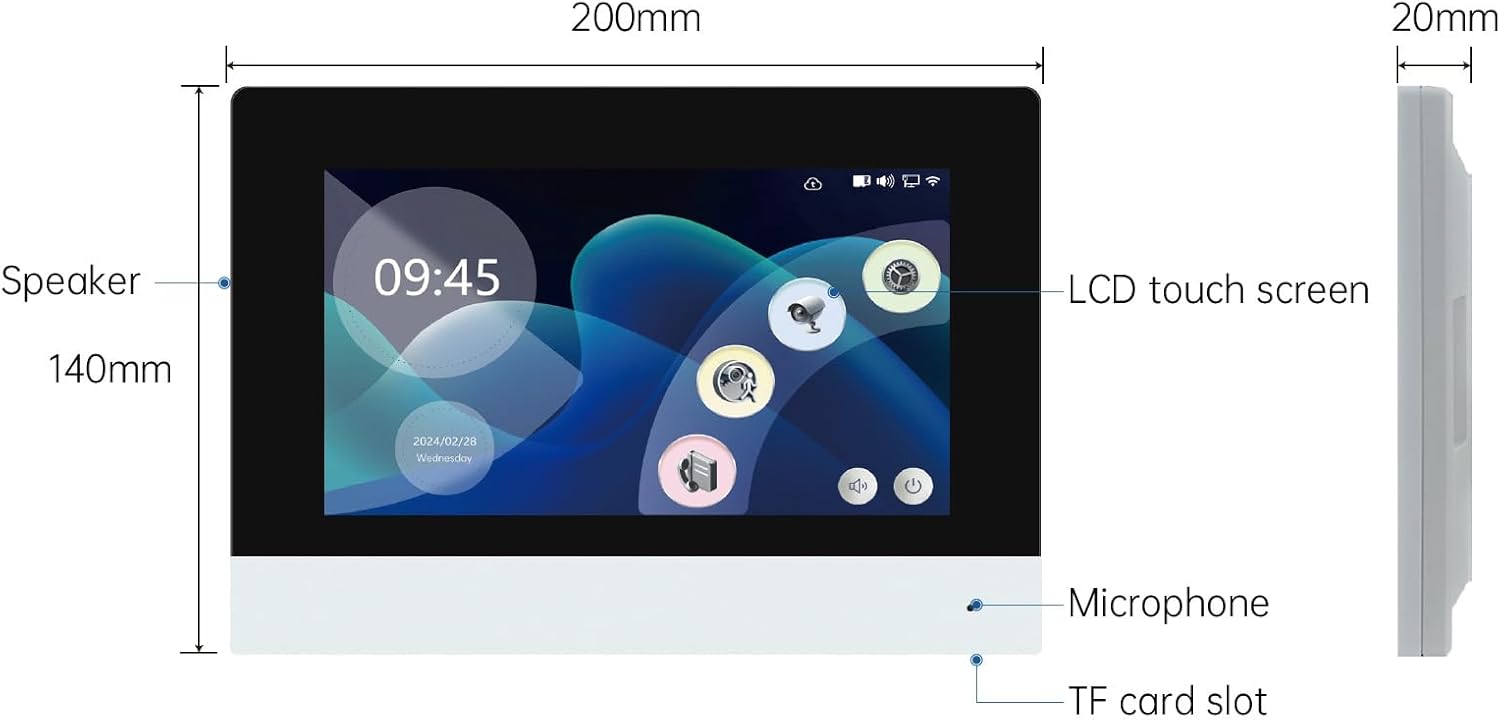
Figure 4: Indoor Monitor Components and Dimensions
Setup
Wiring Diagram
Follow the wiring diagram carefully for proper installation. The electronic lock is for functional reference only and should be purchased separately if required.
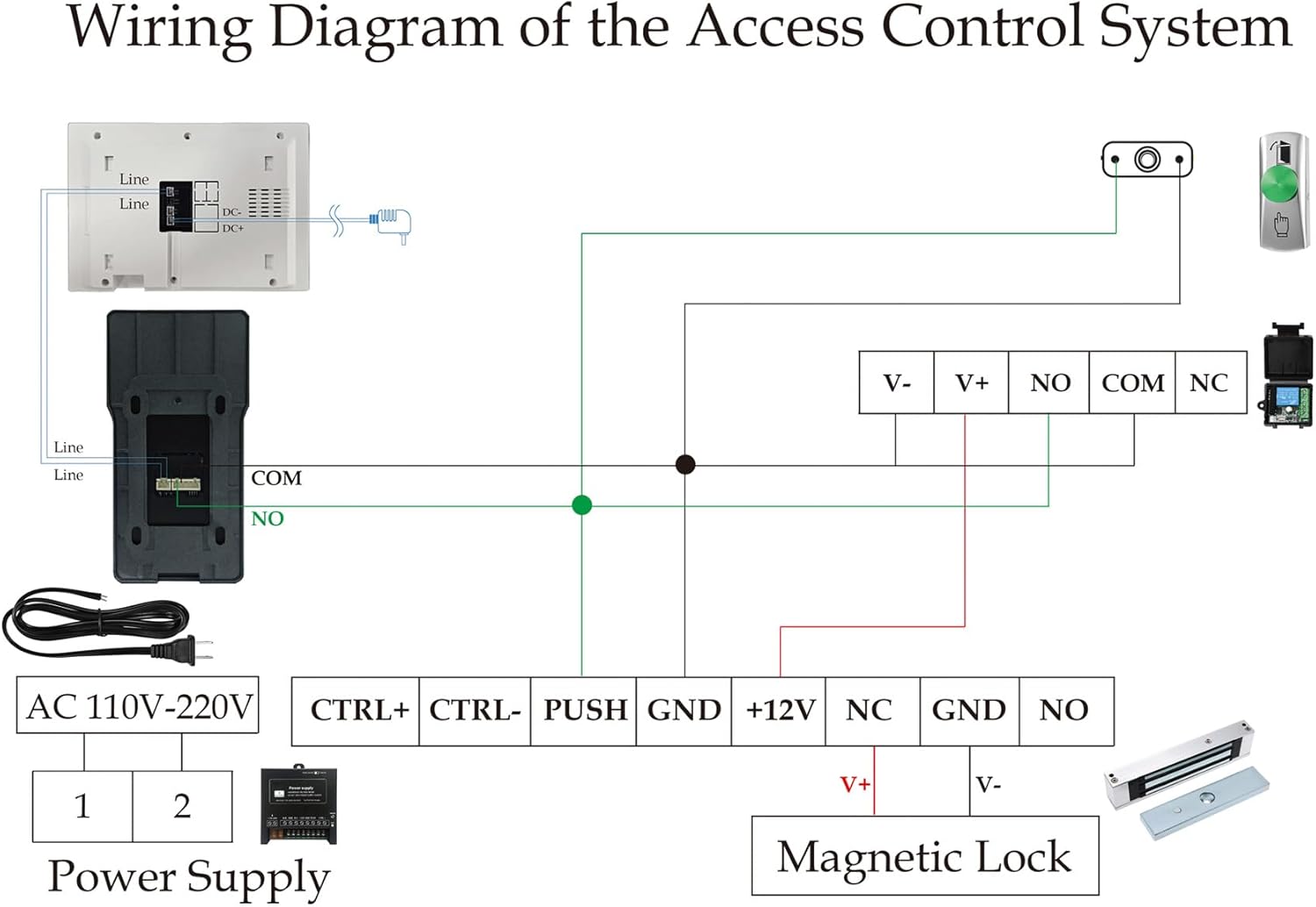
Figure 5: Wiring Diagram (2-Wire Connection)
Power Connection
Connect the power adapter to the indoor monitor and plug it into a standard 110V AC power outlet. Ensure all connections are secure before powering on the system.
Wi-Fi Configuration
To enable remote control via the Tuya app, connect the indoor monitor to your 2.4GHz Wi-Fi network (5GHz networks are not supported). Navigate to the settings menu on the monitor, select WLAN, choose your network, and enter the password. A successful connection will be prompted.
Operating Instructions
Answering Calls and Unlocking
When a visitor presses the call button on the outdoor station, the indoor monitor will ring and display a real-time video feed. Tap the 'Answer' button to communicate with the visitor. To unlock the door, tap the 'Unlock' button on the monitor. Tap 'Hang Up' to end the call.
Video 1: Official video demonstrating the features and operation of the YUANWIN Smart Video Doorbell Intercom System, including unboxing, wiring, call answering, IC card unlocking, and Tuya app remote control.
RFID IC Card Access
To add an IC card for unlocking, navigate to 'Settings' on the indoor monitor, then 'Card Management'. Enter the password to add a new card. Once added, simply tap the IC card on the outdoor station's card reader to unlock the door.
Tuya App Remote Control
After connecting the monitor to Wi-Fi, open the Tuya Smart App on your smartphone. Tap the scan icon (usually in the upper right corner) and scan the QR code displayed on the indoor monitor (found in Wi-Fi settings). Once the device is added, you can receive alerts, view live video, perform two-way audio, and remotely unlock the door from your smartphone.
Maintenance
- Cleaning: Use a soft, dry cloth to clean the indoor monitor and outdoor station. Avoid using abrasive cleaners or solvents.
- Firmware Updates: Periodically check for firmware updates through the Tuya app or the indoor monitor's settings to ensure optimal performance and security.
- Environmental Conditions: Ensure the outdoor station is installed in a location protected from direct heavy rain or extreme temperatures, despite its rainproof design.
Troubleshooting
| Problem | Possible Cause | Solution |
|---|---|---|
| No video/audio from outdoor station | Loose wiring, power issue, camera/microphone fault. | Check all wiring connections. Ensure power supply is stable. Restart the system. |
| Indoor monitor not ringing | Volume too low, 'Do Not Disturb' mode active, wiring issue. | Adjust volume settings. Disable 'Do Not Disturb'. Verify wiring. |
| Cannot connect to Wi-Fi | Incorrect password, 5GHz network, weak signal. | Double-check Wi-Fi password. Ensure you are connecting to a 2.4GHz network. Move monitor closer to router. |
| Remote unlock not working via app | App not connected, Wi-Fi issue, lock not properly configured. | Verify app connection status. Check Wi-Fi connectivity. Ensure the electronic lock is correctly wired and configured. |
| IC card not unlocking door | Card not added, card damaged, reader fault. | Ensure the IC card is properly added to the system. Try another IC card. Contact support if issue persists. |
Specifications
| Feature | Detail |
|---|---|
| Brand | YUANWIN |
| Model Name | YW-TD-D4BR34W |
| Recommended Uses | Indoor Security |
| Connectivity Technology | Powerline, Wi-Fi (2.4GHz) |
| Special Feature | Easy to Install |
| Indoor/Outdoor Usage | Outdoor (Doorbell Unit) |
| Compatible Devices | Magnetic Lock |
| Controller Type | Push Button |
| Color | Video Intercom |
| Power Source | Corded Electric |
| Voltage | 110 Volts (AC) |
| Batteries Required | No |
| Item Weight | 1.3 Kilograms |
| UPC/GTIN | 769894489406 |
Warranty and Support
For warranty information and technical support, please refer to the contact details provided with your purchase documentation or visit the official YUANWIN website. Keep your purchase receipt as proof of purchase for warranty claims.