1. Introduction and Overview
Thank you for choosing the CYCYHEAT 20000mAh Heated Blanket. This portable, cordless electric blanket is designed to provide warmth and comfort in various environments. Featuring high-quality carbon fiber heating elements and a powerful 7.4V 20000mAh rechargeable battery, it offers customizable heat levels for optimal comfort. Its versatile design allows it to be used as a traditional blanket, a shawl, or a poncho, adapting to your needs whether indoors or outdoors.

Image 1.1: The CYCYHEAT Heated Blanket in use, demonstrating its comfort and versatility.
2. Important Safety Information
Please read all safety instructions carefully before using this product. Failure to follow these instructions may result in electric shock, fire, or serious injury.
- Avoid direct contact with skin to prevent burns.
- Do not use while sleeping or unattended.
- Keep away from flammable materials.
- Turn off the heating function when not in use.
- Do not use if damaged or malfunctioning.
- Keep out of reach of children and pets.
- Do not use in bath or shower.
- Follow all electrical safety guidelines.
- If the package is missing batteries or the batteries have quality issues, contact customer support for replacement or reissuance.
- Ensure the battery is 7.4V2A with a 3.8MM DC connector if seeking a spare.
3. Package Contents
Verify that all items are present in your package:
- 1 x Shawl Heated Blanket
- 1 x 20000mAh Rechargeable Battery
- 1 x Data Cable (for charging battery)
- 1 x User Manual
- 1 x Customer After-Sales Card
- 1 x Reusable Bag

Image 3.1: Contents included in the CYCYHEAT Heated Blanket package.
4. Setup
4.1 Charging the Battery
Before first use, fully charge the 20000mAh battery pack. The battery features an LED power display to indicate its charge level.
- Connect the provided data cable to the battery pack and a suitable USB power adapter (not included).
- A full charge typically takes 5-6 hours.
- The battery is ultra-light (0.74 lbs) and compact (4.3×2.7×1.1 inches).

Image 4.1: The 20000mAh battery pack.
4.2 Connecting the Battery
Locate the dedicated pocket inside the blanket for the battery connection.
- Open the zippered pocket on the blanket.
- Connect the blanket's internal charging port to the 7.4V DC interface of the fully charged battery pack.
- Secure the battery inside the pocket.

Image 4.2: Connecting the battery to the blanket.
5. Operating Instructions
5.1 Powering On/Off and Adjusting Heat Levels
The blanket features a single control button for easy operation.
- To Power On: Long press the control button for a few seconds. The heating elements will activate, and the button will illuminate.
- To Adjust Heat Level: Short press the control button to cycle through the three heat settings:
- High (Red Light): Approximately 130°F / 50–55°C. Provides 4–4.30 hours of warmth.
- Medium (White Light): Approximately 120°F / 45–50°C. Provides 6–6.30 hours of warmth.
- Low (Blue Light): Approximately 113°F / 40–45°C. Provides 11–11.30 hours of warmth.
- Quick Heating: The upgraded heating elements warm up in under 30 seconds.
- To Power Off: Long press the control button again until the light turns off.

Image 5.1: Control button for power and heat settings.
5.2 Wearing Options
The blanket is designed for versatile use:
- As a Blanket: Simply drape it over yourself for warmth.
- As a Shawl/Poncho: Use the integrated snaps to secure the blanket around your shoulders, creating a wearable shawl or poncho. This allows for free movement while staying warm.
- Hand Pockets: The blanket includes hand pockets with heating elements for additional warmth.

Image 5.2: The heated blanket can be worn as a shawl or poncho.
Video 5.3: Official product video showcasing the heated blanket's features and wearing styles.
6. Features
- Heating Elements: High-quality carbon fiber heating elements are strategically distributed around the neck, back, waist, and hands for targeted warmth.
- Battery Pack: Upgraded 7.4V 20000mAh ultra-light battery pack with LED power display and 20W fast charging.
- Material: Made from soft, skin-friendly polyester fabric.
- Versatile Design: Can be used as a blanket, shawl, or poncho with snap closures.
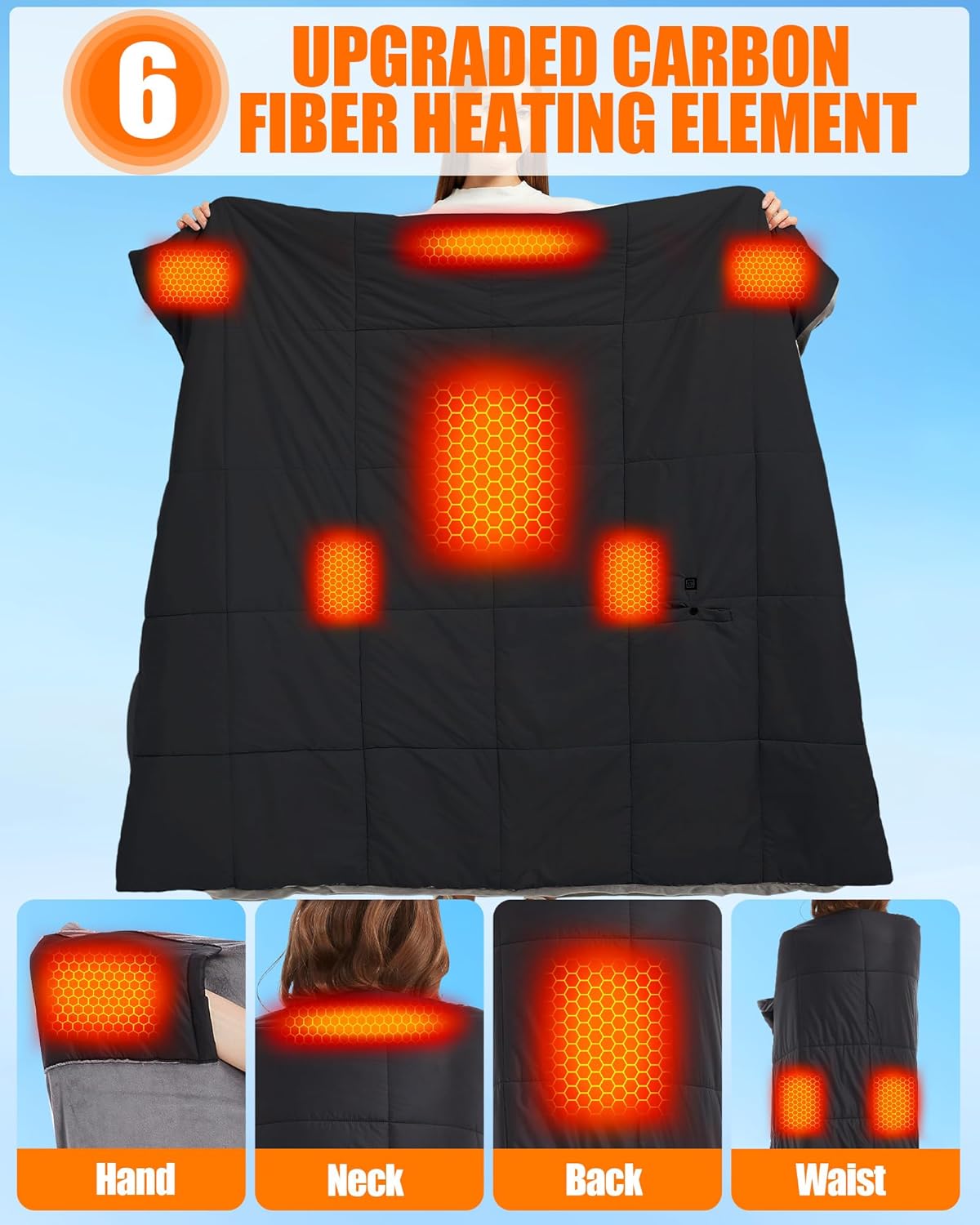
Image 6.1: Diagram illustrating the placement of heating elements for comprehensive warmth.
7. Maintenance
Proper care ensures the longevity of your heated blanket.
- Hand Wash Only: Disconnect the power source (battery) and place all cables securely in the pocket before washing.
- Drying: Lay flat to air dry. Ensure all cable connections are completely dry before re-use.

Image 7.1: Maintenance guidelines for the heated blanket.
8. Troubleshooting
If you encounter issues with your heated blanket, refer to the following common solutions:
- Blanket Not Heating:
- Ensure the battery pack is fully charged.
- Verify that the battery is securely connected to the blanket's internal cable.
- Long press the power button on the blanket to ensure it is turned on.
- Check the LED indicator on the control button; if it's not lit, the blanket is off or the battery is depleted.
- Battery Not Charging:
- Ensure the data cable is properly connected to both the battery and the power adapter.
- Try a different USB power adapter or outlet.
- Unusual Odor or Malfunction:
- Immediately turn off and disconnect the blanket from the battery.
- Do not use the product if you notice any burning smell, smoke, or visible damage. Contact customer support.
9. Specifications
| Feature | Detail |
|---|---|
| Brand | CYCYHEAT |
| Model Name | RTPB-021P |
| Item Model Number | RTAX-021P |
| Material | Polyester |
| Color | Black |
| Size | 62x55 inches (Shawl Blanket) |
| Product Dimensions | 59 x 51 x 1.1 inches |
| Item Weight | 3.56 pounds |
| Special Feature | Battery Powered |
| Battery Type | 1 Lithium Polymer battery (included) |
| Battery Voltage | 7.4V |
| Battery Capacity | 20000mAh |
| Heat Levels | 3 (High: 130°F, Medium: 120°F, Low: 113°F) |
| Heat Duration (approx.) | High: 4-4.30 hrs, Medium: 6-6.30 hrs, Low: 11-11.30 hrs |
| Charging Time (battery) | 5-6 hours |

Image 9.1: Dimensions of the heated blanket.
10. Warranty and Support
Your satisfaction is our priority. If you encounter any issues or need a replacement part, please contact our support team.
- Contacting Support: Go to Your Orders > Order Problems > Contact Seller on Amazon.
- Our support team will respond within 24 hours to resolve your concerns quickly and efficiently.