
Introduction
This manual provides detailed instructions for the ZDAVSFR ZK-10022 CNC Step-Down Adjustable Stabilized Voltage Power Supply. This module is designed to provide a stable and adjustable voltage and current output, suitable for various applications requiring precise power control. Please read this manual thoroughly before operation to ensure correct usage and optimal performance.
Product Features
- Display Board: Features a gold sinking process to prevent oxidation and ensure a complete display over time.
- Independent Silicone Keys: Allows for easy voltage or current adjustment with a simple one-key entry and exit system.
- Versatile Display Options: Supports header, color screen header, or custom serial screen integration.
- Separate Motherboard Design: Offers flexible use and supports stepless current and voltage adjustments.
- Soft Silicone Button Material: Provides a comfortable touch and enhanced durability.
- Storage Space: 11 groups for saving settings.
- 1.8-inch Large Screen: Upgraded display with a visible range of 36 x 29mm.
- Buzzer: Included for operational feedback.
- Cooling Fan: Activates under specific conditions (Temperature > 45 °C, Current > 2A, or Power > 30W).
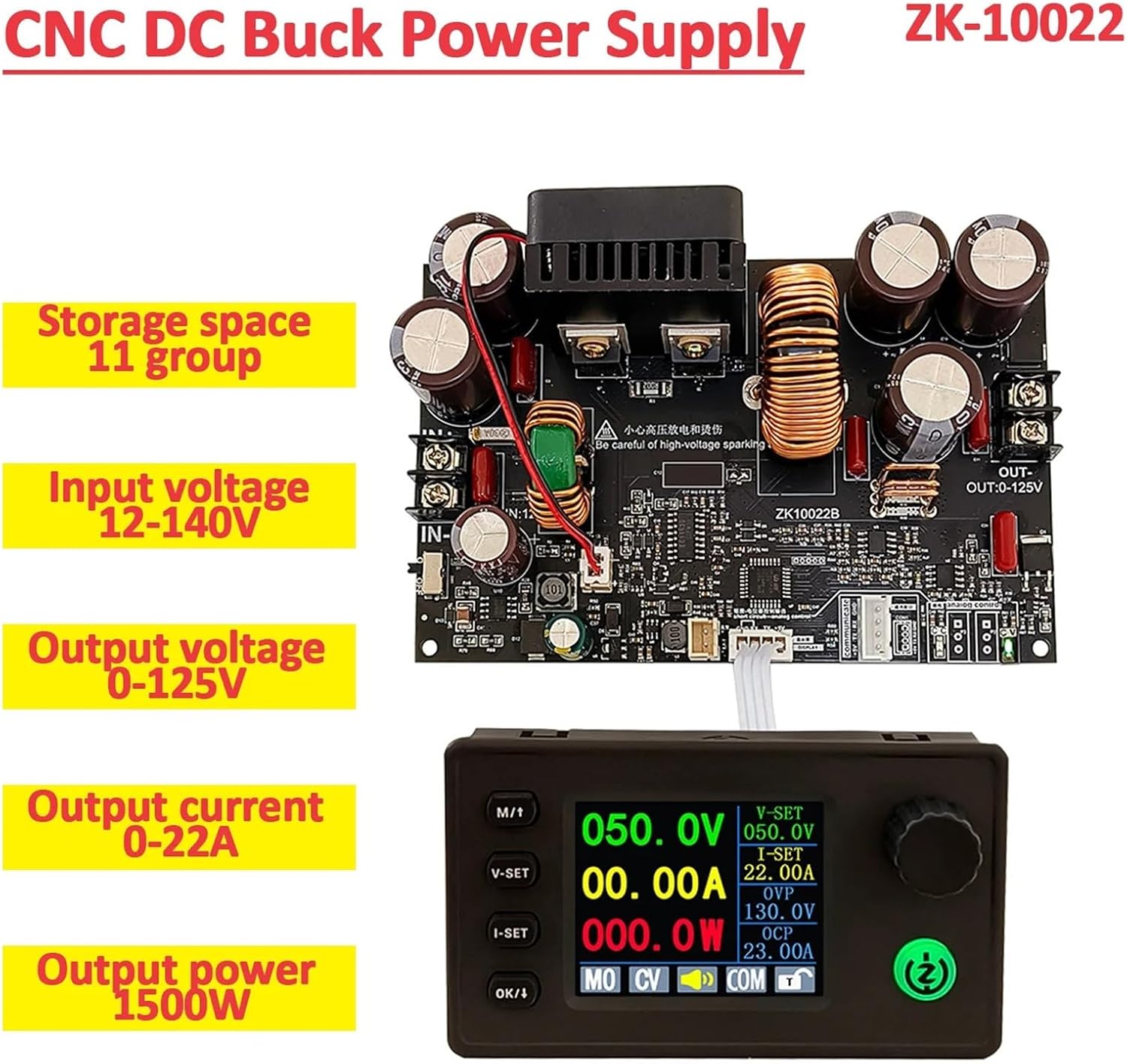
Image 1: Overview of the ZK-10022 CNC Step-Down Power Supply module and its display unit. This image highlights key specifications like input/output voltage, current, and power.

Image 2: Illustrates the third-generation upgrade of the ZK-10022, emphasizing features such as silicon rubber keypads, 1.8-inch large screen display, and support for serial communication with MODBUS protocol.
Specifications
| Parameter | Value |
|---|---|
| Product Name | CNC Power Supply |
| Input Voltage | 12-140V |
| Output Voltage | 0-125V |
| Output Voltage Accuracy | ± 0.3% + 3 words (Calibratable) |
| Output Current Accuracy | ± 0.5% + 3 words (Calibratable) |
| Current Resolution | 0.01A |
| Output Current | 0-22A |
| Output Power | 0-1500W |
| Voltage Resolution | 0.1V |
| Data Group Storage | 11 groups |
| Screen Size | Upgraded 1.8-inch (36 x 29mm visible range) |
| Buzzer | Yes |
| Cooling Fan Activation | Temperature > 45 °C OR Current > 2A OR Power > 30W |
| Product Shell Dimensions | 83 x 48 x 29.4mm (Height excludes rotary encoder) |
| Motherboard Dimensions | 130 x 84 x 42mm |
| Motherboard Net Weight | 227g |
Protection Mechanisms
- Input Undervoltage Protection (LUP): Adjustable from 11-125V, default value 11V.
- Output Overvoltage Protection (OUP): Adjustable from 1-130V, default value 130V.
- Output Overcurrent Protection (OCP): Adjustable from 0.01-23A, default value 23A.
- Output Overpower Protection (OPP): Adjustable from 1-1500W, default value 1500W.
Setup
Before connecting the power supply, ensure all components are present and undamaged. The module consists of a main motherboard and a separate display unit. Connections are typically made via ribbon cables and screw terminals.
- Motherboard Connection: Connect the input power source (12-140V DC) to the "IN" terminals on the motherboard, observing polarity. Connect your load to the "OUT" terminals.
- Display Unit Connection: Connect the display unit to the motherboard using the provided ribbon cable. Ensure the connection is secure and correctly oriented.
- Analog Potentiometer Control (Optional): If using analog potentiometers for voltage and current adjustment (e.g., with ZK10022B motherboard), it may be necessary to solder the potentiometers and plug them into the jumper cap. For serial screen or APP/Upper computer control, the jumper cap should be unplugged and the unit powered on again.
- Serial Communication: For digital communication control, ensure RX and GND are short-circuited for analog potentiometer control, otherwise digital communication is required. The default baud rate is 115200.

Image 3: Detailed view of the ZK-10022 motherboard, showing input/output terminals, connections for the display, and locations for voltage and current regulation potentiometers. It also illustrates the jumper cap for analog vs. digital control.

Image 4: Shows the extended serial port screen options (LCD and color screen meter heads) and the dual communication ports on the motherboard. It emphasizes the flexibility in display and control.
Operating Instructions
The ZK-10022 features an intuitive interface for setting output voltage and current. The independent silicone keys and rotary encoder facilitate precise adjustments.
- Power On: After connecting the input power and load, power on the module. The display unit will illuminate.
- Adjusting Voltage: Press the "V-SET" button to enter voltage adjustment mode. Use the rotary encoder to increase or decrease the desired output voltage. Press "OK/M" to confirm or exit.
- Adjusting Current: Press the "I-SET" button to enter current adjustment mode. Use the rotary encoder to set the desired output current limit. Press "OK/M" to confirm or exit.
- Enabling/Disabling Output: Use the designated output control button (often labeled "ON/OFF" or similar on the display) to enable or disable the power output to the load.
- Saving Settings: The module supports 11 groups of data storage. Refer to the on-screen prompts or specific button labels (e.g., "M/T" for memory functions) to save and recall frequently used voltage/current settings.
- Monitoring: The 1.8-inch display provides real-time readings of output voltage, current, and power, along with active protection statuses.

Image 5: Shows the ZK-10022 with its color screen display, highlighting the user interface for setting voltage, current, and monitoring output. It also reiterates key specifications.
Maintenance
Proper maintenance ensures the longevity and reliable operation of your ZK-10022 power supply.
- Cleaning: Regularly clean the exterior of the module with a soft, dry cloth. Avoid using liquid cleaners or solvents that could damage the components.
- Ventilation: Ensure the cooling fan and ventilation openings are free from dust and obstructions to prevent overheating. Operate the module in a well-ventilated area.
- Connections: Periodically check all electrical connections for tightness and signs of wear or corrosion.
- Storage: When not in use for extended periods, store the module in a dry, dust-free environment.
Troubleshooting
If you encounter issues with your ZK-10022 power supply, refer to the following common troubleshooting steps:
- No Power/Display:
- Check the input power supply connection and ensure it is within the 12-140V range.
- Verify that the ribbon cable connecting the display to the motherboard is securely attached.
- Output Not Working:
- Ensure the output is enabled via the display unit's control button.
- Check for active protection mechanisms (LUP, OUP, OCP, OPP) indicated on the display. Adjust settings or reduce load if a protection is triggered.
- Verify load connections are correct and not short-circuited.
- Inaccurate Readings:
- The module supports calibration. Refer to advanced settings on the display or contact support for calibration procedures if readings are consistently inaccurate.
- Fan Not Running:
- The fan activates only when temperature exceeds 45°C, current exceeds 2A, or power exceeds 30W. This is normal operation.
- If conditions are met and the fan still doesn't run, check for obstructions or contact support.
Warranty and Support
For warranty information, technical support, or service inquiries, please contact the seller or manufacturer directly. Keep your purchase receipt as proof of purchase.