1. Introduction
This manual provides detailed instructions for the installation, operation, and maintenance of your cogamichi 10-inch 8-Core Car Radio. This unit is specifically designed for Toyota Tundra models from 2007-2013 and Toyota Sequoia models from 2008-2012 that are not equipped with a JBL sound system. Please read this manual thoroughly before installation and use to ensure proper function and safety.
2. Safety Information
- Ensure the vehicle's ignition is off and the battery is disconnected before beginning installation to prevent electrical shorts or damage.
- Professional installation is recommended. If you choose to install it yourself, follow all steps carefully.
- Do not operate the device in a manner that distracts you from driving. Always prioritize road safety.
- Avoid exposing the unit to extreme temperatures, direct sunlight for prolonged periods, or excessive moisture.
- Use only approved accessories and wiring harnesses provided with the unit.
3. Package Contents
Verify that all items are present in your package:
- 10-inch 8-Core Car Radio Unit
- Power Harness
- RCA Audio Cable
- Camera Input Cable
- External Microphone
- GPS Antenna
- 4Pin USB Adapter Cable
- 6Pin USB Adapter Cable
- User Manual

Figure 3.1: Unit Dimensions and Included Accessories
4. Setup and Installation
The cogamichi car radio is designed for direct replacement in compatible Toyota Tundra and Sequoia models (non-JBL systems), ensuring a plug-and-play installation without extensive wiring modifications. It integrates with factory steering wheel controls, backup camera, and AC display.
4.1 General Installation Steps
- Carefully remove the existing factory radio and surrounding trim.
- Connect the provided power harness to the vehicle's wiring.
- Connect the GPS antenna and external microphone. Position the microphone for optimal voice pickup.
- If installing an aftermarket rear camera, connect the camera input cable as shown in Figure 4.2.
- Carefully insert the new cogamichi head unit into the dashboard opening, ensuring all connections are secure and no wires are pinched.
- Reattach the trim pieces and test the unit's functionality before fully securing.
Video 4.1: Demonstration of the cogamichi car radio installation process in a Toyota Tundra, showing the removal of the old unit, connection of wires, and fitting of the new 10-inch display into the dashboard.
4.2 Wiring for Steering Wheel Controls and Rear Camera

Figure 4.1: Power Cord and Steering Wheel Control Connections

Figure 4.2: Aftermarket Rear Camera Installation Diagram
5. Operating Instructions
The cogamichi car radio features an 8-core processor with 4GB RAM and 32GB storage, providing responsive performance for various applications.
5.1 Wireless Apple CarPlay & Android Auto
Connect your smartphone wirelessly to access navigation, make calls, send messages, and enjoy music through the head unit's display. Use voice assistants like Siri or Google Assistant for hands-free control.

Figure 5.1: Wireless Apple CarPlay Interface

Figure 5.2: Wireless Android Auto Interface
5.2 Bluetooth Hands-Free Calling
Pair your phone via Bluetooth for crystal-clear hands-free conversations. The unit includes a built-in microphone, and an external microphone can be connected for improved clarity. Manage calls, adjust volume, and navigate tracks using your factory steering wheel controls.
5.3 GPS Navigation
Utilize online and offline GPS navigation through pre-installed or downloaded map applications. The unit supports various navigation apps like Google Maps and Waze.

Figure 5.3: Online & Offline GPS Navigation
5.4 Multimedia and App Support
The unit supports a wide range of multimedia applications and streaming services. Connect to Wi-Fi to download apps like YouTube, Waze, Gmail, Spotify, Netflix, and more from the Google Play Store. The 15-band EQ adjustment allows for personalized audio tuning.

Figure 5.4: 15-Band EQ Adjustment and Rich Multimedia

Figure 5.5: Online Streaming Media Player

Figure 5.6: Google Play Store Access
5.5 Split Screen Functionality
The split-screen feature allows you to run two applications simultaneously, such as navigation and music playback, or a video in Picture-in-Picture (PIP) mode.
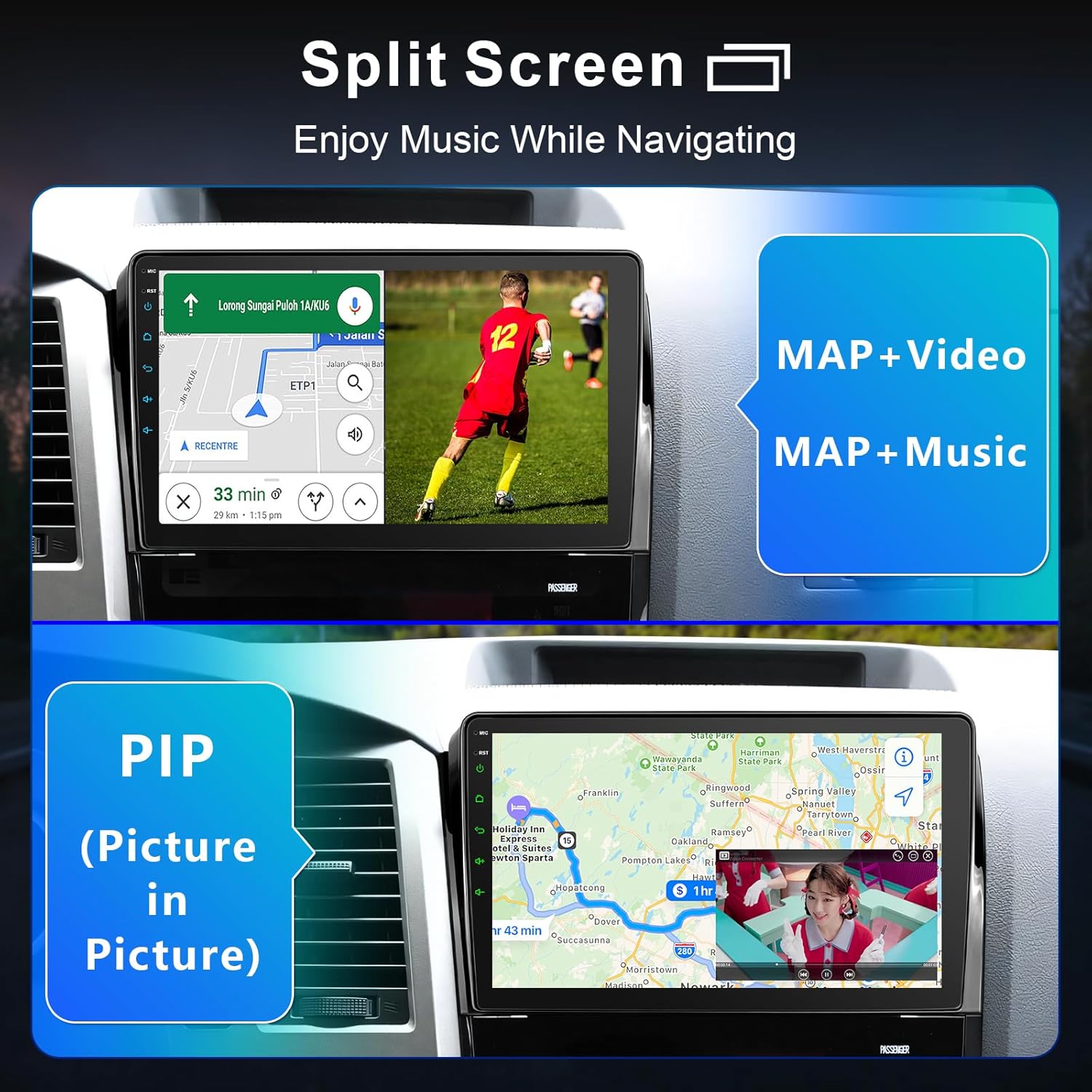
Figure 5.7: Split Screen and Picture-in-Picture Functionality
5.6 10-inch QLED Touch Screen
The unit features a 10-inch QLED touch screen with a resolution of 1280x720P, offering clear visuals and responsive touch control.

Figure 5.8: 10-inch QLED Touch Screen
6. Maintenance
- Cleaning the Screen: Use a soft, lint-free cloth to gently wipe the screen. For stubborn smudges, slightly dampen the cloth with water or a screen-safe cleaner. Avoid harsh chemicals or abrasive materials.
- Software Updates: Periodically check for software updates to ensure optimal performance and access to new features. Updates can typically be found through the unit's settings menu or the manufacturer's website.
- General Care: Keep the unit free from dust and debris. Ensure proper ventilation around the unit to prevent overheating.
7. Troubleshooting
| Problem | Possible Cause | Solution |
|---|---|---|
| Unit does not power on | Incorrect wiring, blown fuse, vehicle battery issue | Check power connections, inspect vehicle fuses, ensure battery is charged. |
| No sound | Volume too low, incorrect audio settings, speaker wiring issues | Increase volume, check audio output settings, verify speaker connections. |
| Wireless CarPlay/Android Auto not connecting | Bluetooth/Wi-Fi off on phone, compatibility issues, incorrect pairing process | Ensure phone's Bluetooth/Wi-Fi is on, restart phone and head unit, re-attempt pairing. Note: Some Samsung phone models may have compatibility variations. |
| GPS signal lost or inaccurate | GPS antenna obstruction, poor satellite reception, software issue | Ensure GPS antenna has a clear view of the sky, update GPS software/maps, check antenna connection. |
| Steering wheel controls not working | Incorrect wiring, software configuration needed | Verify steering wheel control wiring (Figure 4.1), configure controls in the unit's settings menu. |
8. Specifications
- Display: 10-inch QLED Touch Screen, 1280x720P Resolution
- Processor: 8-Core
- RAM: 4GB
- Storage: 32GB
- Connectivity: Bluetooth, Wi-Fi (2.4G & 5G)
- Special Features: Wireless Apple CarPlay, Wireless Android Auto, Built-In Bluetooth, Touchscreen, GPS Navigation, Split Screen, Mirror Link
- Compatible Devices: Smartphone
- Supported Internet Services: YouTube, Waze, Gmail, Spotify, Netflix, TikTok, Disney+, Hulu
- Audio Output Mode: Stereo
- Audio Output Type: Bluetooth, Speakers
- Item Weight: 3.58 pounds
- Package Dimensions: 12.28 x 8.15 x 5.75 inches
9. Warranty and Support
Your cogamichi car radio comes with a standard return policy. For any technical assistance or inquiries, 24-hour technical support is available. Please refer to your purchase documentation for specific warranty details.
9.1 Contacting Support
If you require support, please contact the seller directly through the platform where you made your purchase. Look for an "Ask a question" or "Contact Seller" option.

Figure 9.1: How to Access Technical Support