
Introduction
Thank you for choosing the HOMCOM Ergonomic Mesh Office Chair. This manual provides essential information for the safe assembly, proper operation, and effective maintenance of your new office chair. Please read these instructions thoroughly before assembly and retain them for future reference.

Image: The HOMCOM Ergonomic Mesh Office Chair positioned in a modern office environment.
Safety Instructions
- Ensure all components are present and undamaged before assembly. Do not use if any parts are missing or faulty.
- Follow assembly instructions carefully. Incorrect assembly can lead to instability and injury.
- Do not stand on the chair. Use it only for sitting.
- Avoid placing heavy objects on the chair that exceed its weight capacity.
- Keep children and pets away from the chair during assembly.
- Regularly check all bolts and screws to ensure they remain tight. Retighten as necessary.
- Use the chair on a level surface to prevent tipping.
Package Contents
Before beginning assembly, verify that all parts are included in the package. If any parts are missing or damaged, please contact customer support.

Image: A HOMCOM branded cardboard package indicating one unit.
Typically, your package should contain:
- Backrest assembly
- Seat assembly
- Armrests (left and right)
- Gas lift cylinder and cover
- Star base
- Casters (wheels)
- Mounting hardware (screws, washers, Allen wrench)
- Footrest assembly
Assembly Instructions
Please follow these general steps for assembling your HOMCOM office chair. Refer to the specific diagrams included with your product for detailed part identification and placement.
- Attach Casters to Base: Insert the casters into the holes at the end of each leg of the star base until they click securely into place.
- Insert Gas Lift: Place the gas lift cylinder into the center hole of the star base. Cover it with the telescopic cover.
- Assemble Seat and Backrest: Attach the backrest to the seat mechanism using the provided screws. Ensure all screws are tightened securely.
- Attach Armrests: Secure the armrests to the seat assembly using the designated screws. Pay attention to left and right armrest orientation.
- Attach Footrest: Mount the retractable footrest mechanism to the underside of the seat assembly as per the instructions.
- Connect Seat to Gas Lift: Carefully place the assembled seat and backrest onto the gas lift cylinder, ensuring it is centered and stable.
- Final Checks: Once assembled, sit on the chair to ensure all components are properly seated and stable. Test all adjustment functions.

Image: The HOMCOM Ergonomic Mesh Office Chair fully assembled, showcasing its design and extended footrest.
Operating Instructions
Your HOMCOM Ergonomic Mesh Office Chair offers multiple adjustment features to customize your seating experience for optimal comfort and support.
1. Chair Height Adjustment
To adjust the chair's height, locate the lever typically found under the right side of the seat. While seated, pull the lever up to lower the chair. To raise the chair, stand up slightly and pull the lever up. Release the lever at your desired height.
2. Reclining Function and Retractable Footrest
The chair features a 135° reclining backrest and a retractable footrest for relaxation.
- Recline: Locate the recline lever (often on the left side). Pull the lever to unlock the recline mechanism, lean back to your desired angle (up to 135°), and push the lever down to lock it in place.
- Footrest: Pull the footrest out from under the seat. It can be extended and adjusted to support your legs. Push it back under the seat when not in use.

Image: Visual representation of the chair's 135-degree recline capability and the retractable footrest mechanism.
3. Lumbar Support and Back Height Adjustment
The chair offers adjustable lumbar support and back height to conform to your spine's natural curve.
- Lumbar Support: The lumbar support can be adjusted vertically to three different levels. Gently push or pull the lumbar support pad up or down to find the most comfortable position for your lower back.
- Back Height: The entire backrest can be adjusted in height. Refer to your specific model's mechanism, which typically involves lifting the backrest until it clicks into a new position, or using a lever.

Image: A diagram demonstrating the three-level vertical adjustment for the chair's lumbar support and overall back height.
4. Headrest Adjustment
The headrest can be adjusted to provide optimal neck and head support.
- Forward/Backward: Push or pull the headrest to adjust its depth.
- Rotate: The headrest can be rotated to find the best angle for your neck.
- Removable: The headrest can also be removed if preferred.

Image: Illustrations detailing the adjustable functions of the headrest, including forward/backward movement, rotation, and removal.
5. 3D Armrest Adjustment
The armrests are multi-directional for personalized comfort.
- Up/Down: Press the button on the side of the armrest and move it up or down to adjust height. Release the button to lock.
- Forward/Backward: Slide the armrest pad forward or backward.
- Left/Right (Swivel): Pivot the armrest pad left or right.

Image: A visual guide to the three-dimensional adjustments available for the chair's armrests.
6. Adjustable Seat Depth
The seat depth can be adjusted to accommodate different leg lengths.
- Locate the lever or knob for seat depth adjustment (often under the seat).
- Pull the lever/knob and slide the seat forward or backward by approximately 5cm. Release to lock.

Image: An illustration demonstrating the 5cm adjustable seat depth feature.
7. Overall Ergonomic Support
The chair is designed to provide comprehensive support for various body parts, promoting a healthy posture.
- Neck Support: Provided by the adjustable headrest.
- Back Support: The high backrest contours to the spine.
- Lumbar Support: Adjustable to target the lower back.
- Hip and Leg Support: Achieved through the adjustable seat and retractable footrest.
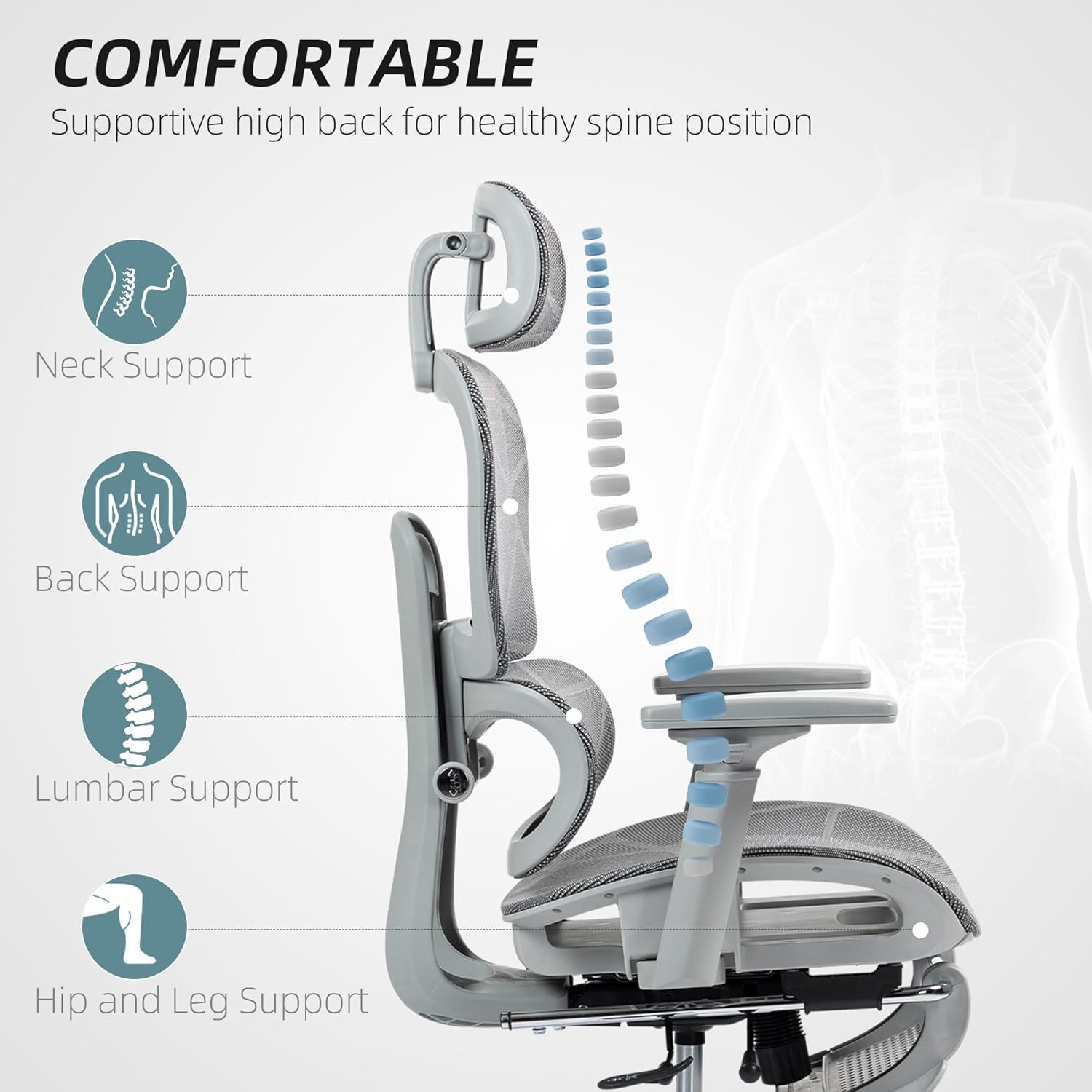
Image: A diagram highlighting the ergonomic support zones of the chair, including neck, back, lumbar, hip, and leg areas.
Maintenance and Care
- Cleaning: For mesh and plastic parts, wipe with a damp cloth and mild soap. Avoid harsh chemicals or abrasive cleaners. For metal parts, use a dry cloth.
- Inspection: Periodically check all screws, bolts, and moving parts for tightness. Retighten as needed to ensure stability and safety.
- Casters: Clean casters regularly to remove hair and debris that may hinder smooth movement.
- Gas Lift: Do not attempt to disassemble the gas lift cylinder. It contains pressurized gas.
Troubleshooting
- Chair Wobbles: Ensure all assembly screws are securely tightened. Check that the casters are fully inserted into the base.
- Chair Does Not Adjust Height: Verify that the gas lift lever is fully engaged or disengaged as required. If the issue persists, the gas lift cylinder may need replacement.
- Lumbar Support Does Not Stay in Position: If the lumbar support mechanism does not hold its adjusted level and returns to its initial position, inspect the internal locking mechanism. Ensure it is not obstructed or damaged. Contact customer support if the issue persists after inspection.
- Casters Not Rolling Smoothly: Remove any hair, dust, or debris from the caster wheels. Lubricate with a silicone-based spray if necessary.
- Squeaking Noises: Identify the source of the squeak. Often, tightening loose screws or applying a small amount of lubricant to moving joints can resolve the issue.
Specifications
| Feature | Detail |
|---|---|
| Brand | HOMCOM |
| Model | B0FD97VPSJ |
| Product Dimensions (Overall) | 64 x 66 x 122 cm (25.2 x 26 x 48 inches) |
| Frame Material | Metal |
| Back Style | Mesh Back |
| Arm Style | 3D Track Armrest |
| Recline Angle | Up to 135° |
| Seat Depth Adjustment | Approx. 5 cm |
| Usage | Indoor |
| Age Range | Adult |
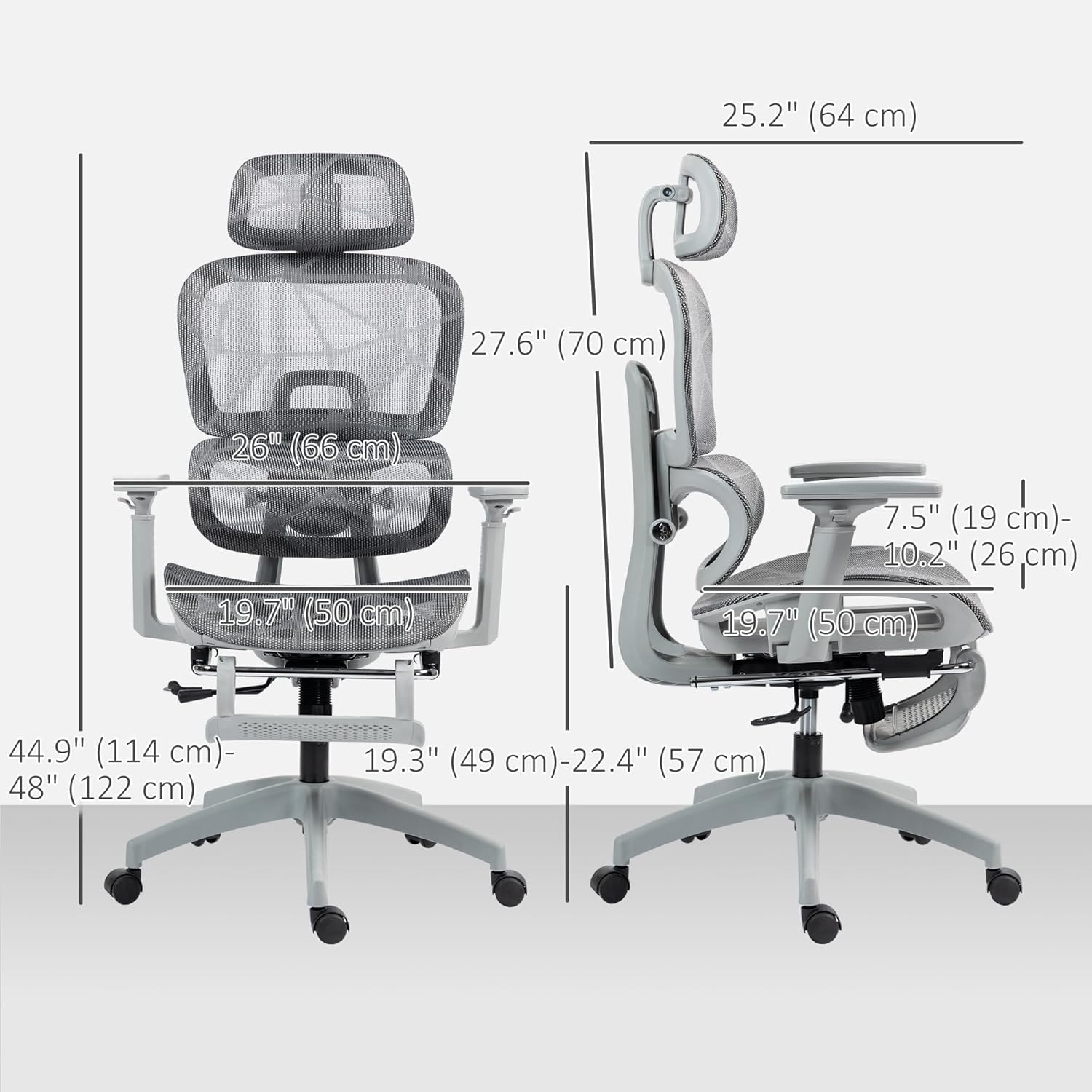
Image: Detailed dimensional drawing of the chair, including height, width, and depth measurements.
Warranty and Customer Support
For warranty information, please refer to the documentation provided with your purchase or visit the official HOMCOM website. If you encounter any issues or have questions regarding your chair, please contact HOMCOM customer support through their official channels. When contacting support, please have your model number (B0FD97VPSJ) and purchase details readily available.


