1. Introduction
The Generic BM4070 LCD Digital Multimeter is a high-precision LCR tester designed for accurate electrical measurements in both field and laboratory settings. It features a clear LCD display for easy data reading, fast response times, and a compact, lightweight design for portability. This device is equipped with multiple functions for professional electrical testing, making it suitable for a wide range of applications.
2. Safety Information
WARNING: To avoid electric shock, do not touch the meter's probes or exposed circuits during measurement. Always ensure the device is properly configured for the measurement type before connecting to a circuit. Do not attempt to measure voltages or currents exceeding the device's specified limits.
- Always inspect the test leads for damage before use.
- Ensure the battery is correctly installed and has sufficient charge.
- Do not operate the meter in wet environments or when your hands are wet.
- Refer to the specifications section for maximum input values.
3. Product Overview
The BM4070 Digital Multimeter is designed for ease of use and clear readings. Below is an illustration of the device and its key components.
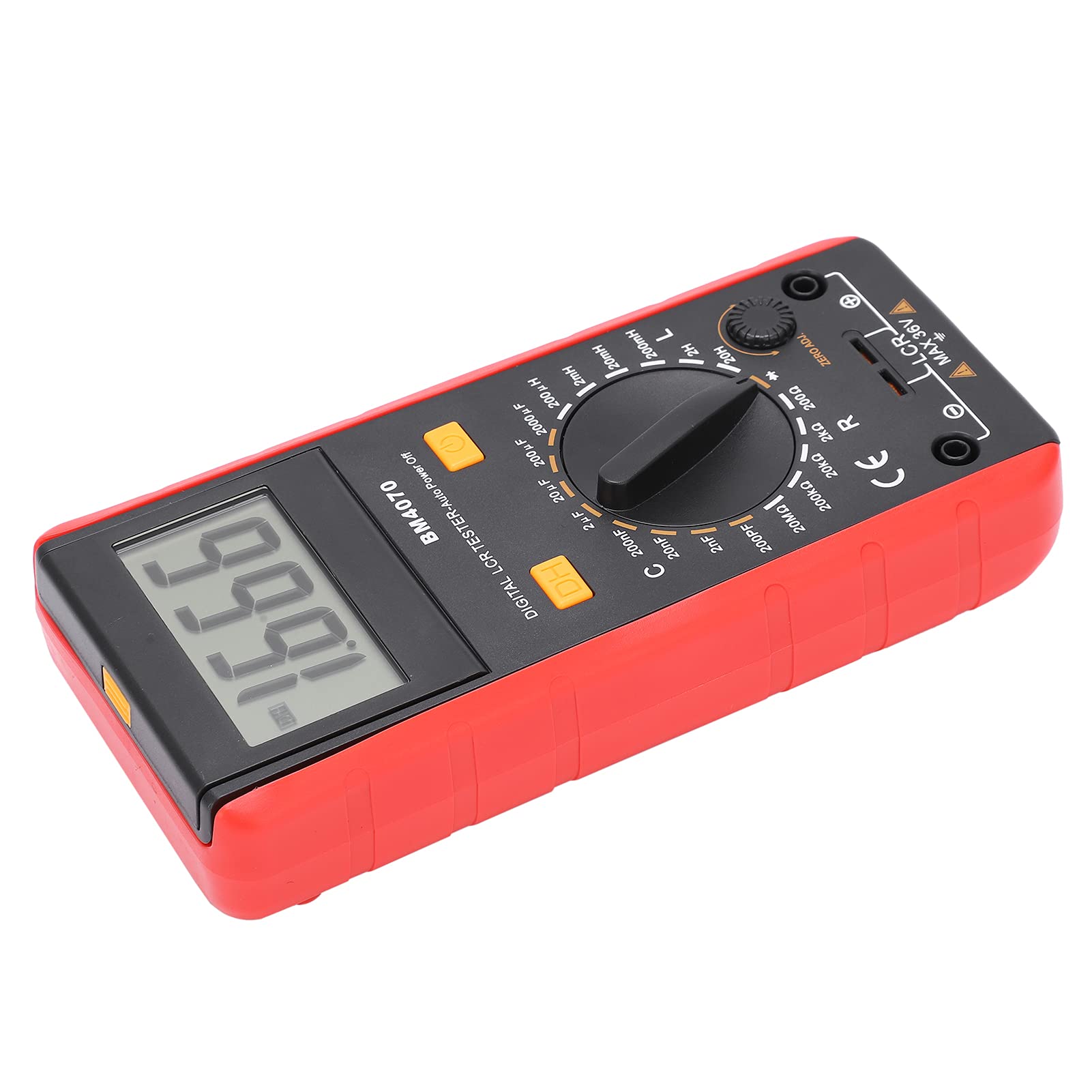
Figure 1: Front view of the Generic BM4070 LCD Digital Multimeter, showing the LCD display, rotary switch, and function buttons.

Figure 2: Close-up of the BM4070's high-definition LCD display, showing a clear numerical reading.
Key Components:
- LCD Display: Shows measurement readings and indicators.
- Rotary Switch: Used to select measurement functions (Capacitance C, Inductance L, Resistance R) and ranges.
- DH Button: Data Hold function to freeze the current reading on the display.
- Power Button: Turns the device on or off.
- Input Jacks: Connect test leads for measurements.
- ZERO ADJ. Knob: For zero adjustment, typically used for resistance measurements to compensate for lead resistance.

Figure 3: Bottom section of the multimeter showing the input jacks and the LCR MAX 36V safety marking.
4. Setup
4.1 Battery Installation
- Locate the battery compartment on the back of the multimeter.
- Using a screwdriver, carefully open the battery cover.
- Insert one 9V 6F22 battery, ensuring correct polarity. (Battery not included)
- Replace the battery cover and secure it with the screw.
4.2 Connecting Test Leads
- Ensure the multimeter is powered off.
- Insert the black test lead into the common (COM) input jack.
- Insert the red test lead into the appropriate input jack for your measurement (e.g., for LCR measurements, use the designated LCR input).
5. Operating Instructions
5.1 Power On/Off
Press the Power Button (usually marked with a circle and a vertical line) to turn the multimeter on. Press it again to turn the device off.
5.2 Selecting Measurement Function
Rotate the central Rotary Switch to select the desired measurement function (C for Capacitance, L for Inductance, R for Resistance) and the appropriate range. Start with a higher range if the value is unknown to prevent overloading.
5.3 Performing Measurements
- After selecting the function and range, connect the test leads to the component you wish to measure.
- For resistance measurements, you may need to use the ZERO ADJ. knob to zero out the resistance of the test leads before connecting to the component.
- Read the measurement value displayed on the LCD screen.
5.4 Data Hold Function
Press the DH Button to freeze the current reading on the display. Press it again to release the hold function and resume live readings.
6. Maintenance
- Keep the multimeter clean and dry. Use a soft, damp cloth for cleaning; do not use abrasive cleaners or solvents.
- Store the device in a cool, dry place away from direct sunlight and extreme temperatures.
- If the device will not be used for an extended period, remove the battery to prevent leakage.
- Regularly check the test leads for any signs of wear or damage. Replace them if necessary.
7. Troubleshooting
If you encounter issues with your BM4070 multimeter, refer to the following common problems and solutions:
- Device does not power on: Check if the battery is installed correctly and has sufficient charge. Replace the battery if necessary.
- No reading or 'OL' displayed: Ensure the test leads are properly connected to the component and the correct measurement function and range are selected. 'OL' (Overload) indicates the measured value exceeds the selected range; switch to a higher range.
- Inaccurate readings: Check for proper test lead connection. Ensure the ZERO ADJ. knob is correctly set for resistance measurements. Verify the component is functioning correctly.
If the problem persists, contact customer support.
8. Specifications
| Feature | Specification |
|---|---|
| Item Type | Multimeter |
| Model | BM4070 |
| Material | ABS |
| Power Supply | 1x9V 6F22 Battery (not included) |
| Sampling Rate | 3 times per second |
| Operating Environment | 0℃ to 40℃ |
| Storage Environment | -10℃ to 50℃ |
| Measurement Accuracy | 0.1mm (General) |
| Capacitance Range | 200pF ~ 200μF (±2.5%+5), 2000μF (±5.0%+5) |
| Inductance Range | 200uH (±3.0%+5), 2mH ~ 2H (±2%+5), 20H (±5%+5) |
| Low Voltage Display | Battery symbol indication |
9. Package Contents
The following items are included in your product package:

Figure 4: Contents of the BM4070 package, including the multimeter, test clips, manual, and tool bag.
- Multimeter x 1 (Battery not included)
- Test Clips x 2
- Instruction Manual x 1
- Tool Bag x 1
10. Warranty and Support
Specific warranty and support information is not provided in the product details. Please refer to the retailer or manufacturer's website for details regarding warranty coverage and customer support options.

