
1. Introduction
This manual provides detailed instructions for the installation, operation, and maintenance of your CNSTWEI 10.25-inch Linux Screen. This multimedia system is designed to enhance your driving experience by integrating modern connectivity features like Wireless CarPlay and Android Auto into your BMW vehicle's existing NBT system.
2. Compatibility and System Requirements
This product is specifically designed for BMW vehicles with the NBT system manufactured between 2012 and 2017. It is compatible with the following models:
- BMW 1 Series: F20, F21 (2012-2017)
- BMW 2 Series: F22, F23 (2012-2017)
- BMW 3 Series: F30, F31, F34 (2012-2017)
- BMW 4 Series: F32, F33, F36 (2012-2017)
Important Compatibility Note: This CarPlay touchscreen is compatible only with vehicles equipped with a 6PIN LVDS Plug NBT System. It is not suitable for installation on cars with a 4PIN CIC system or a 6PIN EVO system. Please verify your vehicle's OEM system and LVDS cable type before installation.

Image Description: This image illustrates the visual differences between CCC, CIC, NBT, and EVO BMW car systems, along with their respective LVDS plug types. It highlights that only the NBT system with a 6PIN LVDS plug is compatible with this screen.
3. Product Features
The CNSTWEI 10.25-inch Linux Screen offers a range of features designed for convenience and enhanced functionality:
- 10.25-inch Touch Screen Display: Features a 1920*720 resolution for a clear visual experience.
- Wireless and Wired CarPlay & Android Auto: Seamlessly connect your smartphone for navigation, calls, messaging, music, and video playback.
- Original System Retention: Maintains all original vehicle functions, including the car radio, factory joystick control, and original reversing camera.
- Control Methods: Supports original car knob, steering wheel buttons, and direct touch input on the screen.
- Camera Support: Compatible with both original factory reversing cameras and parking sensors, as well as aftermarket HD reversing cameras. The camera activates automatically when reverse gear is engaged.
- 360° Surround View: Supports original vehicle 360° surround view cameras. Note: Does not support aftermarket 360° surround view cameras.
- OEM Bluetooth Integration: Utilizes the OEM Bluetooth for calls and music playback when using CarPlay or Android Auto, ensuring high-quality sound and no echo.

Image Description: This image demonstrates the Wireless CarPlay and Android Auto functionality, showing the screen displaying both interfaces with corresponding smartphones.

Image Description: This image illustrates the seamless switching capability between the new CarPlay/Android Auto system and the original BMW OEM car system.
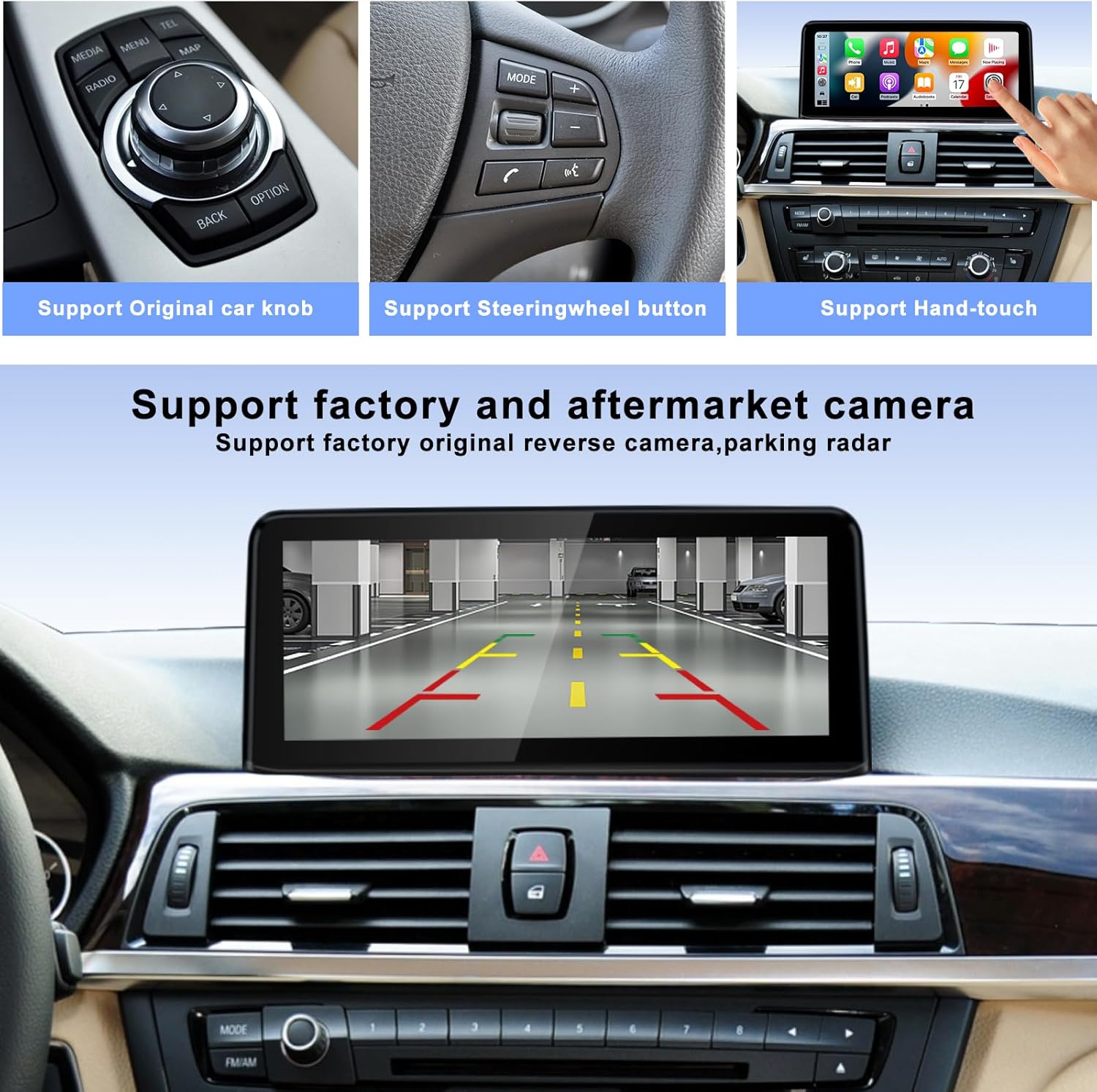
Image Description: This image highlights the various control methods supported by the system, including the original iDrive knob, steering wheel controls, and the new touchscreen. It also shows the integrated reverse camera display.
4. Setup and Installation
The installation process is designed to be plug-and-play, utilizing the original car cables. However, careful attention to detail is required.
4.1 Included Components
Please ensure all the following components are present in your package:
- 10.25-inch Carplay Screen
- AUX cable
- USB Driver cable
- Power cable
- Plastic base
4.2 Installation Steps (General Overview)
- Carefully remove the original car dashboard components to access the OEM screen.
- Disconnect the original screen and its associated cables.
- Connect the new 10.25-inch screen using the provided cables, ensuring correct LVDS plug connection (6PIN NBT system).
- Route all cables neatly and securely.
- Reassemble the dashboard components.
Note: Most installation issues arise from incorrect cable connections and settings. If you encounter any difficulties, please refer to the troubleshooting section or contact customer support.

Image Description: This image provides a visual comparison of the car interior before and after the installation of the 10.25-inch screen, demonstrating the integrated appearance.
5. Operating Instructions
5.1 Powering On and Initial Setup
Upon starting your vehicle, the screen will power on automatically. Follow any on-screen prompts for initial setup, such as language selection.
5.2 Connecting to CarPlay / Android Auto
To connect your smartphone:
- Ensure your phone's Bluetooth and Wi-Fi are enabled.
- On the screen, navigate to the CarPlay or Android Auto icon.
- Follow the on-screen instructions to pair your phone via Bluetooth. Once paired, the system will automatically establish a Wi-Fi connection for wireless CarPlay/Android Auto.
- Alternatively, connect your phone via a USB cable for wired CarPlay/Android Auto.
Note: For calls and music playback through CarPlay/Android Auto, the system will utilize your vehicle's original Bluetooth connection if available. This ensures optimal audio quality.
5.3 Switching Between Systems
The system allows you to seamlessly switch between the new Linux-based CarPlay/Android Auto interface and your original BMW OEM system. Look for an icon labeled "Original car interface" or similar on the screen's main menu. Tapping this icon will revert to the OEM display. You can touch the screen to return to the Linux system.
5.4 Using Control Methods
- Touch Screen: Directly interact with the 10.25-inch display for navigation and selections.
- Original iDrive Controller: Your vehicle's factory joystick/knob can be used to navigate menus and make selections within both the new system and the OEM interface.
- Steering Wheel Buttons: Existing steering wheel controls for volume, track skipping, and call management remain functional.
6. Maintenance
To ensure the longevity and optimal performance of your screen:
- Clean the screen regularly with a soft, lint-free cloth. Avoid abrasive materials or harsh chemical cleaners.
- Do not expose the unit to extreme temperatures or direct sunlight for prolonged periods.
- Keep liquids away from the device.
7. Troubleshooting
If you encounter issues, please review the following common solutions:
- No Power/Screen Blank: Check all power cable connections. Ensure they are securely seated. Verify your vehicle's ignition is on.
- No Sound: Confirm the AUX cable is correctly connected. Ensure your vehicle's original Bluetooth is paired for audio if using CarPlay/Android Auto. Check volume settings on both the screen and your vehicle's audio system.
- CarPlay/Android Auto Not Connecting: Ensure your phone's Bluetooth and Wi-Fi are active. Try restarting your phone and the car system. Re-pair your device. Check for any software updates for your phone's operating system.
- Original Functions Not Working: Double-check all LVDS and other original cable connections. Ensure the system is correctly configured to switch to the OEM interface.
- Image Distortion/Flickering: Verify the LVDS cable connection is secure and undamaged.
If problems persist after attempting these solutions, please contact CNSTWEI customer support for further assistance.
8. Specifications
| Item Weight | 3.52 pounds |
| Package Dimensions | 15 x 7 x 6 inches |
| Display Size | 10.25 Inches |
| Resolution | 1920*720 |
| Operating System | Linux |
| Connectivity Technology | Bluetooth, Wi-Fi |
| Special Feature | Built-In Bluetooth |
| Audio Output Mode | Stereo |
| Mounting Type | Dashboard Mount |
| Model Name | 10.25" CarPlay Screen for BMW F20 F30 |
9. Warranty and Support
This product comes with a 1-year warranty from the date of purchase. For warranty claims, technical support, or any installation assistance, please contact CNSTWEI customer service. Please have your purchase details and product model number ready when contacting support.