
1. Introduction
Thank you for choosing the Wurkkos HD03 Mini Clip Flashlight. This compact and versatile flashlight is designed for various applications, offering multiple lighting modes, including spotlight, floodlight, and RGB, along with convenient Type-C recharging. This manual provides essential information for safe and effective use of your device.
2. Package Contents
Ensure all items are present upon unboxing:
- 1 x Wurkkos HD03 Mini Clip Flashlight
- 1 x Type-C Charging Cable
- 1 x Lanyard
- 1 x User Manual (this document)
3. Setup
3.1 Initial Charge
Before first use, fully charge the HD03 flashlight. The integrated lithium-ion battery recharges via a Type-C port.
- Locate the Type-C charging port on the device.
- Connect the provided Type-C cable to the flashlight and a compatible USB power source (e.g., wall adapter, computer USB port).
- The battery indicator will show charging status. A full charge typically takes approximately 1 hour and 20 minutes.
3.2 Battery Indicator
The HD03 features a battery level indicator to monitor power consumption:
- Green light (always-on): 50-100% battery remaining.
- Orange light (always-on): 20-50% battery remaining.
- Red light (always-on): 1-20% battery remaining (low power).

Image: Battery status indicator on the Wurkkos HD03 flashlight.
4. Operating Instructions
4.1 Power On/Off
The HD03 features a dual-switch system for intuitive control.
- To Power On: Press and hold the right button.
- To Power Off: Press and hold the right button again.
4.2 Switching Between Spotlight and Floodlight Modes
Use the left switch to toggle between the two primary white light modes:
- Spotlight Mode: Slide the left switch upwards. Provides a focused beam up to 680 lumens and 180 meters.
- Floodlight Mode: Slide the left switch downwards. Provides a wider, softer beam up to 320 lumens.

Image: Dual-switch operation for light modes and power.
4.3 Adjusting Brightness Levels (White Light)
While in either Spotlight or Floodlight mode, press and hold the right button to cycle through brightness levels:
- Standard Modes: Moon, Low, Medium, High.
- Special Modes: Turbo, Strobe, SOS, Beacon. Access these by double-clicking the right button from any standard mode.

Image: Overview of 8 lighting modes for Wurkkos HD03.
4.4 RGB Color Modes
The HD03 offers over 20 dynamic RGB lighting effects.
- From any white light mode, double-click the right button to enter RGB mode.
- Press and hold the right button to cycle through the available RGB colors and effects.
- Double-click the right button again to return to white light modes.

Image: Wurkkos HD03 showcasing its RGB color modes.
4.5 Lockout Function
To prevent accidental activation, use the lockout function:
- To Lock: From the OFF state, triple-click the right button. The light will flash to indicate it is locked.
- To Unlock: Triple-click the right button again. The light will flash and then turn on to the last used mode.

Image: Lockout function activation and deactivation.
5. Key Features
The Wurkkos HD03 is designed for convenience and durability:
- Compact and Lightweight: Measuring 28.25 x 2.60 mm and weighing 49g, it is ideal for everyday carry.
- Multiple Carry Options: Features a sturdy clip, a lanyard hole, and a magnetic base for hands-free use.
- Durable Construction: Made from aviation-grade aluminum alloy, it is IPX6 waterproof and resistant to 1.5m drops.
- Long Runtime: Up to 144 hours in Moonlight mode.
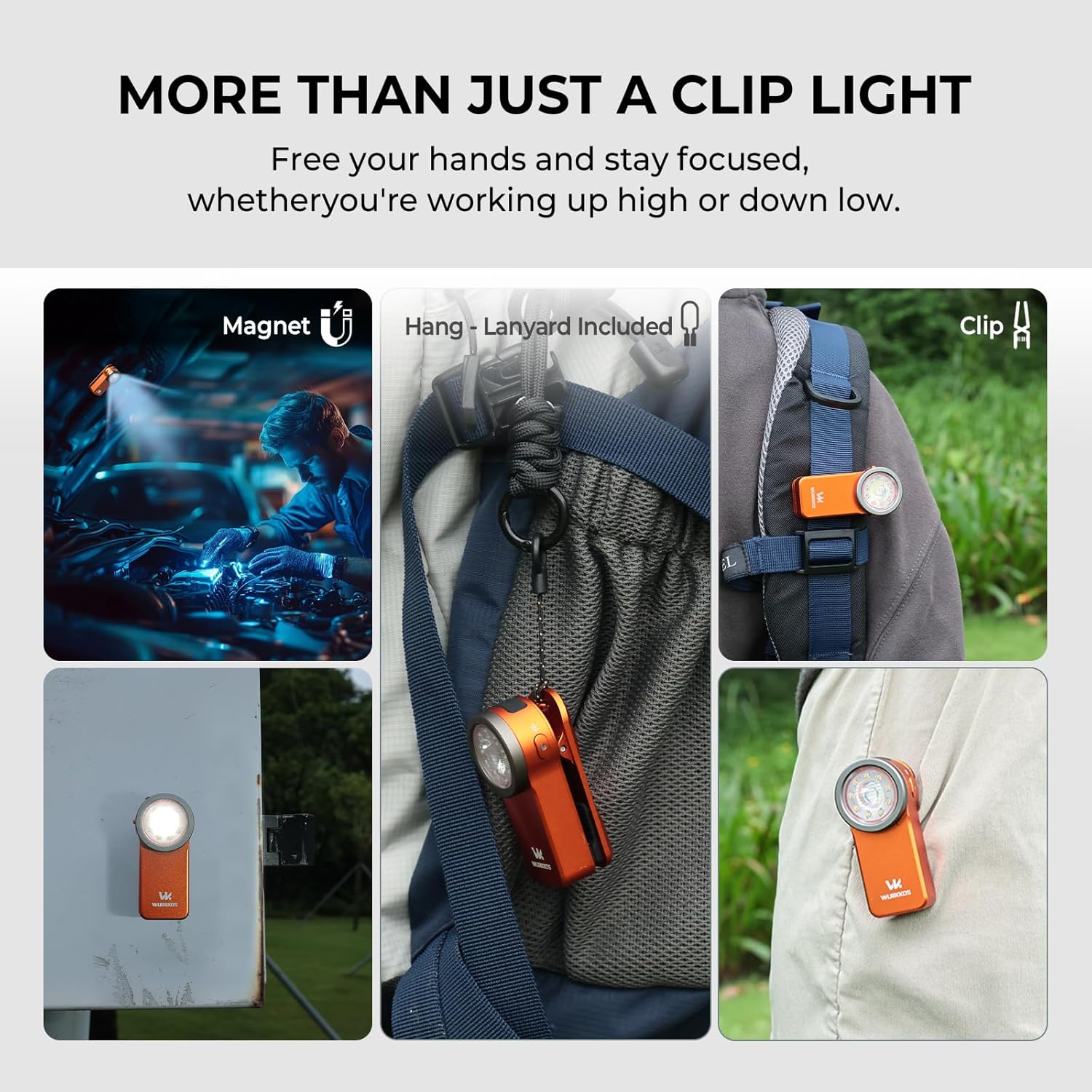
Image: Versatile carry options of the Wurkkos HD03.

Image: Durability features of the Wurkkos HD03.
6. Maintenance
To ensure optimal performance and longevity of your Wurkkos HD03 flashlight:
- Cleaning: Wipe the flashlight with a soft, damp cloth. Avoid abrasive cleaners or solvents.
- Charging: Recharge the battery regularly, especially if the flashlight will not be used for an extended period, to maintain battery health.
- Storage: Store the flashlight in a cool, dry place away from direct sunlight and extreme temperatures.
- Over-heat Protection: The device includes over-heat protection to prolong battery life. If the flashlight becomes too hot, it may automatically reduce brightness.
7. Troubleshooting
| Problem | Possible Cause | Solution |
|---|---|---|
| Flashlight does not turn on. | Low battery; Lockout function active. | Charge the battery; Triple-click the right button to unlock. |
| Light output is dim or inconsistent. | Low battery; Over-heat protection activated. | Charge the battery; Allow the flashlight to cool down. |
| Cannot switch modes. | Incorrect button press sequence. | Refer to Section 4 for correct operating instructions. |
| Charging not working. | Faulty cable or power source; Dirty charging port. | Try a different Type-C cable and power source; Clean the charging port gently. |
8. Specifications
| Feature | Detail |
|---|---|
| Model Number | HD03 |
| Brand | Wurkkos |
| Max White Light Output | 680 Lumens |
| Max Beam Distance | 180 Meters |
| Light Sources | Spotlight, Floodlight, RGB LED |
| Power Source | Battery Powered (Integrated Lithium-ion) |
| Charging Type | Type-C Rechargeable |
| Full Charge Time | Approx. 1 hour 20 minutes |
| Max Runtime (Moonlight) | 144 hours |
| Water Resistance | IPX6 (Waterproof) |
| Impact Resistance | 1.5 meters |
| Material | Aluminum Alloy |
| Product Dimensions (L x W x H) | 30 x 30 x 130 mm (approx.) |
| Item Weight | 13.6 Grams (approx. 49g as per feature bullets) |
| Special Features | Magnetic base, Clip, Lanyard hole, RGB color modes |
9. Video Demonstration
Watch this video for a visual guide on the Wurkkos HD03 Mini Clip Flashlight's features and operation.
Video: Wurkkos HD03 Mini Clip Flashlight overview and usage demonstration. This video showcases the flashlight's design, various light modes including white and RGB, and practical applications like walking in the dark and camping. (Note: Creator type and preview status for this video could not be verified from the provided JSON data.)
10. Warranty and Support
Wurkkos products are manufactured with quality and reliability in mind. For warranty information, technical support, or any inquiries regarding your HD03 Mini Clip Flashlight, please refer to the official Wurkkos website or contact their customer service directly. Keep your purchase receipt as proof of purchase for warranty claims.
For further assistance, visit the Wurkkos Brand Store.