
Introduction
Thank you for choosing the DWVO King Bed Frame with Upholstered Headboard. This platform bed frame is designed to provide a comfortable and functional sleeping solution, featuring integrated LED lights, a built-in charging station, and convenient storage. This manual provides detailed instructions for assembly, operation, maintenance, and troubleshooting to ensure you get the most out of your new bed frame.
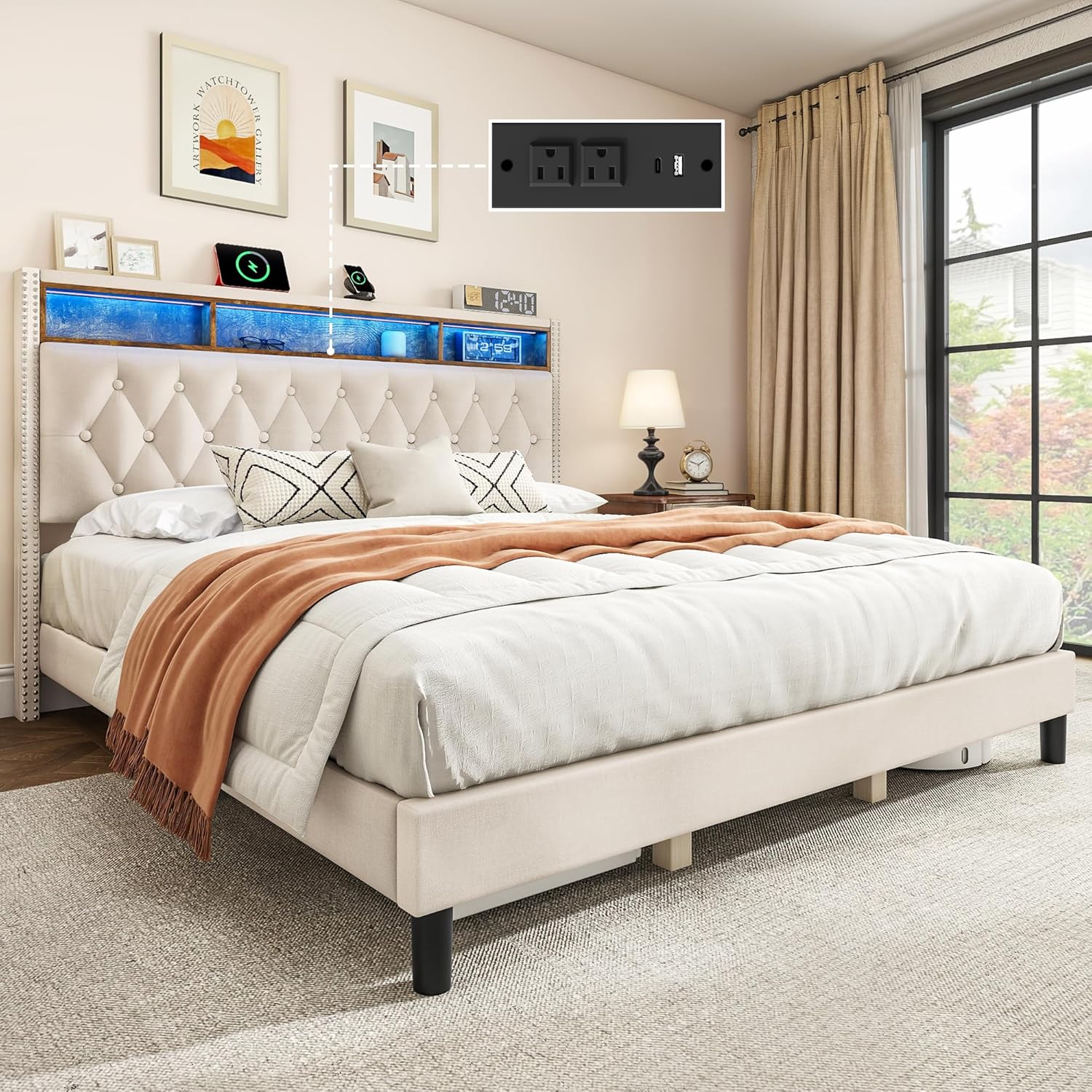
Image: The DWVO King Bed Frame, showcasing its upholstered headboard, integrated LED lighting, and accessible charging station.
Safety Information
- Read all instructions carefully before assembly and use.
- Keep all small parts and packaging materials away from children.
- Ensure all connections are secure before use.
- Do not exceed the maximum weight capacity of 1100 pounds.
- Only use the provided power adapter for the LED lights and charging station.
- Avoid placing liquids directly on the headboard's storage shelf, especially near electrical components.
- If any parts are missing or damaged, contact customer support immediately. Do not attempt to assemble with damaged parts.
Package Contents
Before beginning assembly, verify that all components are present and undamaged. Refer to the included parts list in your packaging for specific quantities.
- Upholstered Headboard with LED Lights and Charging Station
- Bed Frame Rails (Left, Right, Footboard)
- Center Support Beam(s)
- Wood Slats with EVA Noise Reduction Bars
- Support Legs (various sizes)
- Assembly Hardware (screws, bolts, washers, nuts)
- Assembly Tools (Allen wrench, etc.)
- Power Adapter for LED Lights and Charging Station
- Instruction Manual (this document)
Setup and Assembly
Assembly of the DWVO King Bed Frame is designed to be straightforward. It is recommended to have two people for assembly. All necessary tools and labeled parts are included.
- Prepare the Area: Clear a spacious area for assembly. Lay out all parts and hardware, matching them to the included parts list.
- Assemble the Headboard: Attach the side rails to the upholstered headboard. Ensure all bolts are finger-tight before fully tightening.
- Connect Side Rails: Attach the side rails to the footboard. The hook and loop design on the frame simplifies this step and shortens installation time.
- Install Center Support: Place the center support beam(s) within the frame and secure them according to the diagrams in your specific instruction booklet. Attach any necessary support legs to the center beam.
- Place Wood Slats: Lay the wood slats across the frame. The EVA bars on the slats help minimize noise. Ensure they are evenly spaced and secured if applicable.
- Final Tightening: Once all major components are in place, go back and securely tighten all bolts and screws. Do not overtighten.
- Connect Power: Plug the power adapter into the designated port on the headboard and then into a wall outlet.

Image: Diagram illustrating the overall dimensions of the King Bed Frame (approx. 81.8"L x 85.8"W x 44.8"H) and its robust 1100 lbs weight capacity.

Image: Detailed view highlighting the noise-reducing EVA bars on the slats and the easy-to-install hook and loop design for frame assembly.
Operating Instructions
LED Lights Operation:
The integrated LED lights can be controlled via a mobile application. Download the recommended app (refer to the specific instructions included with your product for app name/QR code) to customize the lighting effects.
- Power On/Off: Use the app to turn the LED lights on or off.
- Color Customization: Adjust the color, brightness, and lighting modes to match your preference.
- Sync with Music: Some apps may offer features to sync lights with music or sound.

Image: The bed frame demonstrating its customizable LED light effects, with a color spectrum bar indicating 100% to 0% color changing capabilities.
Charging Station Usage:
The headboard features a built-in charging station with 2 AC outlets (125V/12A) and a USB/Type-C port (5V/2.1A) for convenient device charging.
- AC Outlets: Plug in standard electronic devices such as lamps, alarm clocks, or laptops.
- USB/Type-C Port: Connect your smartphones, tablets, or other USB-powered devices for charging.
- Ensure the bed frame is plugged into a live wall outlet for the charging station to function.

Image: A detailed view of the headboard's built-in charging station, showing two AC outlets and a USB/Type-C port in use with various devices.
Storage Shelf:
The headboard includes a 2-tier open storage shelf, providing easy access to bedtime essentials like books, glasses, or small electronic devices.

Image: The 2-tier open storage shelf integrated into the headboard, designed for convenient access to items.
Maintenance
- Cleaning the Upholstery: For general cleaning, gently vacuum the linen upholstery with a brush attachment to remove dust and debris. For spills, blot immediately with a clean, dry cloth. For stubborn stains, use a mild fabric cleaner specifically designed for upholstery, testing on an inconspicuous area first.
- Cleaning the Frame: Wipe down the metal and wood components with a soft, damp cloth. Avoid harsh chemicals or abrasive cleaners.
- Electrical Components: Ensure the charging station and LED lights are unplugged before cleaning. Use a dry cloth to wipe around the outlets and light strips. Do not spray liquids directly onto electrical parts.
- Regular Checks: Periodically check all bolts and screws to ensure they remain tight. Retighten if necessary to maintain stability and prevent noise.
Troubleshooting
| Problem | Possible Cause | Solution |
|---|---|---|
| Bed frame is wobbly or noisy. | Loose bolts or screws; uneven floor; slats not properly seated. | Ensure all assembly bolts are securely tightened. Check if the floor is level; use furniture pads if needed. Verify all wood slats are correctly placed and secured. The EVA bars are designed to reduce noise. |
| LED lights are not working. | Power adapter not plugged in; loose connection; app issue. | Check if the power adapter is securely plugged into the headboard and a live wall outlet. Ensure the connection between the LED strip and the controller is firm. Restart the mobile app or reinstall it if necessary. |
| Charging station is not providing power. | Bed frame not plugged in; device cable issue; power surge protection tripped. | Verify the bed frame's power adapter is plugged into a live wall outlet. Test with a different device cable. If the outlet has a reset button, try pressing it. |
| Missing parts during assembly. | Packaging error. | Carefully check all packaging materials. If parts are genuinely missing, contact DWVO customer support with your purchase details. |
Specifications
| Brand | DWVO |
| Model Number | MADWVmBeph |
| Size | King (U.S. Standard) |
| Product Dimensions | 80.31"L x 16.53"W x 6.49"H (Headboard dimensions from specifications, overall bed dimensions are 81.8"L x 85.8"W x 44.8"H as per image) |
| Weight Capacity | Up to 1100 pounds |
| Special Feature | LED Lighting, Built-in Charging Station (2 AC Outlets, 1 USB/Type-C Port), Upholstered Headboard with Storage |
| Color | Beige |
| Fabric Type | Linen |
| Assembly Required | Yes |
| Item Weight | 79.4 pounds |
| UPC | 199449814924 |
| Country of Origin | China |
Warranty and Support
DWVO products are designed for quality and durability. For specific warranty information regarding your bed frame, please refer to the warranty card included in your product packaging or visit the official DWVO website.
If you encounter any issues, require replacement parts, or have questions not covered in this manual, please contact DWVO customer support. Have your model number (MADWVmBeph) and purchase information ready when contacting support.
Customer Support: Please refer to your purchase documentation or the DWVO official website for contact details.
Returns: This product is eligible for 30-day easy returns through Amazon.com.