1. Product Overview
The Gurjot F75 Pro is an advanced 81-key 75% layout wireless mechanical keyboard designed for versatility and performance. It features tri-mode connectivity, hot-swappable switches, vibrant RGB backlighting, and a long-lasting 8000mAh battery, making it suitable for various devices and uses.

Image 1: Gurjot F75 Pro Wireless Mechanical Keyboard (Navy Black variant).
2. Package Contents
Verify that all items are present in your package:
- Gurjot F75 Pro Wireless Mechanical Keyboard (Model K81-New Navy Black)
- Dust Cover x1
- USB-C Cable x1
- Keycap/Switches Puller x1
- Extra Leobog Reaper Switches x2
- English/Chinese Brochure (Instruction Manual)

Image 2: All items included in the Gurjot F75 Pro keyboard package, including the keyboard, USB-C cable, keycap/switch puller, extra switches, and documentation.
3. Setup and Connectivity
3.1 Charging the Keyboard
Before first use, fully charge the keyboard using the provided USB-C cable. Connect the USB-C end to the keyboard's port and the USB-A end to a power source (e.g., computer USB port, USB wall adapter).
3.2 Tri-Mode Connection
The keyboard supports three connection modes: Bluetooth 5.0, 2.4GHz wireless, and USB-C wired. A switch on the side of the keyboard allows you to select the desired mode.

Image 3: The keyboard showcasing its three connectivity modes: USB-C wired, 2.4GHz wireless, and Bluetooth 5.0.
3.2.1 Bluetooth 5.0 Connection
- Flip the mode switch on the keyboard to the Bluetooth position.
- On your device (PC, laptop, tablet, smartphone), enable Bluetooth and search for new devices.
- Select "K81-New" or similar from the list of available devices to pair.
- The keyboard can connect to up to five devices simultaneously. Use shortcut keys (refer to the included brochure for specific key combinations) to switch between paired devices.
3.2.2 2.4GHz Wireless Connection
- Flip the mode switch on the keyboard to the 2.4GHz position.
- Insert the 2.4GHz USB dongle into an available USB port on your computer or gaming console.
- The keyboard should automatically connect.
3.2.3 USB-C Wired Connection
- Connect the provided USB-C cable from the keyboard to your computer or device.
- The keyboard will automatically switch to wired mode and begin charging.
3.3 Adjusting Keyboard Height
The keyboard features adjustable kickstands on the underside to customize the typing angle for ergonomic comfort.
4. Operating Instructions
4.1 RGB Backlighting
The F75 Pro keyboard features 16.8 million RGB lighting colors with 19 pre-set lighting effects. You can adjust the lighting brightness and speed using the multi-function knob or specific FN key combinations (refer to the included brochure for details).
Video 1: Demonstration of the Gurjot Wireless Mechanical Keyboard with Knob, showcasing its design and features. This video is 28 seconds long.
4.2 Multi-Function Knob
The dedicated knob on the keyboard allows for easy control of backlight settings and media functions (e.g., volume control, play/pause).
4.3 Gaming Features
- N-Key Rollover: Ensures all key presses are registered accurately, even during rapid, simultaneous inputs.
- WIN Key Lock: Prevents accidental presses of the Windows key during intense gaming sessions.
5. Maintenance
5.1 Cleaning
Use the included dust cover to protect the keyboard when not in use. For cleaning, gently wipe the keycaps and surface with a soft, dry cloth. Avoid using harsh chemicals or abrasive materials.
5.2 Hot-Swappable Switches
The keyboard features a hot-swappable base supporting 3-pin or 5-pin switches. Use the provided keycap/switches puller to easily remove and replace switches without soldering. Extra Leobog Reaper switches are included for replacement or customization.
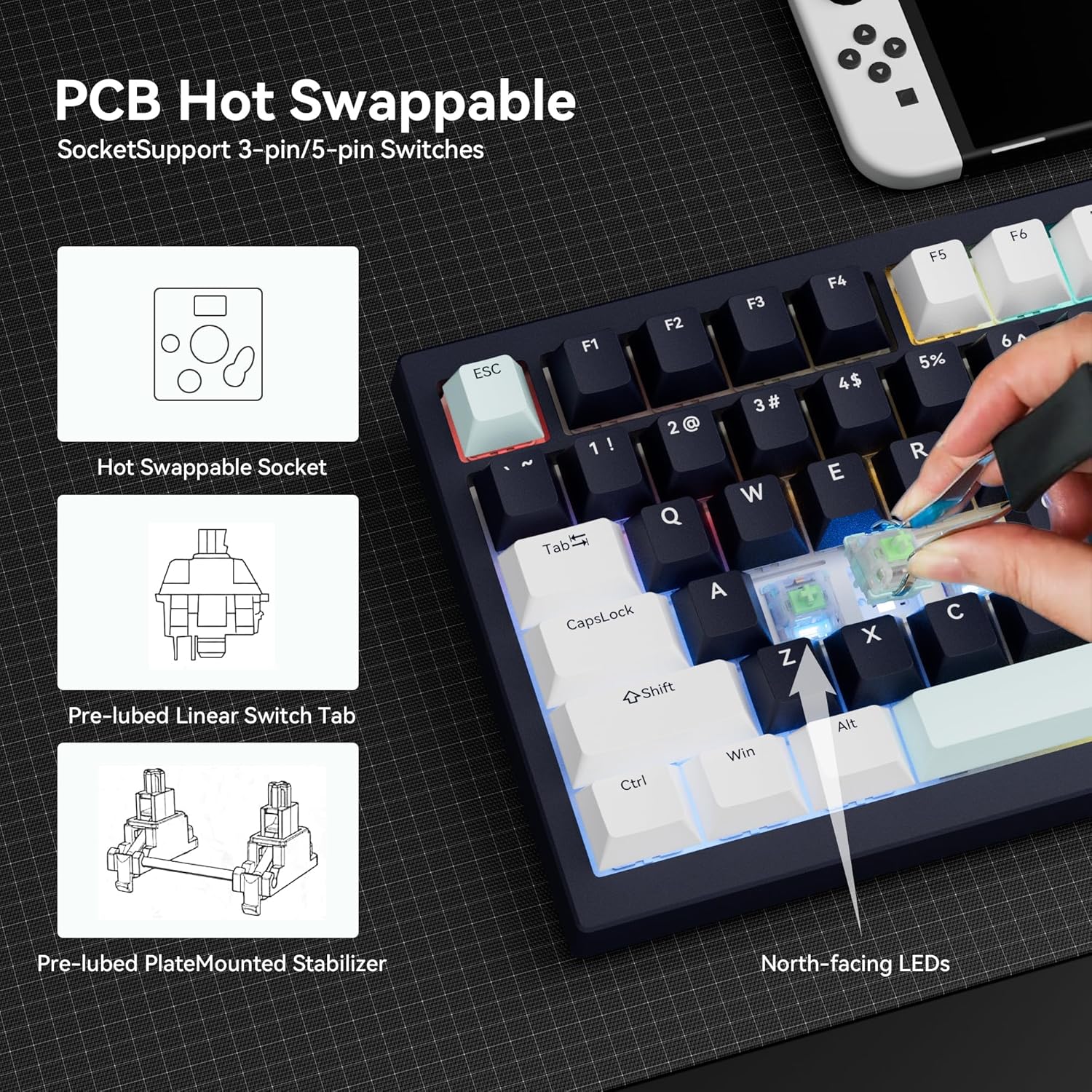
Image 4: Illustration of the PCB hot-swappable design, allowing for easy switch replacement.
6. Troubleshooting
If you encounter issues, try the following:
- Connectivity Issues: Ensure the mode switch is set correctly for your desired connection type (Bluetooth, 2.4GHz, or wired). For Bluetooth, re-pair the device. For 2.4GHz, ensure the dongle is securely inserted. For wired, check the USB-C cable connection.
- Backlight Not Working: Check if the backlight is turned off or set to a very low brightness level using the knob or FN key combinations. Ensure the keyboard has sufficient battery charge.
- Keys Not Responding: Ensure the keyboard is powered on and properly connected. If specific keys are not responding, consider replacing the switch using the hot-swappable feature.
7. Specifications
| Feature | Detail |
|---|---|
| Brand | Gurjot |
| Model Number | K81-New Navy Black |
| Connectivity Technology | 2.4GHz, BT5.0, USB-C |
| Compatible Devices | Laptop, PC, Gaming Console, Tablet, Smartphone |
| Keyboard Description | Mechanical |
| Special Features | Backlit, Hot-Swappable |
| Color | Navy Black |
| Keyboard Backlighting | RGB (16.8 Million Colors, 19 Pre-set Effects) |
| Number of Keys | 81 |
| Battery Capacity | 8000mAh |
| Material | Plastic |
| Keyboard Layout | QWERTY, 75% Compact |
| Switch Type | Pre-lubed Linear Mechanical Switches |
| Dimensions | 330.5 x 142 x 44 mm (approximate, based on image) |
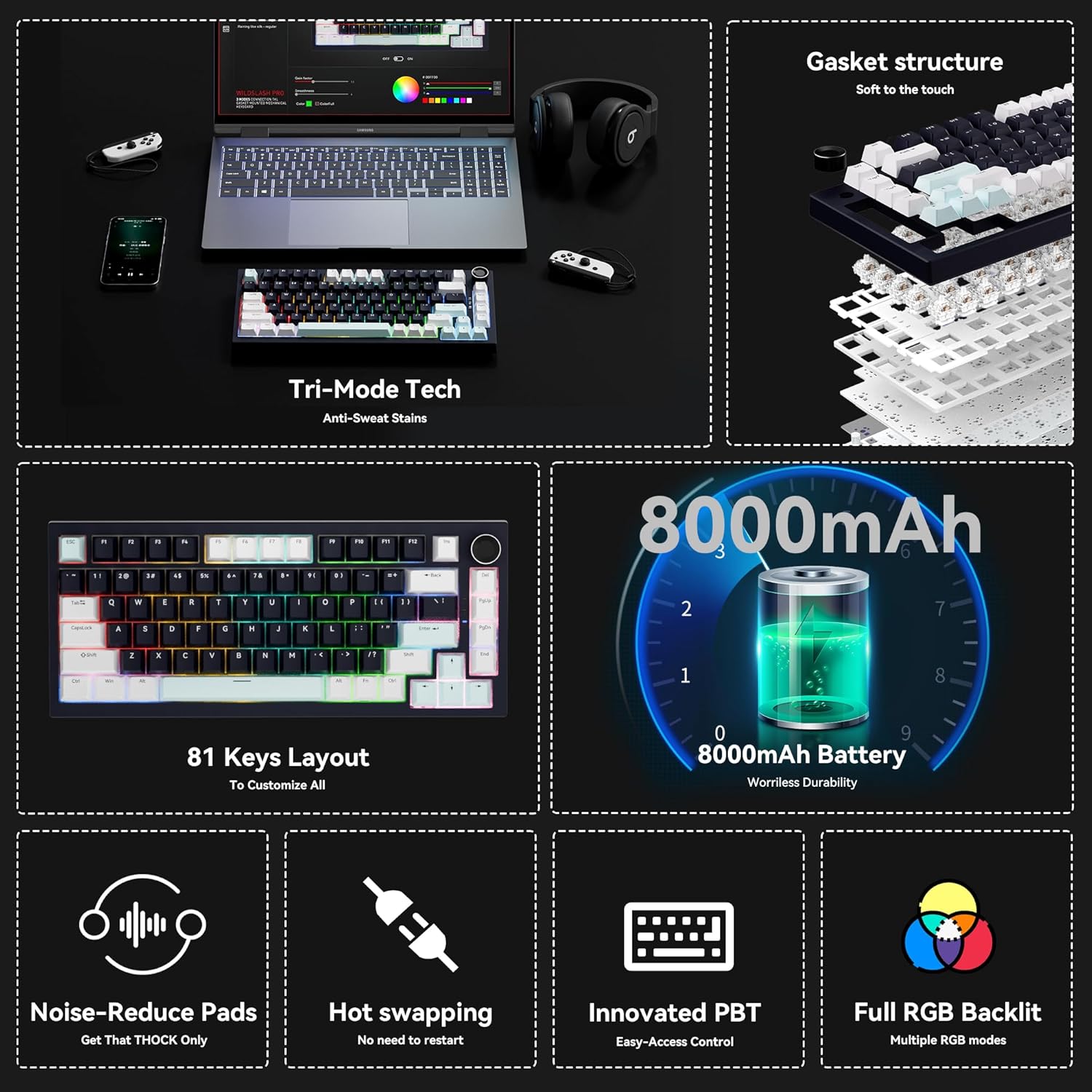
Image 5: Overview of key features including tri-mode connectivity, gasket structure, 81-key layout, 8000mAh battery, noise reduction, hot-swapping, PBT keycaps, and full RGB backlighting.

Image 6: Detailed view emphasizing the 8000mAh high-capacity battery, with an estimated battery life of 53 hours (backlit ON) and 400 hours (backlit OFF).

Image 7: Exploded diagram illustrating the updated gasket structure and internal components for enhanced typing feel and sound.
8. Official Product Videos
Video 1: An official product video from Gurjot Mechanical Keypads, titled "Wireless Mechanical Keyboard with Knob". This video provides a concise overview of the keyboard's features and design. Duration: 0:28.
Video 2: An official product video from Gurjot Mechanical Keypads, titled "Gurjot Wireless Mechanical Keyboard with Knob". This video offers a more in-depth look at the keyboard's functionalities. Duration: 1:14.
Video 3: An official product video from Gurjot Mechanical Keypads, titled "Gurjot Mechanical keyboard display". This video highlights the visual aspects and various lighting modes of the keyboard. Duration: 0:54.
9. Warranty and Support
This product is covered by a standard manufacturer's warranty. For specific warranty details or technical support, please refer to the contact information provided in the included English/Chinese brochure or visit the official Gurjot Mechanical Keypads website.


