
1. Introduction
This manual provides detailed instructions for the Zoop Digital Watch, model 16051PP06. This digital watch features a contemporary design with chronograph settings, a stopwatch, and alarm functions. It is constructed with an ABS case and a PU strap, featuring a unique striped pattern. This watch is designed for daily use and offers reliable timekeeping.
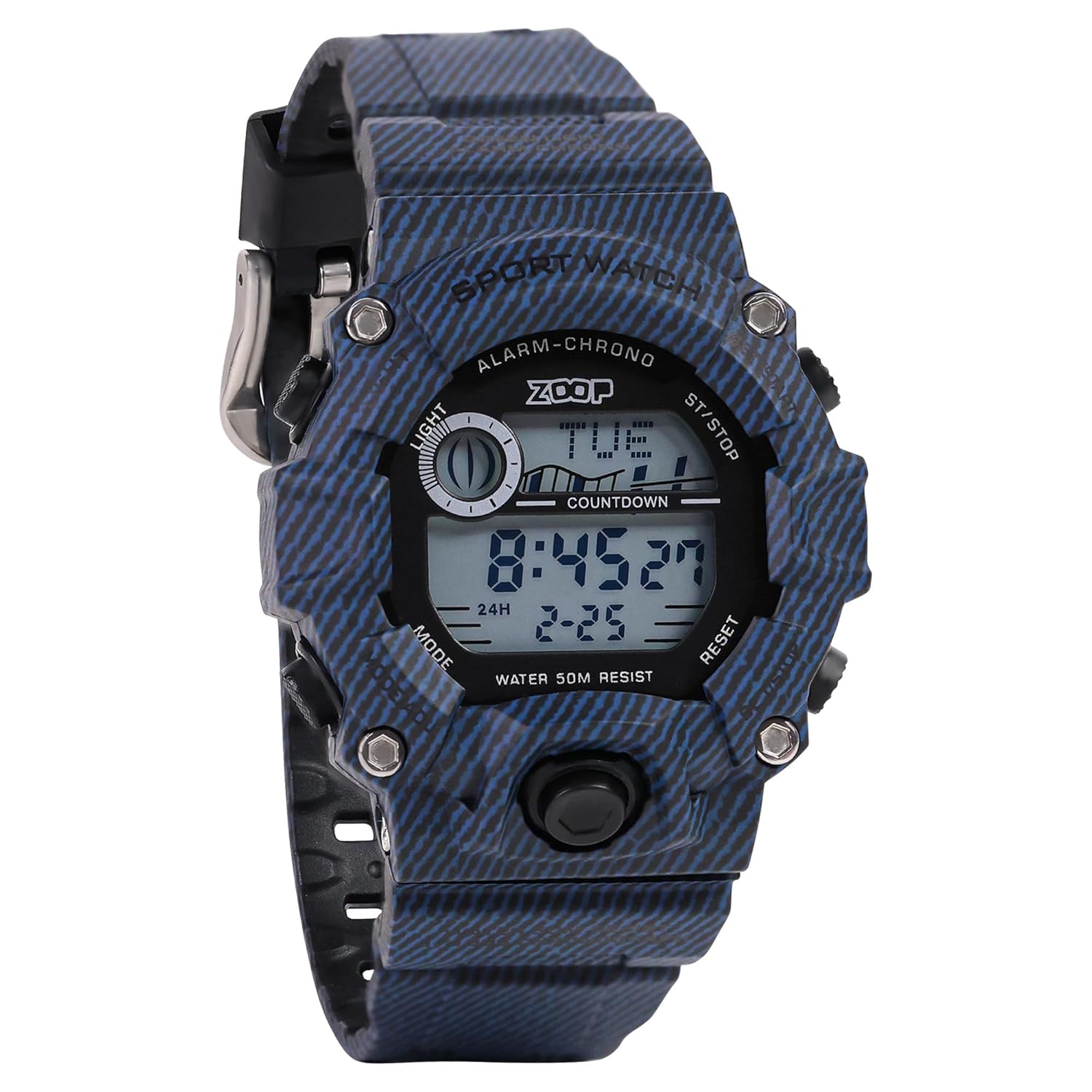
Figure 1: Front view of the Zoop Digital Watch 16051PP06. This image displays the watch face with its digital display, the four control buttons on the sides, and the blue striped pattern on the strap and case.
2. Initial Setup and Button Functions
Before using your watch, familiarize yourself with its buttons and basic settings.
2.1 Button Identification

Figure 2: Side view of the watch, illustrating the button layout. The buttons are labeled as follows: LIGHT (top left), MODE (bottom left), ST/STOP (top right), and RESET (bottom right).
- LIGHT Button (Top Left): Activates the backlight for the display.
- MODE Button (Bottom Left): Cycles through different modes (Time, Chronograph, Alarm, Countdown).
- ST/STOP Button (Top Right): Used to start/stop functions in Chronograph mode and adjust settings.
- RESET Button (Bottom Right): Used to reset values or confirm settings.
2.2 Setting Time and Date
- From the normal time display, press the MODE button repeatedly until the seconds begin to flash. This indicates you are in time-setting mode.
- Press the ST/STOP button to cycle through the settings: seconds, hour, minute, month, date, day.
- Use the RESET button to adjust the flashing value.
- Once all settings are correct, press the MODE button to exit the setting mode and return to the normal time display.
3. Operating Instructions
3.1 Time Display (12/24 Hour Format)
The watch can display time in either 12-hour or 24-hour format. To switch between formats, in the normal time display, press the ST/STOP button. The display will toggle between 'A' (AM) / 'P' (PM) for 12-hour format and 'H' for 24-hour format.
3.2 Using the Chronograph (Stopwatch)
- From the normal time display, press the MODE button once to enter Chronograph mode. The display will show "00:00:00".
- Press the ST/STOP button to start the stopwatch.
- Press the ST/STOP button again to pause the stopwatch.
- To resume, press ST/STOP.
- To reset the stopwatch to zero, ensure it is paused, then press the RESET button.
- Press the MODE button to return to the normal time display.
3.3 Setting and Using the Alarm
- From the normal time display, press the MODE button twice to enter Alarm mode. The alarm time will be displayed, and the hour digits will flash.
- Press the ST/STOP button to select the hour or minute to adjust.
- Use the RESET button to change the flashing value.
- Once the desired alarm time is set, press the MODE button to exit Alarm setting mode.
- To activate/deactivate the alarm, in Alarm mode, press the ST/STOP button. An alarm icon will appear/disappear on the display.
- When the alarm sounds, press any button to stop it.
3.4 Using the Backlight
Press the LIGHT button (top left) to illuminate the display for a few seconds, allowing for visibility in low-light conditions.
3.5 Water Resistance
This watch is water resistant up to 50 meters (5 ATM). It is suitable for everyday use and can withstand splashes, rain, and brief immersion in water. It is not suitable for swimming, diving, or showering with hot water. Do not operate buttons while the watch is wet or submerged.
4. Maintenance
4.1 Cleaning Your Watch
To maintain the appearance of your watch, wipe it regularly with a soft, dry cloth. For stubborn dirt, a slightly damp cloth can be used, followed by immediate drying. Avoid using chemical cleaners, as they may damage the watch's finish or strap material.
4.2 Battery Replacement
The watch is powered by a long-lasting quartz battery. When the display becomes dim or functions become erratic, it may be time for a battery replacement. It is recommended to have the battery replaced by a qualified watch technician to ensure proper sealing and maintain water resistance.
4.3 Acrylic Glass Care
The watch features an acrylic glass crystal, which is durable and impact-resistant. Minor scratches on the acrylic glass can often be polished out using a specialized acrylic polish or a soft cloth with a small amount of non-abrasive toothpaste. Apply gently and wipe clean.
5. Troubleshooting
| Problem | Possible Cause | Solution |
|---|---|---|
| Display is blank or dim. | Low battery. | Replace the battery. |
| Time is incorrect. | Time not set correctly or accidental button press. | Refer to Section 2.2 "Setting Time and Date" to reset the time. |
| Buttons are unresponsive. | Moisture or dirt under buttons; internal malfunction. | Ensure buttons are clean and dry. If issue persists, contact support. |
| Alarm does not sound. | Alarm is not activated or volume is too low (if applicable). | Refer to Section 3.3 "Setting and Using the Alarm" to ensure the alarm is set and activated. |
6. Specifications

Figure 3: The watch displayed with a ruler, showing its approximate case size of 50mm.
| Feature | Detail |
|---|---|
| Model Number | 16051PP06 |
| Brand | Zoop |
| Movement Type | Quartz |
| Display Type | Digital |
| Water Resistance Depth | 50 Meters (5 ATM) |
| Case Diameter | 34 Millimetres |
| Case Thickness | 10.3 Millimetres |
| Band Material | Plastic (PU Strap) |
| Crystal Material | Acrylic |
| Item Weight | 150 Grams |
| Product Dimensions (LxWxH) | 14 x 10 x 7 Centimeters (packaging dimensions) |
Note: The case diameter is listed as 34mm in specifications, while an image suggests a 50mm case size. Please refer to the official product packaging for the most accurate dimensions.
7. Warranty & Support
7.1 Two-Year Guarantee
This Zoop Digital Watch comes with a Two-Year Guarantee from the date of purchase. This warranty covers manufacturing defects under normal use. It does not cover damage resulting from improper use, accidents, unauthorized repairs, or normal wear and tear. Please retain your proof of purchase for warranty claims.
7.2 Manufacturer and Support Information
Manufacturer: Titan Company Limited
Address: #3, SIPCOT Industrial Complex, Hosur - 635126, Tamil Nadu, India
For support or service inquiries, please contact your retailer or the manufacturer directly.