1. Introduction and Overview
The GOLUMUP Hydroponics Growing System GS310 is an advanced indoor gardening solution designed for cultivating herbs, vegetables, and fruits year-round. This system utilizes hydroponic technology, eliminating the need for soil and providing an efficient way to grow plants indoors. It features a smart water circulation system, full-spectrum LED grow lights, and an intuitive LCD touch panel for easy operation.
Key features include:
- High Planting Efficiency: Automatic water circulation system keeps water fresh and oxygenated.
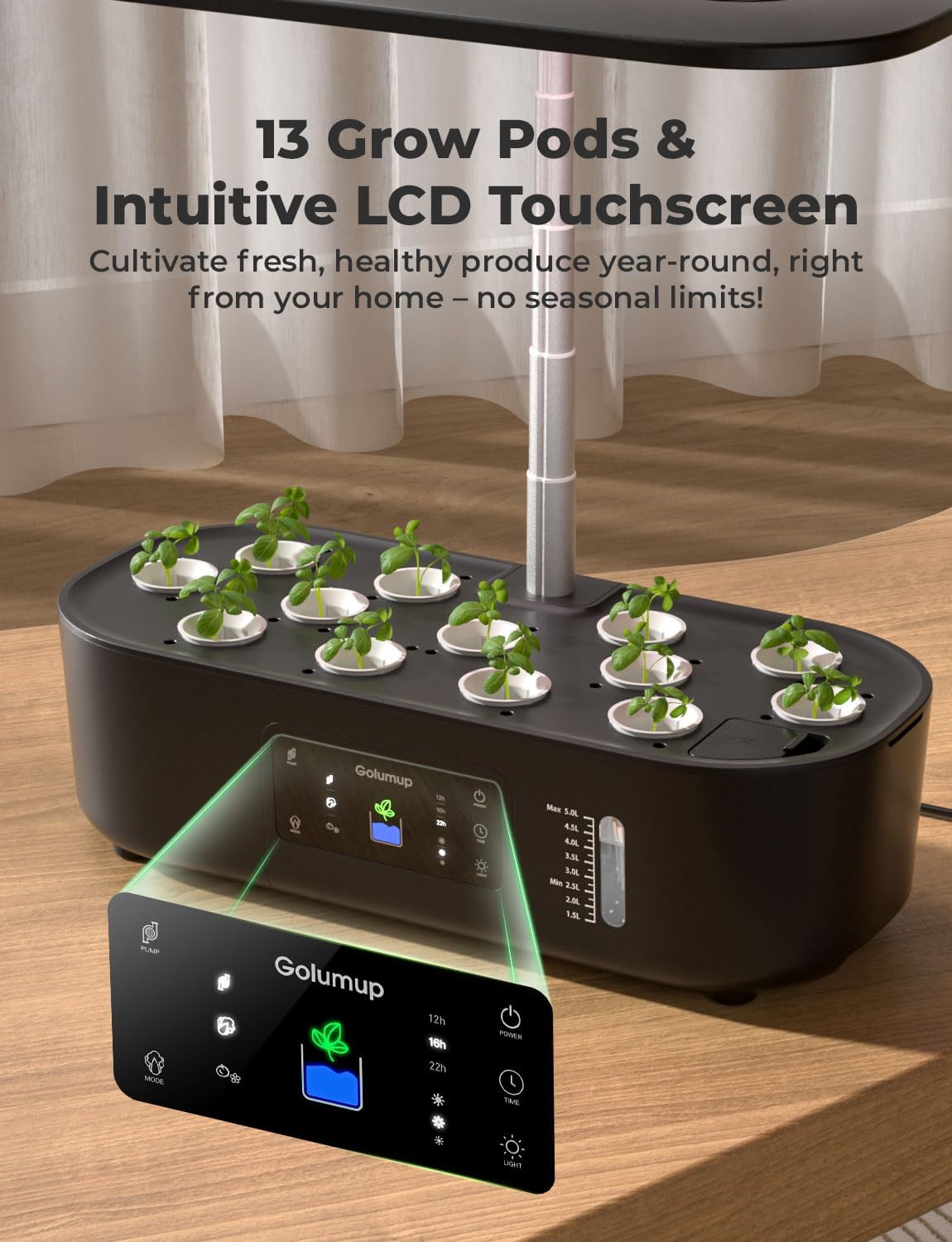
- 13 Plant Pods: Ample space for a variety of plants with a transparent water level window.
- Smart & Quiet Water Circulation: Provides oxygen to roots, automatically turns off every 30 minutes to save energy.
- Adjustable Light Pole: Extends up to 16 inches (approximately 41 cm) to accommodate different growth stages.
- 5L Large Water Capacity: Reduces the frequency of refilling.
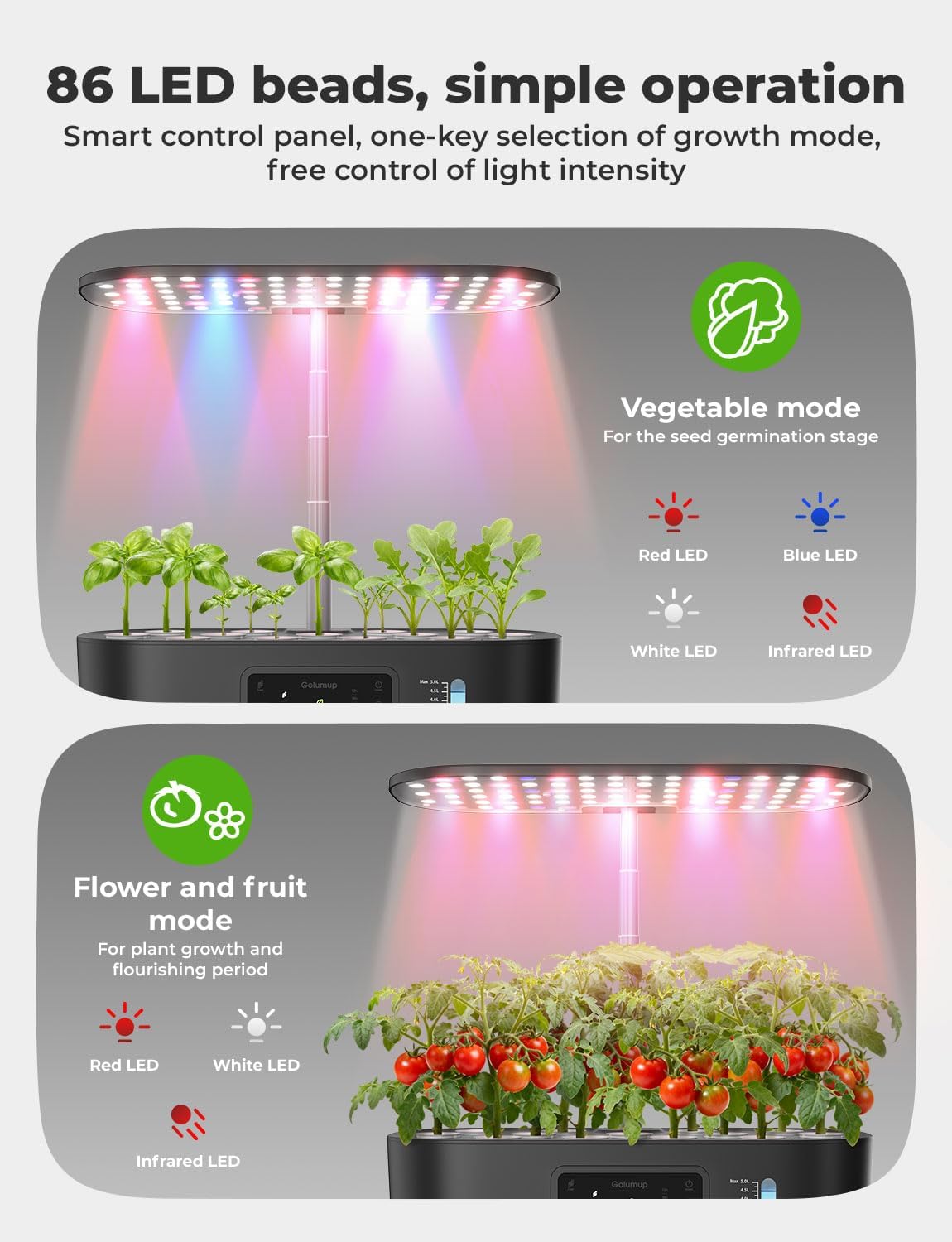
- Full-Spectrum LED Grow Light: Simulates natural sunlight with red, blue, white, and far-red light, offering germination and growth modes.

2. Package Contents
Please ensure all components are present in your package:
- Hydroponic Growing System Base with Water Tank
- LED Grow Light Panel with Adjustable Pole
- 13 Planting Baskets
- 13 Sponge Soil Pods
- 13 Seedling Caps
- 13 Pod Labels
- 1 Tweezer
- 5 Covers (for unused pods)
- 1 Power Adapter
- 1 Set of Fertilizer A+B (Plant Food)

3. Setup Instructions
- Assemble the System: Insert the adjustable light pole into the designated slot on the main unit. Secure the LED grow light panel onto the top of the pole.
- Prepare Planting Pods: Place one sponge soil pod into each planting basket. If planting seeds, gently insert 2-3 seeds into the center of each sponge.
- Insert Pods: Place the prepared planting baskets into the 13 available slots on the system's top cover. Use the provided covers for any unused slots to prevent light exposure and algae growth.
- Label Plants: Use the pod labels to mark the type of plant and planting date for easy identification.
- Add Water: Fill the water tank with fresh water through the designated water filling port. Monitor the transparent water level window to ensure the water level is between the minimum and maximum marks (5L capacity).
- Add Nutrients: Following the instructions on the fertilizer bottles, add the appropriate amount of Plant Food A and Plant Food B to the water tank. Typically, this involves adding 5ml of A and 5ml of B per 1L of water.
- Connect Power: Plug the power adapter into the system and then into a power outlet.

4. Operating Instructions
The GOLUMUP Hydroponics Growing System features an intuitive LCD touch panel for easy control:
- Power Button: Press to turn the system on or off.
- Pump Button: Activates or deactivates the water circulation pump. The system's built-in circulation system automatically turns off every 30 minutes to save energy.
- Timer Modes: The grow light includes 3 automatic timer modes (e.g., 12H, 16H, 22H) for daily light cycles. Select the appropriate mode based on your plants' needs.
- Light Modes (Vegetable/Flower & Fruit): Switch between different light spectrums to optimize plant growth.
- Vegetable Mode: Utilizes red, blue, white, and infrared LED lights for seed germination and leafy green growth.
- Flower & Fruit Mode: Focuses on red, white, and infrared LED lights to promote flowering and fruiting.
- Adjustable Light Pole: The height of the grow light pole can be adjusted up to 16 inches (41 cm) by sliding it up or down to maintain an optimal distance from the plants as they grow.


5. Maintenance
- Water Level Monitoring: Regularly check the transparent water level window on the side of the unit. Refill water when the level drops below the minimum mark.
- Nutrient Replenishment: As plants grow, they consume nutrients. Replenish the nutrient solution according to the plant food instructions, typically every 2-3 weeks, or when refilling the water tank.
- Cleaning: Periodically clean the water tank and pump to prevent algae buildup and ensure optimal performance. This can be done during water changes. The drain plug facilitates easy water changes.
- Pruning: Prune your plants as needed to encourage bushier growth and prevent them from growing too close to the grow light.


6. Troubleshooting
If you encounter any issues with your GOLUMUP Hydroponics Growing System, please refer to the following common solutions:
- Plants Not Growing: Ensure the light timer is set correctly, the water level is adequate, and nutrient solutions A and B have been added in the correct proportions. Check that the pump is circulating water.
- Algae Growth: Ensure all unused planting slots are covered to block light from reaching the water. Regularly clean the water tank and change the water/nutrient solution.
- Pump Not Working: Check if the power adapter is securely connected. Ensure the pump button on the LCD panel is activated. If the water tank is empty, the pump may emit noise; refill the tank.
- Lights Not Turning On: Verify the power connection and ensure the system is turned on. Check the light timer settings on the LCD panel.
7. Specifications
| Specification | Detail |
|---|---|
| Brand | GOLUMUP |
| Model Number | GS310 |
| Product Dimensions | 44.45 x 21.79 x 17.88 cm |
| Item Weight | 2.37 kg |
| Water Tank Capacity | 5 Liters |
| Light Type | Full-Spectrum LED (Red, Blue, White, Far-Red) |
| Adjustable Light Height | Up to 16 inches (41 cm) |
| Control Interface | LCD Touch Panel |
| Number of Pods | 13 |
| Manufacturer | GOLUMUP |
| Country of Origin | China |
8. Warranty and Support
For detailed information regarding warranty coverage, product registration, and customer support, please refer to the official documentation included in your product packaging or visit the GOLUMUP official website. Keep your purchase receipt for warranty claims.


