
1. Safety Information
Please read all instructions carefully before assembly and use. Retain this manual for future reference.
- Maximum Weight Capacity: Do not exceed the maximum weight of 120 kg (265 lbs). Exceeding this limit may cause damage to the chair or personal injury.
- Assembly: Follow all assembly instructions precisely to avoid risks and ensure the chair's stability.
- Usage: Use the chair only for its intended purpose as an office or desk chair.
- Children: Keep children away from the chair during assembly. Do not allow children to play on or with the chair.
- Electrical Components: Ensure the massage function's power cord is not pinched or damaged. Disconnect from power when not in use or before cleaning.
2. Setup and Assembly
The Vinsetto 6-Point Vibrating Massage Office Chair requires assembly. Simple assembly instructions are included with the product. Ensure all components are present before beginning assembly.
2.1. Unpacking
Carefully remove all parts from the packaging. Lay them out on a clean, soft surface to prevent scratches.
2.2. Assembly Steps
Refer to the detailed assembly instructions provided in the product packaging for step-by-step guidance. Typically, assembly involves:
- Attaching the casters to the chair base.
- Inserting the gas lift cylinder into the base.
- Securing the seat mechanism to the seat cushion.
- Attaching the backrest to the seat cushion.
- Connecting the armrests.
- Placing the assembled seat onto the gas lift cylinder.

Image: Fully assembled Vinsetto office chair in a modern office environment.

Image: Detailed dimensions of the office chair, including height, width, and depth measurements.
3. Operating Instructions
3.1. Height Adjustment
To adjust the seat height, locate the lever under the seat on the right side. Pull the lever upwards while taking your weight off the seat to raise it. To lower the seat, pull the lever upwards while remaining seated. Release the lever to lock the height.
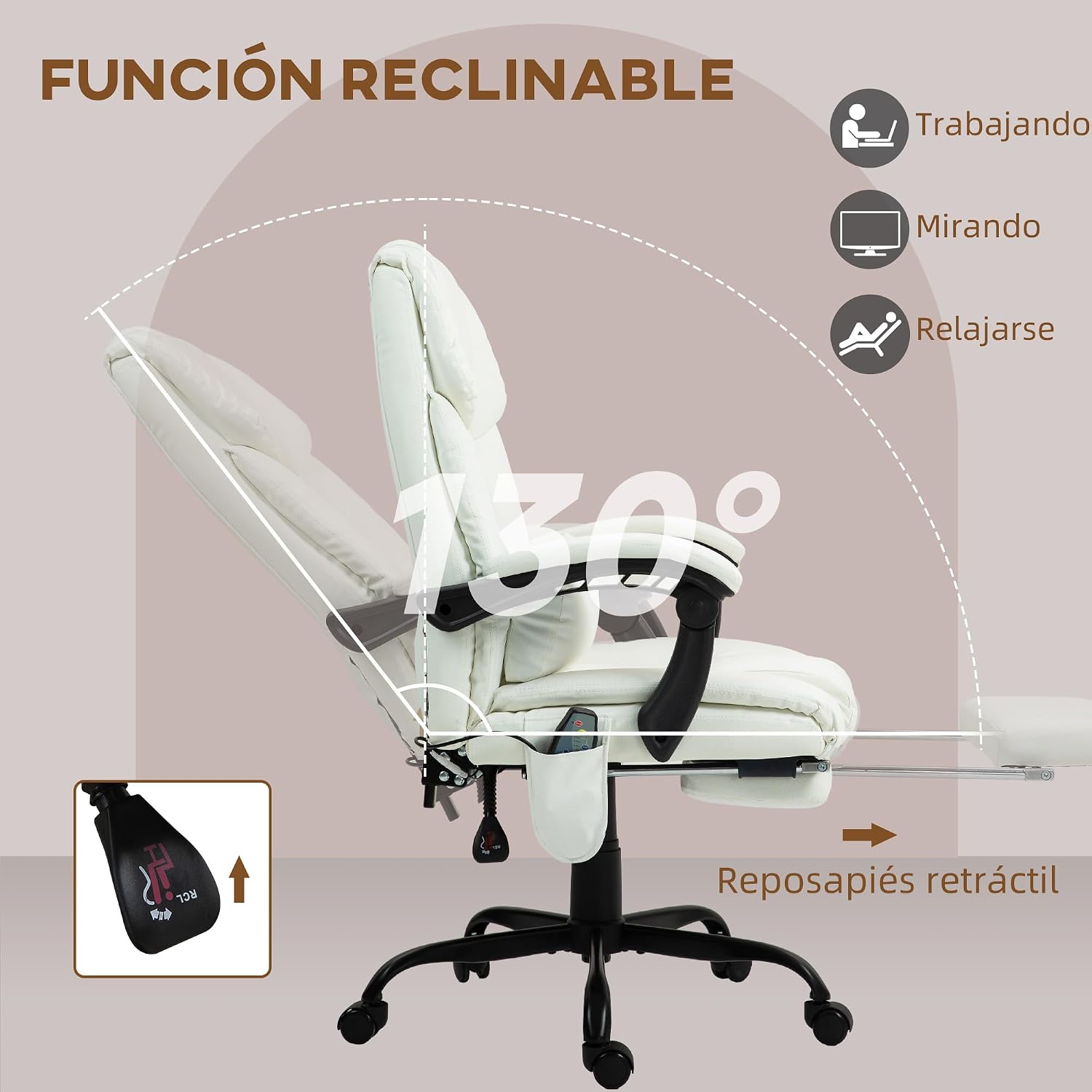
Image: Illustration showing the adjustable height mechanism and lever for the chair.
3.2. Reclining Function
The backrest can recline up to 130 degrees. To recline, pull the lever located under the seat on the left side. Lean back to your desired angle and release the lever to lock the position. To return to an upright position, pull the lever again and lean forward.

Image: Diagram illustrating the chair's reclining function up to 130 degrees, with the footrest extended.
3.3. Footrest Operation
To extend the footrest, pull it out from under the seat. To retract, push it back until it is fully stored under the seat.
3.4. Vibrating Massage Function
The chair features a 6-point vibrating massage system (4 points in the backrest, 2 in the seat) with five adjustable modes. Connect the chair to a power source. Use the included remote control to activate and select massage modes and intensity.

Image: Close-up of the chair's massage points and the remote control for operating the vibrating massage function.
3.5. Lumbar Cushion Adjustment
The additional lumbar cushion can be adjusted vertically to provide optimal support for your lower back. Position it to your comfort.
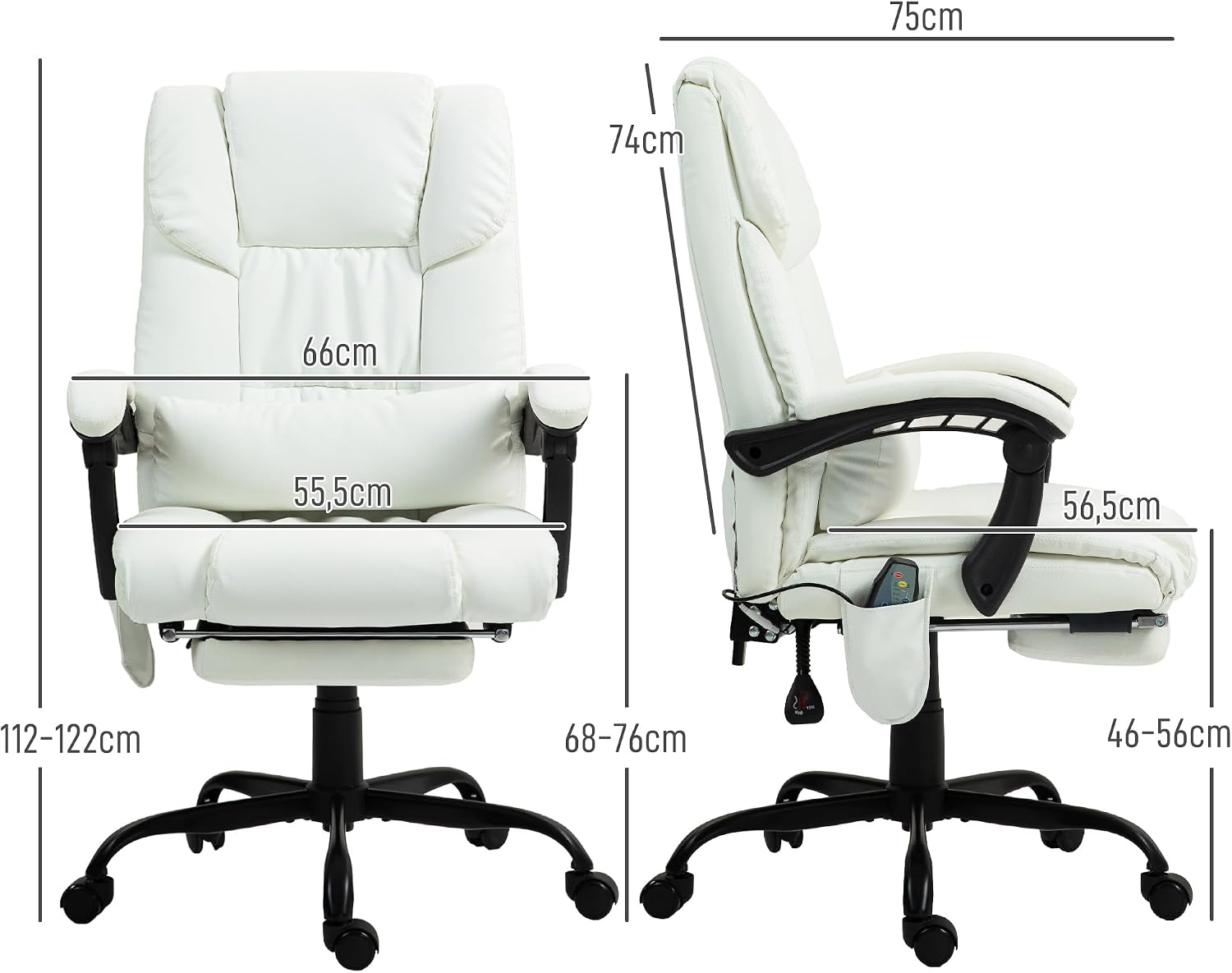
Image: Diagram showing the adjustable lumbar cushion feature on the chair's backrest.
3.6. Swivel Function
The chair is designed to swivel 360 degrees, allowing for easy movement and access within your workspace.

Image: Illustration highlighting the 360-degree swivel capability of the chair.
4. Maintenance
4.1. Cleaning
Wipe clean with a soft, damp cloth. Do not use harsh chemicals or abrasive cleaners, as these may damage the synthetic leather or other materials. Ensure the chair is disconnected from power before cleaning.
4.2. Inspection
Periodically check all screws and bolts to ensure they are tight. Re-tighten if necessary. Inspect the casters for smooth movement and the gas lift for proper function.

Image: Close-up views of the chair's construction, showing PU leather, gas lift, thick padding, and robust base.
5. Troubleshooting
- Chair does not adjust height: Ensure the gas lift lever is fully engaged. If the issue persists, the gas lift cylinder may need replacement.
- Casters do not roll smoothly: Check for debris (hair, dust) caught in the casters. Clean them thoroughly. If damaged, casters may need replacement.
- Massage function not working: Verify the power cord is securely plugged into both the chair and a working power outlet. Check the remote control for battery issues if applicable (this model uses a wired remote).
- Chair is wobbly: Re-tighten all assembly screws and bolts. Ensure the chair is on a flat, even surface.
6. Specifications
| Brand | Vinsetto |
| Model Number | 921-275V90WT |
| Color | White |
| Material | Synthetic Leather (PU/PVC), Metal Frame, Foam Padding |
| Overall Dimensions (LxWxH) | 66 x 75 x 112-122 cm |
| Reclined Dimensions (LxWxH) | 66 x 156 x 88-98 cm |
| Seat Height | 46-56 cm |
| Seat Dimensions | 55.5 x 56.5 cm |
| Footrest Dimensions | 34.5 x 20.5 cm |
| Maximum Load Capacity | 120 kg (265 lbs) |
| Net Weight | 19.5 kg |
| Reclining Angle | Up to 130° |
| Special Features | 6-Point Vibrating Massage, Adjustable Height, Reclining Backrest, Retractable Footrest, Lumbar Cushion, 360° Swivel |
| Assembly Required | Yes |
7. Warranty and Support
Spare Parts Availability: Spare parts for this product are available in the EU for a period of 3 years from the date of purchase.
For further assistance, troubleshooting, or to inquire about spare parts, please contact your retailer or the manufacturer directly. Contact information can typically be found on the product packaging or the retailer's website.


