
Byobyc T18
Byobyc Bluetooth 5.4 Clip On Headphones
Model: T18
1. Product Overview
The Byobyc T18 Clip On Headphones are designed for comfort, stability, and high-quality audio. Featuring Bluetooth 5.4 technology, these open-ear earbuds provide a secure fit for all-day wear while allowing you to remain aware of your surroundings. They are ideal for daily use, commuting, workouts, and travel, offering immersive stereo sound and intuitive touch controls.

This image displays the Byobyc T18 clip-on earbuds alongside their compact charging case, which features an LED digital display for battery status.
2. What's Included
Please check the package contents to ensure all items are present:
- T18 Clip-On Earphones (2 units)
- Type-C Charging Cable (1 unit)
- User Manual (1 unit)
- Wireless Charging Case (1 unit)
3. Key Features
- Lightweight & Comfortable Open Ear Design: Ergonomic clip-on design ensures a secure, pressure-free fit for all-day comfort, allowing awareness of surroundings.
- Immersive Stereo Sound with Bluetooth 5.4: Delivers crystal-clear audio with enhanced stability, faster connections, and ultra-low latency for seamless media and calls.
- Smart Touch Controls: Intuitive touch sensors for easy management of music playback, calls, and voice assistant activation.
- Extended Playtime with LED Display: Up to 40 hours of total playtime with the charging case, featuring an LED digital display for real-time battery status.
- Universal Compatibility: Seamlessly connects with iOS, Android, Windows, and other Bluetooth-enabled devices.
- Waterproof Design: Built to withstand splashes and sweat, suitable for workouts and outdoor activities.

This image highlights the advantages of Bluetooth 5.4, including more stable connection, lower latency, lower power consumption, and a longer transmission range of up to 15 meters.
4. Setup Guide
4.1. Charging the Earbuds and Case
Before first use, fully charge the earbuds and the charging case. The LED digital display on the case indicates the battery level.
- Place the earbuds into the charging case. Ensure they are correctly seated.
- Connect the Type-C charging cable to the charging port on the case and plug the other end into a USB power source (e.g., wall adapter, computer USB port).
- The LED display will show the charging progress. A full charge for the case takes approximately 2 hours.
- Earbuds provide up to 5 hours of music playtime on a single charge, with the charging case extending total playtime to 40 hours.

This image illustrates the charging process, showing the Type-C cable connected to the case and the LED display indicating battery status. It also highlights the 2-hour charging time, 5 hours of earbud music playtime, and 40 hours of total playtime with the charging case.
4.2. Pairing with Your Device
The earbuds support one-step pairing for quick and easy connection.
- Open the charging case. The earbuds will automatically enter pairing mode.
- On your device (smartphone, tablet, laptop), go to Bluetooth settings and turn Bluetooth on.
- Search for available devices and select "T18" from the list.
- Once connected, you will hear a confirmation prompt, and the earbuds will be ready for use.

This image demonstrates the automatic pairing process when opening the case and highlights compatibility with iOS, Android, laptops, and tablets.
4.3. Wearing the Earbuds
For optimal sound quality and comfort, ensure the earbuds are worn correctly.
- Identify the left (L) and right (R) earbuds.
- Gently clip the earbud onto your ear, ensuring the main body rests comfortably in your ear canal and the clip secures it behind your ear.
- Adjust the position for a snug yet comfortable fit. The open-ear design allows for ambient sound awareness.

This image provides a visual guide on how to securely clip the earphone onto the ear and adjust it for a comfortable fit.
5. Operating Instructions
The Byobyc T18 earbuds feature intuitive touch controls on both the left (L) and right (R) earbuds.
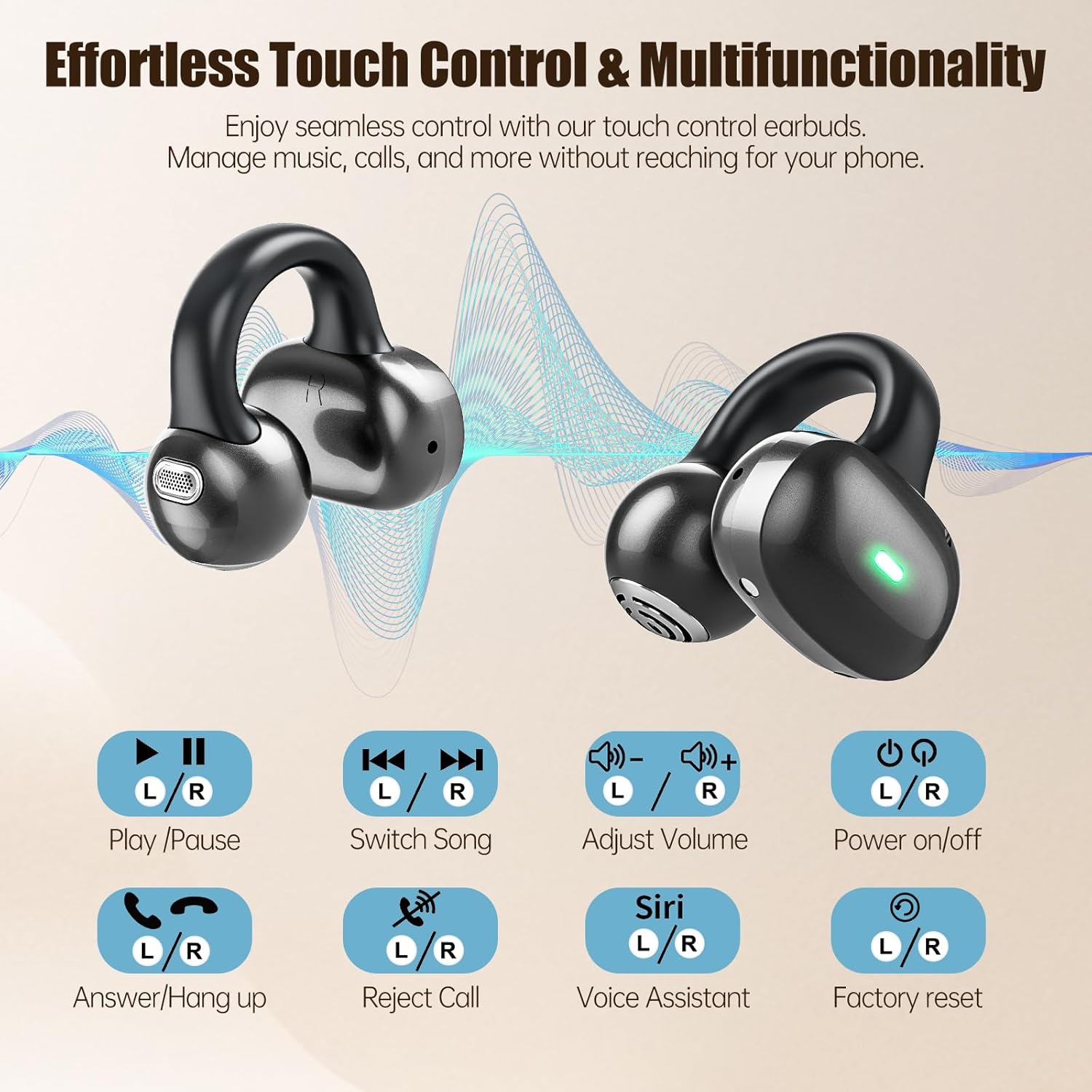
This image displays the various touch control functions for the earbuds, including playback, call management, volume, and voice assistant.
| Function | Action |
|---|---|
| Power On/Off | Touch and hold L/R earbud for 3 seconds. |
| Play/Pause Music | Single tap L/R earbud. |
| Next Song | Double tap R earbud. |
| Previous Song | Double tap L earbud. |
| Volume Up | Triple tap R earbud. |
| Volume Down | Triple tap L earbud. |
| Answer/End Call | Single tap L/R earbud during an incoming call. |
| Reject Call | Touch and hold L/R earbud for 2 seconds during an incoming call. |
| Activate Voice Assistant (Siri, Google Assistant) | Touch and hold L/R earbud for 2 seconds (when not on a call). |
| Factory Reset | Touch and hold L/R earbud for 5 seconds until indicator flashes. (Refer to troubleshooting for detailed steps if needed). |
6. Maintenance
Proper maintenance ensures the longevity and optimal performance of your earbuds.
- Cleaning: Regularly wipe the earbuds and charging case with a soft, dry, lint-free cloth. Do not use harsh chemicals or abrasive materials.
- Water Resistance: The earbuds are waterproof. However, avoid prolonged submersion in water. Dry them thoroughly before placing them back in the charging case.
- Storage: When not in use, store the earbuds in their charging case to protect them from dust and damage. Store in a cool, dry place away from extreme temperatures.
- Battery Care: To preserve battery life, avoid fully discharging the earbuds and case frequently. Charge them regularly, even if not in constant use.
7. Troubleshooting
If you encounter issues with your Byobyc T18 headphones, try the following solutions:
| Problem | Possible Solution |
|---|---|
| Earbuds not pairing/connecting |
|
| No sound from one or both earbuds |
|
| Charging case not charging |
|
| Touch controls not responding |
|
8. Specifications
| Feature | Detail |
|---|---|
| Model Name | T18 |
| Brand | Byobyc |
| Connectivity Technology | Wireless |
| Wireless Communication Technology | Bluetooth |
| Bluetooth Version | 5.4 |
| Bluetooth Range | 15 Meters |
| Ear Placement | Open Ear |
| Form Factor | On Ear |
| Control Type | Touch Control |
| Playtime (Earbuds) | Up to 5 hours |
| Total Playtime (with Charging Case) | Up to 40 hours |
| Charging Time (Case) | Approx. 2 hours (Type-C Fast Charged) |
| Water Resistance Level | Waterproof |
| Material | Plastic |
| Item Weight | 0.1 Kilograms (3.66 ounces) |
| Compatible Devices | iPhone, Android, Cellphones, Desktops, Laptops, Tablets |
9. Warranty and Support
Byobyc is committed to providing high-quality products. For any product-related inquiries, technical support, or warranty claims, please refer to the contact information provided with your purchase or visit the official Byobyc website. Keep your proof of purchase for warranty purposes.
Ask a question about this manual
Ask about setup, troubleshooting, compatibility, parts, safety, or missing instructions. Manuals+ will review the question and use this page’s manual context to help answer it.