Introduction
Thank you for purchasing the E-Motie King Size Bed Frame with Storage Headboard. This modern industrial platform bed is designed to provide both comfort and functionality, featuring an integrated charging station, RGB LED lights, and ample under-bed storage. This manual provides detailed instructions for assembly, operation, maintenance, and troubleshooting to ensure a seamless experience with your new bed frame.
Safety Information
- Read all instructions carefully before assembly and use.
- Keep all small parts and packaging materials away from children.
- Ensure all connections are secure before use. Periodically check and re-tighten screws.
- Do not exceed the maximum weight capacity of 1400 pounds.
- Use only in dry indoor environments. Avoid exposure to moisture.
- Do not attempt to modify the bed frame or its electrical components.
- Unplug the charging station from the wall outlet before cleaning or if not in use for extended periods.
Package Contents
Please verify that all components listed below are present before beginning assembly. If any parts are missing or damaged, please contact customer support.
| Part | Description | Quantity |
|---|---|---|
| Headboard with LED & Charging Station | Integrated headboard unit | 1 |
| Side Rails | Long metal rails connecting headboard and footboard | 2 |
| Footboard | Lower end of the bed frame | 1 |
| Support Slats | Metal slats for mattress support | 14 (approx.) |
| Center Support Beam | Central beam for added stability | 1 |
| Support Legs | Additional legs for frame support | 12 (approx.) |
| Hardware Pack | Screws, bolts, Allen wrench, etc. | 1 set |
Setup and Assembly
Assembly typically requires two adults and takes approximately 1-2 hours. Please follow these steps carefully.
Step 1: Unpack and Identify Parts
Carefully unpack all components and lay them out on a clean, soft surface (like a rug or cardboard) to prevent scratches. Refer to the "Package Contents" section to identify each part.

Image Description: An exploded view diagram of the King size bed frame, showing its dimensions (W: 79.9", L: 76.4", H: 38.4") and various components including the headboard with integrated charging station, side rails, footboard, and support legs. The charging station detail is highlighted.
Step 2: Assemble the Headboard and Footboard
Attach the main support legs to the headboard and footboard sections using the provided hardware. Ensure all screws are finger-tight at this stage.
Step 3: Connect Side Rails
Connect the side rails to the assembled headboard and footboard. Ensure the connections are firm. Some customer feedback indicates that side pieces might be confusing; ensure they fit correctly before fully tightening. The frame features a buckle design and screw fixation for stability.

Image Description: A composite image illustrating key construction details: metal slats with Velcro for noiseless design, fixed connections on four sides for stability, buckle design and screw fixation for enhanced stability, and protective foot pads to prevent scratches and slides.
Step 4: Install Center Support Beam and Legs
Attach the center support beam to the frame. Then, screw in the additional support legs to the frame and center beam. These legs provide crucial stability and support for the mattress.
Step 5: Place Support Slats
Lay the metal support slats across the frame. Many slats come with Velcro for easy, noiseless installation. Ensure they are evenly spaced and securely fastened.
Step 6: Final Tightening
Once all parts are assembled, go back and fully tighten all screws and bolts using the provided Allen wrench. Ensure the frame is stable and does not wobble.
Operating Instructions
Using the Charging Station
The headboard features a built-in charging station with 2 standard 125V/12A sockets, 1 USB port (5V/2A), and 1 Type-C port (5V/2A). To use, simply plug the bed frame's power cord into a wall outlet. You can then connect your electronic devices directly to the ports on the headboard.

Image Description: A close-up view of the headboard's integrated charging station, showing two AC outlets, one USB-A port, and one USB-C port. A smartphone and smartwatch are shown charging wirelessly on a pad placed on the headboard shelf, with their charging cables connected to the built-in ports.
Controlling the LED Lights
The RGB LED lights integrated into the headboard offer over 60,000 color options and various lighting modes. Use the included remote control to:
- Turn the lights On/Off.
- Change colors and adjust brightness.
- Select from various lighting modes (e.g., static, fade, strobe).
- Activate music synchronization mode, where lights flash with rhythm.
- Set timing functions for automatic shut-off.
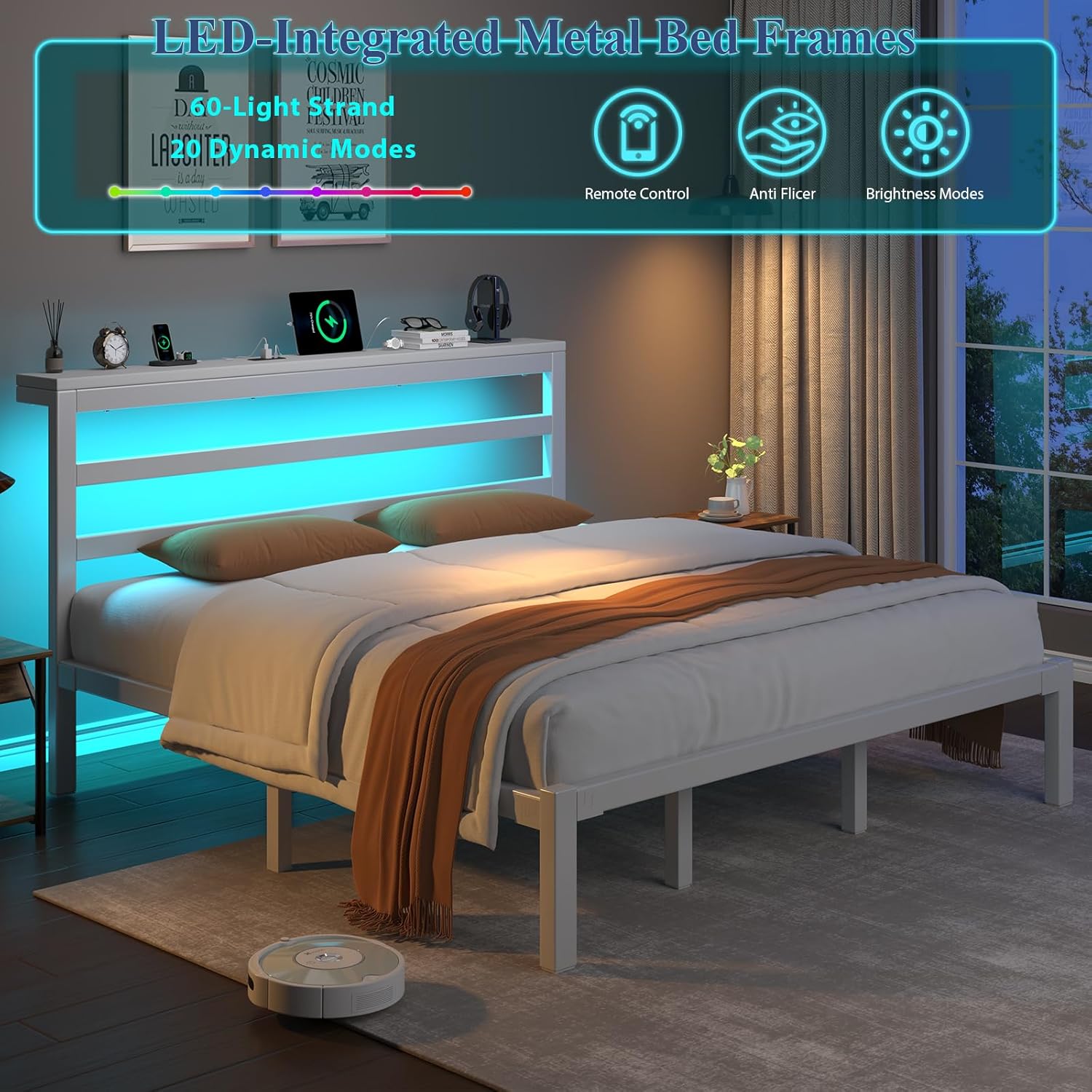
Image Description: A bedroom scene featuring the bed frame with its headboard illuminated by blue LED lights. Overlayed icons indicate features like remote control, anti-flicker technology, and various brightness modes, highlighting the customizable lighting options.

Image Description: A full view of the King size bed frame in a bedroom setting. The headboard is illuminated with a warm yellow LED light, and the integrated charging station is visible with devices placed on the headboard shelf. The overall image showcases the aesthetic and functional aspects of the bed frame.
Utilizing Under-Bed Storage
The bed frame provides approximately 12 inches (30.5 cm) of vertical clearance underneath, offering ample space for storing luggage, shoes, bins, and other items. This helps keep your bedroom tidy and organized.
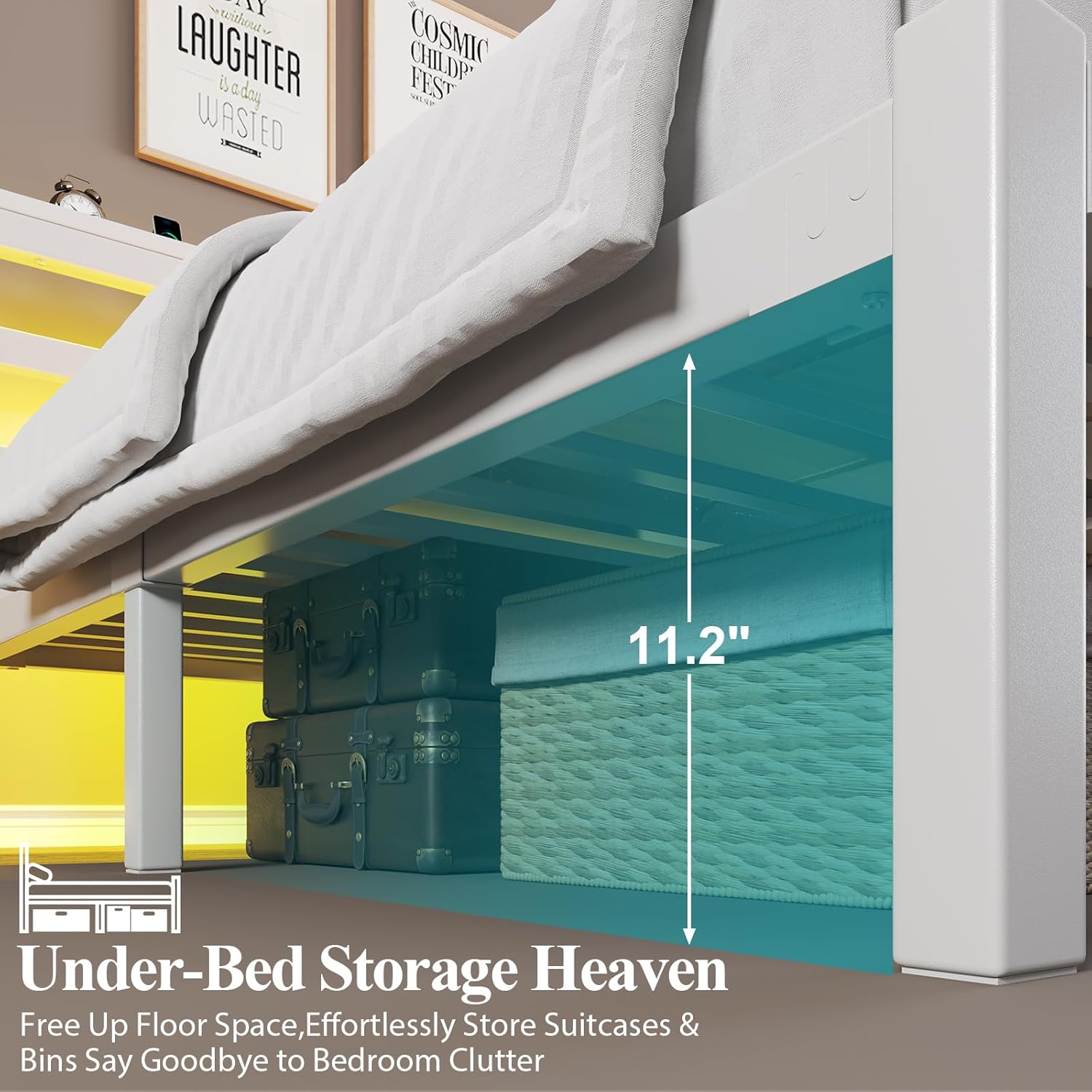
Image Description: A close-up view of the under-bed storage area, showing a measurement of 11.2 inches of vertical clearance. Baskets and suitcases are neatly stored beneath the bed, demonstrating the ample storage capacity.
Maintenance
- Cleaning: Wipe the metal frame with a soft, damp cloth. Avoid abrasive cleaners or harsh chemicals that could damage the finish. For the headboard surface, use a dry or slightly damp cloth.
- Electrical Components: Ensure the charging station and LED lights are unplugged before cleaning. Do not spray liquids directly onto electrical components.
- Regular Checks: Periodically check all screws and bolts to ensure they remain tight. Re-tighten as necessary to maintain stability and prevent squeaking.
- Ventilation: Ensure adequate airflow around the charging station to prevent overheating.
Troubleshooting
| Problem | Possible Cause | Solution |
|---|---|---|
| Bed frame is wobbly or squeaks. | Loose screws or improper assembly. | Ensure all screws and bolts are fully tightened. Review assembly steps, especially for side rails and center support. |
| LED lights are not turning on. | Not plugged in, remote control battery dead, or connection issue. | Check if the bed frame's power cord is securely plugged into a working wall outlet. Replace remote control batteries. Check LED strip connections. |
| Charging station is not working. | Not plugged in, device not compatible, or power surge protection activated. | Verify the bed frame is plugged into a live outlet. Ensure your device is compatible with the charging ports. Try a different device. If overloaded, unplug and wait a few minutes before trying again. |
| Difficulty with assembly steps. | Instructions unclear or parts misidentified. | Refer to the detailed assembly images. Pay close attention to the orientation of parts, especially side rails. If still stuck, contact customer support. |
Specifications
| Feature | Detail |
|---|---|
| Size | King |
| Product Dimensions (L x W x H) | 81"L x 76.4"W x 37.6"H |
| Color | White+LED Light |
| Material | Engineering-grade Iron Alloy |
| Weight Capacity | Up to 1400 lbs |
| Under-bed Clearance | Approx. 12 inches |
| Charging Station | 2 x 125V/12A Sockets, 1 x 5V/2A USB Port, 1 x 5V/2A Type-C Port |
| LED Lights | RGB with 60,000+ color options, multiple modes, music sync, timing functions |
| Special Feature | Squeak Resistant, Matte-textured metal surface |
| Assembly Required | Yes |
Warranty and Support
E-Motie products are designed for durability and performance. For any questions, missing parts, or issues not covered in this manual, please contact E-Motie customer support. Please have your product model (King White+LED Light) and ASIN (B0FD2PPKQ5) ready when contacting support for faster service.
For more information, visit the official E-Motie Store: E-Motie Store on Amazon