1. Introduction
Thank you for choosing the MYPIN Cordless Electric Pressure Washer. This manual provides essential information for the safe and effective use of your new pressure washer. Please read it thoroughly before operation and keep it for future reference.
Package Contents
Verify that all items listed below are included in your package. If any parts are missing or damaged, please contact customer support.
- Handheld Pressure Washer x 1
- Charging Plug x 1
- Faucet Connector x 1
- 6-in-1 Nozzle x 1
- Foam Bottle x 1
- 13L/3.4 Gallon Water Tank x 1
- Bucket Wheels x 4
- Quick Connector x 1
- 7M/275 inch Water Tank Hose x 1
- 5M/196 inch PVC Faucet Hose x 1
- User Manual x 1
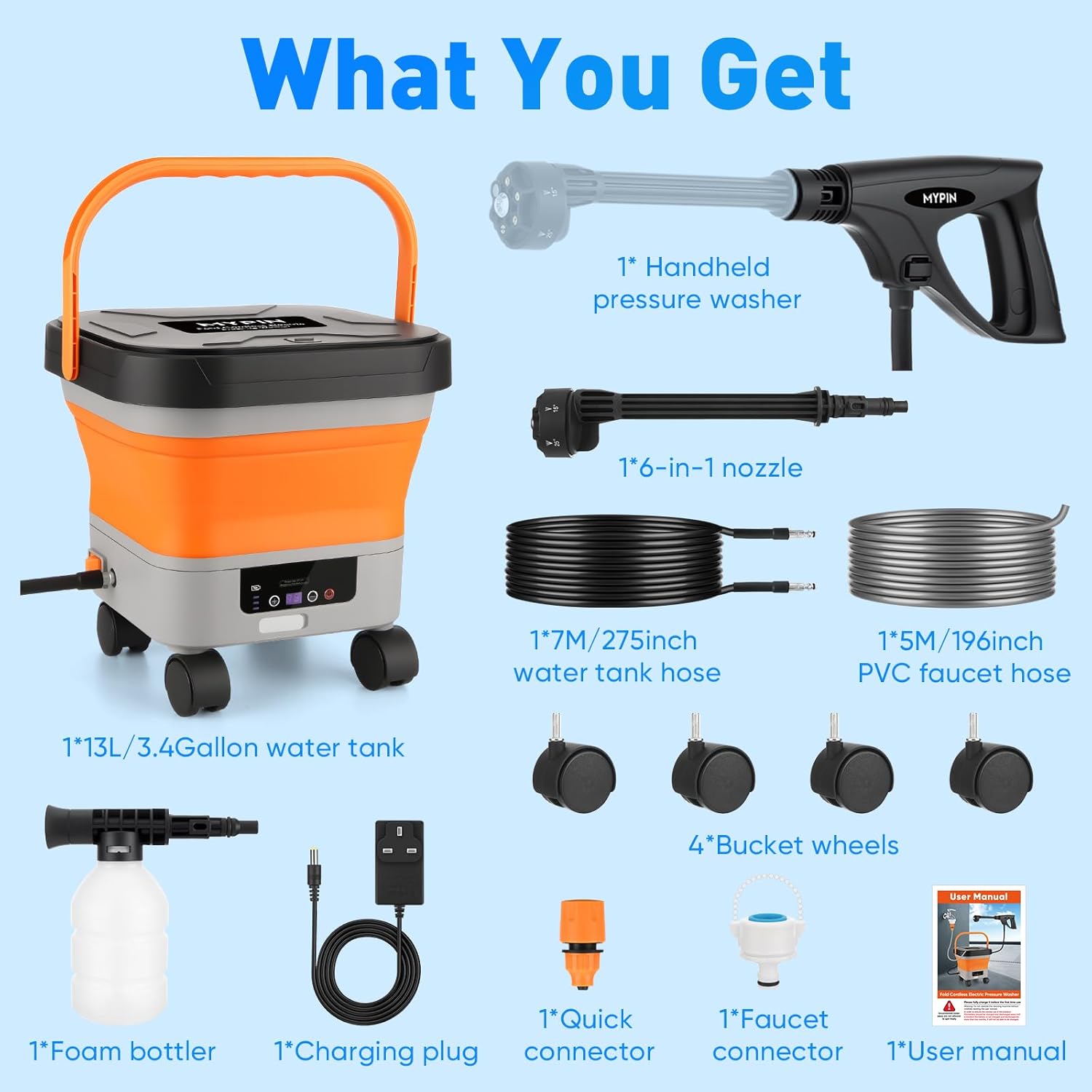
Figure 1.1: All components included in the MYPIN Cordless Electric Pressure Washer package.
2. Safety Information
Always observe basic safety precautions when using this product to reduce the risk of injury, electric shock, or fire. Failure to follow these instructions may result in serious injury or property damage.
General Safety Guidelines
- Read all instructions: Familiarize yourself with the controls and proper use of the pressure washer.
- Wear appropriate safety gear: Always wear eye protection, gloves, and appropriate footwear.
- Keep children and pets away: Do not allow children or untrained individuals to operate the pressure washer.
- Avoid direct spray: Never direct the water spray at people, pets, or electrical devices.
- Use in well-ventilated areas: Ensure adequate ventilation when operating.
- Check for damage: Before each use, inspect the pressure washer, hoses, and connections for any signs of damage. Do not use if damaged.
- Proper storage: Store the pressure washer in a dry, secure location, out of reach of children.
3. Product Features
The MYPIN Cordless Electric Pressure Washer is designed for versatile cleaning tasks with convenience and efficiency.
Key Features
- Cordless and Portable Design: Features a foldable tank and lightweight washer for easy transport and storage, ideal for home and outdoor cleaning. The foldable water tank measures 9.5 x 9.5 x 7.9 inches when collapsed.
- Adjustable Pressure Levels: Offers 7 adjustable pressure levels with a maximum pressure of 660 PSI, allowing you to customize the water pressure for different cleaning needs and surfaces.
- 6-in-1 Nozzle: Equipped with a versatile 6-in-1 nozzle for various spray patterns, including 0°, 15°, 25°, 40°, Sector, and Shower modes.
- LCD Display: An integrated LCD screen displays battery status and current pressure level, providing real-time operational information.
- Large Capacity Water Tank: Comes with a 3.4-gallon (13L) water tank, reducing the need for frequent refills during cleaning.
- Dual Hose Options: Includes a 7M (275-inch) water tank hose and a 5M (196-inch) PVC faucet hose for flexible water source options.
- Wheeled Tank: The water tank is fitted with 4 removable wheels for easy maneuverability.
- Long Battery Life: A full charge (3-4 hours) provides approximately 25-35 minutes of continuous cleaning time.

Figure 3.1: The 6-in-1 nozzle offers multiple spray patterns for diverse cleaning tasks.

Figure 3.2: The foam bottle attachment for deep cleaning with detergent.

Figure 3.3: The foldable design of the water tank for easy storage and portability.

Figure 3.4: The LCD display provides real-time information on battery and pressure levels.
4. Setup
Follow these steps to assemble and prepare your pressure washer for first use.
- Insert Wheels: Attach the four bucket wheels into the designated slots on the base of the water tank. Ensure they are securely locked in place.
- Install Tank Hose: Connect one end of the 7M water tank hose to the outlet port on the water tank.
- Connect to Washer Gun: Connect the other end of the 7M water tank hose to the inlet port on the handheld pressure washer gun.
- Install 6-in-1 Nozzle: Attach the 6-in-1 nozzle to the front of the washer gun. Twist until it clicks into place.
- Connect to Faucet (Optional): If using a direct water source, connect the 5M PVC faucet hose to a standard faucet using the quick connector and faucet connector. Then, connect the other end of the PVC faucet hose to the water tank's inlet.
- Fill Water Tank: Open the water tank and fill it with clean water. Ensure the tank is unfolded and stable.
- Charge Battery: Before first use, fully charge the pressure washer battery using the provided charging plug. The LCD display will indicate charging status.

Figure 4.1: Step-by-step assembly and setup instructions.
5. Operation
Once assembled and charged, your MYPIN pressure washer is ready for use.
Operating the Pressure Washer
- Power On: Press the power button on the pressure washer gun to turn it on. The LCD display will illuminate.
- Select Pressure Level: Use the pressure adjustment buttons (+/-) on the washer gun to select one of the 7 available pressure levels. The selected level will be shown on the LCD.
- Choose Spray Pattern: Rotate the 6-in-1 nozzle to select the desired spray pattern (e.g., 0° for concentrated cleaning, 40° for wider coverage, Shower for gentle rinsing).
- Begin Cleaning: Point the nozzle at the surface to be cleaned and press the trigger on the washer gun. Maintain a safe distance from the surface to avoid damage.
- Using the Foam Bottle: To apply detergent, fill the foam bottle with appropriate cleaning solution. Attach the foam bottle to the washer gun where the nozzle usually connects. Press the trigger to spray foam. After applying foam, remove the bottle and reattach the 6-in-1 nozzle for rinsing.
- Power Off: Release the trigger and press the power button to turn off the pressure washer.

Figure 5.1: Effective cleaning of a car using the pressure washer and wheeled tank.
6. Maintenance
Regular maintenance ensures the longevity and optimal performance of your pressure washer.
Cleaning and Storage
- Rinse After Use: After each use, run clean water through the pressure washer for a few minutes to flush out any remaining detergent or debris.
- Clean Nozzle: Inspect and clean the nozzle for any blockages. Use a small pin or needle to clear any debris from the nozzle opening.
- Drain Water: Empty any remaining water from the tank and hoses to prevent freezing in cold weather, which can cause damage.
- Wipe Down: Wipe the exterior of the pressure washer and tank with a damp cloth. Do not use harsh chemicals.
- Store Properly: Store the pressure washer, hoses, and accessories in a dry, cool, and protected area, away from direct sunlight and extreme temperatures. The foldable tank can be collapsed for compact storage.
- Battery Care: Store the battery in a partially charged state if not used for extended periods. Recharge periodically to maintain battery health.
7. Troubleshooting
If you encounter issues with your pressure washer, refer to the following common problems and solutions.
| Problem | Possible Cause | Solution |
|---|---|---|
| Pressure washer does not turn on. | Battery is not charged. Power button not pressed. | Charge the battery fully. Ensure the power button is pressed firmly. |
| Low water pressure. | Water tank empty. Nozzle clogged. Hose kinked. | Refill water tank. Clean the nozzle. Straighten the hose. |
| Water leaks from connections. | Connections are loose. O-rings are damaged. | Tighten all connections. Inspect and replace damaged O-rings if necessary. |
| Motor runs but no water sprays. | Air in the system. Water inlet blocked. | Prime the pump by running water through it without the nozzle. Check water inlet filter for blockages. |
If the problem persists after attempting these solutions, please contact customer support for further assistance.
8. Specifications
Detailed technical specifications for the MYPIN Cordless Electric Pressure Washer.
| Specification | Value |
|---|---|
| Manufacturer | MYPIN |
| Product Model Number | MJ-CE0419&CE0419W |
| Product Dimensions | 33.02 x 22.1 x 22.1 cm |
| Product Weight | 4.55 kg |
| Brand | MYPIN |
| Power Source | Battery Powered (Cordless) |
| Color | Orange |
| Hose Length | 7 Meters (Water Tank Hose) |
| Max Pressure | 660 PSI |
| Water Tank Capacity | 13 Liters / 3.4 Gallons |
9. Warranty and Support
MYPIN products are manufactured to high-quality standards. This product comes with a standard manufacturer's warranty against defects in materials and workmanship.
Warranty Information
Please refer to the warranty card included in your package or visit the official MYPIN website for detailed warranty terms and conditions. Keep your purchase receipt as proof of purchase for warranty claims.
Customer Support
For technical assistance, troubleshooting, or to inquire about replacement parts, please contact MYPIN customer support. Contact details can typically be found on the product packaging or the official MYPIN website.


