
1. Safety Instructions
Always read and understand all safety warnings and instructions before operating this wood router. Failure to follow these instructions may result in electric shock, fire, and/or serious injury.
General Power Tool Safety
- Work Area Safety: Keep the work area clean and well-lit. Cluttered or dark areas invite accidents. Do not operate power tools in explosive atmospheres, such as in the presence of flammable liquids, gases, or dust.
- Electrical Safety: Power tool plugs must match the outlet. Never modify the plug in any way. Avoid body contact with earthed or grounded surfaces such as pipes, radiators, ranges, and refrigerators.
- Personal Safety: Always wear eye protection. Use hearing protection when operating the tool for extended periods. Dress properly; do not wear loose clothing or jewelry. Keep hair, clothing, and gloves away from moving parts.
Router Specific Safety
- Secure Workpiece: Always clamp the workpiece firmly to prevent movement during operation.
- Router Bit Installation: Ensure the router bit is correctly inserted and securely tightened in the collet before starting the tool.
- Depth Adjustment: Adjust the cutting depth only when the tool is switched off and unplugged.
- Starting the Router: Ensure the router bit is not in contact with the workpiece when starting the tool.
- Direction of Feed: Always feed the router against the direction of bit rotation to maintain control.
- Dust Extraction: Use a dust extraction system when possible to reduce dust exposure and maintain visibility.
2. Product Overview
Familiarize yourself with the components of your DEWINNER Wood Router for safe and effective operation.

Figure 2.1: Labeled components of the DEWINNER Wood Router. Key parts include the Depth Trimming Knob, Fine-tuning Dial, Scale Rod, 7 Speed Regulating Roller, Handle, Lock Knob, Dust Cover, Guard Plate, Collet Adaptor, Clamping Device, Self-locking Button, and Lock Button.
Key Features
- Powerful Motor: 1800W pure copper motor for stable performance.
- Variable Speed: 7 adjustable speeds from 10,000 to 26,000 RPM.
- Adjustable Depth: Cutting depth up to 60mm with pre-set scales.
- Collet Sizes: Compatible with 6mm, 8mm, and 12mm mandrels.
- Comfort & Safety: Soft anti-vibration handle, spindle lock for bit changes, transparent dust cover, and safety lock button.

Figure 2.2: Illustration of key functions: One Key Start for easy operation, efficient Heat Dissipation Part, Self-Locking Wrench for base lifting control, and 7 Adjustable Speeds up to 26000 RPM.
3. What's in the Box
Your DEWINNER Wood Router package includes the following items:
- DEWINNER 1800W Wood Router
- 12 Router Cutters (various types)
- 3 Collets (6mm, 8mm, 12mm)
- Model Template
- Guide Rod
- Carbon Brushes (spare set)
- Wrench
- Clamping Device
- Transparent Cover
- Protective Plate
- Screws
- User Manual
- Canvas Bag for storage and transport
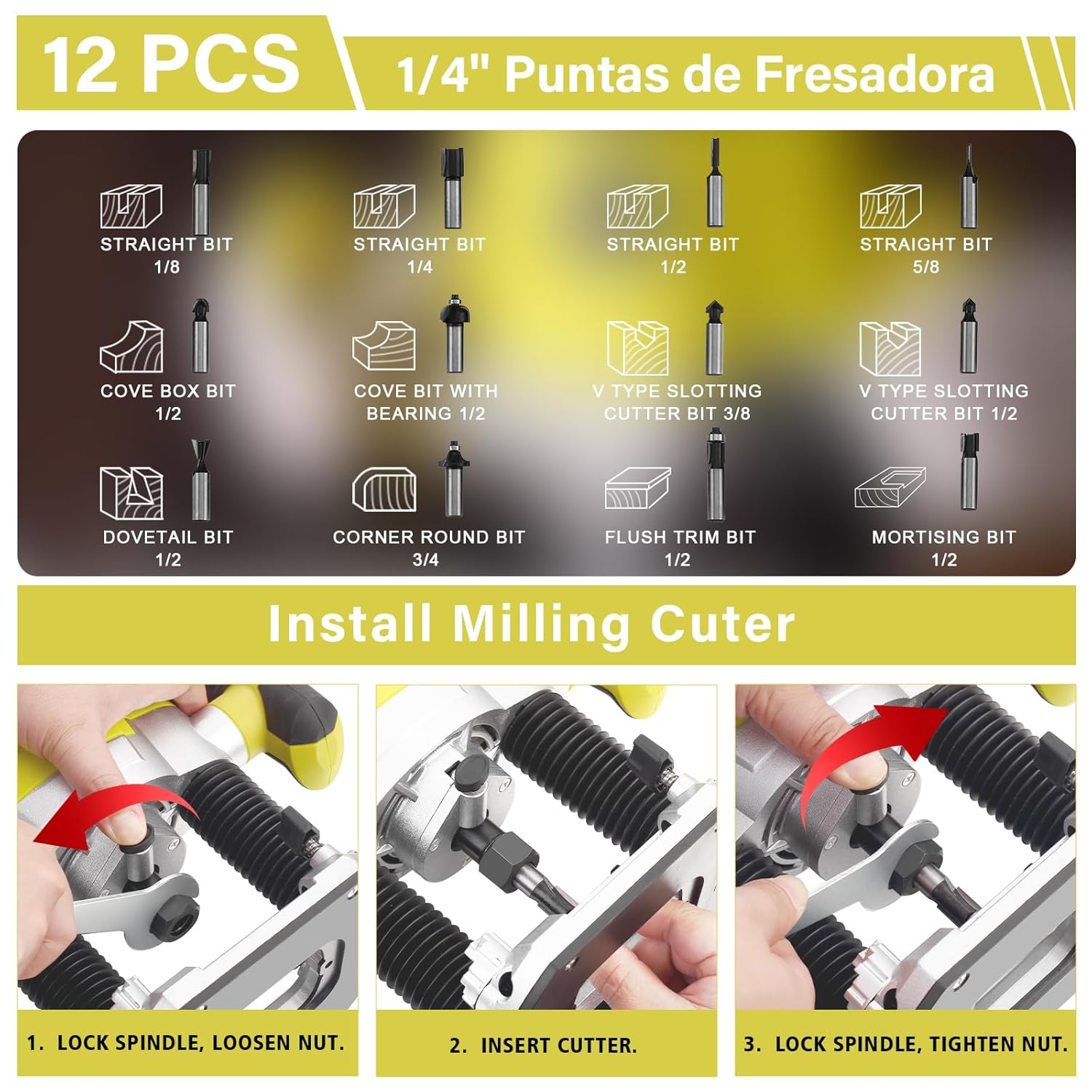
Figure 3.1: The set of 12 included router bits, featuring various types such as straight, cove box, cove with bearing, V-type slotting, dovetail, corner round, flush trim, and mortising bits.
4. Specifications
| Feature | Specification |
|---|---|
| Model Number | DE-60125-FBB-FR1 |
| Rated Power | 1800W |
| No-load Speed | 10,000 - 26,000 RPM (7 Variable Speeds) |
| Voltage | 230V |
| Max Cutting Depth | 60mm |
| Collet Sizes | 6mm, 8mm, 12mm |
| Item Weight | 1.9 Kilograms |
| Manufacturer | DEWINNER |
5. Setup
5.1 Installing Router Bits
- Ensure Power is Off: Always unplug the router from the power source before installing or changing bits.
- Select Collet: Choose the appropriate collet (6mm, 8mm, or 12mm) that matches the shank diameter of your router bit.
- Loosen Collet Nut: Press the spindle lock button and use the provided wrench to loosen the collet nut.
- Insert Bit: Insert the router bit into the collet, ensuring it is seated deeply enough to prevent slippage but not bottomed out.
- Tighten Collet Nut: While holding the spindle lock button, tighten the collet nut firmly with the wrench. Do not overtighten.
Figure 5.1: Step-by-step guide for installing a router bit: 1. Lock spindle, loosen nut. 2. Insert cutter. 3. Lock spindle, tighten nut.
5.2 Adjusting Cutting Depth
- Unplug Router: Disconnect the router from the power supply.
- Position Router: Place the router on a flat surface with the bit facing down.
- Loosen Lock Knob: Loosen the lock knob on the side of the router base.
- Set Initial Depth: Lower the router until the bit just touches the workpiece or a flat reference surface.
- Adjust Scale Rod: Use the Depth Trimming Knob and Fine-tuning Dial to set the desired cutting depth according to the scale rod. The router allows for up to 60mm penetration.
- Tighten Lock Knob: Securely tighten the lock knob to fix the depth setting.

Figure 5.2: The router demonstrating its capability for a depth of 60mm penetration, highlighting precision in woodworking tasks.
5.3 Attaching Guides (Optional)
For straight or curved cuts, attach the guide rod and clamping device to the router base as needed. Ensure all fasteners are tight before operation.
6. Operation
6.1 Powering On/Off
- Connect Power: Plug the router into a suitable 230V power outlet.
- Start: Press the 'One Key Start' switch to turn on the router. The safety lock button prevents accidental activation.
- Stop: Release the 'One Key Start' switch to turn off the router.
6.2 Adjusting Speed
The router features 7 variable speed settings, ranging from 10,000 to 26,000 RPM. Adjust the speed regulating roller to select the appropriate RPM for your material and router bit. Lower speeds are generally used for larger bits, harder materials, or when more control is needed. Higher speeds are suitable for smaller bits and softer materials.

Figure 6.1: The DEWINNER Wood Router in operation, capable of reaching a maximum speed of 26000 RPM for efficient material removal.
6.3 Routing Techniques
- Maintain Control: Always hold the router firmly with both hands.
- Feed Direction: For most routing operations, feed the router against the rotation of the bit. This provides better control and a cleaner cut.
- Shallow Passes: For deep cuts, make several shallow passes rather than one deep pass. This reduces strain on the tool and bit, and improves cut quality.
- Dust Management: Utilize the transparent dust cover and consider connecting a dust extraction system to keep the work area clean and improve visibility.
7. Maintenance
Regular maintenance ensures the longevity and optimal performance of your DEWINNER Wood Router.
7.1 Cleaning
- Disconnect Power: Always unplug the router before cleaning.
- Remove Dust and Debris: Use a brush or compressed air to remove dust and wood chips from the ventilation openings, collet area, and base.
- Wipe Surfaces: Wipe the exterior surfaces with a damp cloth. Do not use harsh chemicals or solvents.
7.2 Carbon Brush Replacement
The router is designed with an external interface for carbon brushes, making replacement easy without disassembly. Replace carbon brushes when they are worn down to approximately 1/4 inch (6mm) or if the motor performance decreases significantly. Use only genuine DEWINNER replacement carbon brushes.
- Unplug Router: Ensure the router is unplugged.
- Locate Brush Caps: Identify the carbon brush caps on the sides of the motor housing.
- Remove Caps: Use a screwdriver to unscrew and remove the brush caps.
- Replace Brushes: Carefully pull out the old carbon brushes and insert the new ones. Ensure they slide in smoothly.
- Secure Caps: Replace and tighten the brush caps.
7.3 Storage
Store the router and its accessories in the provided canvas bag in a clean, dry place, out of reach of children.
8. Troubleshooting
| Problem | Possible Cause | Solution |
|---|---|---|
| Router does not start | No power supply Faulty switch Worn carbon brushes | Check power connection and outlet Contact service center Replace carbon brushes |
| Excessive vibration | Loose router bit Damaged router bit Unbalanced workpiece | Ensure bit is securely tightened Replace bit Secure workpiece properly |
| Motor overheats | Blocked ventilation Overloading the tool Worn carbon brushes | Clean ventilation openings Reduce depth of cut or feed rate Replace carbon brushes |
| Poor cut quality | Dull or incorrect bit Incorrect speed setting Improper feed rate | Replace or sharpen bit; use appropriate bit type Adjust speed according to material Adjust feed rate for smoother cut |
9. Warranty and Support
DEWINNER products are manufactured to high-quality standards. For warranty information, technical support, or service inquiries, please refer to the warranty card included with your purchase or contact DEWINNER customer service through their official channels. Keep your proof of purchase for warranty claims.
