
1. Introduction
This manual provides essential instructions for the safe and effective operation, maintenance, and troubleshooting of your DEWINNER 1800W Wood Router. Please read this manual thoroughly before first use and keep it for future reference. Understanding and following these instructions will ensure optimal performance and extend the lifespan of your tool.
2. Safety Instructions
Always observe basic safety precautions to reduce the risk of fire, electric shock, and personal injury when operating power tools.
- Work Area Safety: Keep your work area clean and well-lit. Cluttered or dark areas invite accidents. Do not operate power tools in explosive atmospheres, such as in the presence of flammable liquids, gases, or dust.
- Electrical Safety: Power tool plugs must match the outlet. Never modify the plug in any way. Avoid body contact with earthed or grounded surfaces, such as pipes, radiators, ranges, and refrigerators.
- Personal Safety: Always wear eye protection. Use hearing protection when operating for extended periods. Wear a dust mask if operations create dust. Dress properly; avoid loose clothing or jewelry. Keep hair, clothing, and gloves away from moving parts.
- Tool Use and Care: Do not force the power tool. Use the correct power tool for your application. Disconnect the plug from the power source before making any adjustments, changing accessories, or storing power tools.
- Maintenance: Maintain power tools. Check for misalignment or binding of moving parts, breakage of parts, and any other condition that may affect the power tool’s operation. If damaged, have the power tool repaired before use.
3. Product Components and Included Accessories
Familiarize yourself with the various parts of your DEWINNER Wood Router and the accessories included in the package.

Image 1: Labeled diagram of the DEWINNER 1800W Wood Router, highlighting key components such as the depth trimming knob, fine-tuning dial, scale rod, speed regulating roller, handle, lock knob, dust cover, collet adaptor, clamping device, self-locking button, and lock button.
Included Accessories:
- 12 Router Bits
- Template Guide
- Guide Rod
- Carbon Brushes (spare set)
- Wrench
- Clamping Device
- Transparent Dust Cover
- Guard Plate
- Screw Accessories
- Collets: 6mm, 8mm, 12mm (pre-installed)
- Parallel Guide
- Canvas Storage Bag
- Instruction Manual
4. Setup
4.1. Installing Router Bits and Collets
The router comes with 6mm, 8mm, and 12mm collets. Ensure you use the correct collet for your chosen router bit.
- Lock Spindle: Press and hold the spindle lock button.
- Loosen Nut: Use the provided wrench to loosen the collet nut.
- Insert Cutter: Insert the desired router bit into the collet. Ensure the shank is fully seated but not bottomed out.
- Tighten Nut: While still holding the spindle lock, tighten the collet nut firmly with the wrench. Do not overtighten.
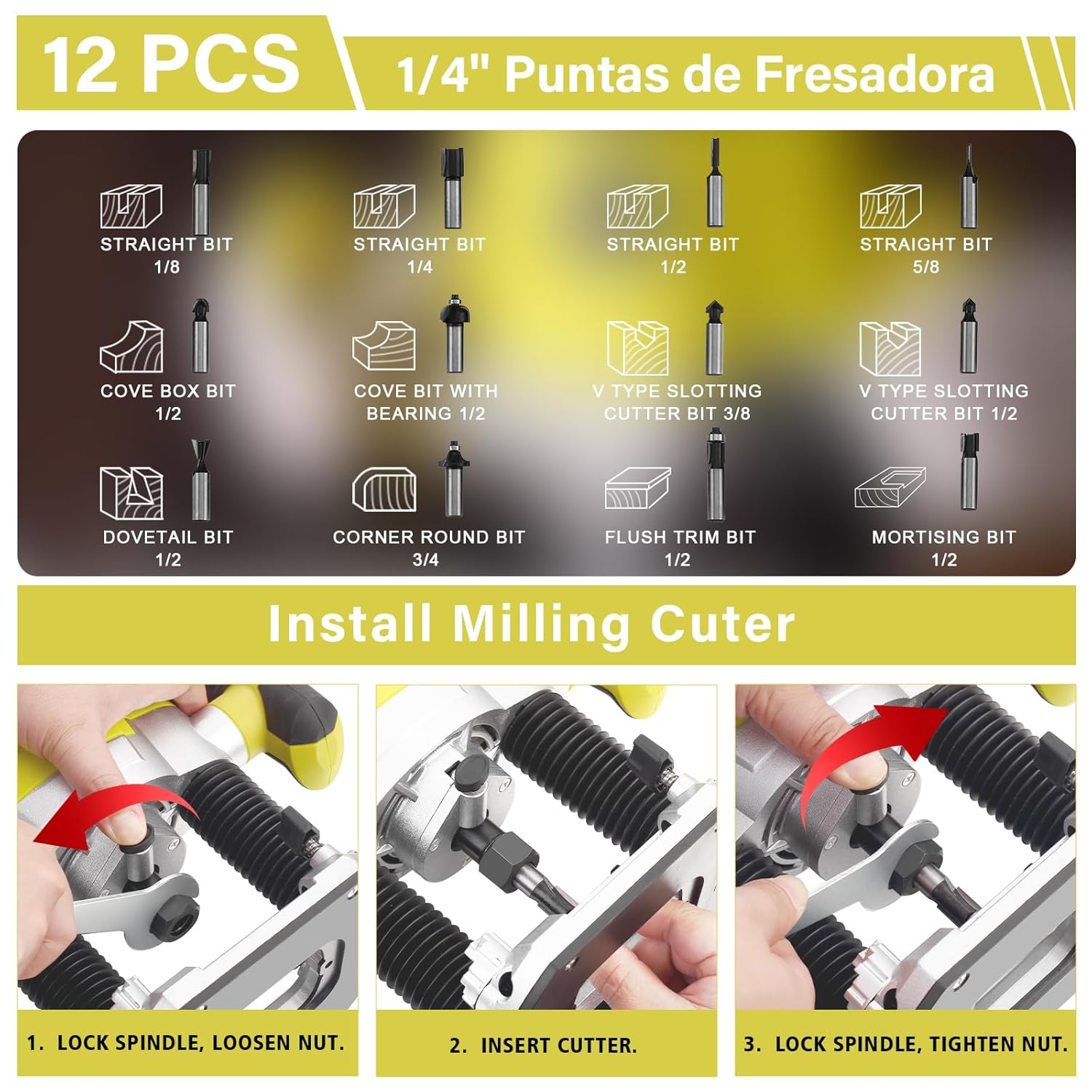
Image 2: Visual guide demonstrating the three steps for installing a router bit: 1. Lock spindle and loosen nut, 2. Insert cutter, 3. Lock spindle and tighten nut. Also shows the variety of 12 included router bits.
4.2. Adjusting Cutting Depth
The router allows for precise depth adjustment up to 60mm.
- Unlock Base: Release the lock knob on the side of the router base.
- Set Rough Depth: Adjust the router body up or down to the approximate desired depth using the scale rod.
- Fine-Tune Depth: Use the fine-tuning dial for precise adjustments. Each mark on the dial corresponds to a small increment of depth.
- Lock Base: Once the desired depth is set, firmly tighten the lock knob to secure the router base.
5. Operating Instructions
5.1. Powering On/Off
To turn the router on, press the power switch. To turn it off, release the switch. The router features a safety lock button to prevent accidental activation.
5.2. Adjusting Speed
The DEWINNER router offers 7 variable speed settings, ranging from 10,000 to 26,000 RPM, allowing you to match the speed to the material and router bit being used.
- Locate Speed Dial: The speed regulating roller is located on the handle.
- Select Speed: Rotate the dial to select the desired speed setting (1-7). Lower speeds are generally used for larger bits, harder materials, or when more control is needed. Higher speeds are suitable for smaller bits and softer materials.

Image 3: Close-up view of the 7-speed regulating roller, demonstrating how to adjust the router's RPM for different applications.
5.3. Routing Techniques
Always perform a test cut on scrap material before routing your final workpiece.
- Direction of Cut: Always feed the router against the rotation of the bit. This provides better control and prevents the router from running away.
- Straight Cuts: Use the parallel guide for accurate straight cuts along an edge.
- Curved Cuts: For curved cuts, use the router freehand or with a template guide and template.
- Multiple Passes: For deeper cuts, make several shallow passes instead of one deep pass. This reduces strain on the motor and bit, and results in a cleaner cut.

Image 4: The DEWINNER 1800W Wood Router in operation, demonstrating a straight cut on a wooden workpiece, highlighting its powerful performance at high speeds.
6. Maintenance
Regular maintenance ensures the longevity and safe operation of your router.
6.1. Cleaning
After each use, disconnect the router from the power supply and clean it. Remove all dust and wood chips from the ventilation slots and around the collet area using a brush or compressed air. The transparent dust cover helps keep the work area clean during operation.
6.2. Carbon Brush Replacement
The router is equipped with an external carbon brush interface, making replacement easy without disassembling the tool. Carbon brushes are wear parts and should be replaced when they become worn down to approximately 1/4 inch (6mm) or if the motor sparks excessively.
- Disconnect Power: Always unplug the router from the power source.
- Locate Brush Caps: Identify the carbon brush caps on the sides of the motor housing.
- Remove Caps: Unscrew the brush caps using a screwdriver.
- Remove Old Brushes: Carefully pull out the old carbon brushes.
- Insert New Brushes: Insert the new carbon brushes, ensuring they are oriented correctly.
- Replace Caps: Screw the brush caps back on firmly.
7. Troubleshooting
Refer to the table below for common issues and their solutions.
| Problem | Possible Cause | Solution |
|---|---|---|
| Router does not start | No power supply; Faulty power cord/plug; Worn carbon brushes | Check power connection; Inspect cord/plug for damage; Replace carbon brushes. |
| Excessive vibration/noise | Loose router bit; Damaged router bit; Worn bearings | Ensure bit is securely tightened; Replace damaged bit; Contact service for bearing replacement. |
| Motor overheating | Overloading the tool; Blocked ventilation slots; Worn carbon brushes | Reduce load/make shallower passes; Clean ventilation slots; Replace carbon brushes. |
| Poor cut quality | Dull or incorrect router bit; Incorrect speed setting; Improper feed rate | Replace bit or use appropriate type; Adjust speed; Adjust feed rate. |
8. Specifications
- Model Number: DE-60125-ZH
- Rated Power: 1800W
- Voltage: 230V
- No-load Speed: 10,000 - 26,000 RPM (7 variable speeds)
- Collet Sizes: 6mm, 8mm, 12mm
- Max Cutting Depth: 60mm
- Dimensions (Package): 29 x 29 x 17.5 cm
- Weight (Package): 1.9 kilograms
- Country of Origin: China
9. Warranty and Support
DEWINNER products are manufactured to high-quality standards. For any questions regarding product operation, maintenance, or if you encounter any issues not covered in this manual, please contact DEWINNER customer support. Specific warranty details may vary by region and retailer; please refer to your purchase documentation for warranty terms.
