1. Introduction
This manual provides detailed instructions for the assembly, operation, and maintenance of your Newtral PRO LAP Adjustable Laptop Bed Tray and Chair Mount Desk. Please read this manual thoroughly before use to ensure proper functionality and safety.
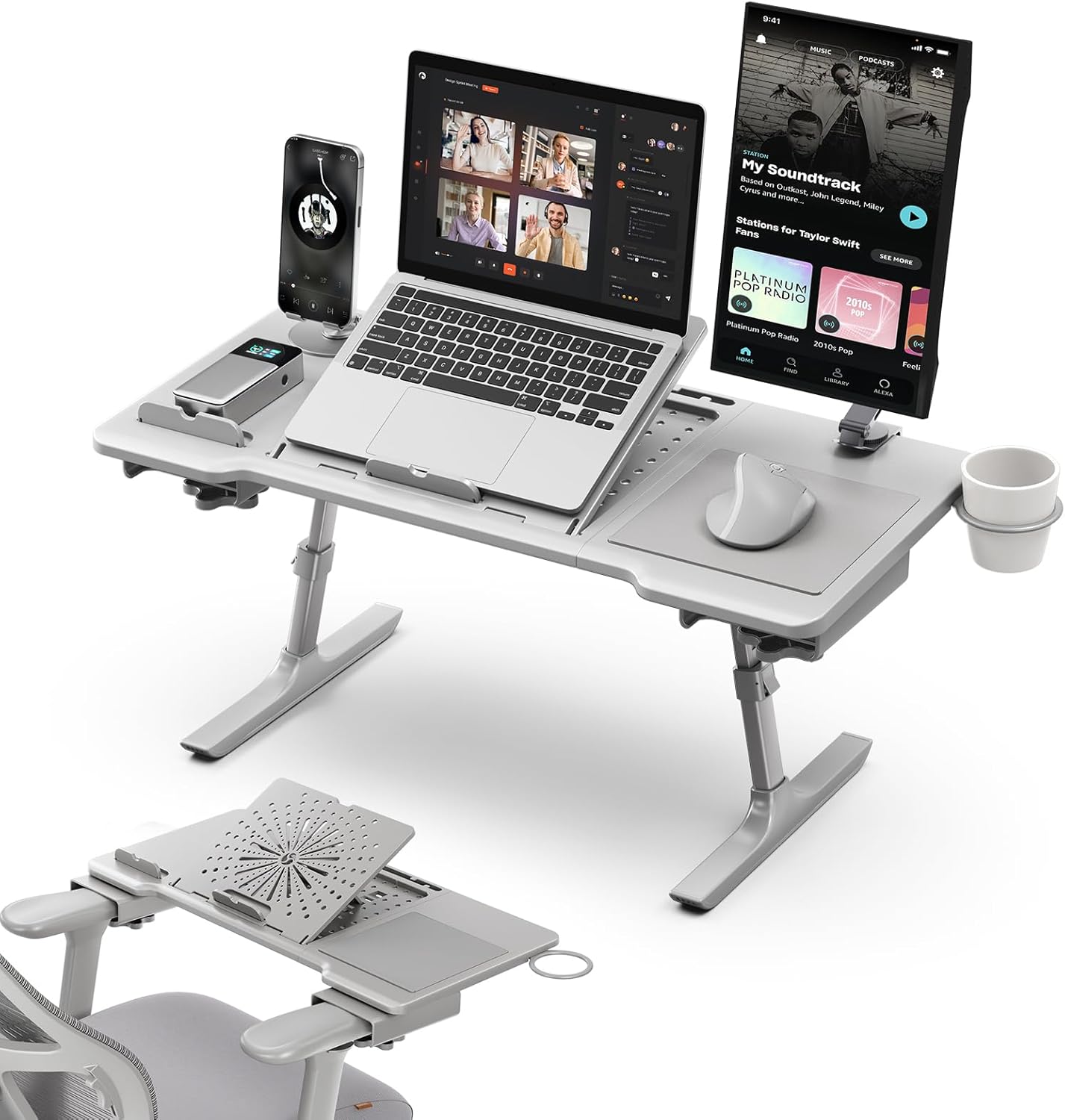
Figure 1: Newtral PRO LAP Adjustable Laptop Desk in a typical setup.
2. Safety Information
- Ensure all components are securely fastened before placing any devices on the desk.
- Do not exceed the maximum weight capacity of 110 lbs (approximately 50 kg).
- Keep hands and fingers clear of moving parts during adjustment to prevent pinching.
- Avoid placing hot items directly on the desk surface without adequate protection.
- Use on a stable and level surface when not attached to a chair.
3. Package Contents
Verify that all the following components are included in your package:
- Newtral PRO LAP Desk Unit (main platform with integrated features)
- Adjustable Legs (2 units)
- Chair Armrest Pads (pre-installed or separate, depending on model revision)
- Assembly Hardware (screws, tools if required)
- Instruction Manual (this document)
4. Setup and Assembly
The Newtral PRO LAP desk requires some assembly. Follow these steps carefully:
- Unpack Components: Carefully remove all parts from the packaging and lay them out on a clean, flat surface.
- Attach Legs (if detached): If the adjustable legs are separate, align them with the designated slots on the underside of the main desk unit. Secure them using the provided hardware. Ensure they are firmly attached.
- Chair Mount Installation (Optional):
- Identify T-shaped armrests on your office chair. The desk is designed to fit armrests with widths less than 4.72 inches and thickness less than 1.42 inches.
- Slide the desk's armrest clamps onto your chair's armrests. Ensure a snug fit.
- Verify the desk is stable and level before placing any equipment on it.

Figure 2: Chair armrest compatibility and attachment.
- Height Adjustment:
- Locate the height adjustment mechanisms on each leg.
- Press the release button or lever and extend/retract the legs to your desired height (5 levels, from 13.8 cm to 32.1 cm).
- Ensure both legs are adjusted to the same height for stability.
- Angle Adjustment:
- The main laptop platform features an angle adjustment mechanism.
- Lift the platform and select one of the 5 available angles (10° to 40°) for ergonomic viewing.
- Ensure the platform clicks securely into place at the chosen angle.

Figure 3: Height and angle adjustment mechanisms.
5. Operating Instructions
The Newtral PRO LAP desk offers versatile usage options:

Figure 4: Versatile usage scenarios for the Newtral PRO LAP desk.
- As a Bed/Sofa Desk: Place the desk on your bed or sofa. Adjust the height and angle for comfortable use while sitting or reclining. The ventilated base helps prevent laptop overheating.
- As a Chair Mount Desk: Attach the desk to your office chair's armrests as described in Section 4. Adjust height and angle to create an ergonomic workstation.
- Integrated Features:
- Cup Holder: Use the deep cup holder to keep your beverage secure.
- Built-in Mousepad: The fixed mousepad provides a dedicated surface for your mouse.
- Magnetic Base: A magnetic base is integrated for attaching compatible phone holders (phone holder not included).
- Cable Management System: Utilize the integrated slots to organize and route your device cables, maintaining a tidy workspace.
- Device Ledge: A front ledge prevents your laptop or tablet from sliding off when the platform is tilted.

Figure 5: Key features of the Newtral PRO LAP desk.
- Folding for Storage: The desk features a foldable design for compact storage.
- Ensure all devices are removed from the desk.
- Collapse the adjustable legs fully.
- Fold the legs inwards towards the main platform. The desk folds to a thickness of approximately 1.6 cm.

Figure 6: Folding the desk for compact storage.
6. Maintenance
- Cleaning: Wipe the desk surface with a soft, damp cloth. Avoid abrasive cleaners or solvents.
- Inspection: Periodically check all screws and connections to ensure they are tight. Tighten if necessary.
- Storage: Store the desk in a dry place away from direct sunlight and extreme temperatures.
7. Troubleshooting
- Issue: Desk feels unstable.
- Solution: Ensure both legs are adjusted to the same height. Verify all assembly screws are tightened. If using as a chair mount, confirm the armrest clamps are securely attached and your chair's armrests meet the size requirements (width < 4.72 in, thickness < 1.42 in).
- Issue: Laptop slides off the tilted platform.
- Solution: Ensure the device ledge is properly engaged at the front of the platform. If the ledge is not present or damaged, discontinue use and contact support.
- Issue: Difficulty adjusting height or angle.
- Solution: Ensure no weight is on the desk during adjustment. Press the release mechanisms firmly. If mechanisms are stiff, apply a small amount of silicone lubricant (avoid oil-based lubricants) to the moving parts.
8. Specifications
| Brand | Newtral |
| Model Number | PRO LAP |
| Color | Gray |
| Dimensions (L x W x H) | 71.63 cm x 33.53 cm x 25.4 cm (folded: approx. 1.6 cm thickness) |
| Weight | 3.18 kg (7 lbs) |
| Material | Acrylonitrile Butadiene Styrene (ABS), Metal |
| Height Adjustment | 5 levels (13.8 cm - 32.1 cm) |
| Angle Adjustment | 5 angles (10° - 40°) |
| Weight Capacity | 110 lbs (approx. 50 kg) |
| Special Features | Adjustable, Built-in Mousepad, Foldable, Multifunctional Support, Anti-slip Strip, Ventilated Base, Cup Holder, Magnetic Phone Holder Base, Cable Management |

Figure 7: Dimensions and armrest compatibility guide.
9. Warranty and Support
Newtral products are manufactured to high-quality standards. For warranty information, please refer to the product packaging or contact Newtral customer support directly. If you encounter any issues or have questions not covered in this manual, please visit the official Newtral website or contact their customer service department for assistance.
Online Support: Visit the Newtral Store on Amazon


