
Introduction
Thank you for choosing the Kkoneber Solar-Powered Digital Pool Thermometer with Floating Lights. This device provides accurate water temperature readings for your pool, hot tub, or spa, while also offering dynamic lighting options to enhance your outdoor environment. Designed for durability and ease of use, it features solar charging, a clear backlit LCD display, and remote control functionality.
Safety Information
- Always ensure the USB charging port cover is securely closed before placing the thermometer in water to maintain its waterproof integrity.
- Do not attempt to disassemble or modify the device, as this may compromise its waterproof features and void the warranty.
- Keep the remote control away from water.
- This product is not a toy. Keep out of reach of children.
- Ensure the solar panel is clean for optimal charging performance.
Package Contents
Please check the package to ensure all items are present:
- Kkoneber Solar-Powered Digital Pool Thermometer with Floating Lights
- Remote Control (requires 2x AAA batteries, not included)
- USB Charging Cable
- User Manual (this document)
Product Overview
The Kkoneber pool thermometer combines temperature monitoring with ambient lighting. Key components include:
- Solar Panel: Located on top for automatic charging in sunlight.
- Digital LCD Display: Shows water temperature with an automatic backlight for night visibility.
- Power Button: Located on the side of the thermometer.
- USB-C Charging Port: For alternative charging, located under a waterproof cover.
- Light Beads: Two rows of internal light beads for dynamic lighting effects.
- Tether Loop: For securing the thermometer to prevent it from being drawn into a skimmer or drifting away.
- Temperature Sensor: Extends approximately 5 inches below the water surface for accurate readings.

Image: Overview of the Kkoneber Solar-Powered Digital Pool Thermometer, showing the device, remote control, various lighting modes, and brightness levels. The remote control has a 650ft range.

Image: Diagram illustrating the solar charging capability and the Type-C charging port of the Kkoneber pool thermometer. It highlights the high-efficiency solar panel and environmental protection features.
Setup
- Initial Charging: Upon receiving the product, connect the provided USB charging cable to the Type-C port on the thermometer and charge it for 1-3 hours. Ensure the charging port cover is sealed tightly after charging.
- Remote Control Battery Installation: Open the battery compartment on the back of the remote control and insert 2 AAA batteries (not included), observing correct polarity.
- Placement: Place the thermometer in your pool, hot tub, or spa. The device is designed to float.
- Securing the Thermometer: Use the integrated tether loop to secure the thermometer to the side of your pool or a skimmer basket to prevent it from drifting or being drawn into filtration systems. The temperature sensor extends 5 inches below the surface for accurate readings.
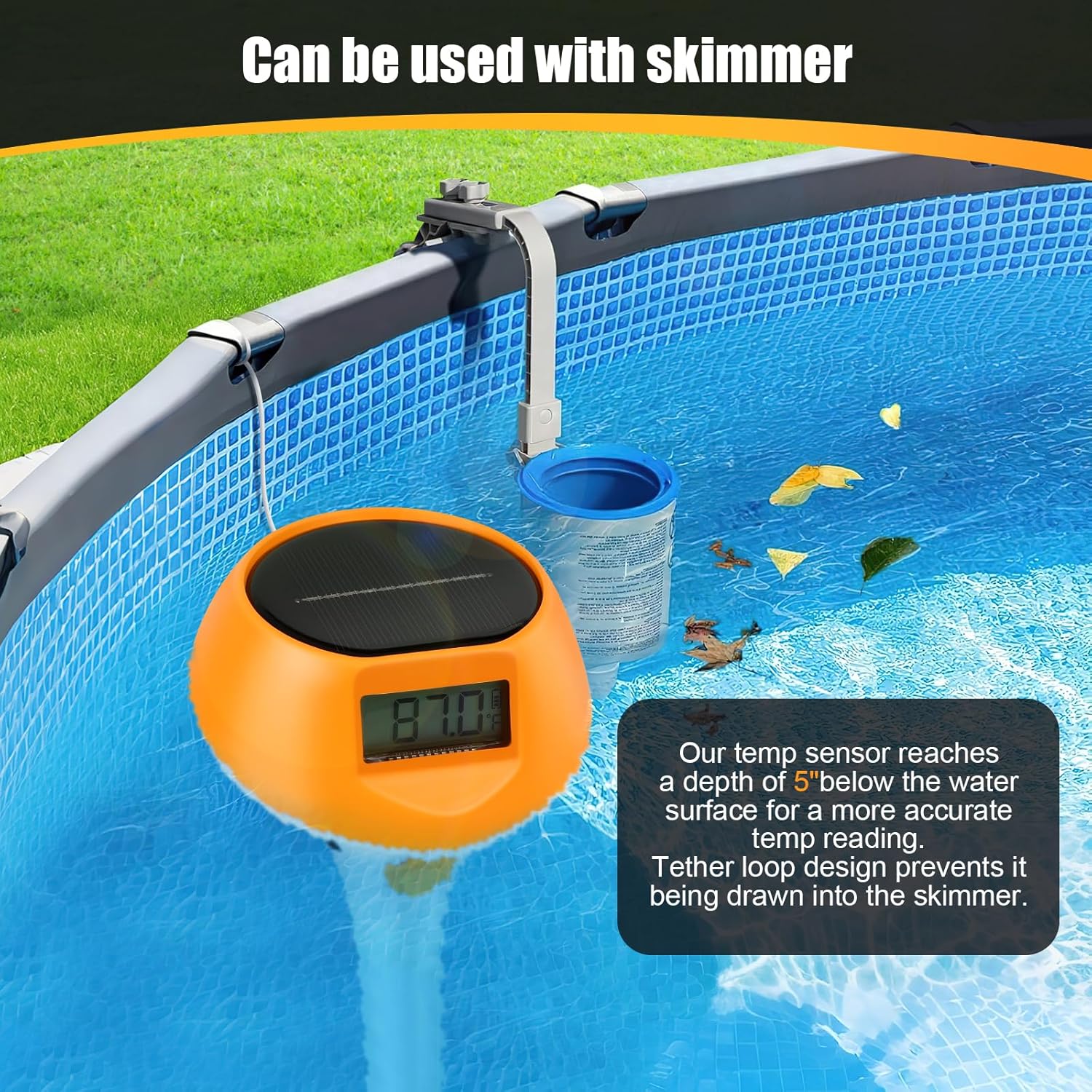
Image: The Kkoneber pool thermometer shown tethered and used in conjunction with a pool skimmer, demonstrating how the tether loop prevents it from entering the skimmer while the sensor measures water temperature at a depth of 5 inches.
Operating Instructions
Temperature Monitoring
- The thermometer automatically displays the water temperature on its LCD screen.
- The screen features an automatic backlight that activates at night for clear visibility.
- To switch between Celsius (℃) and Fahrenheit (℉), locate the ℃/℉ button on the thermometer's body or use the corresponding function on the remote control if available.
- The temperature measurement range is -14℉ to 198℉ (-10℃ to 92℃).

Image: The Kkoneber pool thermometer displaying a temperature reading, alongside graphics indicating its temperature range (-14℉ to 198℉ / -10℃ to 92℃), IP68 waterproof rating, and high-efficiency digital display screen.
Lighting Functions (Remote Control)
Use the remote control to manage the floating lights:
- Power ON/OFF: Press the ON or OFF button to turn the lights on or off.
- Brightness Adjustment: Use the Brightness +/- buttons (sun icons) to select from 5 brightness levels.
- Color Selection: Choose from 16 static colors using the color buttons (R, G, B, and other color swatches).
- Dynamic Modes: Select from 6 dynamic lighting modes (FLASH, SMOOTH, FADE). Pressing the same mode button again may switch to a secondary variation of that mode.
- Timer Options: Set the lights to turn off automatically after 2, 4, or 8 hours using the 2H, 4H, 8H buttons. Press the TIME OFF button to cancel the timer.
- The remote control has a maximum range of 650 feet.

Image: Detailed diagram of the remote control for the Kkoneber pool thermometer, labeling buttons for power, timer options (2H, 4H, 8H), brightness adjustment, 16 static colors, and 6 dynamic modes (FLASH, SMOOTH, FADE).
Charging
- Solar Charging: The device features an enlarged solar panel and built-in magnets to orient it towards the sun for efficient charging during the day.
- USB Charging: For extended brightness or during periods of limited sunlight, use the provided USB cable to charge the device. A one-hour charge can provide all-night illumination.
Maintenance
- Cleaning: Regularly wipe the solar panel and the device surface with a soft, damp cloth to remove dirt, debris, or mineral deposits. This ensures optimal solar charging and clear temperature readings.
- Waterproof Integrity: The device is designed with upgraded waterproofing and a double sealing ring. Always ensure the USB charging port cover is securely closed to prevent water ingress.
- Storage: During off-season or prolonged periods of non-use, clean the thermometer, fully charge it, and store it in a cool, dry place away from direct sunlight.
Troubleshooting
| Problem | Possible Cause | Solution |
|---|---|---|
| Temperature reading appears inaccurate. | The thermometer measures temperature at approximately 5 inches below the surface, which may differ from deeper water temperatures. | Ensure the sensor is fully submerged. Compare with another thermometer if precise deep-water readings are critical. Note that surface temperature can fluctuate more rapidly. |
| Lights are dim or not turning on. | Low battery charge. Insufficient solar exposure. Remote control battery low or out of range. | Charge the thermometer via USB for 1-3 hours. Ensure the solar panel is clean and exposed to direct sunlight. Replace remote control batteries. Move closer to the thermometer with the remote. |
| Thermometer not charging via solar. | Solar panel is dirty or obstructed. Insufficient sunlight. | Clean the solar panel. Ensure the thermometer is placed in an area with direct sunlight for several hours daily. Use USB charging as an alternative. |
| Remote control not responding. | Remote control batteries are dead or incorrectly inserted. Out of range. Interference. | Replace AAA batteries in the remote control, ensuring correct polarity. Move closer to the thermometer (within 650ft). Ensure no major obstructions between remote and thermometer. |
Specifications
| Feature | Detail |
|---|---|
| Model Name | LD-PTL18-B |
| Brand | Kkoneber |
| Power Source | Battery and Solar Powered |
| Battery Type | 1 x 12V battery (included for thermometer) |
| Temperature Range | -14℉ to 198℉ (-10℃ to 92℃) |
| Temperature Units | Celsius (℃) / Fahrenheit (℉) switchable |
| Lighting Modes | 22 lighting modes, 5 brightness levels, 16 static colors, 6 dynamic modes |
| Remote Control Range | Up to 650 feet (approx. 200 meters) |
| Waterproof Rating | Upgraded waterproofness with double sealing ring (IP68 implied by description) |
| Usage Environment | Outdoor (Pools, Hot Tubs, Spas, Ice Baths) |
| Reusability | Reusable |
| Dimensions (approx.) | 8.3 inches height, 4.4 inches solar panel diameter (based on image) |

Image: Diagram illustrating the approximate dimensions of the Kkoneber pool thermometer, showing a height of 8.3 inches and a solar panel diameter of 4.4 inches.
Warranty and Support
This Kkoneber product is backed by a 2-year warranty from the date of purchase, ensuring consistent accuracy and prolonged reliability. If you encounter any issues or require assistance, please contact Kkoneber customer support through your retailer's platform or the contact information provided with your purchase. Please have your model number (LD-PTL18-B) and purchase details ready when contacting support.