
1. Introduction
Thank you for choosing the YIYEIE Digital Torque Wrench. This manual provides comprehensive instructions for the safe and effective use, maintenance, and troubleshooting of your new tool. Please read this manual thoroughly before operation and retain it for future reference.
2. Safety Information
WARNING: To prevent injury and damage to the tool or workpiece, observe the following safety precautions:
- Do not overload the wrench. Exceeding 110% of the maximum torque capacity can cause damage to the tool and potential injury.
- Avoid dropping or striking the wrench. Impact can affect accuracy and internal components.
- Protect the wrench from water and excessive heat. This tool is IP54 fluid-resistant, but not waterproof.
- Wipe the wrench dry after use. Do not use alcohol or harsh chemicals for cleaning, as this may damage the display or finish.
- Always wear appropriate personal protective equipment, such as safety glasses, when using power tools.
- Ensure the workpiece is securely fastened before applying torque.
3. Package Contents
Verify that all items are present in your package:
- 1 x YIYEIE Digital Torque Wrench 3/8" Drive
- 1 x 3/8" Dr. Extension Bar (5 inches)
- 1 x 3/8" Dr. Extension Bar (6 inches)
- 1 x 3/8"F x 1/2"M Adapter
- AAA Batteries (included)
- Storage Case
- Calibration Certificate

4. Product Overview
The YIYEIE Digital Torque Wrench is designed for precise torque application with a 3/8" drive. It features a digital display, multiple measurement units, and smart alerts for accurate and efficient work.
Key Features:
- Accuracy: ±1% certified accuracy, maintained for over 35,000 cycles.
- Measurement Units: N·m, ft-lb, in-lb, kg-cm, kg-m.
- Operating Modes: Peak, Track, and Preset modes.
- Smart Alerts: Visual (LED) and audible (buzzer) alerts indicate proximity to target torque.
- Display: Colorful LCD screen for clear readings in various lighting conditions.
- Memory: Stores up to 500 data sets and 10 preset values.
- Durability: Constructed from chrome-vanadium steel with an anti-slip grip and IP54 fluid resistance.


Components:
- Ratchet Head: 72-tooth quick-release design with a reversible switch for clockwise and counter-clockwise operation.
- Digital Display: LCD screen showing torque values, units, and mode.
- Control Buttons: Up, Down, Unit (U), Mode (M), and Power (C) buttons.
- LED Indicators: Green and Red LEDs for torque alerts.
- Handle: Ergonomic anti-slip grip.

5. Setup
5.1 Battery Installation
- Locate the battery compartment cover at the base of the handle.
- Twist or slide the cover to open it.
- Insert the included AAA batteries, ensuring correct polarity (+/-).
- Replace the battery compartment cover securely.
5.2 Initial Power-On
Press the 'C' (Power) button to turn on the wrench. The LCD screen will illuminate, and the wrench will perform a self-test before displaying the current settings.
6. Operating Instructions
6.1 Power On/Off
- Power On: Press the 'C' button.
- Power Off: Press and hold the 'C' button for a few seconds, or the wrench will automatically shut down after 3 minutes of inactivity to conserve battery life.
6.2 Unit Selection
Press the 'U' (Unit) button to cycle through the available measurement units: N·m, ft-lb, in-lb, kg-cm, kg-m. Select the unit required for your application.
6.3 Mode Selection
Press the 'M' (Mode) button to switch between operating modes:
- Track Mode: Displays the real-time torque being applied.
- Peak Mode: Records and displays the maximum torque value achieved during an application.
- Preset Mode: Allows you to set a target torque value, with alerts indicating when it is reached.

6.4 Setting Target Torque (Preset Mode)
- Enter Preset Mode by pressing the 'M' button until 'PRESET' or 'P' is indicated on the display.
- Use the 'Up' and 'Down' arrow buttons to adjust the target torque value.
- Confirm the setting by pressing the 'M' button again or waiting a few seconds for it to auto-confirm.
6.5 Using Preset Values
The wrench can store up to 10 preset torque values (P0-P9) for quick access.
- In Preset Mode, press the 'M' button to cycle through the stored preset values (P0-P9).
- To save a new preset, set the desired torque value as described in 6.4, then press and hold the 'M' button until the display flashes, indicating it's saved to the current preset slot.

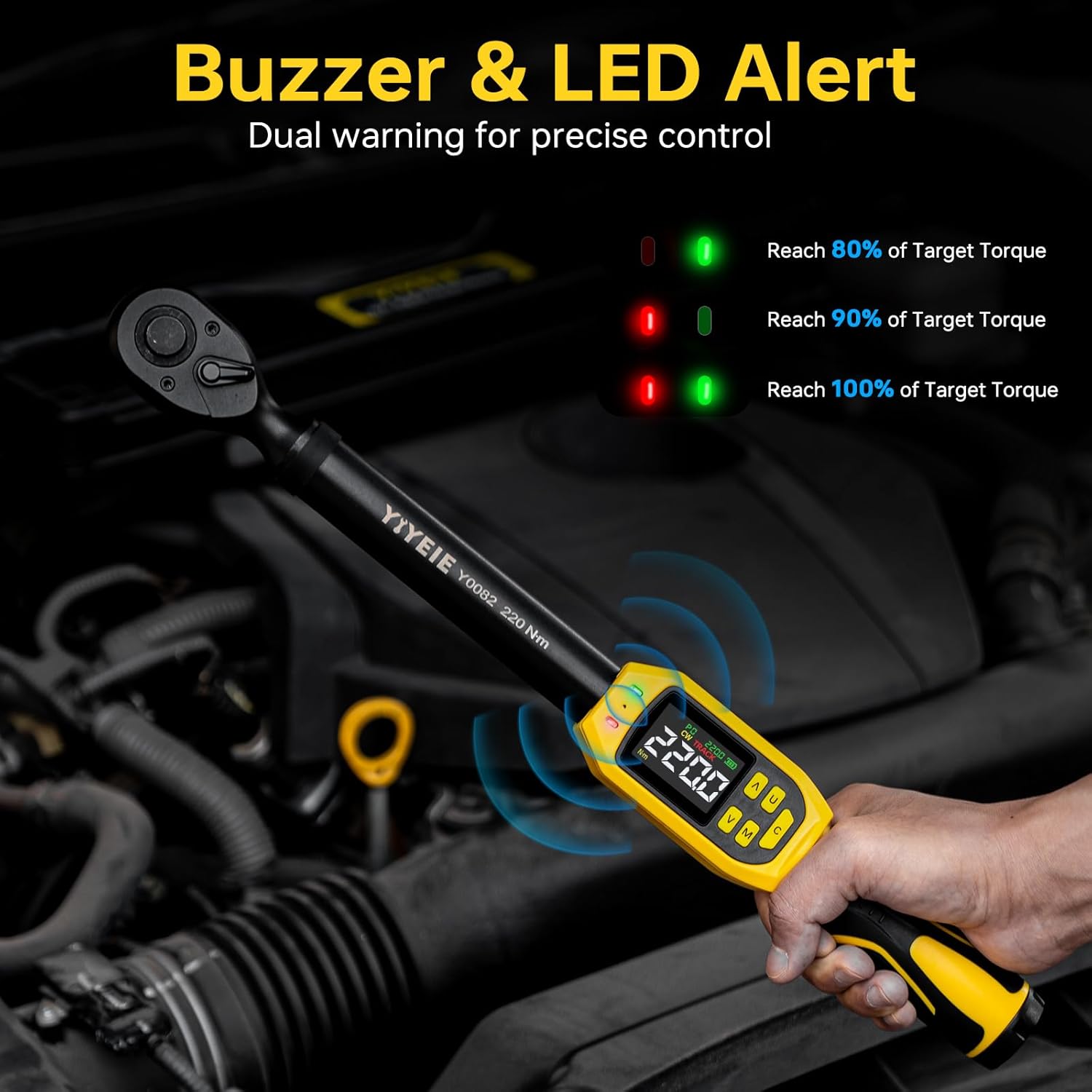
6.6 Interpreting Alerts
When approaching the target torque in Preset Mode, the wrench provides visual and audible alerts:
- Green LED (80%): Illuminates when 80% of the target torque is reached.
- Red LED (90%): Illuminates when 90% of the target torque is reached.
- Both LEDs ON (100%): Both Green and Red LEDs illuminate, and the buzzer sounds continuously when 100% of the target torque is reached. This indicates the target torque has been achieved, and further tightening should cease to prevent overtightening.
6.7 Data Storage and Recall
The wrench automatically stores up to 500 torque application records. To view or delete stored data, refer to the detailed instructions in the full user manual (if available) or contact customer support.
6.8 Using Extension Bars and Adapter
The included 5-inch and 6-inch extension bars, along with the 3/8"F x 1/2"M adapter, provide increased reach and versatility for accessing fasteners in tight or recessed areas.

7. Maintenance and Care
7.1 Cleaning
After each use, wipe the wrench clean with a dry, soft cloth. Do not use abrasive cleaners, solvents, or alcohol, as these can damage the finish or electronic components. Ensure no moisture enters the display or button areas.
7.2 Storage
Store the digital torque wrench in its protective case when not in use. Keep it in a dry environment, away from direct sunlight, extreme temperatures, and corrosive substances. Remove batteries if the wrench will not be used for an extended period to prevent leakage.
7.3 Calibration
Your YIYEIE Digital Torque Wrench is factory calibrated and includes an ASME & DIN-ISO traceable certificate. While the digital core is designed to maintain accuracy for 35,000 cycles, periodic re-calibration is recommended, especially after heavy use or if accuracy is suspected to be compromised. Contact YIYEIE customer support for re-calibration services.
8. Troubleshooting
- Wrench does not power on: Check battery installation and ensure batteries are not depleted. Replace with fresh AAA batteries if necessary.
- Inaccurate readings: Ensure the wrench is properly calibrated. Avoid dropping or striking the wrench, as this can affect accuracy. Ensure the correct unit of measurement is selected.
- Buzzer/LED alerts not working: Verify the wrench is in Preset Mode and a target torque has been set. Check battery level.
- Display issues: If the display is dim or flickering, replace the batteries. If the issue persists, contact customer support.
For further assistance, please refer to the comprehensive troubleshooting guide on the YIYEIE website or contact customer support.
9. Specifications
| Specification | Value |
|---|---|
| Brand | YIYEIE |
| Model Number | Y0081 |
| Drive Size | 3/8-Inch |
| Torque Range | 5-99.5 ft-lb (6.8-135 N·m) |
| Accuracy | ±1% |
| Material | Chrome Vanadium Steel |
| Finish | Painted |
| Head Style | Square Drive |
| Item Weight | 3.91 pounds |
| Package Dimensions | 17.56 x 4.06 x 2.24 inches |
| Batteries Required | Yes (AAA Alkaline) |
| Included Components | Digital torque wrench, 5" extension bar, 6" extension bar, 3/8"F x 1/2"M adapter |
10. Warranty and Support
10.1 Warranty Information
The YIYEIE Digital Torque Wrench comes with a 1-year warranty from the date of purchase, covering defects in materials and workmanship. This warranty does not cover damage caused by misuse, abuse, unauthorized modification, or normal wear and tear. Please retain your proof of purchase for warranty claims.
10.2 Customer Support
For technical assistance, warranty claims, or any questions regarding your YIYEIE Digital Torque Wrench, please contact YIYEIE customer support through the retailer's platform or the official YIYEIE website. Our team is available to provide support and guidance.