
1. Introduction
Thank you for choosing the Shintenchi Electric Height Adjustable Standing Desk. This manual provides essential information for the safe assembly, operation, and maintenance of your new desk. Please read these instructions thoroughly before use and retain them for future reference.

Figure 1: Shintenchi Standing Desk with a typical workstation setup.
2. Safety Information
Always ensure the desk is properly assembled and stable before use. Keep the work area clear of obstacles to prevent accidents. Do not exceed the weight limit of the desk. Always follow the manufacturer's instructions for use and maintenance. This desk is intended for home office use only and may not be suitable for commercial or industrial environments without proper safety measures.
- Ensure all screws are tightened securely during assembly.
- Keep children and pets away from the desk during operation.
- Do not place liquids directly on the control panel.
- Disconnect power before cleaning or maintenance.
3. Package Contents
Verify that all components are present before beginning assembly. If any parts are missing or damaged, contact customer support.
- Desktop Panels (Engineered Wood)
- Leg Frames (Metal)
- Motor and Control Box
- Control Panel with Memory Presets
- Power Adapter and Cable
- Hardware Kit (Screws, Allen Wrenches)
- Cable Management Accessories
- Headphone Hook
- Instruction Manual
4. Assembly Instructions
Assembly is designed to be straightforward with pre-drilled holes, clearly labeled accessories, and included tools. A detailed installation manual is provided in the package. For visual guidance, an assembly video may also be available from the manufacturer.
- Unpack Components: Carefully remove all parts from the packaging and lay them out on a clean, soft surface to prevent scratches.
- Assemble Desktop: If the desktop consists of multiple panels, join them according to the instructions, ensuring proper alignment.
- Attach Leg Frames: Secure the leg frames to the desktop using the provided screws and tools. Ensure all connections are firm.
- Install Motor and Control Box: Mount the motor and control box to the designated locations on the leg frame. Connect the motor cables to the control box.
- Mount Control Panel: Attach the control panel to the underside of the desktop in an easily accessible position. Connect its cable to the control box.
- Connect Power: Plug the power adapter into the control box, then into a wall outlet.
- Cable Management: Use the provided cable management accessories to organize and secure all cables, preventing entanglement during height adjustments.
- Attach Accessories: Install the headphone hook and any other accessories as desired.

Figure 2: Side view illustrating the desk's structural components.

Figure 3: Back view detailing motor and cable connections.
5. Operating Instructions
The Shintenchi Standing Desk features an electric height adjustment system with memory functions for convenience.
5.1. Adjusting Height
- Raise Desk: Press and hold the Up Arrow button on the control panel. The desk will move upwards. Release the button at your desired height.
- Lower Desk: Press and hold the Down Arrow button on the control panel. The desk will move downwards. Release the button at your desired height.
The desk offers a height adjustment range from 27.6 inches to 45.3 inches.
5.2. Setting Memory Presets
The control panel includes four preset buttons (1, 2, 3, 4) to store and recall your preferred sitting and standing heights.
- Adjust the desk to your desired height using the Up/Down arrows.
- Press the "M" button (Memory button). The display will show "S-".
- Within 3 seconds, press one of the number buttons (1, 2, 3, or 4). The display will show "S-1", "S-2", etc., indicating the height is saved.
- To recall a saved height, simply press the corresponding number button. The desk will automatically move to the stored position.
5.3. Safety Features
- Intelligent Pause: The desk is equipped with a safety mechanism that pauses movement if an obstruction is detected.
- Power-Off Protection: In case of power fluctuations or outages, the desk's settings are protected.

Figure 4: Control panel and integrated features.
6. Maintenance
Regular maintenance ensures the longevity and optimal performance of your standing desk.
- Cleaning: Wipe the desktop and frame with a soft, damp cloth. Avoid abrasive cleaners or harsh chemicals.
- Inspection: Periodically check all screws and connections to ensure they remain tight. Retighten if necessary.
- Cable Management: Ensure cables are not pinched or tangled, especially during height adjustments.
7. Troubleshooting
If you encounter issues with your desk, refer to the following common solutions:
- Desk Not Moving:
- Check if the power cable is securely plugged into the wall outlet and the control box.
- Ensure no objects are obstructing the desk's movement.
- Try resetting the desk by unplugging it for 30 seconds, then plugging it back in.
- Uneven Height:
- Perform a reset procedure (as above).
- Ensure the desk is on a level surface.
- Error Codes: If the control panel displays an error code, consult the detailed manual provided with the product or contact customer support for specific guidance.
8. Specifications
Key technical specifications for the Shintenchi Standing Desk (Model SZJ):
| Feature | Specification |
|---|---|
| Brand | Shintenchi |
| Model Number | SZJ |
| Product Dimensions (D x W x H) | 23.62" x 63" x 45.3" |
| Height Adjustment Range | 27.6" to 45.3" |
| Maximum Bearing Capacity | 150 lbs |
| Desktop Material | Engineered Wood |
| Base Material | Metal |
| Lifting Speed | 22 MM/S |
| Maximum Noise Level | 50db |
| Special Features | Adjustable Height, Memory Presets, Intelligent Pause, Power-Off Protection, Built-in Outlet |
| Item Weight | 46 Pounds |
| UPC | 810195527264 |
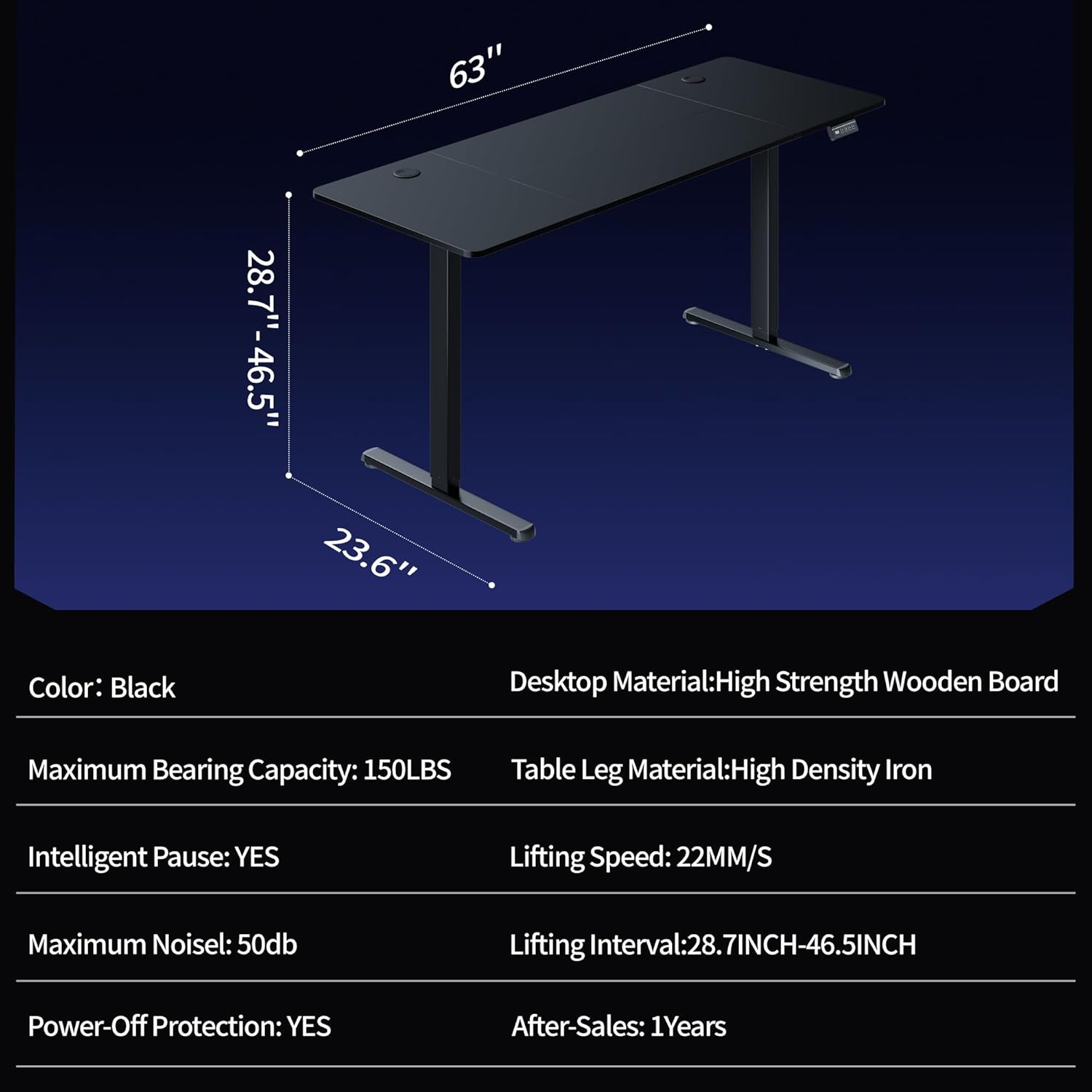
Figure 5: Desk dimensions and adjustable height range.
9. Warranty and Support
The Shintenchi Standing Desk comes with a Lifetime Warranty, as specified by the manufacturer. For warranty claims or technical support, please refer to the contact information provided with your purchase documentation or visit the official Shintenchi website.
Additional protection plans may be available for purchase separately to extend coverage beyond the standard warranty. Please check with your retailer for details on available plans.