
LG SKM1
LG SKM1 2.0 Channel Compact Bluetooth Soundbar Instruction Manual
Model: SKM1
Introduction
This manual provides essential instructions for the setup, operation, and maintenance of your LG SKM1 2.0 Channel Compact Bluetooth Soundbar. Please read this manual thoroughly before using the product to ensure proper and safe operation. Keep this manual for future reference.

Image: Front view of the LG SKM1 Soundbar, showcasing its compact and sleek design.
Important Safety Information
Always follow basic safety precautions when using this product to reduce the risk of fire, electric shock, and injury to persons. This includes, but is not limited to:
- Do not expose the unit to rain or moisture.
- Do not open the cabinet. Refer servicing to qualified personnel only.
- Ensure proper ventilation and do not block any ventilation openings.
- Use only attachments/accessories specified by the manufacturer.
- Unplug this apparatus during lightning storms or when unused for long periods.
What's in the Box
Verify that all components are present before proceeding with setup:
- LG SKM1 Soundbar Unit
- Remote Control
- AAA Batteries (2)
- Power Cord
- Warranty Card
- Instruction Manual (this document)

Image: The LG SKM1 Soundbar shown with its remote control and power cord, indicating included accessories.
Setup Guide
1. Positioning the Soundbar
Place the soundbar on a stable, flat surface directly in front of your television. Ensure there are no obstructions blocking the front of the soundbar for optimal audio projection.
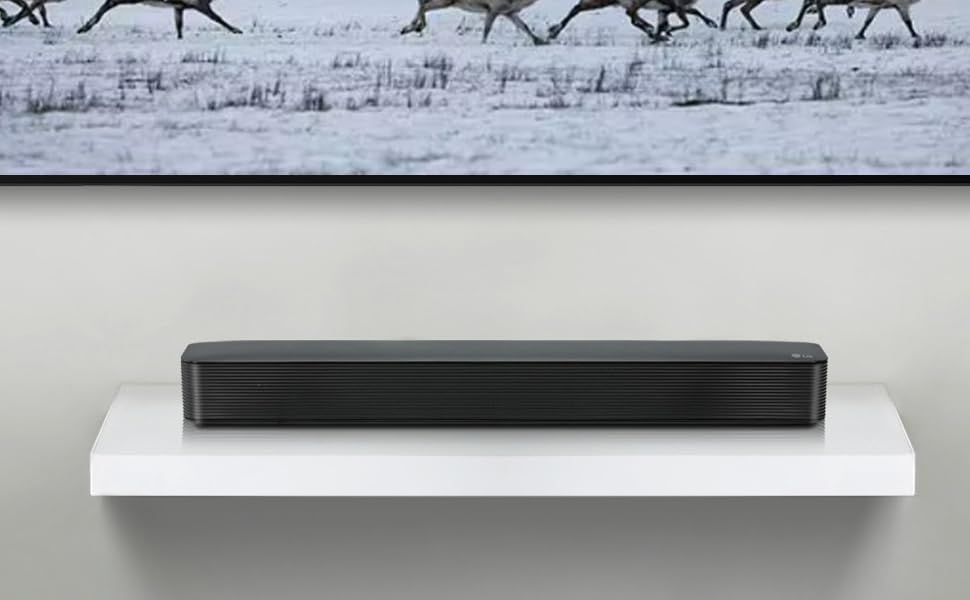
Image: The LG SKM1 Soundbar positioned on a shelf directly beneath a television, demonstrating ideal placement.
2. Connecting Power
- Connect the power cord to the AC IN port on the back of the soundbar.
- Plug the other end of the power cord into a wall outlet.

Image: Rear view of the LG SKM1 Soundbar, showing the power input, USB, and optical input ports.
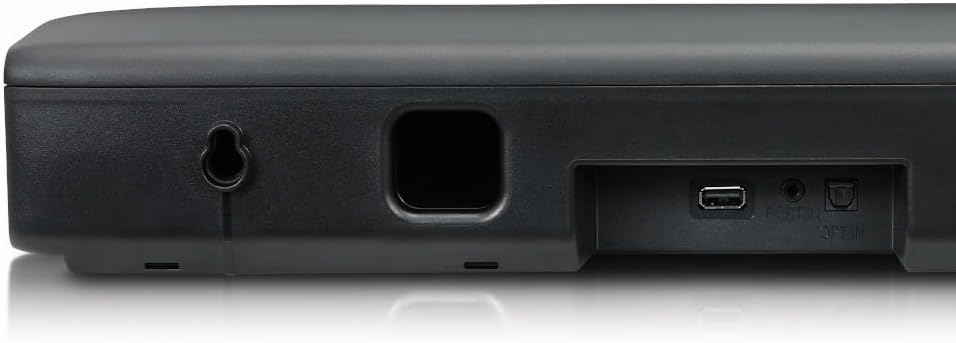
Image: Close-up of the rear panel of the LG SKM1 Soundbar, highlighting the power input, USB port, and optical input.
3. Audio Connection Options
Choose one of the following methods to connect the soundbar to your TV or other audio source:
Optical Cable Connection (Recommended for TV)
- Connect one end of an optical cable (not included) to the OPT IN port on the soundbar.
- Connect the other end to the Optical Digital Audio Out port on your TV.
- On your TV's audio settings, select "Optical" or "External Speaker" as the audio output.
Bluetooth Connection (Wireless)
- Power on the soundbar.
- Press the Function button on the remote control or the unit until "BT" appears on the display. The soundbar will enter pairing mode.
- On your Bluetooth device (e.g., smartphone, tablet), enable Bluetooth and search for available devices.
- Select "LG SKM1" from the list of devices.
- Once paired, the soundbar will indicate a successful connection.
AUX Connection (3.5mm Audio Cable)
- Connect one end of a 3.5mm audio cable (not included) to the AUX IN port on the soundbar.
- Connect the other end to the headphone jack or AUX Out port on your audio device.
- Press the Function button on the remote control or the unit until "AUX" appears on the display.
4. Remote Control Setup
Insert the two AAA batteries (included) into the remote control, ensuring correct polarity.
Operating Instructions
Basic Functions
- Power On/Off: Press the Power button on the remote or the unit.
- Volume Control: Use the VOL + or VOL - buttons on the remote or unit.
- Mute: Press the Mute button on the remote.
- Function Selection: Press the Function button to cycle through input modes (Optical, Bluetooth, AUX).
Bluetooth Operation
Once paired, your device will automatically connect to the soundbar when both are powered on and within range. If connection is lost, re-select "LG SKM1" from your device's Bluetooth settings.
- Play/Pause: Press the Play/Pause button on the remote.
- Skip Track: Use the Skip Forward or Skip Backward buttons on the remote.
Sound Modes
The LG SKM1 may offer various sound modes to optimize your listening experience. Refer to the remote control for specific buttons (e.g., "Standard", "Cinema", "Music") to switch between modes.
Maintenance
- Cleaning: Use a soft, dry cloth to clean the exterior of the soundbar. Do not use liquid cleaners or abrasive materials.
- Ventilation: Ensure the ventilation openings are not blocked by dust or debris.
- Storage: If storing the unit for an extended period, unplug it from the power outlet and store it in a cool, dry place.
Troubleshooting
| Problem | Possible Cause | Solution |
|---|---|---|
| No power | Power cord not connected securely. | Check power cord connection to the soundbar and wall outlet. |
| No sound | Incorrect input selected. Volume too low. Audio cable not connected. | Press Function to select correct input. Increase volume. Check audio cable connections. Ensure TV audio output is set to external speakers. |
| Bluetooth pairing fails | Soundbar not in pairing mode. Device too far. Interference. | Ensure soundbar is in BT pairing mode. Move device closer. Turn off other Bluetooth devices. |
| Remote control not working | Batteries are dead or inserted incorrectly. Obstruction. | Replace batteries, ensuring correct polarity. Remove any obstructions between remote and soundbar. |
Specifications
- Model Name: SKM1 (FBALGSKM1)
- Speaker Type: Soundbar
- Surround Sound Channel Configuration: 2.0
- Connectivity Technology: Bluetooth, USB
- Wireless Communication Technology: Bluetooth
- Audio Output Mode: Stereo
- Speaker Maximum Output Power: 13 Watts
- Product Dimensions (D x W x H): 3.5" x 25.6" x 3.03"
- Item Weight: 4.4 Pounds
- Power Source: Corded Electric
- Control Method: Remote
- Compatible Devices: Television, Smartphones, Tablets, Streaming Devices
- Included Components: Remote, AAA Batteries (2), Power Cord, Warranty Card
Warranty Information
This LG SKM1 Soundbar comes with a Limited Warranty. Please refer to the included Warranty Card for detailed terms, conditions, and registration information. Keep your proof of purchase for warranty claims.
Customer Support
For technical assistance, troubleshooting beyond this manual, or warranty service, please contact LG Customer Support. Visit the official LG website for contact information specific to your region.
Official LG Website: www.lg.com