1. Introduction
Thank you for choosing the MotionGrey MC3 Ergonomic Office Chair. This manual provides essential information for the proper assembly, operation, and maintenance of your new chair. Designed for comfort and versatility, the MC3 chair features dynamic lumbar support, a detachable headrest, reclining backrest, and adjustable armrests to support various postures and enhance your sitting experience.

Image 1.1: The MotionGrey MC3 Ergonomic Office Chair, showcasing its mesh back, adjustable lumbar support, and 2D armrests.

Image 1.2: Overview of the MotionGrey MC3 Ergonomic Office Chair's key features, including removable headrest, reclining backrest, 2D adjustable armrest, SGS & BIFMA certified gas lift, and fully adjustable lumbar support.
2. Setup and Assembly
Before beginning assembly, ensure all components are present and undamaged. Refer to the included assembly guide for detailed, step-by-step instructions. All necessary tools are typically provided.
2.1 Unpacking and Component Check
- Carefully remove all parts from the packaging.
- Lay out all components on a clean, flat surface.
- Compare the parts with the component list in your assembly guide to ensure nothing is missing.
2.2 General Assembly Steps (Refer to included manual for specifics)
- Attach the casters to the chair base.
- Insert the gas lift into the center of the chair base.
- Assemble the seat and backrest components, including armrests and control mechanism.
- Attach the assembled seat and backrest to the gas lift.
- Install the headrest, if desired.
Note: If the included assembly instructions are unclear, please refer to the manufacturer's official website or contact customer support for an updated guide or video tutorial.
3. Operation and Adjustments
The MotionGrey MC3 chair offers several adjustment features to customize your seating experience for optimal comfort and ergonomic support.
3.1 Seat Height Adjustment
- Locate the lever on the right side, beneath the seat (often marked with an upward arrow).
- To raise the seat: Lift the lever while taking your weight off the seat.
- To lower the seat: Lift the lever while seated.

Image 3.1: Illustration of the tilt lever for backrest recline and the lift lever for seat height adjustment, located beneath the seat.
3.2 Backrest Recline and Tilt Tension
- Recline: Use the lever on the left side, beneath the seat (often marked with a chair icon). Pull the lever outwards to unlock the recline, lean back to your desired angle (up to 145°), and push the lever inwards to lock.
- Tilt Tension: The round knob located at the front, under the seat, controls the resistance of the recline. Turn clockwise to increase tension (harder to recline) and counter-clockwise to decrease tension (easier to recline).
Image 3.2: The chair's backrest reclining up to 145 degrees, with indicators for the tilt lever and lift lever for seat height. The breathable mesh back is also highlighted.
3.3 Dynamic Lumbar Support Adjustment
- Locate the twist knob on the side of the backrest.
- Twist the knob to adjust the lumbar support's height and depth to match your spine's natural curve.

Image 3.3: Detailed view of the ergonomic lumbar support system, showing the twist knob for adjusting its position up/down and forward/back to align with the spine's natural curve.
3.4 Detachable and Adjustable Headrest
- Height Adjustment: Grasp the headrest and slide it up or down to your preferred height.
- Detachment: The headrest can be removed for a low-back chair option. Refer to your assembly guide for specific detachment instructions.

Image 3.4: Demonstrates the adjustable height and quick-release features of the headrest, allowing for a 2-in-1 low-back setup.
3.5 2D Armrest Adjustment
- Locate the button or lever on the side of each armrest.
- Press the button/lever and move the armrest up or down to adjust its height. Release to lock.

Image 3.5: Close-up of the adjustable armrests, highlighting the one-touch height adjustment mechanism for elbow and shoulder relief.
4. Maintenance
Regular maintenance helps prolong the life and performance of your office chair.
- Cleaning: Wipe down plastic and metal parts with a soft, damp cloth. For mesh and fabric areas, use a mild upholstery cleaner if necessary, and allow to air dry completely. Avoid harsh chemicals.
- Fasteners: Periodically check all screws and bolts to ensure they are tight. Re-tighten as needed to prevent wobbling or instability.
- Casters: Clean casters regularly to remove hair and debris that can impede smooth rolling.
- Gas Lift: Do not attempt to disassemble the gas lift. If it malfunctions, contact customer support.
5. Troubleshooting
If you encounter issues with your MotionGrey MC3 chair, refer to the following common solutions:
| Problem | Possible Cause | Solution |
|---|---|---|
| Chair is wobbly or unstable | Loose screws or bolts | Check and tighten all assembly screws and bolts. |
| Seat height adjustment not working | Gas lift malfunction or lever issue | Ensure the lever is fully engaged. If the issue persists, the gas lift may need replacement. Contact support. |
| Casters not rolling smoothly | Debris in casters | Remove hair, dust, or other debris from the caster wheels. |
| Squeaking noises | Loose connections or friction | Tighten all screws. Apply a small amount of silicone lubricant to moving parts if necessary, avoiding plastic components. |
| Strong chemical smell | New product off-gassing | Allow the chair to air out in a well-ventilated area for several days. |
6. Specifications
Key specifications for the MotionGrey MC3 Ergonomic Office Chair:
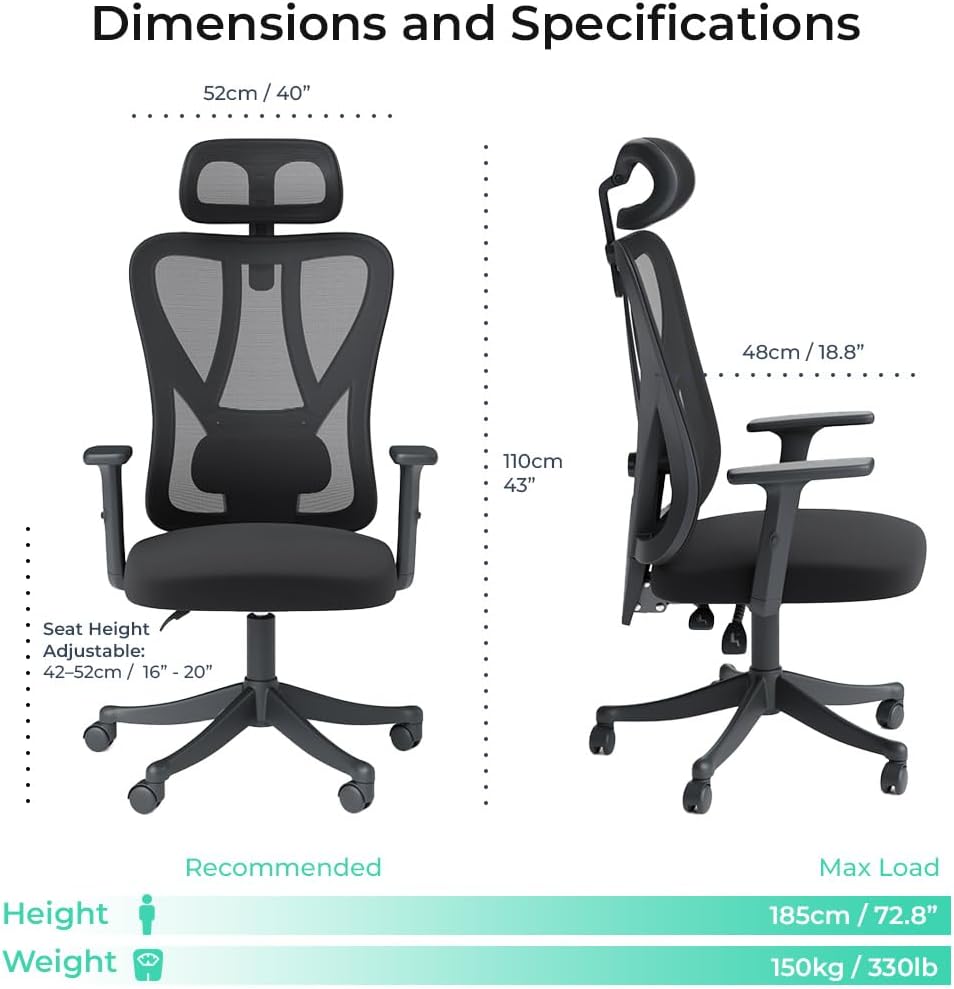
Image 6.1: Detailed dimensions and recommended user specifications for the MotionGrey MC3 Ergonomic Office Chair.
- Brand: MOTIONGREY
- Model Number: OC-MC-3-BK
- Colour: Black
- Material: Mesh (backrest), Foam (seat)
- Product Dimensions: 48D x 65W x 128H Centimetres (approx. 18.9D x 25.6W x 50.4H inches)
- Item Weight: 13.2 kg (approx. 29 lbs)
- Maximum Load Capacity: 150 kg (330 lbs)
- Recommended User Height: Up to 185 cm (72.8 inches)
- Seat Height Adjustable Range: 42-52 cm (16-20 inches)
- Backrest Recline: Up to 145°
- Certifications: SGS & BIFMA certified gas lift
7. Warranty and Support
For warranty information, please refer to the documentation included with your purchase or visit the official MotionGrey website. Warranty terms and conditions may vary.
7.1 Customer Support
If you have any questions, require assistance with assembly, or need to report a defect, please contact MotionGrey customer support:
- Manufacturer: MotionGrey
- Phone: 778-312-1311
- Address: 6660 Graybar Rd #155, Richmond, BC V6W 1H9, Canada
- Online Store: MotionGrey Amazon Store