
Haier HW120-DM14F9BKU1
Haier 12kg Fully Automatic Front Load Washing Machine
Model: HW120-DM14F9BKU1
Introduction
This manual provides essential information for the safe and efficient operation of your new Haier 12kg Fully Automatic Front Load Washing Machine, model HW120-DM14F9BKU1. Please read these instructions carefully before using the appliance and retain them for future reference. This washing machine is designed to make your laundry process easy and comfortable with advanced features like AI One Touch, AI Colour Panel, Direct Motion, Refresh, and Night Wash.
Safety Information
To reduce the risk of fire, electric shock, or injury when using your appliance, follow these basic precautions:
- Ensure the appliance is properly grounded.
- Do not operate any appliance with a damaged cord or plug.
- Keep flammable materials away from the appliance.
- Supervise children when the appliance is in use.
- Do not wash items that are soiled with gasoline, dry-cleaning solvents, or other flammable or explosive substances.
- Always unplug the appliance before cleaning or performing maintenance.
What's in the Box
Verify that all components are present:
- Haier 12kg Fully Automatic Front Load Washing Machine
- Drain Hose
- Fill Hose
- Power Cord
- User Manual (this document)
Setup
Placement
The Haier HW120-DM14F9BKU1 is a freestanding unit. Place it on a firm, level surface to minimize vibration and noise during operation. Ensure there is adequate space around the machine for ventilation and maintenance. The product dimensions are 60D x 60W x 85H Centimeters.

Figure 1: Front view of the washing machine.
Connections
- Water Supply: Connect the fill hose to a cold water tap and to the water inlet valve on the back of the washing machine. Ensure connections are tight to prevent leaks.
- Drainage: Securely attach the drain hose to the machine's drain outlet and route it to a suitable drain pipe or sink, ensuring it is not kinked or blocked.
- Power: Plug the power cord into a grounded 220 Volt, 16 Amp electrical outlet. Do not use extension cords or adapters.
Operating Instructions
Your Haier washing machine features a digital color touch panel for intuitive control.
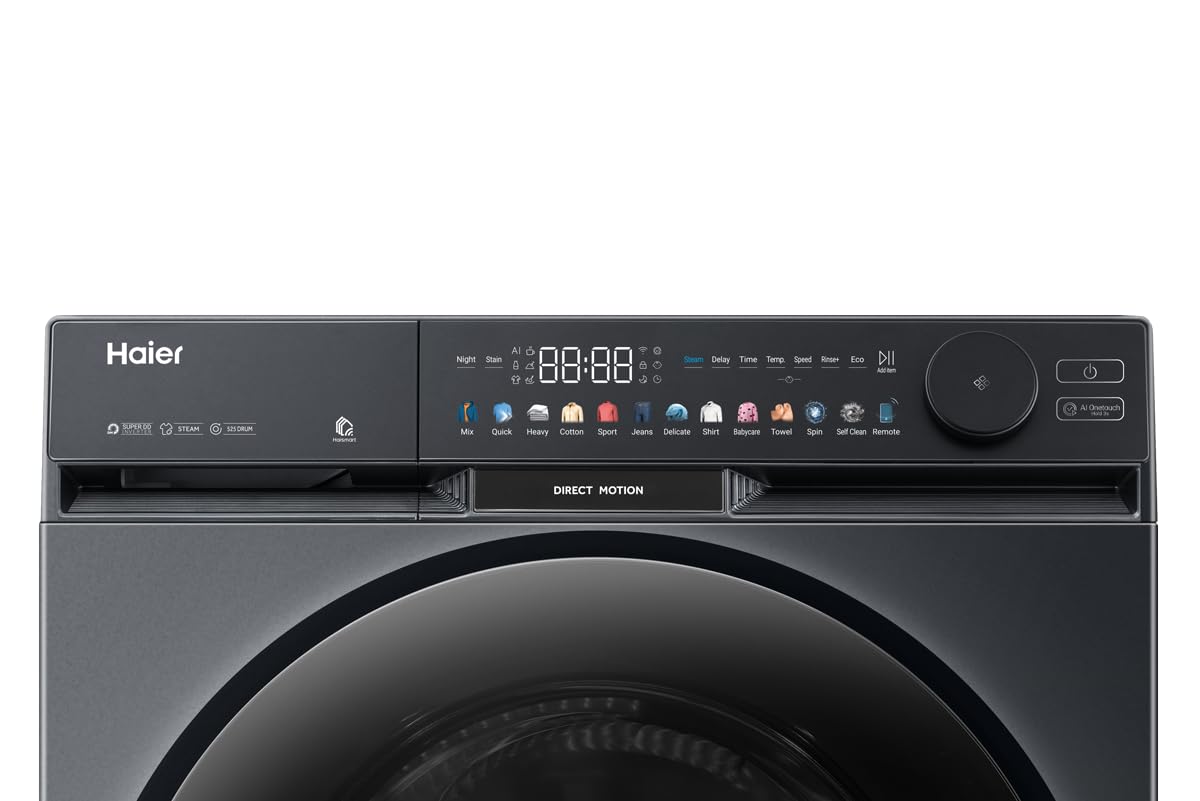
Figure 2: Digital color touch panel.
Basic Operation
- Load Laundry: Open the front load door and place up to 12kg of laundry into the stainless steel drum. Ensure the door is securely closed.
- Add Detergent: Dispense appropriate detergent and fabric softener into the designated compartments.
- Select Program: Use the AI Colour Panel or AI One Touch function to select your desired wash program. Options include Mix, Quick, Heavy, Cotton, Sport, Jeans, Delicate, Shirt, Babycare, Towel, Spin, Self Clean, and Remote.
- Adjust Settings: Customize temperature, spin speed (up to 1400 RPM), and delay start if needed.
- Start Cycle: Press the Start/Pause button to begin the wash cycle.

Figure 3: Washing machine with door open.
Special Features
- AI One Touch: Simplifies program selection for optimal results.
- AI Colour Panel: Provides an intuitive and visually appealing interface.
- Direct Motion: Ensures quiet and efficient operation with a direct drive motor.
- Refresh: A specialized cycle to refresh clothes without a full wash.
- Night Wash: Designed for quieter operation during off-peak hours.
- 525 Super Drum: Large drum capacity for effective washing of bulky items.
Maintenance
Cleaning the Drum
Regularly use the 'Self Clean' program to maintain the cleanliness of the stainless steel drum and prevent odor buildup.
Exterior Care
Wipe the glossy exterior surfaces with a soft, damp cloth. Avoid abrasive cleaners that could damage the finish or the digital touch panel.
Filter Cleaning
Periodically check and clean the drain pump filter to ensure proper drainage and prevent blockages. Refer to the detailed instructions in the full manual for filter location and cleaning steps.
Troubleshooting
If you encounter issues with your washing machine, consult the following basic troubleshooting steps:
- Machine not starting: Check if the power cord is securely plugged in and if the circuit breaker has tripped. Ensure the door is fully closed.
- No water filling: Verify that the water supply tap is open and the fill hose is not kinked or blocked.
- Water not draining: Inspect the drain hose for kinks or blockages. Clean the drain pump filter if necessary.
- Excessive vibration/noise: Ensure the machine is on a level surface and that the transit bolts (if applicable) have been removed during installation. Distribute laundry evenly in the drum.
For more complex issues or persistent problems, please contact Haier customer support.
Specifications
| Feature | Specification |
|---|---|
| Model | HW120-DM14F9BKU1 |
| Brand | Haier |
| Capacity | 12 Kilograms |
| Operation Mode | Fully Automatic |
| Access Location | Front Load |
| Controls Type | Touch |
| Spin RPM | 1400 |
| Drum Material | Stainless Steel |
| Wattage | 700 Watts |
| Voltage | 220 Volts |
| Amperage | 16 Amps |
| Product Dimensions (LxWxH) | 60 x 60 x 85 Centimeters |
| Item Weight | 72 Kilograms |
| Finish Type | Glossy |
| Special Features | 525 super drum, AI colour panel, AI one touch, Direct motion, Night wash |
Warranty and Support
Warranty Information
Your Haier 12kg Fully Automatic Front Load Washing Machine comes with a comprehensive warranty:
- Product Warranty: 5 years
- Motor Warranty: 20 years
Please retain your purchase receipt as proof of purchase for warranty claims.
Manufacturer and Importer Details
Manufacturer: Haier Appliances India Pvt. Ltd., B-3, Ranjangaon Growth Centre, MIDC Ranjangaon, Shirur, Pune-412209, Maharashtra, INDIA
Importer: HAIER APPLIANCES INDIA PVT LTD, Plot No. H-6, DMIC Integrated Industrial Township, Greater Noida, Uttar Pradesh – 201308, E-mail ID info@haierindia.com
For service requests or technical support, please contact Haier customer service through their official channels.
Related Documents - HW120-DM14F9BKU1
 |
Haier 12kg 500 Series Front Load Washing Machine with Ultra Fresh Air - Quick Reference Guide Explore the Haier HWF12DW1, a 12kg 500 Series Front Load Washing Machine featuring Ultra Fresh Air technology, Smart Dosing, UV Protect for hygiene, and 14 versatile wash cycles. This guide provides key specifications, features, and benefits for efficient laundry care. |
 |
Haier 12kg 600 Series Front Loader Washing Machine HWF12PXB1 - Quick Reference Guide Quick reference guide for the Haier 12kg 600 Series Front Loader Washing Machine (HWF12PXB1) featuring Ultra Fresh Air, UV Protect, Smart Dosing, and Steam Refresh. Includes specifications, dimensions, and wash cycles. |
 |
Haier 8.5kg Front Loader Washing Machine Quick Reference Guide A quick reference guide for the Haier 8.5kg front loader washing machine, detailing its features, benefits, specifications, and wash cycles. Includes information on energy and water efficiency, steam refresh, Wi-Fi compatibility, and dimensions. |
 |
Haier HWF12DW1 12kg 5-Star Front Load Washing Machine | Quick Reference Guide Quick reference guide for the Haier HWF12DW1 12kg 500 Series Front Load Washing Machine. Features include 5-star energy and water ratings, Ultra Fresh Air, Smart Dosing, UV Protect, and 14 wash cycles. Learn about dimensions, specifications, and warranty. |
 |
Haier HWF12PXW1 12kg Front Loader Washing Machine | Ultra Fresh Air, UV Protect Quick reference guide for the Haier 12kg 600 Series Front Loader Washing Machine (HWF12PXW1) featuring Ultra Fresh Air, UV Protect, Smart Dosing, and Steam Refresh. Includes dimensions, specifications, and warranty information. |
 |
Haier 12kg 600 Series Front Loader Washing Machine HWF12PXW1 - Features & Specs Detailed quick reference guide for the Haier 12kg 600 Series Front Loader Washing Machine (HWF12PXW1). Discover features like Ultra Fresh Air, UV Protect, Steam Refresh, Smart Dosing, Wi-Fi control, dimensions, specifications, and wash cycles. |
Ask a question about this manual
Ask about setup, troubleshooting, compatibility, parts, safety, or missing instructions. Manuals+ will review the question and use this page’s manual context to help answer it.