Introduction
This manual provides detailed instructions for the setup, operation, and maintenance of your Niderson P114 Smart Watch. Please read this guide thoroughly to ensure proper use and to maximize the features of your device. The Niderson P114 is a versatile smartwatch compatible with both Android and iOS devices, offering a 1.85-inch HD touchscreen, Bluetooth calling, over 110 sports modes, IP68 waterproofing, and comprehensive health monitoring capabilities.

Image: The Niderson P114 Smart Watch, showcasing its main display with health metrics and a separate image of the phone dialer interface.
What's in the Box
Upon opening your Niderson P114 Smart Watch package, you should find the following items:
- P114 Smartwatch * 1
- Magnetic charging wire * 1
- User manual * 1
Setup
1. Charging the Smart Watch
Before initial use, fully charge your Niderson P114 Smart Watch. Connect the magnetic charging wire to the charging points on the back of the watch and plug the USB end into a compatible power source. A full charge typically takes 1.5-2 hours.

Image: The Niderson P114 Smart Watch connected to its magnetic charging cable, illustrating the charging process.
2. App Installation and Pairing
To unlock the full functionality of your smartwatch, you need to install the companion application and pair it with your smartphone.
- Download the App: Search for and download the "Dafit" app from your smartphone's app store (available for iOS 9.0 and above, and Android 4.4 and above).
- Enable Bluetooth: Ensure Bluetooth is enabled on your smartphone.
- Open the App: Launch the "Dafit" app and follow the on-screen instructions to create an account or log in.
- Add Device: Within the app, navigate to the device management section and select "Add Device" or a similar option. The app will search for available smartwatches.
- Select Your Watch: Choose "P114" from the list of discovered devices. Confirm the pairing request on both your phone and the watch if prompted.
Once successfully paired, the watch will synchronize data with the app, and you can customize settings and view detailed health and activity reports.
Operating Instructions
1. Display and Watch Faces
The Niderson P114 features a 1.85-inch HD square screen with IPS full-view technology for clear visibility. You can customize the watch face to match your style.
- Changing Watch Faces: After syncing with the "Dafit" app, you can select from over 100 watch faces within the app to apply to your smartwatch.
- Waking the Screen: Lift your wrist or press the side button to wake the watch screen.

Image: The 1.85-inch HD color screen of the Niderson P114 Smart Watch, displaying multiple customizable watch face designs.
2. Bluetooth Calling and Smart Reminders
The smartwatch is equipped with a built-in HD speaker and microphone, allowing you to manage calls directly from your wrist.
- Making/Receiving Calls: Once paired via Bluetooth, you can make and receive calls directly on the watch. This is convenient during workouts or when your phone is not easily accessible.
- Message Notifications: The watch can receive notifications from various platforms such as Facebook, WhatsApp, and Twitter. Lift your wrist to view the latest messages. Note: Message replies are not currently supported.

Image: Demonstrates Bluetooth call and message notification features, showing a user making a call and another user receiving a message on the watch.
3. Sports Modes and IP68 Waterproofing
The P114 Smart Watch supports over 110 sports modes and has an IP68 waterproof rating.
- Sports Tracking: Select your desired sport mode (e.g., hiking, cycling, yoga, basketball, soccer) from the watch menu. The watch will monitor real-time data such as heart rate, distance, speed, and calorie burn.
- Water Resistance: The IP68 rating means the watch is resistant to dust and can withstand immersion in water up to 1.5 meters for 30 minutes. It is suitable for daily use, including exposure to sweat and rain. It is not recommended for swimming or diving.
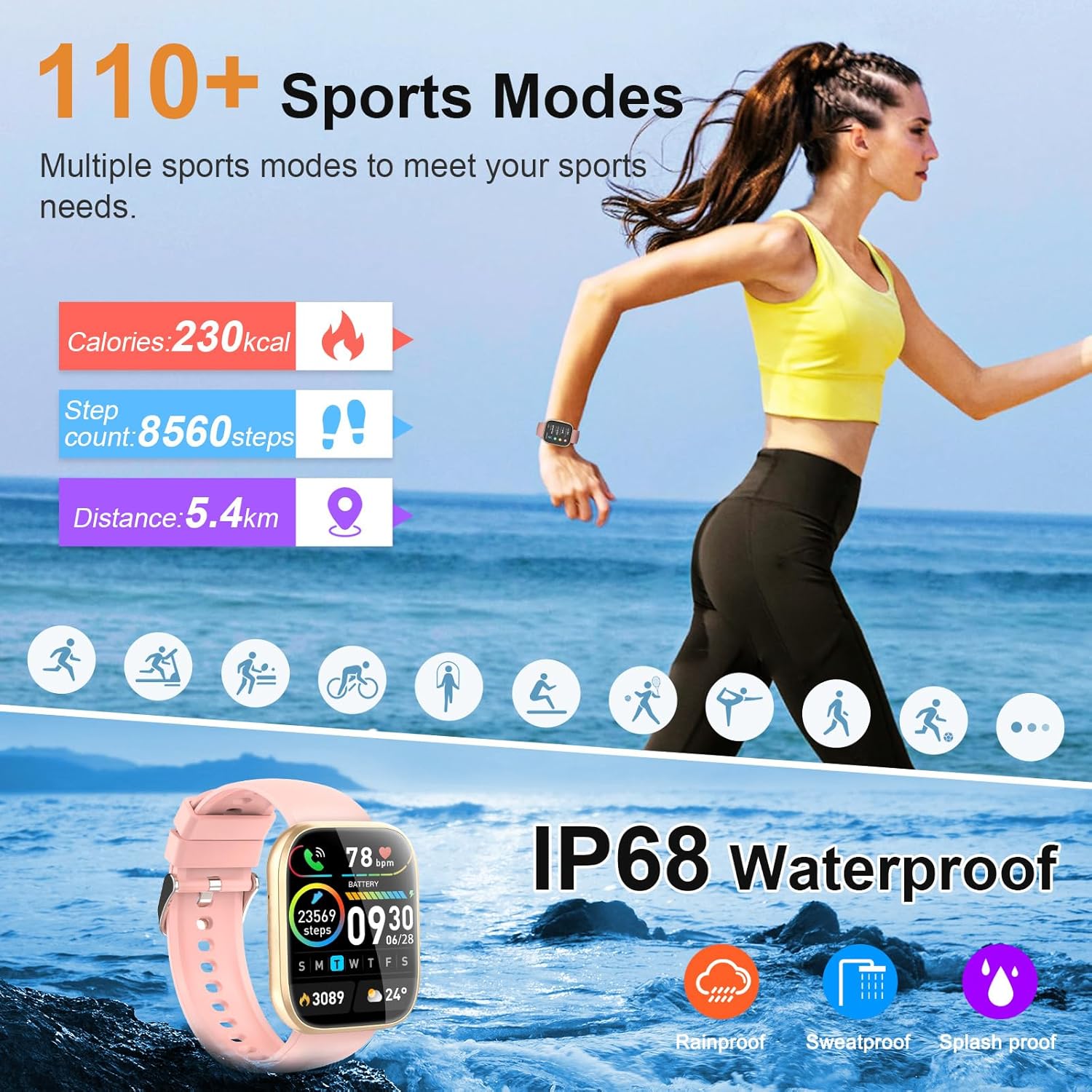
Image: Highlights the 110+ sports modes and IP68 waterproof capabilities of the Niderson P114 Smart Watch, featuring a woman running and icons for rainproof, sweatproof, and splashproof.
4. 24/7 Health Tracking
The P114 Smart Watch provides continuous health monitoring to help you stay informed about your well-being.
- Heart Rate Monitoring: The efficient green-light professional detector provides 24-hour accurate heart rate monitoring. View your heart rate data on the watch or in the "Dafit" app.
- Sleep Monitoring: The watch records your deep sleep, light sleep, and awake time, generating visual data reports in the app to help you understand and improve your sleep quality.
- Menstrual Cycle Tracking: A dedicated function is available to track menstrual cycles, providing support for women's health.

Image: Illustrates the heart rate and sleep monitoring features, showing an app interface for heart rate and individuals engaged in exercise and sleep while wearing the watch.
5. Other Useful Functions
The Niderson P114 Smart Watch includes a variety of additional features to enhance your daily life:
- Timer
- Stopwatch
- Searcher (Find My Phone)
- Sedentary Reminder
- Music Control
- Weather Display
- Photo Control (Remote Camera Shutter)
- Alarm Clock
- Calculator
- Stress Test

Image: The Niderson P114 Smart Watch showcasing its interface with icons for various functions such as music control, weather forecast, alarm clock, and calculator.
Maintenance
1. Battery Life and Charging
The P114 Smart Watch offers extended battery life and efficient charging.
- Usage Time: Up to 5-7 days on a full charge.
- Standby Time: Up to 30 days.
- Charging Time: Approximately 1.5-2 hours for a full charge using the magnetic charging cable.
2. Cleaning and Care
To maintain your smartwatch, regularly clean the screen and strap with a soft, dry cloth. Avoid using harsh chemicals or abrasive materials. Ensure the charging contacts are clean and dry before charging.
3. Water Resistance Guidelines
While the watch is IP68 waterproof, it is important to follow these guidelines:
- Do not expose the watch to hot water, steam, or high-pressure water jets.
- Avoid wearing the watch during swimming, diving, or showering.
- If the watch gets wet, wipe it dry thoroughly before charging or operating.
Troubleshooting
If you encounter issues with your Niderson P114 Smart Watch, refer to the following common solutions:
- Watch not turning on: Ensure the watch is fully charged. Connect it to the charger for at least 30 minutes.
- Cannot pair with phone:
- Ensure Bluetooth is enabled on your phone.
- Make sure the watch is within range of your phone.
- Restart both your phone and the watch.
- Check if the "Dafit" app is updated to the latest version.
- Forget the device in your phone's Bluetooth settings and try pairing again through the app.
- Notifications not appearing:
- Verify that notification permissions are enabled for the "Dafit" app in your phone's settings.
- Ensure notifications are enabled within the "Dafit" app for specific applications.
- Check if the watch is properly connected via Bluetooth.
- Inaccurate health data:
- Ensure the watch is worn snugly on your wrist, not too tight or too loose.
- Clean the sensor on the back of the watch.
- Update the "Dafit" app and watch firmware if available.
- Short battery life:
- Reduce screen brightness.
- Disable continuous heart rate monitoring if not needed 24/7.
- Limit the number of apps sending notifications to the watch.
- Ensure the watch is fully charged each time.
Specifications
| Feature | Detail |
|---|---|
| Model Name | P114 |
| Brand | Niderson |
| Screen Size | 1.85 Inches |
| Display Type | HD Touchscreen with IPS full-view technology |
| Shape | Rectangular |
| Operating System | Android/iOS compatible |
| Connectivity Technology | Bluetooth |
| Water Resistance | IP68 |
| Battery Type | Lithium Polymer (2 AA batteries included) |
| Item Weight | 2.08 ounces |
| Special Features | Bluetooth Calling, 110+ Sport Modes, 24/7 Health Tracking (Heart Rate, Sleep, Menstrual), Custom Watch Faces, Timer, Stopwatch, Sedentary Reminder, Music Control, Weather Display, Camera Control |
Warranty and Support
Niderson is committed to providing comprehensive after-sales support for your P114 Smart Watch.
- Lifetime Satisfied Support: We offer lifetime support and solutions for our products.
- 30-Day Return Policy: Enjoy a 30-day no-reason return policy.
- 24-Hour Service: Quick service via email for any inquiries or issues.
- 2-Year Free Replacement: A 2-year free replacement warranty is provided for manufacturing defects.
For further assistance, please refer to the contact information provided in your product packaging or visit the official Niderson website.

Image: Details of Niderson's comprehensive after-sales support, including lifetime support, 30-day return, 24-hour service, and 2-year free replacement.


