
Introduction
This manual provides comprehensive instructions for the assembly, operation, and maintenance of your YITAHOME Queen Size Bed Frame. This bed frame features a velvet upholstered design, integrated RGB LED lighting, a convenient charging station in the headboard, and four under-bed storage drawers. Please read this manual thoroughly before beginning assembly or use to ensure proper setup and safe operation.

Image: YITAHOME Queen Size Bed Frame in green velvet with LED lighting and storage drawers.
Important Safety Information
- Always assemble the bed frame on a soft, clean surface to prevent damage to the product or your floor.
- Ensure all parts are present and undamaged before beginning assembly. Do not use if any parts are missing or broken.
- Follow all assembly steps in the order provided. Do not skip steps.
- Use only the provided hardware. Substituting hardware may compromise the structural integrity of the bed frame.
- Two people are recommended for assembly to ensure safety and ease of installation.
- Do not overtighten screws, as this may strip threads or damage components.
- Keep small parts and packaging materials away from children and pets to prevent choking hazards.
- Ensure the bed frame is placed on a level surface to prevent wobbling or instability.
- Do not exceed the maximum weight capacity of 1000 pounds.
- For electrical components (LED lights, charging station), ensure proper connection to a suitable power outlet. Do not overload the charging station.
Parts List
Before assembly, verify that all components listed below are included in your package. Each part is typically numbered for easy identification during the assembly process.
| Component | Description |
|---|---|
| Headboard | Upholstered headboard with integrated bookcase and charging station. |
| Side Rails | Left and right upholstered side rails for the bed frame. |
| Footboard | Upholstered footboard with integrated drawer mechanism. |
| Support Slats | Wooden slats that support the mattress. |
| Center Support Beam | Metal beam providing central support for the slats. |
| Support Legs | Adjustable legs for the center support beam. |
| Storage Drawers (4) | Under-bed drawers with wheels for storage. |
| Hardware Pack | Includes screws, bolts, nuts, and tools required for assembly. |
| LED Light Strip | RGB LED strip for headboard illumination. |
| Remote Control | For controlling LED light functions. |
| Charging Station Unit | Power outlets and USB/Type-C ports for the headboard. |

Image: Diagram showing the overall dimensions and key components of the bed frame.
Assembly Instructions
Please refer to the detailed step-by-step instructions provided in the included assembly manual. The general assembly process involves connecting the headboard, side rails, and footboard, installing the center support beam and slats, and finally integrating the storage drawers, LED lights, and charging station.
For a visual guide, please watch the official installation video below:
Video: Official installation guide for the YITAHOME Velvet Upholstered Bed with Charging Station. This video demonstrates the step-by-step assembly process for the bed frame components, including the headboard, side rails, footboard, slats, and the integration of the charging station and LED lights.
Key Assembly Steps:
- Headboard Assembly: Attach the headboard components, including the bookcase shelves and the charging station unit. Ensure all connections are secure.
- Frame Assembly: Connect the side rails to the headboard and footboard using the provided hardware.
- Support System Installation: Install the center support beam and its legs. Then, place the wooden slats across the frame, securing them as per instructions. The mute sponge strip should be applied to the middle beam to prevent noise.
- Drawer Integration: Assemble the four under-bed storage drawers and slide them into their designated positions beneath the bed frame. Ensure the screw clamps are used to hold them in place.
- LED Light Setup: Install the RGB LED light strip into the headboard. Connect it to the power source and test its functionality with the remote control or smart APP.
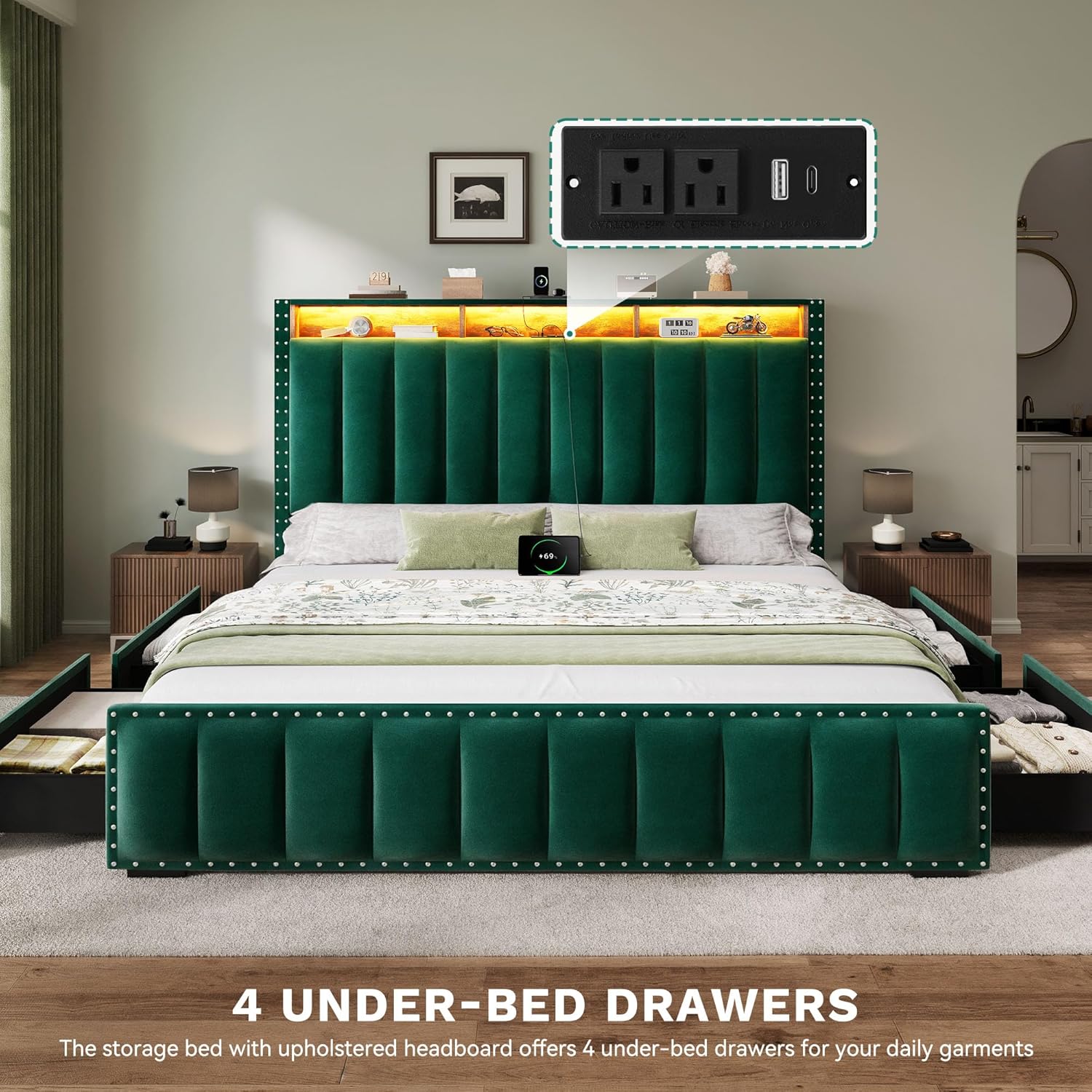
Image: The assembled bed frame showcasing the four under-bed storage drawers pulled out, demonstrating their capacity and wheeled design.
Operating Instructions
RGB LED Lights:
The integrated RGB LED lights offer customizable ambiance for your bedroom. They can be controlled via the included 24-key remote control or a dedicated smart application on your mobile device.
- Power On/Off: Use the power button on the remote or app to turn the lights on or off.
- Color Selection: Choose from over 60,000 RGB colors to match your mood or decor.
- Brightness Adjustment: Adjust the light intensity to your preference.
- Modes: Explore various lighting modes, including static colors, dynamic color changes, music synchronization, and timing functions.
- Music Sync: Activate music synchronization mode to have the lights react to audio played in the room.
- Timing Function: Set a timer for the lights to automatically turn off.
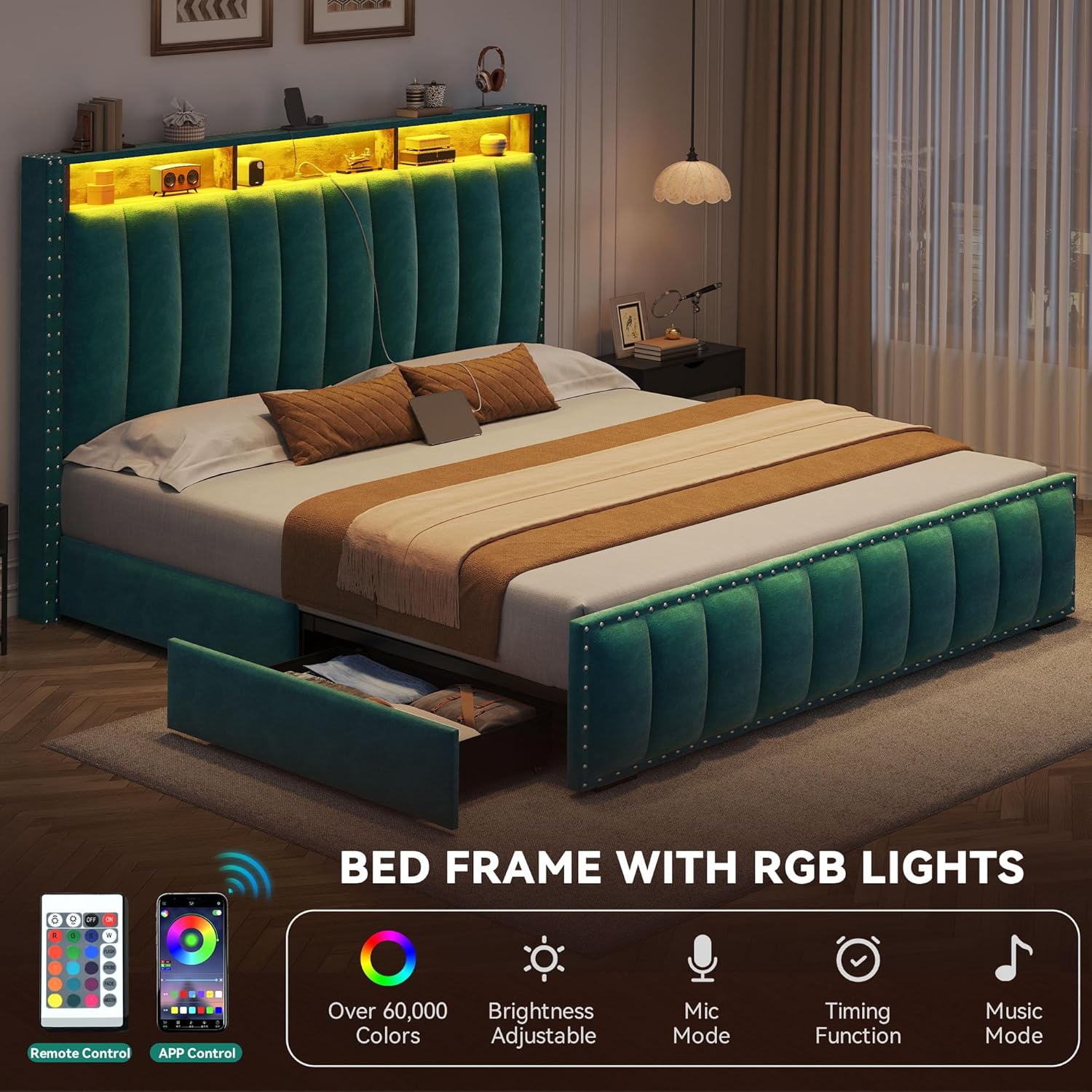
Image: The bed frame's headboard illuminated with RGB LED lights, demonstrating various color options and showing the remote control and smartphone app interface for control.
Charging Station:
The headboard features a built-in charging station for convenient access to power for your electronic devices.
- AC Outlets: Two 125V/12A AC sockets are available for standard plugs.
- USB Ports: One 5V/2A USB port is provided for charging USB-compatible devices.
- Type-C Port: One 2.5V/2.1A Type-C port is included for modern devices.
- Usage: Simply plug your devices into the appropriate port. Ensure the bed frame is connected to a wall outlet for the charging station to function.

Image: Close-up view of the headboard's integrated charging station, highlighting the two AC outlets, one USB port, and one Type-C port.
Storage Drawers:
The four under-bed storage drawers provide ample space for organizing bedding, clothing, or other items.
- Access: The drawers are equipped with rollers for smooth pulling out and pushing in.
- Security: A screw clamp mechanism is designed to hold each drawer securely in place when not in use, preventing accidental sliding.
- Capacity: Utilize the drawers to maximize storage efficiency in your bedroom.

Image: A detailed view of one of the under-bed storage drawers, showing its wheeled design for easy movement and its capacity for storing items.
Care and Maintenance
- Upholstery Cleaning: For the velvet upholstery, gently vacuum regularly to remove dust. For spills, blot immediately with a clean, dry cloth. For tougher stains, use a mild fabric cleaner specifically designed for velvet, testing on an inconspicuous area first. Avoid harsh chemicals or abrasive cleaners.
- Frame Cleaning: Wipe down the metal and wooden parts of the frame with a soft, damp cloth. Dry immediately to prevent moisture damage.
- Hardware Check: Periodically check all screws and bolts to ensure they remain tight. Retighten if necessary to maintain stability and prevent squeaks.
- Drawer Maintenance: Keep the drawer wheels free of debris to ensure smooth operation.
- Electrical Components: Ensure the charging station and LED lights are kept dry. Do not attempt to repair electrical components yourself; contact qualified personnel if issues arise.

Image: A close-up texture shot of the skin-friendly velvet material used in the bed frame's upholstery, highlighting its soft and smooth quality.
Troubleshooting
| Problem | Possible Cause | Solution |
|---|---|---|
| Bed frame squeaks | Loose hardware; friction between metal parts. | Tighten all screws and bolts. Ensure the mute sponge strip is correctly installed on the center beam to reduce friction. |
| LED lights not working | Power connection issue; remote control battery dead; light strip damage. | Check if the power adapter is securely plugged into the wall and the light strip. Replace remote control batteries. If issues persist, contact customer support. |
| Charging station not working | Bed frame not plugged in; device cable faulty; charging station unit malfunction. | Ensure the bed frame's power cord is securely plugged into a working wall outlet. Try a different charging cable or device. If still not working, contact customer support. |
| Drawers are difficult to open/close | Obstruction in the track; wheels are dirty or damaged; drawer overloaded. | Check for any items blocking the drawer path. Clean the wheels and tracks. Reduce the weight in the drawer. Inspect wheels for damage. |
| Mattress slides on the frame | Incorrect mattress size; lack of non-slip features. | Ensure your mattress is the correct Queen size (87"L x 65.1"W). The bed frame features a non-slip embedded design. If sliding persists, consider using a non-slip mattress pad. |
Product Specifications
- Size: Queen
- Product Dimensions: 87"L x 65.1"W x 45.5"H
- Color: Green
- Fabric Type: Velvet
- Weight Capacity: 1000 pounds
- Item Weight: 95 Pounds
- Special Features: No Box Spring Needed, Remote Control, Slatted, LED Lighting, Charging Station (2 AC sockets, 1 USB port, 1 Type-C port)
- Assembly Required: Yes
- Manufacturer: YITAHOME
- Model Number: MAYIHwI7R8
- UPC: 199449621102
- Country of Origin: China
- Recommended Mattress Height: 8-12 inches
Warranty Information
Specific warranty details for your YITAHOME bed frame are typically included with your purchase documentation. Please refer to the warranty card or contact YITAHOME customer service for information regarding coverage, terms, and conditions. Generally, products are covered against manufacturing defects for a specified period from the date of purchase.
Customer Support
If you have any questions, require assistance with assembly, or encounter any issues with your YITAHOME Queen Size Bed Frame, please do not hesitate to contact our customer support team. We are committed to providing the best possible service.
Contact Information:
- Website: Visit the official YITAHOME website for support resources and contact options.
- Email: Refer to your purchase documentation for the customer service email address.
- Phone: Refer to your purchase documentation for the customer service phone number.
When contacting support, please have your model number (MAYIHwI7R8) and purchase details readily available.