
WAMPAT B0FCS2TYYR
WAMPAT TV Stand Set with Charging Station
Model: B0FCS2TYYR
Introduction
Thank you for choosing the WAMPAT TV Stand Set. This versatile 3-in-1 wood entertainment center is designed to accommodate TVs up to 85 inches and features an integrated charging station. It can be configured as a single long TV stand or separated into a storage TV stand and two end tables, offering flexible solutions for your living space.
This manual provides essential information for the safe assembly, operation, and maintenance of your new TV stand. Please read all instructions carefully before beginning assembly and retain this manual for future reference.

Image: The WAMPAT TV Stand Set, illustrating its capacity to hold TVs of various sizes, including up to 85 inches.
Important Safety Information
- Exercise caution around sharp edges during assembly and use to prevent injury.
- Always follow the assembly instructions carefully to ensure the stability and structural integrity of the TV stand. Improper assembly can lead to tip-over risks.
- Do not overload the TV stand or its shelves. Refer to the specifications section for weight capacities.
- Keep small parts and packaging materials away from children to prevent choking hazards.
- Place the TV stand on a level, stable surface to prevent wobbling or tipping.
- Ensure all electrical connections for the charging station are secure and comply with local electrical codes.
Package Contents
Your WAMPAT TV Stand Set is shipped in multiple packages (typically three). Please ensure you have received all packages before beginning assembly. Carefully unpack all components and verify that all parts and hardware listed in the included assembly guide are present and undamaged. If any parts are missing or damaged, please contact customer support immediately.
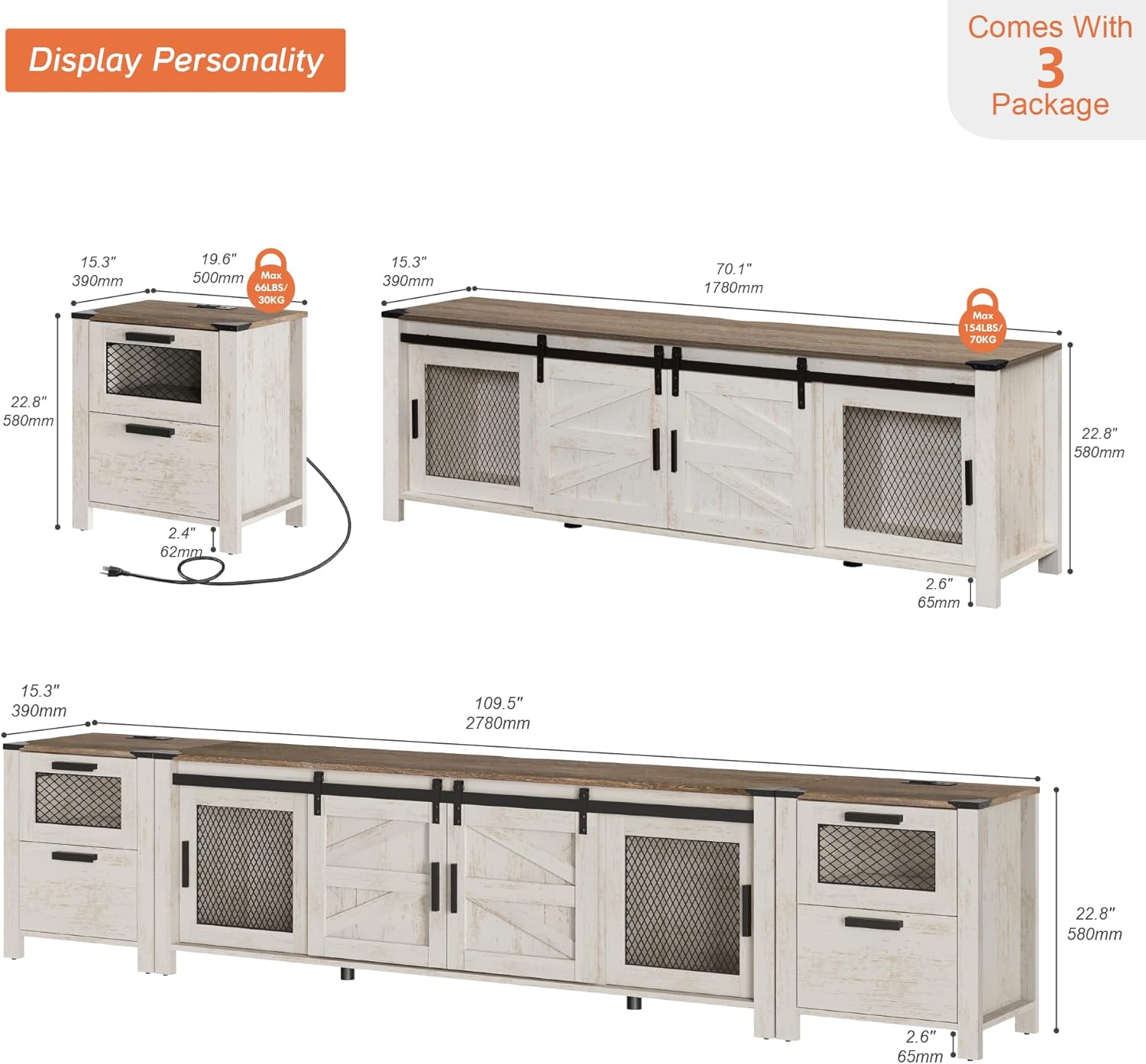
Image: An illustration detailing the dimensions of the TV stand components and indicating that the product ships in three separate packages.
Setup and Assembly
Assembly of the WAMPAT TV Stand Set requires two people for optimal safety and ease. Basic assembly instructions are included in your package. Please follow them step-by-step.
General Assembly Steps:
- Prepare Your Workspace: Clear a spacious area and lay out all components on a soft, clean surface to prevent scratches.
- Identify Parts: Match each part to the corresponding labels in the assembly guide.
- Follow Instructions: Assemble the main frame, then attach shelves, doors, and drawers as directed in the provided manual. Ensure all fasteners are tightened securely.
- Install Charging Station: Integrate the charging station according to the instructions, ensuring proper electrical connection.
3-in-1 Configuration Options:
This furniture set offers flexibility in arrangement:
- Long TV Stand: Combine all three units to form a single, extended TV stand suitable for larger televisions.
- Separate Units: Use the central TV stand unit independently and position the two drawer end tables on either side of a sofa or as standalone storage.

Image: The WAMPAT TV Stand Set fully assembled, showcasing its design and functionality in a living room setting.
Operating Instructions
1. Integrated Charging Station
The TV stand includes a convenient charging station with 2 standard AC outlets and 2 USB ports. To use, simply plug the power cord from the charging station into a wall outlet. You can then connect your phones, lamps, and other devices directly to the integrated outlets and USB ports.

Image: A detailed view of the integrated charging station, highlighting its two AC outlets and two USB ports in use.
2. Sliding Barn Doors
The central section of the TV stand features sliding barn doors. Gently slide the doors along their tracks to open or close the storage compartments. This allows for flexible access to your media devices and other stored items.
3. Adjustable Shelves
The interior shelves are adjustable to accommodate items of various heights. To adjust a shelf, remove all items, lift the shelf, and reposition the shelf pegs into the desired holes. Ensure the shelf is level and securely seated before placing items back on it.
4. Cable Management
Utilize the pre-drilled cable management holes located on the back panel of the TV stand to organize and route your electronic device cables. This helps maintain a tidy appearance and prevents tangled wires.

Image: Close-up views demonstrating the sliding barn door mechanism, a cable management cutout, and the adjustable shelf feature.

Image: Detailed shots of the industrial mesh doors, the design of the metal handles, and the protective metal corner accents.
Maintenance and Care
- Cleaning: Wipe surfaces with a soft, damp cloth. Avoid using harsh chemicals, abrasive cleaners, or polishes that may damage the finish. While the material is described as 'waterproof', it is best to wipe up spills immediately.
- Hardware Check: Periodically check all screws, bolts, and fasteners to ensure they remain tight. Loose hardware can affect the stability and safety of the unit.
- Avoid Direct Sunlight: Prolonged exposure to direct sunlight can cause fading or discoloration of the wood finish.
- Weight Distribution: Distribute weight evenly across shelves and the top surface to prevent warping or structural stress.
Troubleshooting
- Missing or Damaged Parts: If you find any parts missing or damaged upon unpacking, do not proceed with assembly. Contact WAMPAT customer service immediately for assistance and replacement parts.
- Stability Issues: If the TV stand feels unstable after assembly, recheck all connections and ensure every screw and bolt is securely tightened. Verify that the unit is placed on a flat, level surface. Do not exceed the maximum weight capacity.
- Charging Station Not Working: Ensure the charging station's power cord is fully plugged into a functional wall outlet. Check that your devices are properly connected to the AC outlets or USB ports. If issues persist, try a different outlet.
- Drawers or Doors Not Operating Smoothly: Check for any obstructions in the tracks or hinges. Ensure that the drawer slides or door mechanisms were installed correctly according to the assembly instructions.
Specifications
| Model Number | B0FCS2TYYR |
| Brand | WAMPAT |
| Color | Antique Oak |
| Style | Country Rustic |
| Material Type | Engineered Wood |
| Shape | Rectangular |
| Number Of Shelves | 3 |
| Item Depth | 21 inches |
| Assembly Required | Yes |
| Additional Features | Waterproof (refer to maintenance for care) |
| Charging Station | 2 Standard AC Outlets, 2 USB Ports |
Customer Support
For any questions regarding assembly, missing parts, or product operation, please contact WAMPAT customer service. Refer to the contact information provided in your product packaging or visit the official WAMPAT website for support.
Please have your model number (B0FCS2TYYR) and purchase date ready when contacting support to ensure efficient service.
Ask a question about this manual
Ask about setup, troubleshooting, compatibility, parts, safety, or missing instructions. Manuals+ will review the question and use this page’s manual context to help answer it.