
xiaobi Bi-M217
xiaobi M.2 NVMe SSD Enclosure (Model Bi-M217) Instruction Manual
High-Speed USB 3.2 Gen 2 (10 Gbps) to NVMe M-Key/(B+M) Key PCIe NVMe Adapter
Introduction
Thank you for choosing the xiaobi M.2 NVMe SSD Enclosure. This manual provides essential information for the proper setup, operation, and maintenance of your device. Please read these instructions carefully before use to ensure optimal performance and longevity of your product.

Image: The xiaobi M.2 NVMe SSD Enclosure, shown with its included USB-C to USB-C and USB-C to USB-A cables.
Product Overview
The xiaobi M.2 NVMe SSD Enclosure is designed for high-speed data transfer and convenient portability. It features a tool-free design for easy installation of M.2 NVMe SSDs and supports USB 3.2 Gen 2 for speeds up to 10Gbps.
Key Features:
- 10Gbps High-Speed Transfer: Equipped with USB 3.2 Gen 2 interface for rapid data transfer.
- Wide SSD Compatibility: Supports M-Key and B+M Key NVMe SSDs in 2230, 2242, 2260, and 2280 sizes.
- Tool-Free Installation: Simple plug-and-play setup without the need for tools.
- Efficient Heat Dissipation: Aluminum alloy housing and silicone thermal pad ensure stable performance.
- Broad System Compatibility: Works with Windows, macOS, and Linux operating systems.
Package Contents
- xiaobi M.2 NVMe SSD Enclosure Body
- USB-C to USB-C/USB-A 2-in-1 Cable
- Silicone Thermal Pad
- Rubber Plugs (for SSD securing)
- User Manual
Compatibility
SSD Type and Size:
- Compatible with M.2 NVMe SSDs (M-Key or B+M Key interfaces).
- Supports standard M.2 NVMe SSD sizes: 2230, 2242, 2260, and 2280.
- Note: Not compatible with SATA (NGFF) or mSATA SSDs. Please verify your SSD's interface before installation.
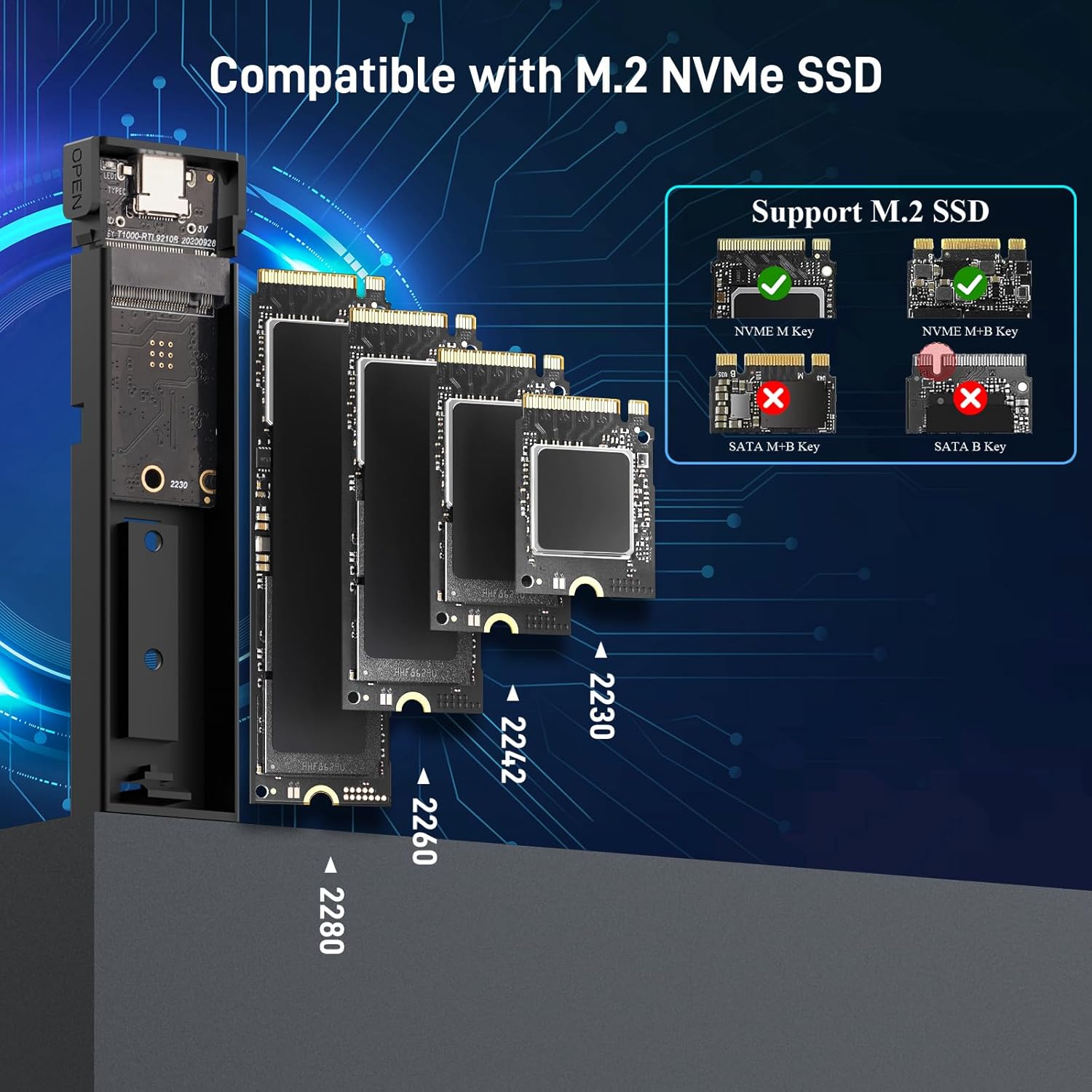
Image: Visual guide to compatible M.2 NVMe SSD types (M-Key, B+M Key) and supported lengths (2230, 2242, 2260, 2280).
System Compatibility:
- Windows operating systems
- macOS operating systems
- Linux operating systems
- Compatible with various devices including PCs, laptops, smartphones, and tablets.

Image: The enclosure is compatible with a wide range of devices and operating systems, including PC, Laptop, Phone & Tablet, TV box, and Projector, running Windows, Mac OS, Android, Linux, and iOS.
Setup & Installation
The xiaobi M.2 NVMe SSD Enclosure features a tool-free design for quick and easy installation.
Step-by-Step Guide:
- Open the Enclosure: Press the 'OPEN' buttons on both sides of the enclosure simultaneously using your fingers. This will release the internal tray.
- Insert the SSD: Gently insert your M.2 NVMe SSD into the M-Key slot on the internal tray. Secure the SSD in place using the provided rubber plug at the end.
- Apply Thermal Pad: Peel off the protective film from both sides of the silicone thermal pad. Carefully place the thermal pad onto the SSD chip. This helps in efficient heat dissipation.
- Close the Enclosure: Slide the internal tray back into the aluminum alloy housing until it clicks securely into place.

Image: A visual guide demonstrating the four steps for tool-free SSD installation: opening the enclosure, inserting the SSD, applying the thermal pad, and closing the lid.
Installation Video:
Video: This video demonstrates the tool-free installation process of an M.2 NVMe SSD into the xiaobi enclosure, showing how to open the case, insert the SSD, and secure it.
Operating Instructions
Connecting to a Device:
Use the included 2-in-1 USB-C to USB-C/USB-A cable to connect the enclosure to your computer, laptop, smartphone, or tablet. The enclosure is plug-and-play, requiring no additional drivers or software installation.
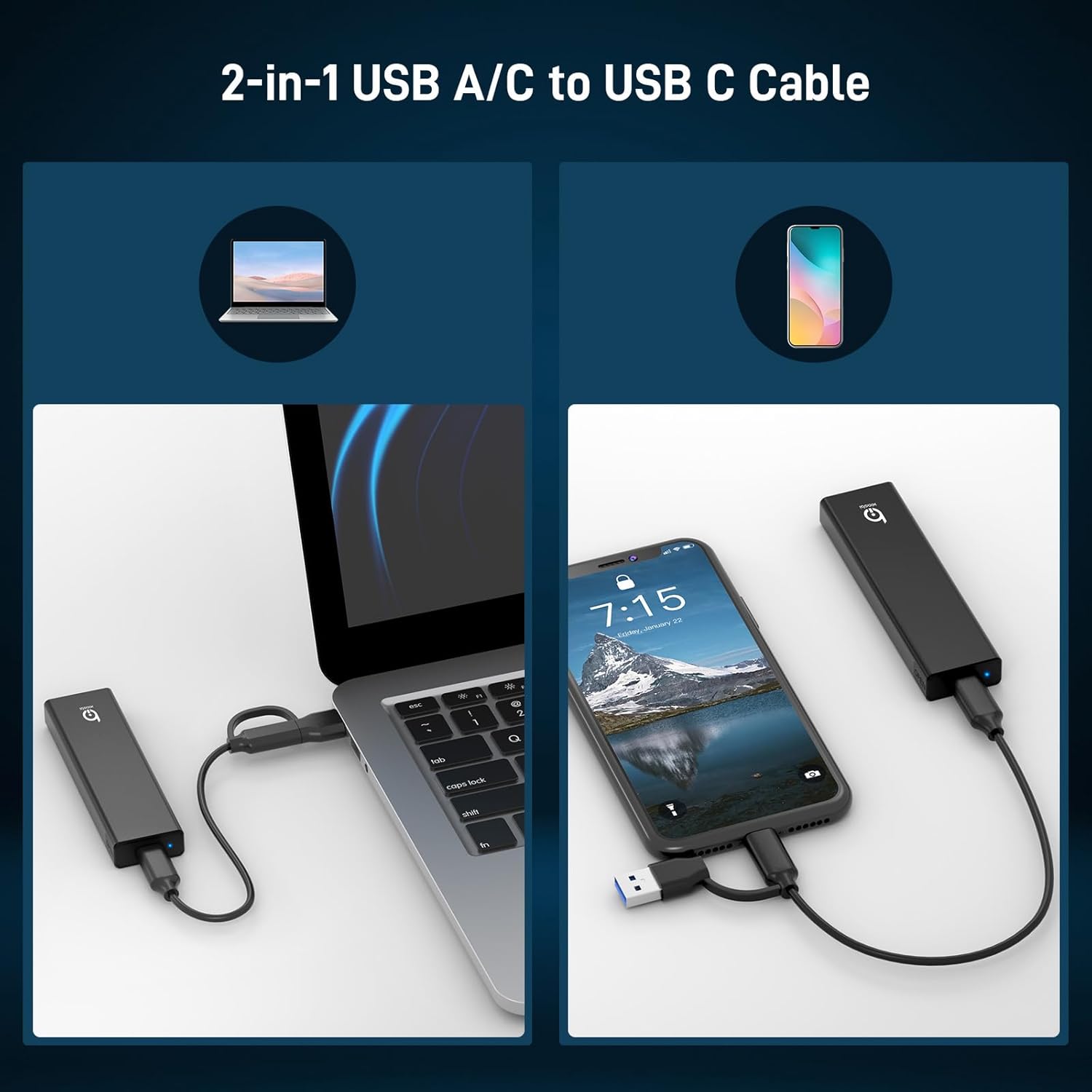
Image: The versatile 2-in-1 USB cable allows connection to both USB-A and USB-C ports on various devices.
Data Transfer:
The enclosure supports USB 3.2 Gen 2, providing data transfer speeds of up to 10Gbps. Actual transfer speeds may vary depending on the SSD's performance, the host device's USB port, and system specifications.

Image: A visual representation of 10Gbps transfer speeds, highlighting the performance advantage of NVMe over SATA.
UASP and Trim Support:
The enclosure supports UASP (USB Attached SCSI Protocol) and Trim commands, which optimize data transfer efficiency and help maintain the performance and lifespan of your SSD.
Maintenance
Heat Dissipation:
The aluminum alloy housing and silicone thermal pad are designed to effectively dissipate heat, preventing your SSD from overheating during prolonged use or high-speed transfers. Ensure the thermal pad is correctly installed for optimal cooling.

Image: An illustration detailing the internal components, including the aluminum alloy housing and silicone thermal pad, working together for efficient heat dissipation.
General Care:
- Keep the enclosure clean and free from dust.
- Avoid exposing the device to extreme temperatures or humidity.
- Do not attempt to disassemble the enclosure beyond the intended tool-free access.
Troubleshooting
SSD Not Recognized:
- Ensure the M.2 NVMe SSD is correctly inserted into the enclosure and secured with the rubber plug.
- Verify that the enclosure is securely connected to your device's USB port. Try a different USB port or cable.
- Check if your SSD is an NVMe (M-Key or B+M Key) type. This enclosure is not compatible with SATA M.2 SSDs.
- For new SSDs, it may need to be initialized and formatted in your operating system's Disk Management (Windows) or Disk Utility (macOS).
Slow Transfer Speeds:
- Ensure your device's USB port supports USB 3.2 Gen 2 (10Gbps) or at least USB 3.0/3.1 for optimal speeds. Older USB 2.0 ports will result in significantly lower speeds.
- The actual speed depends on the performance of your M.2 NVMe SSD.
- For SSDs with 2TB capacity or larger, connecting the USB cable to a rear USB port on your computer case is recommended for better stability.
- Confirm the thermal pad is properly installed to prevent thermal throttling, which can reduce performance.
Specifications
| Feature | Specification |
|---|---|
| Model Number | Bi-M217 |
| Brand | xiaobi |
| Hardware Interface | USB 3.2 Gen 2, USB Type C |
| Data Transfer Rate | 10 Gigabits Per Second |
| Compatible SSDs | M.2 NVMe (M-Key / B+M Key) |
| Supported SSD Sizes | 2230, 2242, 2260, 2280 |
| Max Storage Capacity | 8 TB |
| Compatible Devices | Desktop, Laptop, Smartphone, Tablet |
| Compatible Systems | Windows, macOS, Linux |
| Material | ABS plastic, Aluminum |
| Item Weight | 3.17 ounces |
| Package Dimensions | 5.47 x 3.58 x 0.67 inches |
Warranty & Support
xiaobi products are designed for reliability and performance. For specific warranty details and technical support, please refer to the official xiaobi brand store or contact customer service through your purchase platform.
You can visit the official xiaobi store for more information and support: xiaobi Store on Amazon
Ask a question about this manual
Ask about setup, troubleshooting, compatibility, parts, safety, or missing instructions. Manuals+ will review the question and use this page’s manual context to help answer it.