
1. Product Overview
This manual provides essential information for the installation and proper use of the SwarKing Replacement LCD Display Touch Screen Digitizer Assembly. This product is designed to replace faulty or damaged screens on compatible Boost Mobile Summit 5G SN339D-SMT devices, restoring full display and touch functionality.

Image 1.1: SwarKing Replacement LCD Display Touch Screen Digitizer Assembly with included repair tools.
2. Compatibility
This replacement LCD Display Touch Screen Digitizer Assembly is specifically compatible with the following mobile phone model:
- Boost Mobile Summit 5G SN339D-SMT
Please verify your device's model number before proceeding with the purchase and installation to ensure proper fit and function.

Image 2.1: Visual confirmation of compatible model: Boost Mobile Summit 5G SN339D-SMT.
3. Package Contents
Upon opening the package, please ensure all the following items are present and in good condition:
- 1 x High-quality LCD Touch Screen Replacement (Black with Frame)
- 1 x Set of Special Removal Tools (6 x screwdrivers)
- 2 x 3M Adhesive Tapes
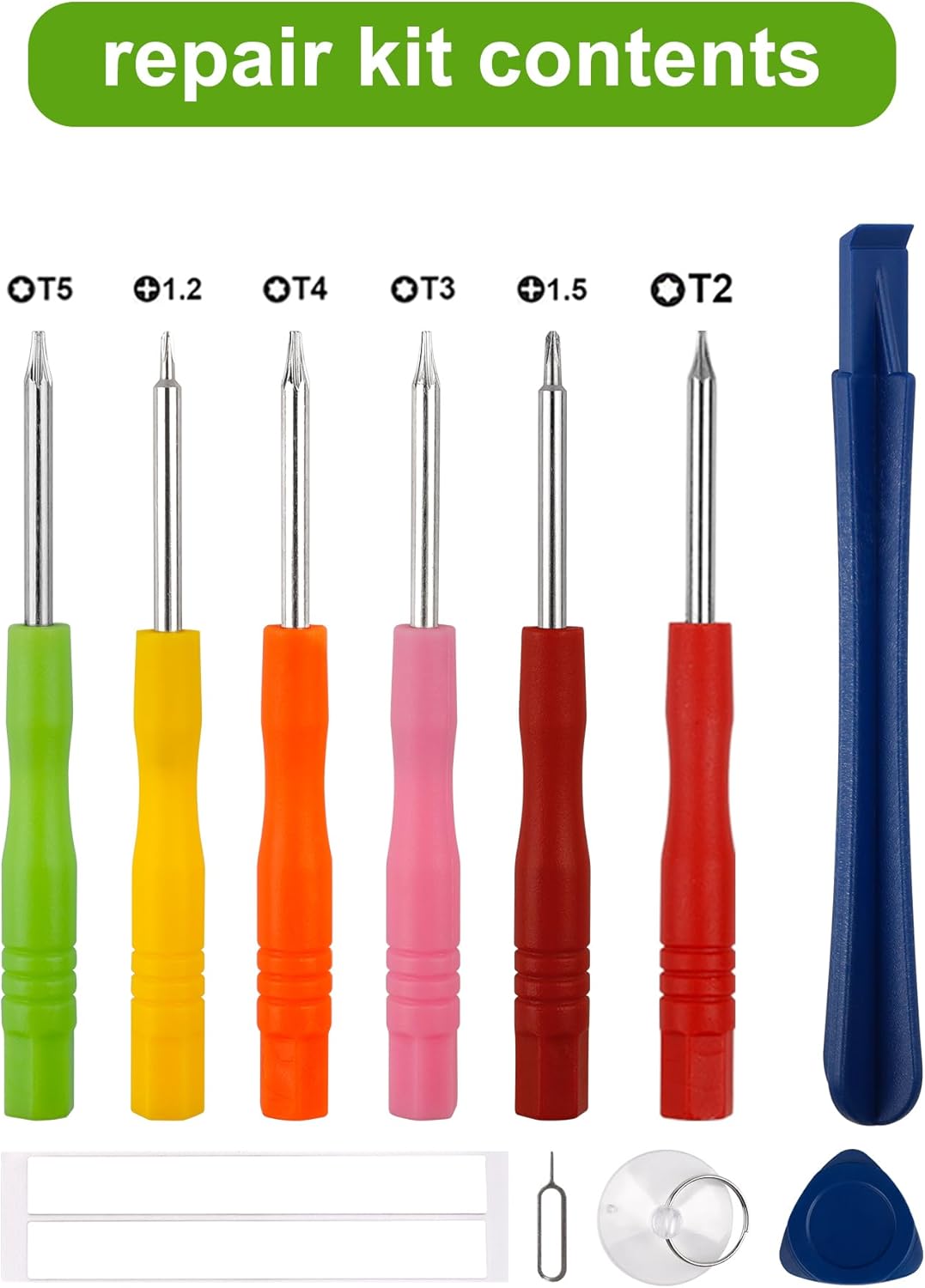
Image 3.1: Contents of the repair kit, including various screwdrivers and other necessary tools.
4. Setup and Installation Precautions
Replacing a mobile phone screen requires careful handling and attention to detail. Improper installation can lead to damage to the new screen or the device. We highly recommend professional installation if you are not confident in your technical abilities.
Important Steps Before Installation:
- Disconnect Battery: Before beginning any work, unplug the battery connector and remove the battery from the device. This prevents short circuits and potential damage to the phone's internal components during the repair process.
- Watch Instruction Videos: There are numerous instructional videos available online (e.g., on YouTube) demonstrating the screen replacement process for your specific phone model. Watching these videos thoroughly before starting is crucial for understanding each step.
- Test Before Installation: The screen replacement is a very fragile product. Before fully installing the screen, connect the new display's flex cable to the motherboard and test its functionality (touch, display, brightness) without fully adhering it to the frame. This ensures the screen is working correctly before final assembly.
- Handle Flex Cables Carefully: Ensure the LCD cable is not over-bent. Bending the cable beyond 90 degrees can cause irreversible damage, leading to a black display or other display issues.
- Use Correct Screwdrivers and Track Screws: Use the correct screwdriver for each screw. Mobile phone screws often vary in size and length. Mark the screws and keep track of their original locations. Placing a screw of incorrect size or length into the wrong hole can damage the phone's internal structure or the new screen.

Image 4.1: Rear view of the LCD display assembly, showing the flex cable connection point.

Image 4.2: The LCD display separated from its frame, illustrating the components involved in replacement.
5. Operating (Post-Installation Functionality)
Once the new LCD Display Touch Screen Digitizer Assembly is correctly installed, your Boost Mobile Summit 5G SN339D-SMT device should regain its full display and touch capabilities. The screen will function identically to the original, allowing for normal phone operation.
- Display Clarity: Expect clear, vibrant visuals.
- Touch Responsiveness: The touch screen should respond accurately and smoothly to all gestures and taps.
- Brightness Adjustment: The screen's brightness should be adjustable via the phone's settings.
6. Maintenance
To ensure the longevity and optimal performance of your new screen, follow these maintenance guidelines:
- Clean Gently: Use a soft, lint-free cloth (e.g., microfiber) to clean the screen. For stubborn smudges, slightly dampen the cloth with water or a screen-specific cleaner. Avoid harsh chemicals or abrasive materials.
- Avoid Pressure: Do not apply excessive pressure to the screen, especially when cleaning or handling the device.
- Protect from Drops: While the new screen replaces a damaged one, it is still susceptible to impact. Consider using a screen protector and a protective case for your phone to prevent future damage.
- Temperature Extremes: Avoid exposing the device to extreme temperatures (very hot or very cold), as this can affect screen performance and lifespan.
7. Troubleshooting
If you encounter any issues after installation, refer to the common problems and solutions below. Many display issues can arise from improper installation.

Image 7.1: Examples of common screen issues that this replacement part addresses.
| Problem | Possible Cause | Solution |
|---|---|---|
| Black Display / No Image |
|
|
| White Screen / Blurred Screen |
|
|
| Lines Appear on LCD Screen |
|
|
| Touch Screen Unresponsive |
|
|
If problems persist after attempting these solutions, it is recommended to seek assistance from a professional technician or contact customer support.
8. Specifications
| Compatible Models | Boost Mobile Summit 5G SN339D-SMT |
| Color | Black (with Frame) |
| Type | LCD Display Touch Screen Digitizer Assembly |
| Parcel Dimensions | 18.7 x 10.4 x 2.8 cm |
| Item Weight | 180 g |
| Manufacturer | shenzhen baoran keji youxiangongsi |
9. Customer Support
Your satisfaction is important to us. If you have any questions, concerns, or encounter any issues with the product you have received, please do not hesitate to contact us.
We are committed to providing professional solutions and satisfactory service within 24 hours.
Contact Information:
- Please refer to your purchase platform (e.g., Amazon) for direct seller contact options.