
EMIAH YMX-C590-10-1
EMIAH C590 Series Office Chair User Manual
Model: YMX-C590-10-1
Introduction
This manual provides detailed instructions for the assembly, operation, and maintenance of your EMIAH C590 Series Office Chair. Please read this manual thoroughly before assembly and use to ensure proper function and safety.
Safety Information
- Assembly may require tools and caution.
- Do not exceed the maximum weight capacity of 300 pounds.
- Keep the chair clean by wiping with a damp cloth. Avoid liquids and harsh chemicals.
Package Contents
Please verify that all components are present before beginning assembly.
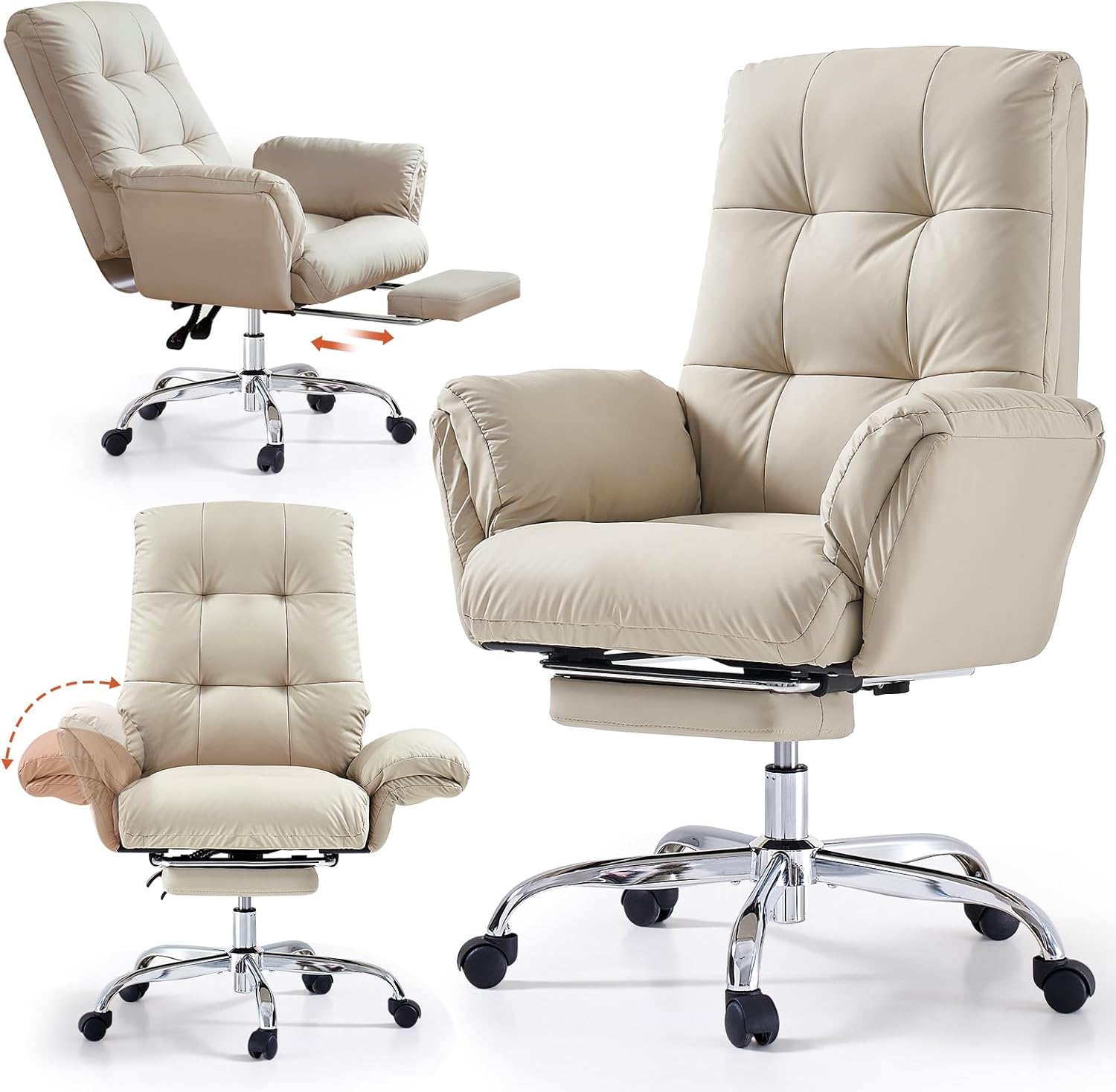
Image: The EMIAH C590 Series Office Chair, fully assembled, providing a visual reference for the complete product.
- Backrest x 1
- Seat Cushion x 1
- Right Armrest x 1
- Left Armrest x 1
- Base Legs x 5
- Nylon Casters x 5
- Five-Star Accessory x 1
- Footrest Accessory 1 x 2
- Footrest Accessory 2 x 2
- Control System x 1
- Metal Connection Tab x 1
- Gas Lever x 1
- Foot Rest x 1
- Foot Connecting Rods x 1
- A-H Screws x 8 Packages
- I & J Wrenches x 2
Assembly Instructions
For a visual guide, please refer to the assembly video below. During installation, when tightening screws, please tighten them to about 80% looseness first. When all screws are aligned, then fully tighten them.
Video: EMIAH C590 Series Chair Assembly Guide. This video demonstrates the step-by-step assembly process for the office chair.
- Step 1: Assemble the Chair Base
Attach the Base Legs using the Five-Star Accessory and B Screws. Then, add the Casters to the Base. Use Wrench J for tightening.
- Step 2: Insert Gas Lever
Insert the Gas Lever into the center hole of the assembled base.
- Step 3: Attach Armrests to Seat Cushion
Attach the left and right Armrests to the Seat Cushion using Screws C and Wrench J.
- Step 4: Assemble the Footrest
Attach the footrest to the connecting rod using screw D and footrest accessory 1. Use Wrench J. Then, attach footrest accessory 2 to the bottom of the seat cushion using screw E and wrench I.
- Step 5: Attach Control System
Attach the control system to the bottom of the seat cushion using screw F and wrench J.
- Step 6: Attach Metal Connecting Tab to Backrest
Attach the metal connecting tab to the backrest using screw G and wrench J.
- Step 7: Connect Seat Cushion to Gas Lever Base and Backrest
Connect the assembled seat cushion with the gas lever base. Insert the metal connecting plate on the backrest into the seat cushion slot, secure it with screw H and wrench J, then attach the back cover to the bottom of the seat cushion.
Operating Instructions
Your EMIAH C590 Series Office Chair offers several adjustable features for personalized comfort.
Video: EMIAH C590 Series Office Chair Product Overview. This video highlights the key features and adjustments of the office chair.
- Height Adjustment: Use the LIFT control lever (located under the seat) to adjust the chair's height. Pull the lever up to raise the seat, or pull it up while seated to lower the seat.
- Reclining Function: The backrest angle can be adjusted and locked at any position between 90° and 155°. Move the LOCK control lever up or down to freely adjust the backrest angle.

Image: A person relaxing in the EMIAH C590 chair with the backrest reclined and footrest extended.
- Adjustable Footrest: The chair includes a built-in footrest that can be extended to support your legs when reclining. Pull the footrest out from under the seat when needed, and push it back in for storage.
- Flip-up Armrests: The armrests can be flipped up to allow for more space, such as sitting cross-legged, or to push the chair closer to a desk.

Image: Two EMIAH C590 chairs demonstrating the armrests in both the standard and flipped-up positions.
- Criss-Cross Seating: The wide seat design accommodates various sitting postures, including criss-cross.

Image: A collage showing different comfortable sitting positions, including criss-cross, in the EMIAH C590 chair.
Maintenance
To maintain the quality and longevity of your EMIAH C590 Series Office Chair:
- Cleaning: Wipe clean with a damp cloth. Avoid using harsh chemicals or abrasive cleaners, as these can damage the PU leather material.
- Inspection: Periodically check all screws and connections to ensure they are tight. Re-tighten if necessary.
- Casters: Keep casters free of debris to ensure smooth rolling.
Troubleshooting
If you encounter any issues with your EMIAH C590 Series Office Chair, please consider the following common solutions:
- Chair feels wobbly: Ensure all assembly screws are fully tightened. Check that the gas lever is properly seated in the base.
- Casters not rolling smoothly: Inspect casters for any trapped hair or debris and clean them.
- Height adjustment not working: Verify that the gas lever is correctly installed and not obstructed. Ensure the lever is fully engaged when attempting to adjust height.
- Recline function not locking: Check that the recline lock lever is fully engaged in the desired position.
If problems persist, please contact customer support for further assistance.
Specifications

Image: Detailed diagram showing the dimensions of the EMIAH C590 Series Office Chair.
| Brand | EMIAH |
| Model Name | YMX-C590-10-1 |
| Color | Beige |
| Product Dimensions | 27.56"D x 36.61"W x 40"H |
| Item Weight | 42.1 pounds |
| Maximum Weight Recommendation | 300 Pounds |
| Material | PU Leather, Sponge (Fill Material) |
| Special Features | Adjustable Backrest, Arm Rest, Back Support, Ergonomic, Reclining, Foot Rest |
| Reclining Angle | 90° - 155° |
| Seat Height | 18.5 Inches |
| Seat Depth | 18.5 inches |
| Assembly Required | Yes |
Warranty and Support
EMIAH offers the following support for your product:
- After-Sales Service: 30-day after-sales service policy.
- Quality Support: One-year quality support.
- Our dedicated customer service team is available to assist with any pre-sales or after-sales inquiries.
Ask a question about this manual
Ask about setup, troubleshooting, compatibility, parts, safety, or missing instructions. Manuals+ will review the question and use this page’s manual context to help answer it.