Introduction
Thank you for purchasing the Commercial Electric 7130-16-CE Bathroom Exhaust Fan. This unit is designed to provide efficient ventilation, integrated audio via a Bluetooth speaker, and versatile lighting with adjustable CCT LED and a night light function. This manual provides essential information for safe installation, operation, and maintenance of your new exhaust fan. Please read all instructions carefully before installation and retain this manual for future reference.
Safety Information
WARNING: To reduce the risk of fire, electric shock, or injury to persons, observe the following:
- Installation work and electrical wiring must be done by qualified person(s) in accordance with all applicable codes and standards, including fire-rated construction codes and standards.
- Use this unit only in the manner intended by the manufacturer. If you have questions, contact the manufacturer.
- Before servicing or cleaning unit, switch power off at the service panel and lock the service disconnecting means to prevent power from being switched on accidentally. When the service disconnecting means cannot be locked, securely fasten a prominent warning device, such as a tag, to the service panel.
- Do not use this fan with any solid-state speed control device.
- This unit is intended for installation in a ceiling only.
- Always wear safety glasses and gloves during installation.
Package Contents
Verify that all components are present before beginning installation. If any parts are missing or damaged, do not attempt to install the product. Contact customer service for assistance.
- Exhaust Fan Unit (Housing, Motor, Blower)
- Grille with Integrated LED Light and Bluetooth Speaker
- Mounting Hardware
- Duct Connector
- User Manual
- Tools (as specified in product packaging)
Setup and Installation
Proper installation is crucial for the performance and safety of your exhaust fan. Consult a qualified electrician if you are unsure about any part of the installation process.
- Preparation: Turn off power at the circuit breaker. Determine the desired mounting location in the ceiling, ensuring adequate space for the fan housing and ductwork.
- Cut Opening: Create a ceiling opening according to the dimensions provided in the installation template (if included) or product specifications.
- Mount Housing: Secure the fan housing to the ceiling joists using the provided mounting hardware. Ensure the housing is level and firmly attached.
- Duct Connection: Connect the appropriate size ductwork (typically 4-inch round) to the fan's duct connector. Seal all duct connections with duct tape or clamps to prevent air leakage.
- Electrical Wiring: Connect the fan's wiring to the household electrical supply in accordance with local electrical codes. This typically involves connecting the hot, neutral, and ground wires. Ensure separate wiring for the fan, main LED light, and night light if controlled independently.
- Install Grille: Once wiring is complete and secured, attach the grille assembly to the fan housing. Ensure the spring clips or mounting tabs are properly engaged.
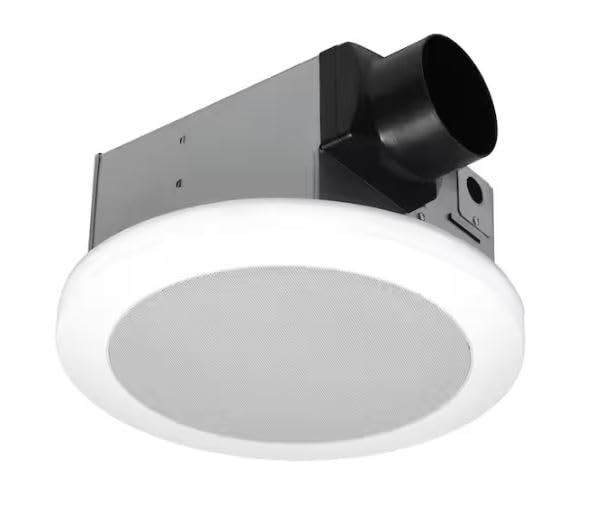
Image 1: Commercial Electric 7130-16-CE Bathroom Exhaust Fan Unit. This image displays the Commercial Electric 7130-16-CE ceiling bathroom exhaust fan unit. It features a white circular grille with a speaker mesh in the center, integrated with the fan housing and duct connector visible at the top. The unit is designed for ceiling installation.
Operating Instructions
After successful installation, restore power to the unit at the circuit breaker.
Fan and Light Operation
- Fan: Operate the fan using the designated wall switch.
- Main LED Light: Operate the main LED light using its dedicated wall switch.
- Adjustable CCT: If your wall switch supports CCT adjustment (e.g., toggle switch), cycle through color temperatures (Warm White, Neutral White, Cool White) by quickly toggling the light switch OFF and ON.
- Night Light: Operate the night light using its dedicated wall switch.
Bluetooth Speaker Operation
- Power On: Ensure the fan unit has power. The Bluetooth speaker will typically enter pairing mode automatically when powered on for the first time or if not connected to a device.
- Enable Bluetooth: On your mobile device (smartphone, tablet, etc.), enable Bluetooth.
- Pairing: Search for available Bluetooth devices. The fan's speaker will appear as a device name (e.g., "CE Fan Speaker" or similar). Select it to pair.
- Playback: Once paired, you can play audio from your device through the fan's speaker. Control volume and track selection from your mobile device.
- Reconnection: The speaker will usually automatically reconnect to the last paired device when both are within range and Bluetooth is enabled.
Maintenance
Regular maintenance ensures optimal performance and longevity of your exhaust fan. Always disconnect power before performing any maintenance.
- Grille Cleaning: Periodically remove the grille and wash it with mild soap and water. Rinse thoroughly and dry completely before reattaching.
- Fan Blade Cleaning: With the power off, carefully wipe the fan blades and motor housing with a damp cloth to remove dust and debris. Do not allow water to enter the motor.
- LED Light: The integrated LED lights are designed for long life and are not user-serviceable. If the light fails, the entire grille assembly may need replacement.
- Ductwork Inspection: Annually inspect ductwork for any blockages or damage that could impede airflow.
Troubleshooting
Before contacting customer service, review the following common issues and solutions.
| Problem | Possible Cause | Solution |
|---|---|---|
| Fan does not operate. | No power; loose wiring; faulty switch. | Check circuit breaker. Verify wiring connections. Test or replace wall switch. |
| Light does not turn on. | No power; loose wiring; faulty switch; LED failure. | Check circuit breaker. Verify wiring connections. Test or replace wall switch. Contact customer service if LED is faulty. |
| Bluetooth speaker does not connect. | Bluetooth not enabled on device; speaker not in pairing mode; already connected to another device. | Ensure Bluetooth is on. Power cycle the fan. Disconnect from other devices. Re-pair. |
| Excessive noise during operation. | Loose mounting; debris in fan blades; motor issue. | Ensure fan housing is securely mounted. Disconnect power and clean fan blades. If noise persists, contact customer service. |
| Poor ventilation. | Blocked ductwork; incorrect duct size; dirty fan blades. | Inspect and clear ductwork. Ensure proper duct size is used. Clean fan blades. |
Specifications
| Feature | Specification |
|---|---|
| Model Number | 7130-16-CE |
| Air Movement (CFM) | 110 |
| Sound Level (Sones) | 1.5 |
| Power Source | Hardwired (AC) |
| Lighting Type | Adjustable CCT LED, Night Light |
| Speaker | Integrated Bluetooth Speaker |
| Mounting Type | Ceiling Mount |
| Package Dimensions | 15.5 x 15.5 x 11 inches |
| Weight | 12.55 Pounds |
| Manufacturer | Commercial Electric |
| ASIN | B0FCMZVYMH |
Warranty and Support
This Commercial Electric product is manufactured to high-quality standards and is warranted to be free from defects in materials and workmanship. For specific warranty details, please refer to the warranty card included with your product or visit the Commercial Electric official website. For technical assistance, replacement parts, or any questions regarding your product, please contact Commercial Electric customer support.