1. Product Overview
The rgjzkgn 1080P FHD Mini Body Camera is a compact, hands-free wearable device designed for capturing high-quality video and photos in various settings. Featuring 1080P FHD@30fps video recording, 12M photo capability, anti-shake technology, and a 1.47-inch TFT screen for instant playback, this camera is ideal for work, travel, sports, and outdoor adventures. Its thumb-sized design and multiple mounting options ensure versatility and ease of use.
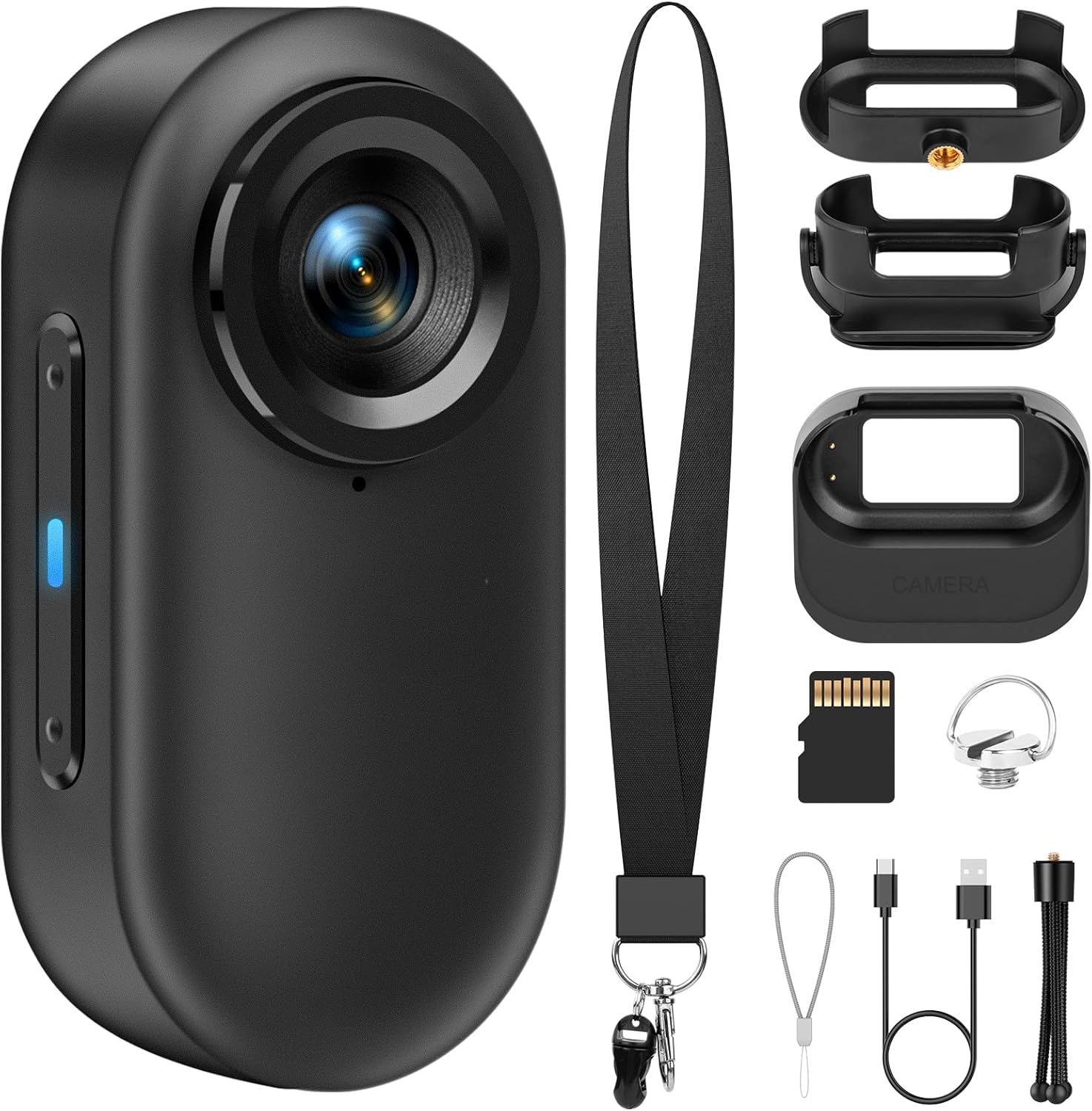
Figure 1.1: The rgjzkgn 1080P FHD Mini Body Camera shown with its various accessories, including the charging case, lanyard, clips, and tripod.
2. What's in the Box
Please verify that all items listed below are included in your package:
- 128GB Body Camera (1)
- Magnet Charging Case Pendant (1)
- Safety Cord (1)
- Portable Back Clip (1)
- Tripod (1)
- USB Cable (1)
- Screw (1)
Figure 2.1: All components included in the product packaging.
3. Setup
3.1 Charging the Camera
Before first use, fully charge the camera. Connect the camera to a power source using the provided USB cable. The camera supports charging while recording when used with the Magnet Charging Case Pendant.
3.2 Inserting the SD Card
The camera comes with a 128GB memory card pre-installed. Ensure it is properly seated before operation. This card can store approximately 900 minutes of 1080P FHD video.
3.3 Attaching Accessories
The camera offers versatile mounting options:
- Magnet Pendant: Snap the camera into the magnet charging case pendant and hang it around your neck with the safety cord for secure, hands-free recording.
- Portable Back Clip: Attach the clip to the camera to secure it to clothing (shirt, dress), a belt, or even a pet's collar.
- Tripod: Mount the camera onto the included tripod for stable recording on flat surfaces.

Figure 3.1: Examples of how to carry the camera using the magnet pendant, clip, or tripod.
4. Operating Instructions
4.1 Power On/Off and Quick Capture
- Power ON: Long-press the right button for about 3 seconds to turn on the camera.
- Quick Capture: With one press, you can easily start recording. A blue indicator light will flash during recording to confirm operation.
- Power OFF: If you finish your recording, long-press the right button for about 3 seconds to turn off the camera.

Figure 4.1: Visual guide for basic camera operation.
4.2 Viewing Playback
The camera features a 1.47-inch TFT screen, allowing you to immediately check and play back recorded videos and photos directly on the device.

Figure 4.2: The camera's display allows for immediate review of captured footage.
4.3 Connecting to a Computer
To transfer or view files on a larger screen, connect the camera to your computer using the provided USB cable. The camera will appear as a removable disk, allowing you to easily access and manage your audio and video files.

Figure 4.3: Connecting the camera to a computer for file transfer.
5. Features
- 1080P FHD Support: Records high-definition video at 1080P FHD@30fps and captures 12M photos.
- Anti-shake Technology: Utilizes intelligent anti-shake algorithms to ensure stable and clear footage, even during movement.
- User-Friendly Operation: Simple one-press recording activation, suitable for all users.
- Compact & Lightweight: Measures 62 x 30 x 18mm and weighs only 1.23oz (34.87g), making it highly portable.
- Long Battery Life: Offers up to 4.5 hours of continuous recording (2 hours from camera, 2.5 hours from charging case).
- 128GB Memory Card: Provides ample storage for extended recording sessions.
- Hands-Free Design: Multiple attachment options (magnet pendant, clip, tripod) allow for versatile, hands-free use.
- Motion Detection: Automatically begins recording when a moving object is detected.
- Loop Recording: Automatically overwrites the oldest video files when the SD card reaches its storage limit, ensuring continuous recording.
- Universal Compatibility: Suitable for monitoring babies, pets, elderly parents, or for use in various environments like offices, homes, and outdoors.

Figure 5.1: Detailed dimensions and screen size of the camera.

Figure 5.2: Visual demonstration of the camera's anti-shake capabilities.
6. Maintenance
- Cleaning: Use a soft, dry cloth to clean the camera body and lens. Avoid using harsh chemicals or abrasive materials.
- Storage: Store the camera in a cool, dry place away from direct sunlight and extreme temperatures.
- Battery Care: To prolong battery life, avoid fully discharging the battery frequently. Charge the camera regularly, even if not in use for extended periods.
- SD Card: Periodically back up important recordings from the SD card to a computer or external storage device. Format the SD card regularly to maintain optimal performance.
7. Troubleshooting
| Problem | Possible Cause | Solution |
|---|---|---|
| Camera not turning on | Low battery; Power button not pressed long enough | Charge the camera fully; Long-press the power button for 3 seconds |
| Cannot record video | SD card full; SD card error; Camera in wrong mode | Transfer files and format SD card; Reinsert or replace SD card; Check operating mode |
| Poor video quality | Dirty lens; Insufficient lighting; Excessive movement | Clean the lens; Ensure adequate lighting; Utilize anti-shake feature or stabilize camera |
| Camera not recognized by computer | Faulty USB cable; Driver issue; Incorrect connection | Try a different USB cable; Restart computer; Ensure proper connection |
8. Specifications
| Feature | Detail |
|---|---|
| Brand Name | rgjzkgn |
| Model Number | C1-KC665-1 |
| Item Weight | 5.9 ounces |
| Package Dimensions | 6.18 x 4.02 x 1.73 inches |
| Batteries | 1 AAA batteries required (included) |
| Color | Black |
| Special Features | Anti-Shake, Lightweight, Motion Detection, Shock Resistance, Compact |
| Video Capture Resolution | 1080p |
| Media Type | Micro SD Card |
| Shooting Modes | Sports, Landscape, Burst, Time-lapse |
| Exposure Control Type | Automatic |
| Visible Screen Diagonal | 1.47 inches / 4 cm |
9. Warranty and Support
For warranty information and technical support, please refer to the product packaging or contact the manufacturer directly through their official website. Keep your purchase receipt as proof of purchase for any warranty claims.
For further assistance, you may also visit the rgjzkgn Store on Amazon: rgjzkgn Store