
CamZeste PH770T
CamZeste PH770T 4K WiFi Hunting Camera User Manual
Comprehensive instructions for setup, operation, and maintenance.
Introduction
The CamZeste PH770T is a high-performance hunting camera designed for capturing wildlife and monitoring outdoor areas. It features 84MP photo resolution, 4K Ultra HD video recording, a rapid 0.1-second trigger speed, and a wide 130-degree detection angle. Equipped with advanced infrared night vision and IP66 waterproofing, it ensures reliable operation in various environmental conditions. This manual provides detailed guidance to help you set up, operate, and maintain your camera effectively.

Figure 1: CamZeste PH770T Hunting Camera. This image shows the front view of the camera, highlighting its camouflage design, lens, and infrared LEDs. It also displays icons for WiFi and Bluetooth connectivity, along with a smartphone screen showing a bear, indicating its use for wildlife monitoring.
1. Setup
1.1 Package Contents
Before proceeding with the setup, please verify that all components are present in the package:
- 1 x CamZeste PH770T Hunting Camera
- 8 x AA Batteries
- 1 x 32GB Micro SD Card
- 1 x Type-C USB Cable
- 1 x Mounting Strap
- 1 x User Manual (French version included, this document is an English guide)
- 1 x Tripod & Stand Support
- 3 x Bolts and Screws for mounting

Figure 2: Included Components. This image illustrates all items typically found in the CamZeste PH770T package, including the camera, batteries, SD card, cables, and mounting accessories.
1.2 Battery Installation
The camera requires 8 AA batteries for operation. Ensure the batteries are inserted with the correct polarity.
- Open the camera's battery compartment latch, usually located on the side or bottom.
- Insert 8 AA batteries according to the polarity indicators (+/-) inside the compartment.
- Close the battery compartment securely to ensure waterproofing.
1.3 SD Card Installation
A 32GB Micro SD card is included for storing photos and videos. The camera supports up to 256GB Micro SD cards (Class 10 or higher recommended).
- Locate the Micro SD card slot, typically near the battery compartment or on the side.
- Insert the Micro SD card into the slot with the gold contacts facing the correct direction, until it clicks into place.
- To remove, gently push the card in until it springs out.
1.4 Mounting the Camera
The camera can be mounted using the included strap or the tripod/stand support.
- Strap Mounting: Thread the provided strap through the slots on the back of the camera and secure it around a tree or pole. Adjust the strap to ensure the camera is stable and pointed in the desired direction.
- Tripod/Stand Mounting: Use the standard 1/4-inch threaded insert at the bottom of the camera to attach it to the included tripod or any compatible mounting bracket.
- Screw Mounting: For permanent installation, use the provided bolts and screws to attach the camera to a wall or other flat surface.
Ensure the camera is positioned at an appropriate height and angle to capture the target area effectively, avoiding direct sunlight or strong light sources that might interfere with image quality or trigger false detections.
2. Operation
2.1 Basic Controls and Display
The camera features a 2.4-inch LCD screen and control buttons for direct operation. Familiarize yourself with the menu navigation and settings.
- Power Switch: Turn the camera ON/OFF.
- Mode Button: Switch between Photo, Video, and Playback modes.
- Menu Button: Access camera settings.
- Navigation Buttons: Use Up/Down/Left/Right to navigate menus and adjust settings.
- OK Button: Confirm selections.
2.2 Photo and Video Recording
The PH770T captures high-resolution images and videos:
- Photo Resolution: Up to 84 Megapixels.
- Video Resolution: Up to 4K Ultra HD.
To configure photo or video settings, enter the menu and select your preferred resolution, video length, and other parameters.

Figure 3: Image Clarity Comparison. This image demonstrates the superior clarity of 4K/84MP resolution (left) compared to 2K/48MP (right), highlighting the detailed capture capabilities of the CamZeste PH770T.
2.3 Motion Detection and Trigger Speed
The camera is equipped with three infrared sensors for wide-angle motion detection and a fast trigger speed to capture fleeting moments.
- Trigger Speed: 0.1 seconds.
- Detection Distance: Up to 25 meters (82 feet).
- Sensing Angle: 130 degrees.
Adjust the sensitivity of the motion sensors in the settings menu to optimize detection for your specific environment and target subjects.

Figure 4: Fast Trigger Speed. This image visually compares the 0.1-second trigger speed of the CamZeste PH770T (top) with a slower 0.5-second trigger speed (bottom), illustrating its ability to capture fast-moving subjects without blur.

Figure 5: Wide Detection Angle. This image shows the camera's 130-degree sensing angle and 25-meter detection distance, indicating its broad coverage for monitoring wildlife.
2.4 Night Vision
The PH770T utilizes 45 powerful 850nm infrared LEDs to provide clear night vision without startling animals.
- IR LEDs: 45 x 850nm.
- Night Vision Range: Up to 25 meters (82 feet).
The camera automatically switches to night vision mode in low-light conditions, ensuring continuous monitoring.
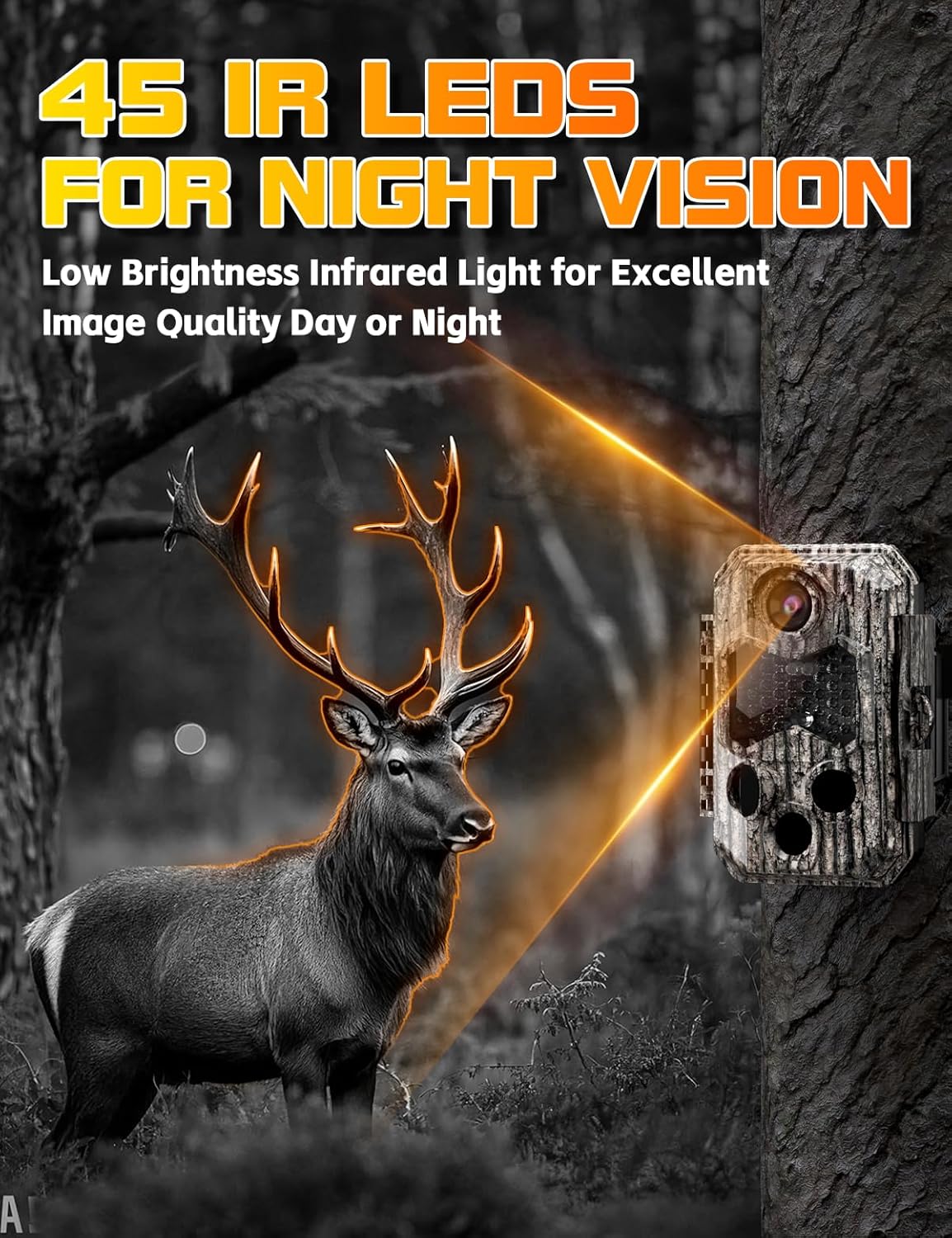
Figure 6: Infrared Night Vision. This image depicts the camera's 45 IR LEDs illuminating a deer at night, demonstrating its capability to capture clear images in complete darkness without visible light.
2.5 Wi-Fi Connection and App Usage
The camera can be accessed remotely via a user-friendly application (e.g., "Trail Camera Go" or similar, as mentioned in reviews) on your smartphone or tablet.
- Wireless Range: Approximately 20 meters (65 feet) in open, unobstructed areas.
- Note: This camera does not connect to home Wi-Fi networks. It establishes a direct Wi-Fi connection with your mobile device.
Steps for App Connection:
- Download the recommended application from your device's app store.
- Turn on the camera's Wi-Fi function (refer to the camera's on-screen menu).
- On your smartphone, connect to the camera's Wi-Fi network (SSID and password usually displayed on the camera screen or in the manual).
- Open the app to view live feed, review captured media, change settings, and download files to your phone.

Figure 7: Remote Access via App. This image shows a person using a smartphone to access the camera remotely, illustrating the ease of operation and monitoring within a 65-foot wireless range without needing a router.

Figure 8: File Viewing Options. This image displays three methods for viewing captured files: connecting the camera to a PC via Type-C cable, using the wireless app connection, or directly inserting the SD card into a computer with a card reader.
2.6 Loop Recording
The camera supports loop recording, which automatically overwrites the oldest files when the memory card is full. This ensures continuous recording without manual intervention.

Figure 9: Loop Recording. This image illustrates the loop recording process, where the camera automatically records, and when the memory card is full, it deletes the oldest files to make space for new recordings.
2.7 Time-Lapse Function
The time-lapse feature allows the camera to take photos at predefined intervals and combine them into an animated video. This is useful for observing long-term events like construction projects or plant growth.

Figure 10: Time-Lapse Photography. This image demonstrates the camera's time-lapse capability, showing a sequence of images capturing the progression of a house construction project over time.
3. Maintenance
3.1 Cleaning
- Regularly clean the camera lens and the PIR sensors with a soft, lint-free cloth to ensure optimal image quality and detection performance.
- Wipe the camera body with a damp cloth to remove dirt or debris. Avoid using harsh chemicals or abrasive materials.
3.2 Battery Care
- Replace all 8 AA batteries when the low battery indicator appears to ensure continuous operation.
- If the camera will not be used for an extended period, remove the batteries to prevent leakage and damage.
3.3 Storage
Store the camera in a cool, dry place away from direct sunlight and extreme temperatures when not in use.

Figure 11: IP66 Waterproofing. This image highlights the camera's IP66 waterproof rating, indicating its suitability for outdoor use in various weather conditions, including sun, rain, and snow.
4. Troubleshooting
This section addresses common issues you might encounter with your CamZeste PH770T camera.
4.1 Camera Not Powering On
- Check Batteries: Ensure 8 fresh AA batteries are correctly inserted with the proper polarity.
- Battery Type: Verify that you are using alkaline batteries as recommended.
- Power Switch: Make sure the power switch is in the 'ON' position.
4.2 No Photos/Videos Captured
- SD Card: Ensure the Micro SD card is properly inserted and not full. Format the SD card if it's new or causing issues (this will erase all data).
- Motion Sensor: Check the PIR sensor sensitivity settings. Increase sensitivity if needed.
- Placement: Ensure the camera is placed in an area where motion is expected and not obstructed. Avoid placing it directly facing strong light sources or heat sources that might cause false triggers.
- Mode: Confirm the camera is set to the correct operating mode (Photo or Video).
4.3 Poor Image/Video Quality
- Lens Cleanliness: Clean the camera lens and IR LEDs with a soft cloth.
- Lighting Conditions: Ensure adequate lighting during daytime. For night vision, confirm the IR LEDs are functioning.
- Distance: Subjects too far or too close may result in blurry images.
- Resolution Settings: Verify that the camera's photo and video resolution settings are set to the highest quality (84MP/4K).
4.4 Wi-Fi Connection Issues
- Range: Ensure your mobile device is within the 20-meter (65-foot) wireless range of the camera.
- Camera Wi-Fi: Confirm the camera's Wi-Fi function is enabled.
- App: Make sure you are using the correct and updated version of the companion app.
- Interference: Minimize obstacles between the camera and your mobile device.
- Home Wi-Fi: Remember, the camera does not connect to your home Wi-Fi network. It creates its own direct network.
5. Specifications
| Feature | Specification |
|---|---|
| Brand | CamZeste |
| Model Name | PH770T |
| Photo Resolution | 84 Megapixels |
| Video Recording Resolution | 4K Ultra HD |
| Trigger Speed | 0.1 seconds |
| Detection Angle | 130 Degrees |
| Night Vision Range | 25 Meters |
| Infrared LEDs | 45 x 850nm |
| Water Resistance Level | IP66 (Waterproof) |
| Power Source | 8 x AA Alkaline Batteries (Included) |
| Storage | Micro SD Card (32GB included, supports up to 256GB) |
| Wireless Connectivity | Wi-Fi, Bluetooth |
| Dimensions (L x W x H) | 10.1 x 8.6 x 14.6 cm (3.98 x 3.39 x 5.75 inches) |
| Weight | 750 grams (1.65 lbs) |
| Material | Acrylonitrile Butadiene Styrene (ABS) |
| Mounting Type | Tree Mount |
| Recommended Use | Wildlife monitoring, Outdoor security, Scouting |
6. Warranty and Support
For any product inquiries, technical support, or warranty claims, please contact CamZeste customer service through the platform where you purchased the product. Please retain your proof of purchase for warranty validation.
For further assistance, refer to the official CamZeste website or contact their support team directly.
Ask a question about this manual
Ask about setup, troubleshooting, compatibility, parts, safety, or missing instructions. Manuals+ will review the question and use this page’s manual context to help answer it.