
1. Introduction and Overview
The HumsiENK 12V 100Ah LiFePO4 Lithium Battery MAX PLUS is a high-performance, long-lasting power solution designed for a wide range of applications. This battery features advanced LiFePO4 cell technology, a built-in 110A Battery Management System (BMS), and Bluetooth 5.0 connectivity for real-time monitoring. It offers a significantly longer lifespan and lighter weight compared to traditional lead-acid batteries, making it an ideal choice for RVs, marine applications, trolling motors, solar systems, and various off-grid setups.

Figure 1: HumsiENK 12V 100Ah LiFePO4 Lithium Battery MAX PLUS. This image shows the battery unit with a smartphone displaying the Bluetooth app interface, highlighting its smart monitoring capabilities.
Key Features:
- Long Lifespan: Up to 10 years with 15000+ cycles at 60% Depth of Discharge (DOD).
- Compact & Lightweight: Weighs only 26 lbs, saving over 30% space compared to lead-acid batteries.
- Expandable System: Supports 4S4P configuration for up to 48V 400Ah (20.48kWh) systems.
- Smart BMS & Bluetooth 5.0: Built-in 110A BMS with Bluetooth for real-time monitoring via a dedicated app, offering protection against overcharge, overdischarge, over-current, and short-circuit.
- Extreme Conditions Resistance: Operates from -4°F to 150°F, with low-temperature charging cut-off below -4°F. IP67 waterproof rating.
2. Setup
Proper setup is crucial for the safe and efficient operation of your HumsiENK LiFePO4 battery. Always ensure all connections are secure and correctly polarized.
2.1 Unboxing and Inspection
Upon receiving your battery, carefully unbox it and inspect for any signs of damage. The package should include the battery, user manual, M8 terminals, and plastic insulating caps.
Video 1: HumsiENK 12V 100Ah Product Packaging Status. This video demonstrates the unboxing process and contents of the battery package.
2.2 Terminal Connection
Connect your cables to the battery terminals using the provided M8 bolts. Ensure the positive (+) cable connects to the positive terminal (red cap) and the negative (-) cable connects to the negative terminal (black cap). Tighten all connections securely to prevent arcing or poor contact.

Figure 2: Comparison of battery terminals. This image illustrates the M8 terminals for secure connections.
2.3 Charging the Battery
Use a dedicated LiFePO4 battery charger. Connect the charger's positive lead to the battery's positive terminal and the negative lead to the battery's negative terminal. Plug the charger into an appropriate power source. The battery's BMS will manage the charging process, preventing overcharge.
Video 2: HumsiENK 12V 100AH LiFePO4 Battery -110A BMS. This video demonstrates the charging operation of the battery.
2.4 Bluetooth App Connection
Download the HumsiENK Bluetooth app from your smartphone's app store. Enable Bluetooth on your device and open the app. Follow the in-app instructions to connect to your battery for real-time monitoring.

Figure 3: Wireless Control with Bluetooth 5.0. This image shows the smartphone app interface for monitoring battery status.
3. Operating Instructions
The HumsiENK LiFePO4 battery is designed for versatile and reliable power delivery across various environments.
3.1 Powering Devices
Once connected, the battery can power a wide range of 12V compatible devices. For AC appliances, an inverter is required. Ensure the inverter's capacity matches your load requirements.
Video 3: Battery Operated Use. This video demonstrates the battery powering various devices via an inverter.
3.2 Series and Parallel Configuration
The battery supports up to a 4S4P configuration, allowing for increased voltage (series) or capacity (parallel). For series connections, ensure all batteries are of the same voltage and capacity. For parallel connections, ensure all batteries are of the same voltage and capacity and are fully charged before connecting.

Figure 4: 4S4P Battery Configuration. This diagram illustrates how multiple batteries can be connected in series and parallel to expand the system's voltage and capacity.
3.3 Temperature Considerations
The battery operates efficiently within a wide temperature range of -4°F to 150°F. A built-in low-temperature cut-off feature automatically stops charging below -4°F to protect the battery and prolong its lifespan.
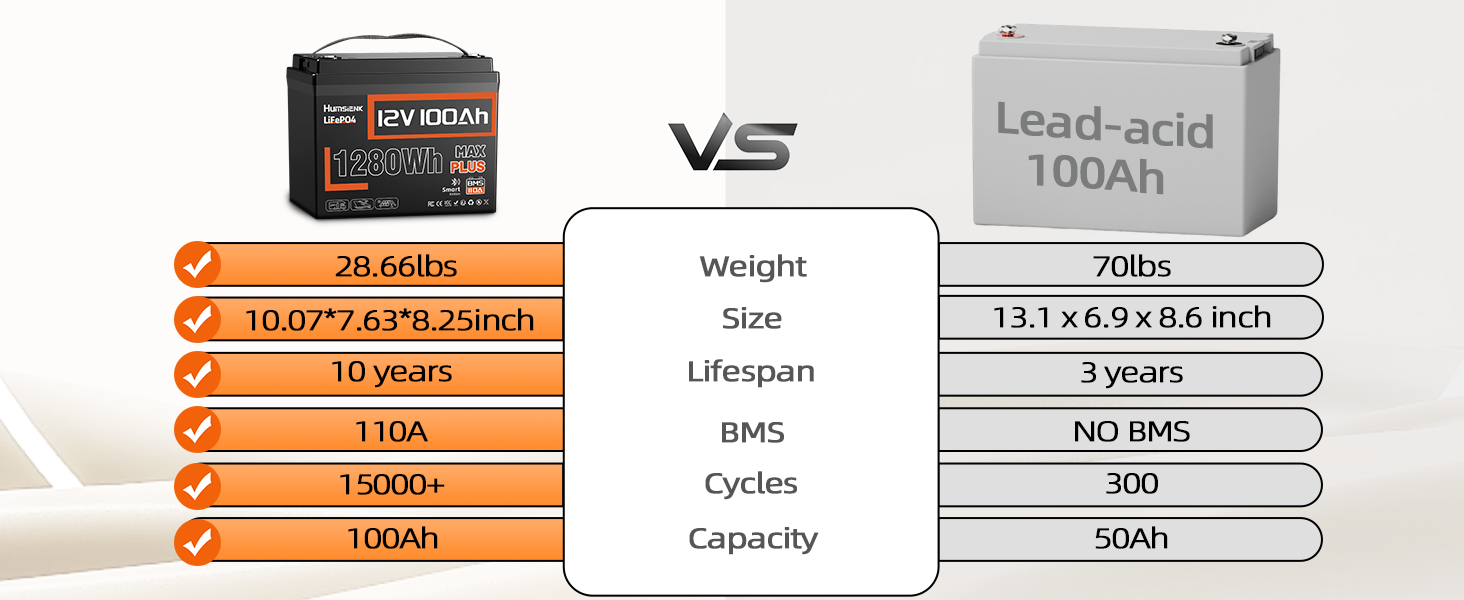
Figure 5: Operating in Extreme Temperatures. This image highlights the battery's wide operating temperature range and low-temperature charging protection.
4. Maintenance
LiFePO4 batteries require minimal maintenance compared to lead-acid batteries, but following these guidelines will ensure optimal performance and longevity.
4.1 Regular Inspection
Periodically check battery terminals for corrosion or loose connections. Ensure the battery casing is free from damage. The IP67 waterproof rating provides protection against moisture and rust, but regular visual inspection is recommended.

Figure 6: IP67 Waterproof Rating. This image shows the battery submerged in water, demonstrating its moisture-proof and anti-collision design.
4.2 BMS Protection
The built-in 110A BMS actively protects the battery from common issues such as overcharge, overdischarge, over-current, and short-circuit. This system ensures safe operation and extends the battery's life. Monitor BMS status via the Bluetooth app.
Video 4: 12V 100Ah LiFePO4 Battery 110A BMS with Bluetooth. This video highlights the BMS features and Bluetooth connectivity.
4.3 Storage
If storing the battery for an extended period, ensure it is charged to approximately 50% State of Charge (SOC) and stored in a cool, dry place. Avoid extreme temperatures during storage.
5. Troubleshooting
If you encounter issues with your HumsiENK LiFePO4 battery, refer to the following common troubleshooting steps:
- No Power Output: Check all cable connections for tightness and correct polarity. Verify the battery's State of Charge (SOC) via the Bluetooth app. The BMS may have activated a protection mode (e.g., over-discharge).
- Charging Issues: Ensure you are using a compatible LiFePO4 charger. Check charger connections and power supply. If charging in cold temperatures, the low-temperature cut-off may be active (charging will resume once the battery temperature rises above -4°F).
- Bluetooth Connectivity Problems: Ensure Bluetooth is enabled on your smartphone and the battery is within range. Restart the app and try reconnecting.
- Unusual Behavior: Consult the Bluetooth app for any alarm or protection messages from the BMS. This will provide specific diagnostic information.
For persistent issues, contact HumsiENK customer support for assistance.
6. Specifications
| Feature | Specification |
|---|---|
| Brand | HumsiENK |
| Model | 12V 100Ah LiFePO4 Lithium Battery 110 |
| Nominal Voltage | 12V |
| Nominal Capacity | 100Ah |
| Energy | 1280Wh |
| BMS | Built-in 110A Smart BMS |
| Bluetooth | Bluetooth 5.0 App Monitoring |
| Cycle Life | 15000+ cycles @ 60% DOD (6000+ cycles @ 80% DOD) |
| Lifespan | 10 Years |
| Operating Temperature | -4°F to 150°F (-20°C to 65°C) |
| Low Temperature Charging Cut-off | Below -4°F (-20°C) |
| Waterproof Rating | IP67 |
| Product Dimensions | 10.07 x 7.63 x 8.25 inches |
| Item Weight | 26 lbs |
| Max Expandable System | 4S4P (48V 400Ah, 20.48kWh) |
7. Warranty and Support
HumsiENK is committed to providing reliable products and excellent customer service.
7.1 Warranty
The HumsiENK 12V 100Ah LiFePO4 Lithium Battery MAX PLUS comes with a 5-year solution promise. This warranty covers defects in materials and workmanship under normal use and service conditions.
7.2 Customer Support
For any product-related problems or questions regarding your LiFePO4 battery, please do not hesitate to reach out to our support team. We offer professional technical support and a 24-hour satisfactory response customer online support.
Contact information can be found in your user manual or on the official HumsiENK website.