
Philips 6905302331
Philips 3600LM Solar Security Light User Manual
Model: 6905302331
1. Introduction
This manual provides essential information for the safe and efficient operation of your Philips 3600LM Solar Security Light. Please read this manual thoroughly before installation and use, and retain it for future reference.
The Philips Solar Security Light is designed for outdoor use, providing bright, motion-activated illumination with the convenience of solar power. It features a separate solar panel, three adjustable LED heads, and multiple operating modes to suit various outdoor lighting needs.

Image 1.1: Philips Solar Security Light components and packaging.
2. Safety Information
Observe the following safety precautions to prevent injury or damage:
- Ensure the mounting surface is stable and can support the weight of the light fixture.
- Do not look directly into the LED light source when it is illuminated, as this may cause eye strain or damage.
- Keep the solar panel clean to ensure optimal charging efficiency.
- Do not attempt to disassemble or modify the product. Refer all servicing to qualified personnel.
- Dispose of batteries according to local regulations.
3. Package Contents
Verify that all items are present in the package:
- 1 x Philips Solar Security Light Unit (with 3 adjustable heads and motion sensor)
- 1 x Separate Solar Panel (with 16ft cable)
- 4 x Mounting Screws
- 4 x Expansion Screws (Wall Anchors)
- 1 x User Manual (this document)

Image 3.1: Product dimensions and included accessories.
4. Product Features
The Philips Solar Security Light offers advanced features for reliable outdoor illumination:
- High Brightness: Provides up to 3600 lumens of 5000K cool white light.
- Adjustable Heads: Three LED light heads can be individually adjusted for wide coverage (up to 300°).
- Motion Sensor: Passive Infrared (PIR) sensor detects motion at a 180° angle with an adjustable range up to 59 feet.
- Separate Solar Panel: Allows optimal positioning for maximum sunlight exposure, connected by a 16-foot cable.
- Durable Design: Water-resistant and corrosion-resistant, designed to withstand various weather conditions.
- Multiple Lighting Modes: Includes Test Mode, Security Mode, and Dusk-to-Dawn Mode.

Image 4.1: Overview of product features.

Image 4.2: Adjustable light head design for customized coverage.
5. Installation Guide
The Philips Solar Security Light is designed for easy installation with no wiring required for power. It can be mounted on a wall or under an eave.
5.1 Choosing a Location
- Select a location for the solar panel that receives direct sunlight for at least 6-8 hours daily.
- Mount the light unit in the desired area, ensuring the motion sensor has an unobstructed view of the detection zone.
- Recommended light installation height: approximately 8.2 feet (2.5 meters) for optimal motion detection and light coverage.
5.2 Mounting Options
Image 5.1: Eave mounting and wall mounting options.
Note: For enhanced water resistance, ensure a tight seal between the mounting surface and the luminaire. Eave mounting may slightly reduce the sensing range.
5.3 Installation Steps
- Mark the drilling points on the wall or eave using the mounting bracket as a template.
- Drill holes at the marked points. Insert expansion screws (wall anchors) if mounting into masonry.
- Secure the mounting bracket for the light unit using the provided screws.
- Attach the light unit to the secured bracket.
- Mount the solar panel in a location with maximum direct sunlight using its separate bracket and screws.
- Connect the solar panel cable to the light unit. Ensure the connection is secure.
- Adjust the angle of the solar panel for optimal sun exposure and the light heads for desired coverage.
Image 5.2: Visual guide for installation steps.
6. Operation
The light unit features adjustable settings for sensitivity, duration, and brightness, along with three distinct operating modes.
6.1 Sensor Settings
The control panel on the underside of the light unit allows adjustment of the motion sensor and brightness settings:
- Sensitivity (L/M/H): Adjusts the detection range of the motion sensor.
- L (Low): 0-20 ft
- M (Medium): 0-39 ft
- H (High): 0-59 ft
- Duration (30S/60S/120S): Sets how long the light remains on after motion is detected.
- Brightness (OFF/50%/100%): Selects the desired brightness level when activated.
- OFF: Light remains off.
- 50%: 1800 lumens
- 100%: 3600 lumens
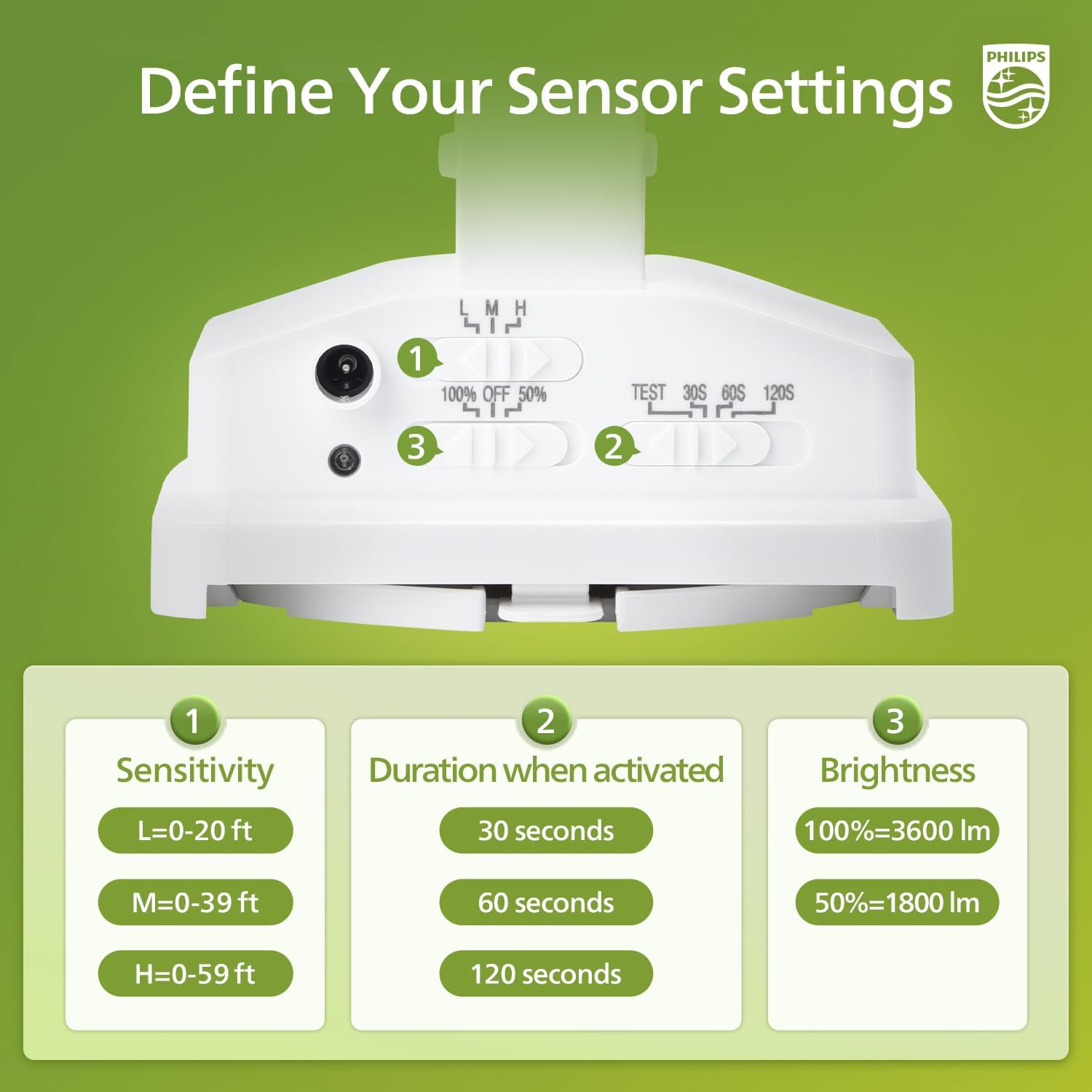
Image 6.1: Sensor setting controls.

Image 6.2: Motion sensor detection range.
6.2 Lighting Modes
The light offers three distinct operating modes, selectable via a switch:
- Test Mode: Can be activated during both day and night. When motion is detected, the light turns on for 5 seconds at 100% brightness. If no motion, it stays off. This mode is useful for testing sensor functionality and coverage.
- Security Mode: Activates only at night. When motion is detected, the light turns on at the selected brightness (50% or 100%) for the set duration (30, 60, or 120 seconds). If no motion, it stays off.
- Dusk-to-Dawn Mode: Activates only at night. The light automatically turns on at dusk and remains on at a low brightness (typically 50%) until dawn, then turns off. Motion detection may override this to full brightness temporarily depending on the model.
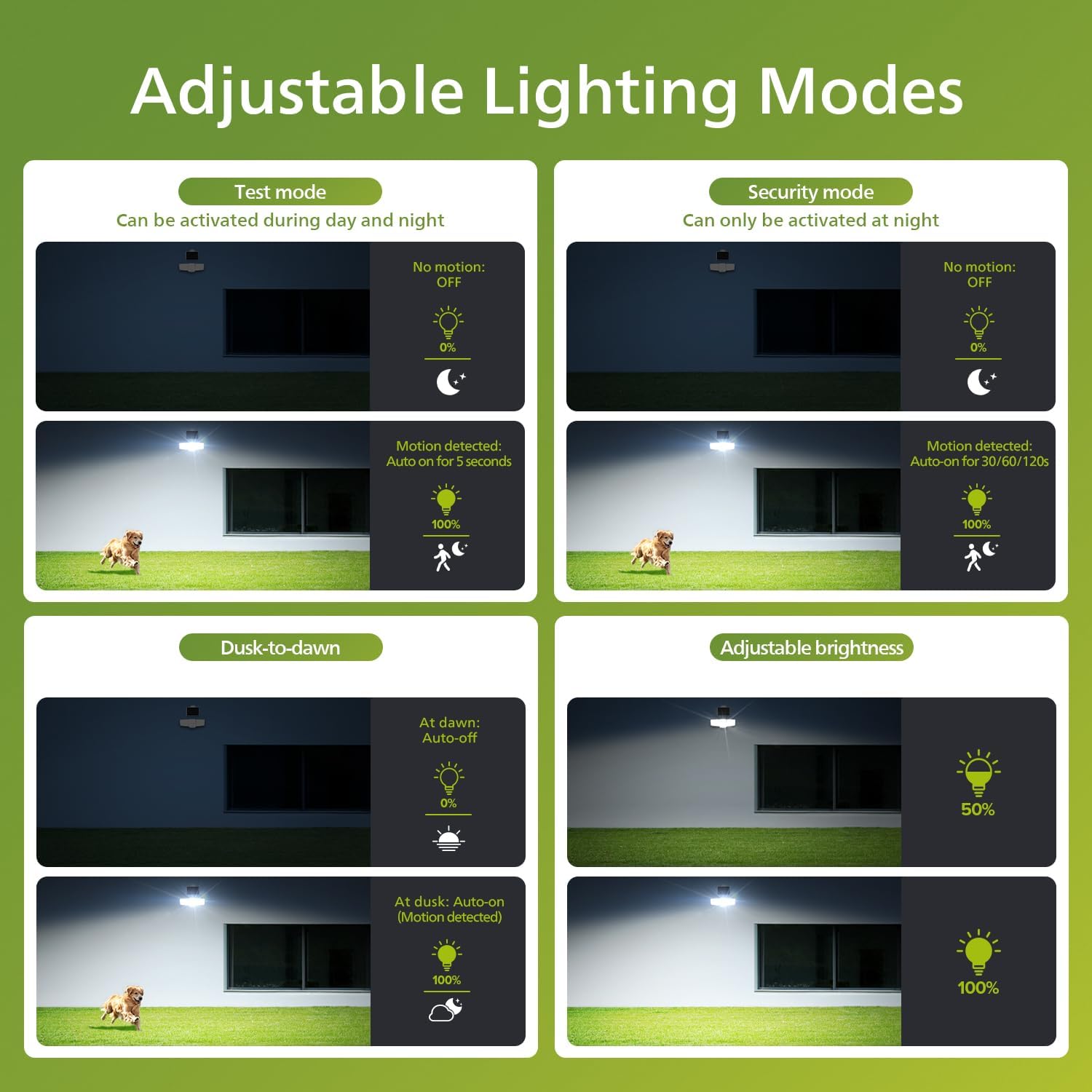
Image 6.3: Adjustable lighting modes explained.
7. Maintenance
Regular maintenance ensures optimal performance and longevity of your solar security light.
- Cleaning: Periodically wipe the solar panel with a soft, damp cloth to remove dust, dirt, or debris that may obstruct sunlight absorption. Clean the light heads and motion sensor lens as needed.
- Battery Care: The integrated batteries are designed for long-term use. Ensure the solar panel receives adequate sunlight daily for consistent charging.
- Environmental Protection: The product is water-resistant and corrosion-resistant. No special weatherproofing is typically required after proper installation.

Image 7.1: Water-resistant design for all weather conditions.
8. Troubleshooting
If you encounter issues with your Philips Solar Security Light, refer to the following common problems and solutions:
| Problem | Possible Cause | Solution |
|---|---|---|
| Light does not turn on at night. | Insufficient solar panel charging. | Ensure solar panel is in direct sunlight for 6-8 hours daily. Clean the solar panel. |
| Light is dim or flickers. | Low battery charge. | Allow the solar panel to charge for a full day in direct sunlight. |
| Motion sensor not detecting. | Sensor sensitivity too low or obstructed. | Adjust sensitivity to 'M' or 'H'. Clear any obstructions in front of the sensor. Ensure installation height is appropriate. |
| Light stays on constantly. | Continuous motion detected or incorrect mode. | Check for objects causing constant motion. Verify the light is not in Dusk-to-Dawn mode if motion-only operation is desired. |
| Light turns on during the day. | Light is in Test Mode. | Switch the operating mode to Security Mode or Dusk-to-Dawn Mode. |
9. Technical Specifications
- Brand: Philips
- Model Name: Solar Security Lights Outdoor 929004755003
- Item Model Number: 6905302331
- Light Output: Up to 3600 Lumens
- Color Temperature: 5000 Kelvin (Cool White)
- Power Source: Solar Powered
- Battery: 2 Nonstandard Battery batteries required (included), total 4000 mAh capacity.
- Motion Sensor: PIR, 180° detection angle, 0-59 ft adjustable range
- Cable Length (Solar Panel): 16 feet
- Material: Plastic, Polycarbonate
- Special Features: Anti-Rust, Dimmable, Dusk to Dawn, Water-resistant
- Product Dimensions: 13.39"L x 5"W x 5.94"H
- Item Weight: 3.54 pounds
- UPC: 046677609184

Image 9.1: Solar panel and light output details. Note: Total battery capacity is 4000 mAh from two batteries.
10. Warranty and Support
For warranty information and customer support, please refer to the official Philips website or contact their customer service department. Keep your purchase receipt as proof of purchase.
Online Support: Visit www.philips.com/support
Contact Information: Refer to the contact details provided on the product packaging or the Philips support website for your region.
Related documents6905302331


Ask a question about this manual
Ask about setup, troubleshooting, compatibility, parts, safety, or missing instructions. Manuals+ will review the question and use this page’s manual context to help answer it.