
1. Introduction
This manual provides comprehensive instructions for the installation, operation, and maintenance of your ANJIELO SMART Multi-Unit Visual Intercom Doorbell System. This system is designed for apartment buildings and multi-family homes, offering enhanced security and communication capabilities.
The system includes one outdoor doorbell unit and ten 7-inch indoor monitors, enabling visual and audio communication with visitors, motion detection, and remote access control via the Tuya app.

Figure 1.1: Overview of the ANJIELO SMART Multi-Unit Intercom System, showing the outdoor doorbell unit and ten indoor monitors.
2. Package Contents
Please verify that all items are present in your package:
- 1 x Outdoor Doorbell Unit
- 10 x 7-inch Indoor Monitors
- Mounting Screws and Anchors
- Wiring Cables (specific types and lengths may vary)
- User Manual (this document)
- RFID Cards (for access control)
If any components are missing or damaged, please contact ANJIELO SMART customer support immediately.
3. System Overview and Features
The ANJIELO SMART Multi-Unit Visual Intercom Doorbell System provides a comprehensive solution for building access and security. Key features include:
- Multi-Family Design: Supports up to 12 indoor monitors with individual communication channels, ensuring privacy and no interference between units.
- Two-Way Intercom: Enables real-time audio and video communication between the outdoor unit, indoor monitors, and the Tuya smartphone application.
- Motion Detection: Automatically records video when motion is detected near the outdoor unit, enhancing security surveillance.
- Night Vision: Equipped with infrared LED lighting for clear visibility and identification of visitors in low-light or complete darkness.
- 7-inch Touch Monitor: Intuitive touch screen operation for hands-free communication and system control.
- 1080P Outdoor Doorbell: High-definition camera with a 160-degree wide-angle view, housed in a waterproof, dustproof, and vandal-resistant aluminum casing.
- Multiple Unlocking Methods: Supports unlocking via RFID card, indoor monitor, or remotely via the Tuya app.
- Tuya App Integration: Remote monitoring, communication, and door unlocking from anywhere using your smartphone.

Figure 3.1: Diagram illustrating the multi-unit setup, showing one outdoor unit connected to multiple indoor monitors in an apartment building.
4. Installation and Setup
4.1 Safety Precautions
- Ensure power is disconnected before installation.
- Consult a qualified electrician if you are unsure about wiring.
- Install the outdoor unit in a location protected from direct heavy rain and sunlight for optimal performance and longevity.
4.2 Outdoor Doorbell Unit Installation
The outdoor unit is designed for embedded installation. Refer to the provided template for precise measurements.
- Prepare the Mounting Location: Choose a suitable wall location near the entrance, ensuring it is at an appropriate height for visitors to use and for the camera to capture faces clearly.
- Cut the Opening: Based on the unit's dimensions (265mm x 128mm x 48mm), cut an opening in the wall for embedded installation.
- Run Wiring: Route the necessary power and communication cables from the indoor monitor locations to the outdoor unit's mounting point.
- Connect Wiring: Connect the power supply (DC 15V, 0.5A) and communication cables to the designated terminals on the outdoor unit. Ensure correct polarity.
- Secure the Unit: Insert the outdoor unit into the prepared opening and secure it using the provided screws.
- Test Basic Functionality: Before fully sealing, perform a basic power-on test to ensure the unit receives power.

Figure 4.1: Dimensions of the outdoor doorbell unit (264mm x 127mm) and the 7-inch indoor monitor (198mm x 130mm).
4.3 Indoor Monitor Installation
The indoor monitors are designed for wall-mount installation.
- Choose Location: Select a convenient location inside each apartment unit, typically near the entrance, for the 7-inch monitor.
- Mounting Bracket: Secure the wall-mounting bracket (not explicitly listed but implied for wall mount) to the wall using screws and anchors.
- Connect Wiring: Connect the communication cables from the outdoor unit and the power supply to the back of each indoor monitor.
- Attach Monitor: Carefully attach the monitor to the mounting bracket.
4.4 System Wiring Diagram
A detailed wiring diagram is crucial for multi-unit installations. Please refer to the separate wiring diagram provided with your product for specific connections between the outdoor unit, multiple indoor monitors, and power supplies. Ensure all connections are secure and correctly terminated.
4.5 Tuya App Setup
- Download App: Download the "Tuya Smart" or "Smart Life" app from your smartphone's app store (iOS or Android).
- Register/Login: Create a new account or log in to your existing Tuya account.
- Add Device: Follow the in-app instructions to add your ANJIELO SMART Intercom System. This typically involves selecting "Video Surveillance" or "Doorbell" and following the pairing process, which may include scanning a QR code or connecting to a temporary Wi-Fi hotspot created by the monitor.
- Connect to Wi-Fi: Ensure your indoor monitor is connected to your local Wi-Fi network for Tuya app functionality.
- Configure Settings: Adjust settings such as motion detection sensitivity, notification preferences, and recording options within the Tuya app.
5. Operating Instructions
5.1 Answering a Call from the Outdoor Unit
- When a visitor presses the doorbell button, the indoor monitor(s) will ring and display the visitor's video feed.
- On the Monitor: Tap the "Answer" icon on the touch screen to establish two-way audio and video communication.
- Via Tuya App: If enabled, your smartphone will receive a notification. Tap the notification to open the app and answer the call remotely.
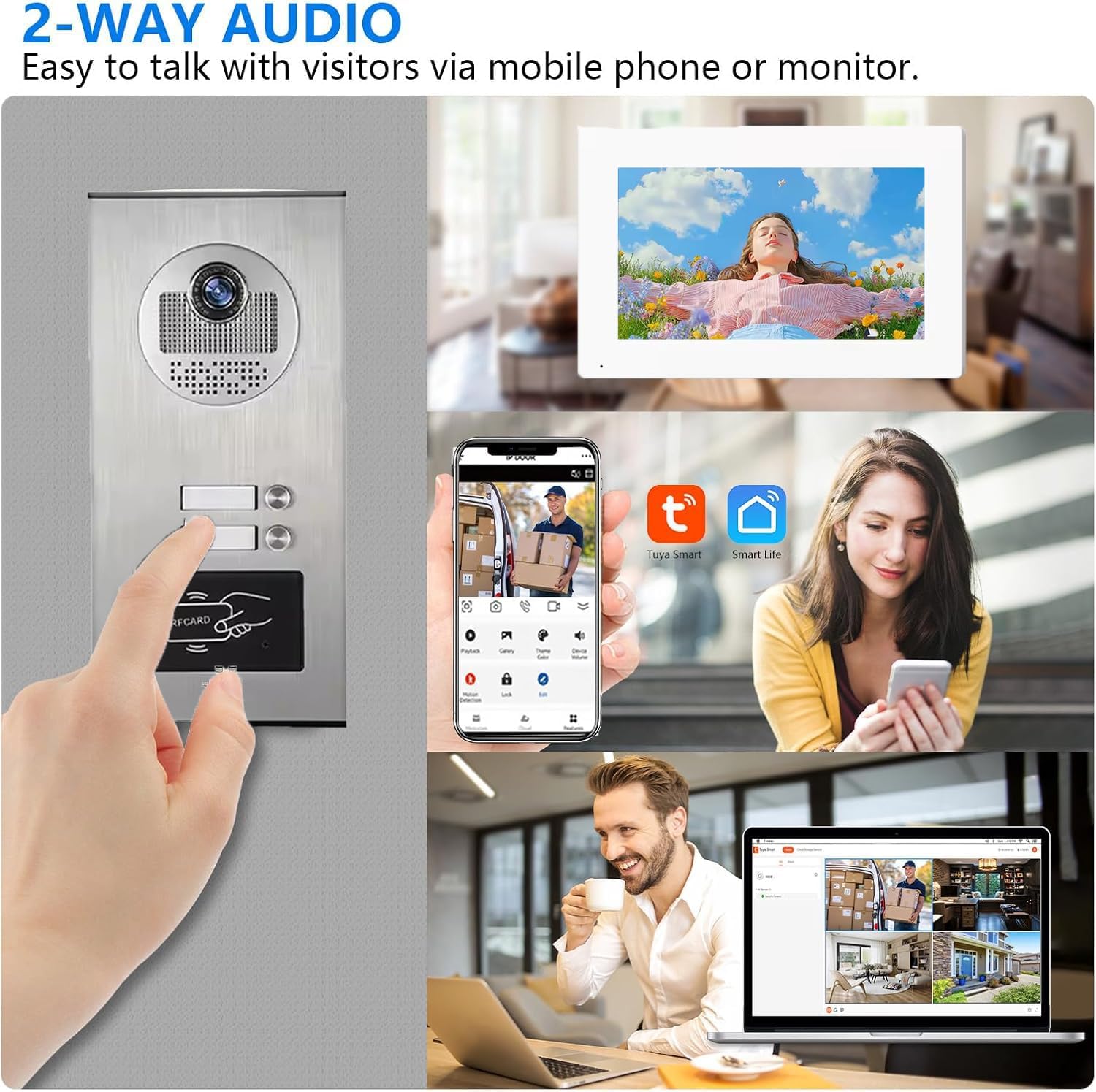
Figure 5.1: Illustration of two-way audio communication with a visitor using the indoor monitor or the Tuya smartphone application.
5.2 Unlocking the Door
The system supports three methods for door unlocking:
- RFID Card: Present a pre-programmed RFID card to the card reader on the outdoor unit.
- Indoor Monitor: During an active call or while viewing the outdoor camera feed, tap the "Unlock" icon on the indoor monitor's touch screen.
- Tuya App: During an active call or while viewing the live feed, tap the "Unlock" button within the Tuya app.

Figure 5.2: The three available methods for unlocking the door: using an IC card, through the indoor monitor, or remotely via the Tuya app.

Figure 5.3: Remote door unlocking functionality through the Tuya app on a smartphone.
5.3 Motion Detection
The outdoor unit features PIR motion detection. When motion is detected within the configured zone, the system will:
- Automatically begin recording video.
- Send a notification to your connected Tuya app (if configured).
Adjust motion detection sensitivity and recording duration in the indoor monitor settings or via the Tuya app.

Figure 5.4: Motion detection in action, showing an alert on a smartphone when movement is detected near the doorbell.
5.4 Night Vision
The outdoor unit automatically activates its infrared LED lights in low-light conditions, providing clear black-and-white video for night vision. This ensures visibility of visitors even in complete darkness.

Figure 5.5: The doorbell unit's night vision capability, showing clear visibility in a dark outdoor environment.

Figure 5.6: Comparison of video feed during daytime and nighttime, demonstrating the effectiveness of night vision.
6. Maintenance
- Cleaning: Regularly wipe the outdoor unit's camera lens and the indoor monitor screens with a soft, damp cloth. Avoid abrasive cleaners.
- Firmware Updates: Check for firmware updates for your indoor monitors and the Tuya app periodically to ensure optimal performance and security. Updates are typically managed through the Tuya app.
- Wiring Inspection: Periodically inspect all wiring connections for signs of wear or damage. Ensure connections remain secure.
- Power Supply: Ensure the system receives a stable DC 15V power supply. Fluctuations can affect performance.
7. Troubleshooting
| Problem | Possible Cause | Solution |
|---|---|---|
| No power to indoor monitor/outdoor unit. | Loose power connection, power adapter failure, circuit breaker tripped. | Check all power connections. Verify power adapter functionality. Reset circuit breaker if necessary. |
| No video/audio from outdoor unit. | Loose communication cable, damaged camera/microphone, incorrect wiring. | Inspect communication cables for secure connection. Review wiring diagram. Contact support if hardware is suspected. |
| Tuya app not receiving notifications/calls. | Monitor not connected to Wi-Fi, app permissions denied, incorrect app settings, network issues. | Ensure monitor is connected to Wi-Fi. Check app notification permissions on your smartphone. Verify Tuya app settings for notifications. Restart router/modem. |
| Door unlock function not working. | Electronic lock not connected correctly, power issue to lock, RFID card not programmed. | Verify wiring to the electronic lock. Ensure the lock receives power. Program RFID cards as per instructions. |
| Poor night vision quality. | Obstructed camera lens, IR LEDs blocked or faulty. | Clean the camera lens. Ensure no obstructions are blocking the IR LEDs. |
For issues not listed here, please contact ANJIELO SMART customer support.
8. Specifications
Outdoor Doorbell Unit
- Camera Lens: AMOS
- Resolution: 700TVL (Analog), 1080P (Digital Camera)
- Illumination: 0 LUX/F1.2
- Night Vision: Visible within 1m (Infrared LEDs)
- Power Supply: DC 15V, 0.5A
- Working Temperature: -35°C to 50°C (-31°F to 122°F)
- Case Material: Aluminum panels, waterproof, dustproof, vandal resistant
- Installation: Embedded Installation
- Dimensions: 265mm x 128mm x 48mm (10.43 x 5.04 x 1.89 inches)
- Net Weight: 840g
- Wide Angle: 160 degrees
- Connectivity: Wired
Indoor Monitor (7-inch)
- Screen Size: 7-inch Touch Screen
- Operation: Touch operation, hands-free
- Connectivity: Wi-Fi (for Tuya app), Wired (to outdoor unit)
- Compatible Devices: Smartphone (via Tuya app)
- Mounting Type: Wall Mount
- Dimensions: 198mm x 130mm (7.8 x 5.1 inches)
- Included Components: Monitor
- Special Feature: 2-Way Audio
General System
- Brand: ANJIELO SMART
- Model Name: 530+KXT7W
- Controller Type: Tuya
- Video Capture Resolution: 1080p
- Video Capture Format: MJPEG
- Recommended Uses: Outdoor Security
9. Warranty and Support
ANJIELO SMART products come with a standard manufacturer's warranty. Please refer to the warranty card included in your package or visit the official ANJIELO SMART website for detailed warranty terms and conditions.
For technical support, troubleshooting assistance, or warranty claims, please contact ANJIELO SMART customer service through the following channels:
- Website: www.anjielo.com
- Email: [Insert Customer Support Email Here, if available]
- Phone: [Insert Customer Support Phone Number Here, if available]
When contacting support, please have your product model number (530+KXT7W) and purchase date ready.