
Filter Tops CUCKOO_8S_NUP
Water Replacement Filter SET User Manual
Model: CUCKOO_8S_NUP | Brand: Filter Tops
1. Introduction
This user manual provides essential information for the installation, operation, and maintenance of your Filter Tops Water Replacement Filter SET. This set is designed to be compatible with various Cuckoo water purifier models, ensuring clean and filtered water for your household.
Compatible Cuckoo Models: CP-MN031, CP-M011, CP-M021, CPFS-12M0803, CPFS-MN031, MN031US, MN031W, CP-MN031BK, CP-MN031US, CPFS-MN031US.
2. Product Overview
The Filter Tops Water Replacement Filter SET includes a combination of filters designed to provide multi-stage filtration for your Cuckoo water purifier. The specific configuration of filters may vary based on the purchased option:
- Option 1: 1 Neo-Sense, 1 Post Carbon, 1 UF Nano Membrane Filter
- Option 2: 3 Neo-Sense, 1 Post Carbon, 1 UF Nano Membrane Filter
- Option 3: 3 Neo-Sense, 2 Post Carbon, 1 UF Nano Membrane Filter
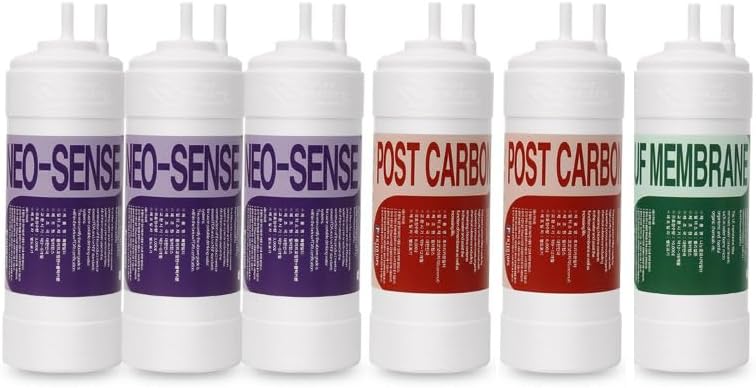
Image: A set of six water filter cartridges. From left to right, there are three Neo-Sense filters with purple labels, followed by two Post Carbon filters with red labels, and finally one UF Membrane filter with a green label. All filters are white with two small protrusions at the top.
3. Setup and Installation
Follow these general steps for replacing the filters in your Cuckoo water purifier. Always refer to your specific Cuckoo water purifier's manual for detailed instructions, as procedures may vary by model.
- Prepare for Installation: Turn off the water supply to your water purifier. Unplug the unit from the power outlet.
- Drain Water: Open the dispenser faucet to release any pressure and drain residual water from the system.
- Remove Old Filters: Locate the filter compartments. Depending on your model, filters may twist out or require a release button. Carefully remove the old filters. Be prepared for some water spillage.
- Install New Filters: Unpack the new Filter Tops replacement filters. Insert each filter into its corresponding slot. Ensure the filters are securely seated and properly aligned. The Neo-Sense, Post Carbon, and UF Nano Membrane filters are typically installed in a specific order as per your purifier's design.
- Restore Water Supply: Close the dispenser faucet. Slowly turn on the water supply to the purifier. Check for any leaks around the newly installed filters.
- Flush the System: Before consuming water, flush the system by dispensing several gallons of water through the faucet. This removes any carbon fines or air from the new filters. Continue flushing until the water runs clear and free of air bubbles.
- Reconnect Power: Plug the water purifier back into the power outlet.
4. Operating Instructions
After successful installation and flushing, your water purifier is ready for normal operation. The new filters will begin purifying water immediately. Monitor the water taste and clarity to ensure proper function.
5. Maintenance
Regular maintenance is crucial for optimal performance and longevity of your water purifier and filters.
- Filter Replacement Schedule: Filters have a limited lifespan. Replace your Neo-Sense, Post Carbon, and UF Nano Membrane filters according to the recommendations in your Cuckoo water purifier's manual, or typically every 6-12 months depending on water quality and usage. Timely replacement ensures continued water quality.
- External Cleaning: Periodically wipe down the exterior of your water purifier with a soft, damp cloth. Avoid using harsh chemicals or abrasive cleaners.
6. Troubleshooting
If you encounter issues after installing your new filters, consider the following common problems and solutions:
- Slow Water Flow:
- Check Installation: Ensure filters are fully seated and correctly installed.
- Air in System: Flush the system thoroughly to remove trapped air.
- Clogged Filters: If filters are old, they may be clogged and require replacement.
- Unusual Taste or Odor:
- Insufficient Flushing: Flush more water through the system to remove carbon fines.
- Expired Filters: Filters may have reached the end of their lifespan and need replacement.
- Leaks Around Filters:
- Improper Seating: Ensure filters are twisted or pushed in completely and correctly aligned.
- Damaged O-rings: Inspect the O-rings on the filters or in the housing for damage.
If problems persist, consult your Cuckoo water purifier's original manual or contact customer support.
7. Specifications
| Attribute | Detail |
|---|---|
| Material | Plastic |
| Product Dimensions | 1.5"D x 1.5"W x 8"H |
| Item Weight | 3 Pounds |
| External Testing Certification | ISO |
| Manufacturer | Top Filters |
| Country of Origin | Korea, Republic of |
| Compatible Models | CPFS-12M0803, CPFS-MN031, CP-MN031, CP-MN031BK, CP-MN031US, CPFS-MN031US |
8. Warranty and Support
For any questions regarding the Filter Tops Water Replacement Filter SET, or for technical support, please contact the manufacturer, Top Filters. Please retain your proof of purchase for any warranty claims.
Ask a question about this manual
Ask about setup, troubleshooting, compatibility, parts, safety, or missing instructions. Manuals+ will review the question and use this page’s manual context to help answer it.