
WAMELPRI U80 Series
WAMELPRI U80 Series Upper Arm Electronic Blood Pressure Monitor User Manual
Model: U80 Series
1. Introduction
This manual provides essential instructions for the safe and effective use of your WAMELPRI U80 Series Upper Arm Electronic Blood Pressure Monitor. Please read it thoroughly before first use and retain it for future reference.
The WAMELPRI U80 Series monitor is designed for accurate measurement of systolic and diastolic blood pressure, as well as pulse rate, in adults. It features a large LED display, dual-user memory, and one-touch operation for ease of use.
2. Product Overview
Familiarize yourself with the components and display interface of your blood pressure monitor.
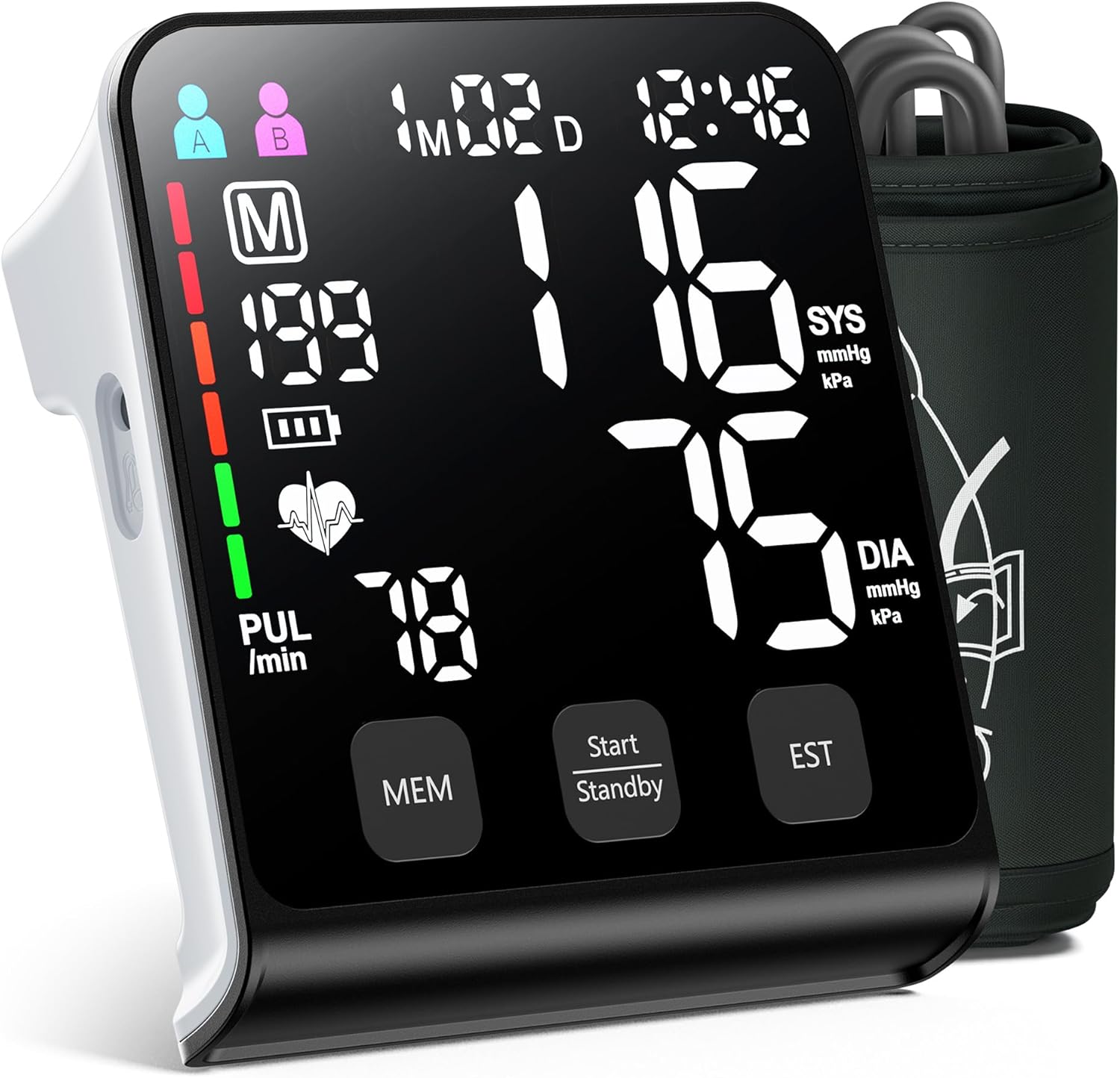
Image: The WAMELPRI U80 Series Upper Arm Electronic Blood Pressure Monitor, showing the main unit with its large LED display and the attached arm cuff.
2.1 Display Interface Instructions

Image: A detailed diagram illustrating the various indicators on the monitor's LED display, including user selection (A/B), memory symbol, memory times, blood pressure classification indicator, irregular heartbeat display, pulse rate, systolic blood pressure, diastolic blood pressure, battery level, and date/time.
- User Indicator (A/B): Shows which user's data is currently selected or being recorded.
- Year/Month/Date/Time: Displays the current date and time.
- Systolic Blood Pressure (SYS mmHg/kPa): The top number in a blood pressure reading.
- Diastolic Blood Pressure (DIA mmHg/kPa): The bottom number in a blood pressure reading.
- Pulse Rate (PUL /min): Your heart rate in beats per minute.
- Blood Pressure Classification Indicator: A color-coded bar on the left side of the display indicating the blood pressure level (e.g., green for normal, yellow for mild, red for serious).
- Memory Symbol (M): Indicates that the current reading is being stored in memory.
- Memory Times: Shows the number of readings stored.
- Battery Level: Indicates the remaining battery power.
- Irregular Heartbeat Display: An icon that appears if an irregular heartbeat is detected during measurement.
3. Setup
3.1 Power Supply
The monitor can be powered by batteries or via a USB Type-C connection.

Image: The underside of the blood pressure monitor, illustrating the battery compartment for AAA batteries and the Type-C port for external power.
Battery Installation:
- Open the battery compartment cover on the back of the unit.
- Insert 4 AAA batteries, ensuring correct polarity (+/-).
- Close the battery compartment cover securely.
USB Power:
Connect a Type-C USB cable to the monitor's Type-C port and to a compatible USB power adapter or port.
3.2 Cuff Attachment
The monitor comes with a wide-range arm cuff designed to fit arm circumferences from 9 to 17 inches (22-42 cm).

Image: A visual guide demonstrating how the wide-range cuff fits various arm sizes, from thin to normal to fat arms, ensuring proper placement for accurate readings.
- Ensure the air tube is securely connected to the monitor.
- Wrap the cuff around your upper arm, approximately 1-2 cm above the elbow joint.
- The air tube should run down the center of your arm in line with your middle finger.
- Ensure the cuff is snug but not too tight; you should be able to insert one finger between the cuff and your arm.
4. Operating Instructions
4.1 Before Measurement
- Rest seated for at least 5 minutes with your feet flat on the floor.
- Avoid talking or moving during the measurement.
- Measure before breakfast and morning medications.
- Check at consistent pre-bedtime hours if monitoring evening pressure.
- Wait at least 30 minutes after exercise or stress before measuring.

Image: A man seated at a table with the blood pressure monitor, demonstrating the correct posture for measurement. Accompanying text lists optimal measurement guidelines such as resting for 5+ minutes, avoiding talking/moving, measuring before breakfast/medications, consistent timing, and waiting after exercise/stress.
4.2 Taking a Measurement
- Select User: Press the user selection button (if available, or it might be automatic based on the device's design) to select User A or User B. The U80 Series supports dual users with 199 records each.
- Position Arm: Place your arm on a flat surface so the cuff is at heart level.
- Start Measurement: Press the "Start/Standby" button. The cuff will automatically inflate, and the measurement will begin.
- Read Results: Once the measurement is complete, your systolic pressure, diastolic pressure, and pulse rate will be displayed on the large LED screen. The blood pressure classification indicator will also light up.
- Store Results: The monitor automatically stores the readings.

Image: A step-by-step visual guide demonstrating the process of taking a blood pressure measurement: 1. Installing batteries, 2. Wearing the cuff correctly 1-2 cm above the elbow, 3. Adjusting sitting position, and 4. Taking the measurement with the device displaying results.
4.3 Viewing Stored Readings
To access previous measurements:
- Press the "MEM" button.
- The display will show the most recent reading.
- Press "MEM" repeatedly to scroll through older readings.
5. Maintenance
5.1 Cleaning
- Wipe the monitor and cuff with a soft, dry cloth.
- If necessary, use a slightly damp cloth with mild soap, then wipe dry.
- Do not use abrasive cleaners, solvents, or immerse the unit in water.
5.2 Storage
- Store the monitor and cuff in a clean, dry place, away from direct sunlight and extreme temperatures.
- If not using for an extended period, remove the batteries to prevent leakage.
5.3 Calibration
It is recommended to have the blood pressure monitor calibrated once a year to ensure continued accuracy. Refer to the manufacturer's guidelines or contact customer support for calibration services.
6. Troubleshooting
| Problem | Possible Cause | Solution |
|---|---|---|
| Monitor does not power on. | Batteries are dead or incorrectly inserted. No USB power. | Replace batteries with new ones, ensuring correct polarity. Connect to a working USB power source. |
| Inaccurate readings. | Incorrect cuff placement, movement during measurement, improper posture, need for calibration. | Ensure cuff is correctly placed and snug. Remain still and silent during measurement. Maintain correct posture. Consider annual calibration. |
| Cuff does not inflate or inflates too little/much. | Air tube disconnected, cuff damaged, or internal error. | Check that the air tube is securely connected. Inspect cuff for damage. If problem persists, contact customer support. |
| Irregular Heartbeat (IHB) symbol appears frequently. | Detection of irregular heart rhythm. | This indicates an irregular heartbeat was detected. Consult a medical professional if this occurs frequently. |
7. Specifications
- Model: U80 Series
- Brand: WAMELPRI
- Measurement Method: Oscillometric
- Measurement Range: Blood Pressure: 0-299 mmHg; Pulse: 40-199 beats/minute
- Accuracy: Pressure: ±3 mmHg; Pulse: ±5% of reading
- Cuff Size: Wide-range, fits arm circumference 9-17 inches (22-42 cm)
- Display: 4.5-inch LED Backlit Display
- Memory: 2 users, 199 readings per user
- Power Source: 4 x AAA batteries or USB Type-C
- Product Dimensions: 4.7"L x 1.9"W x 4.7"Th
- Weight: 1.28 Pounds (approx.)
- Manufacturer: SHENZHEN URION TECHNOLOGY CO., LTD
- Date First Available: June 9, 2025
- UPC: 757911407380
8. Warranty and Support
For warranty information, technical support, or service inquiries, please contact WAMELPRI customer service. Details can typically be found on the product packaging or the official WAMELPRI website.
WAMELPRI offers 24-hour online service and professional health guidance to ensure customer satisfaction.
9. Important Safety Information
- This device is intended for adult use only.
- Do not self-diagnose or self-treat based on measurement results. Always consult a healthcare professional for interpretation of readings and treatment decisions.
- Keep the device out of reach of children and pets.
- Do not use the device in a moving vehicle.
- Do not use the device near strong electromagnetic fields.
- Statements regarding dietary supplements have not been evaluated by the FDA and are not intended to diagnose, treat, cure, or prevent any disease or health condition.
10. Additional Resources
10.1 Product Videos
The following videos provide visual guidance on using your WAMELPRI U80 Series Blood Pressure Monitor:
Video: A demonstration of the WAMELPRI U80 Series Blood Pressure Monitor's display, highlighting the blood pressure classification indicator and how readings are presented.
Video: A close-up view of the WAMELPRI U80 Series Blood Pressure Monitor's display, showing a typical measurement result with systolic, diastolic, and pulse readings.
Ask a question about this manual
Ask about setup, troubleshooting, compatibility, parts, safety, or missing instructions. Manuals+ will review the question and use this page’s manual context to help answer it.