Introduction
The Bigprot M802 rechargeable hearing aids are designed to provide clear sound amplification for adults and seniors experiencing hearing loss. Featuring intelligent sound processing and noise cancellation, these lightweight, behind-the-ear devices offer comfortable wear and ease of use. Please note: This product is not recommended for severe hearing loss.
What's Included
Your Bigprot M802 package contains the following items:
- 1 x Pair of Bigprot M802 Hearing Aids
- 1 x Portable Charging Case
- 1 x Type-C Charging Cable
- 12 x Ear Tips (various sizes)
- 2 x Cleaning Brushes
- 1 x Cleaning Cloth
- 1 x User Manual
- 1 x Quick Start Guide

Product Overview
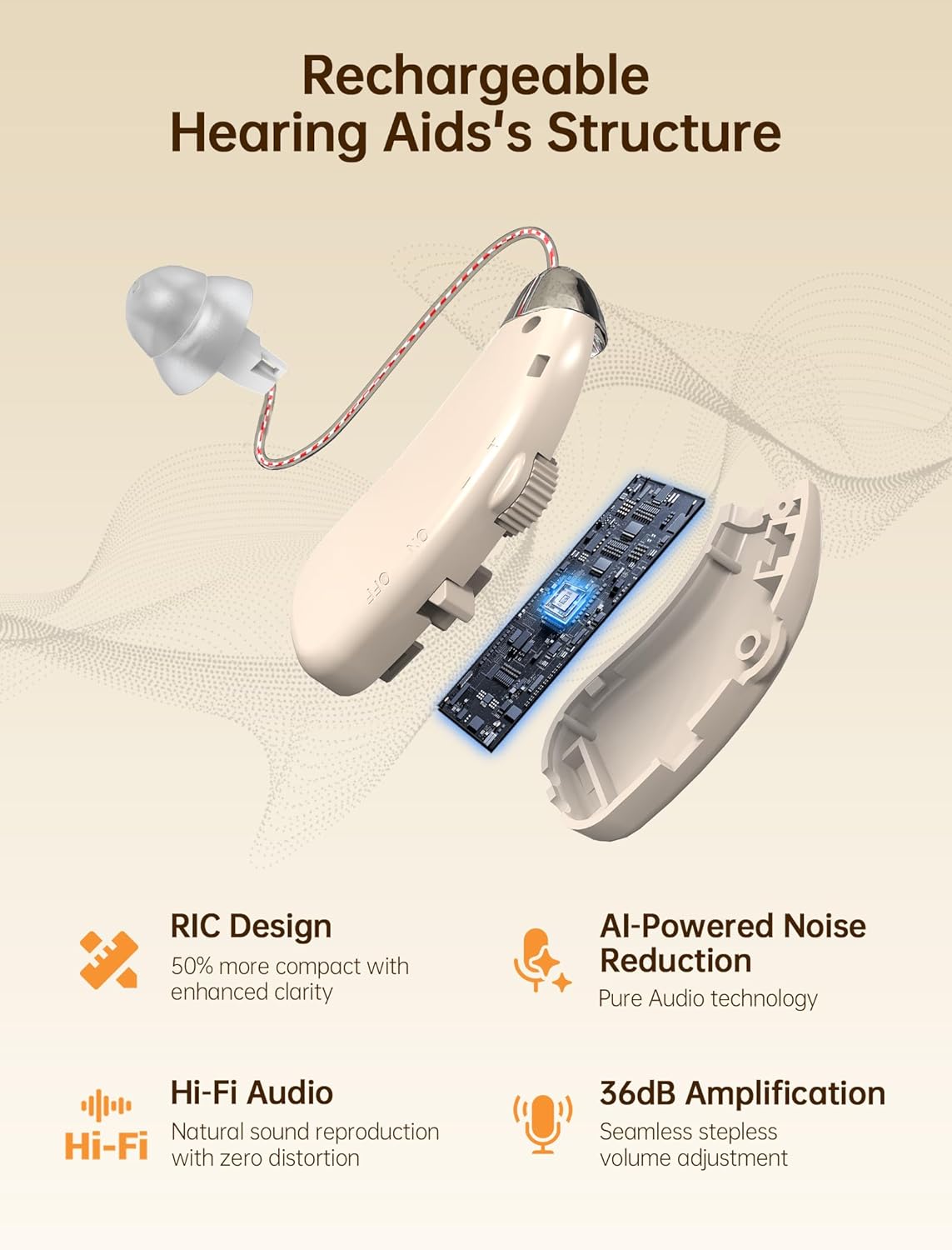
The Bigprot M802 hearing aids are designed for discreet and effective sound amplification. Each unit is lightweight and features intuitive controls.

Key Components
- Hearing Aid Unit: Features an on/off switch, stepless volume control, and a receiver-in-canal (RIC) design.
- Ear Tips: Silicone tips available in various sizes for a comfortable and secure fit.
- Charging Case: Portable case with an LED display to show battery percentage for both the case and individual hearing aids.
Official Product Video: Hearing Aids for Adults
Video 1: An official Bigprot video demonstrating the features and benefits of the hearing aids for adults.
Official Product Video: Bigprot Hearing Aids Rechargeable for Seniors
Video 2: An official Bigprot video highlighting the rechargeable features and suitability for seniors.
Setup
Charging the Device
Before first use, fully charge both the hearing aids and the charging case.
- Place the hearing aids into their respective slots in the charging case. Ensure proper contact with the charging pins.
- Close the charging case. The LED display will show the charging status for each hearing aid (L/R progress bars) and the case's remaining power.
- To charge the case, connect the provided Type-C charging cable to the charging port on the case and to a compatible USB power source (e.g., wall adapter, computer, power bank). The case fully charges in approximately 1.5 hours.
- A fully charged case provides up to 120 hours of total hearing time, with each full charge of the hearing aids lasting up to 24 hours.

Selecting Ear Tips
The correct ear tip size is crucial for optimal sound quality and comfort, as well as to prevent feedback (whistling). Your M802 comes pre-installed with a Medium size ear tip. Experiment with the included ear tips to find the best fit for your ear canal.
- Gently remove the pre-installed ear tip by pulling it off the receiver.
- Select a new ear tip size (Small, Medium, or Large) that feels comfortable and creates a good seal in your ear canal.
- Carefully push the new ear tip onto the receiver until it is securely attached.
- Always turn off the hearing aid before changing the ear tip.

Operating Instructions
Wearing the Hearing Aids
Follow these steps to correctly wear your hearing aids:
- Remove the hearing aids from the charging case.
- Identify the Left (blue indicator) and Right (red indicator) hearing aids.
- Choose the appropriate earbud size for comfort and fit.
- Turn on the hearing aid using the ON/OFF switch.
- Place the hearing aid behind your ear, then gently insert the ear tip into your ear canal.
- Adjust the volume to a comfortable level using the stepless volume control.

Adjusting Volume
The Bigprot M802 features a stepless volume control for precise adjustment. Gently turn the dial clockwise to increase volume and counter-clockwise to decrease it. Start at a lower volume and gradually increase as needed for optimal listening comfort.

Power On/Off
Each hearing aid has a dedicated ON/OFF switch. Slide the switch to the 'ON' position to activate the device and to the 'OFF' position to power it down. Always turn off the hearing aids when not in use to conserve battery life and prevent accidental feedback.
Official Product Video: M802 Hearing Aids Wearing Process
Video 3: An official Bigprot video demonstrating the step-by-step process of wearing the M802 hearing aids.
Maintenance
Regular cleaning and maintenance will ensure the longevity and optimal performance of your Bigprot M802 hearing aids.
- Ensure your ears are clean before wearing hearing aids to prevent wax buildup.
- Use the provided cleaning brush daily to remove earwax and debris from the ear tips and hearing aid unit.
- Wipe the charging box and the hearing device's charging port with a lint-free cloth weekly.
- Store the hearing aids in their charging case when not in use to protect them from dust and damage.

Troubleshooting
If you encounter issues with your Bigprot M802 hearing aids, refer to the following troubleshooting tips:
Charging Issues:
- Insulation Sticker: Check if the insulation sticker on the hearing aid charging contacts has been removed.
- Case Display: Ensure the charging case display is working properly.
- Charger Compatibility: Verify that the charger head is compatible (no more than 5V); avoid fast chargers.
- Cleaning: Clean the charging case and hearing aids with alcohol if charging doesn't work, especially when the case is full.
- Normal Sleep Mode: If the battery is fully drained, the hearing aid may enter sleep mode. Wait for it to charge.
- Discharge Test: Set the volume to maximum (you may hear noise due to mic exposure), wait for the battery to drain, then try charging again.

Specifications
Detailed technical specifications for the Bigprot M802 hearing aids:
| Feature | Detail |
|---|---|
| Product Dimensions | 2.5 x 1.8 x 0.1 inches (each hearing aid) |
| Item Model Number | ZF-M802 |
| Batteries | 2 Lithium Ion batteries (included) |
| Manufacturer | Bigprot |
| Brand | Bigprot |
| Color | White |
| Material | Acrylonitrile Butadiene Styrene (ABS), Silicone |
| Model Name | M802 |
| Power Source | Battery Powered |
Warranty and Customer Support
Bigprot is committed to customer satisfaction. Your purchase is backed by a 30-day money-back guarantee. For any questions or support, please contact our customer service team.
Contact Information:
- After-sale Phone: +1 833 919 1990
- Official Website: bigprot.com
- Official Email: service@bigprot.com
