Introduction
Thank you for choosing the Romorgniz Dresser with 16 Fabric Drawers and Charging Station. This manual provides essential information for the safe and efficient assembly, operation, and maintenance of your new dresser. Please read all instructions carefully before beginning assembly and retain this manual for future reference.
Important Safety Information
To prevent serious injury or death, please follow these safety precautions:
- Anti-Tipping Kit: Always install the included anti-tipping kit to secure the dresser to a wall. This prevents the dresser from tipping over, especially if children climb on it.
- Weight Distribution: Distribute items evenly across drawers and on the top surface. Avoid placing heavy items on the top edge or in only one section of the dresser.
- Electrical Safety: When using the built-in charging station, ensure all devices and cables are in good condition. Do not overload the outlets. Keep liquids away from the charging station.
- Assembly: Assemble the dresser on a soft, clean surface to prevent scratches. Ensure all screws and fasteners are tightened securely before use.
Parts List
Before assembly, verify that all parts listed below are present and undamaged. If any parts are missing or defective, contact customer support.

Image: Exploded view of all components included with the Romorgniz Dresser, showing numbered parts for easy identification during assembly.
Setup and Assembly
Assembly is required for this dresser. Please follow the step-by-step instructions provided below. An Allen wrench and screwdriver are included for your convenience.
Step 1: Assemble the Base Frame
Begin by attaching the adjustable feet to the bottom frame pieces (Parts 3 and 4). Then, connect the horizontal support bars (Parts 10, 11, 12, 13) to form the lower and upper sections of the frame.
Video: Detailed assembly instructions for the dresser's metal frame, including attaching adjustable feet and connecting support bars.
Step 2: Install Vertical Supports
Attach the vertical support bars (Parts 6, 7, 8, 9) to create the individual compartments for the drawers. Ensure all connections are secure.
Step 3: Attach Top Panels and Charging Station
Place the wooden top panels (Parts 1 and 2) onto the assembled frame. Secure them using the provided screws. Install the charging station (Part 21) into the designated cutout on one of the top panels, ensuring it is flush and securely fastened.

Image: A close-up view of the built-in charging station integrated into the dresser's top surface, featuring three standard AC outlets and two USB ports.
Step 4: Prepare and Insert Fabric Drawers
Unfold each fabric drawer (Parts 22, 23, 24, 25) and insert the bottom panel to give it shape. Attach the handles to the front of each drawer. Once assembled, slide the drawers into their respective compartments in the frame.
Video: Demonstrates the assembly of the dresser, including the frame construction and insertion of the fabric drawers.
Step 5: Install Anti-Tipping Kit
Locate the anti-tipping kit components (Part 19). Follow the instructions to securely attach the dresser to the wall. This is a critical safety step to prevent accidental tipping.

Image: Detailed view of the dresser's construction, highlighting the non-woven fabric, MDF board, anti-tipping kit, and adjustable feet for stability.
Operating Instructions
Using the Fabric Drawers
The dresser features 16 fabric drawers of various sizes, designed for organizing clothes, accessories, and other items. The drawers are lightweight and slide smoothly for easy access. To open, gently pull the handle. To close, push the drawer fully into its compartment.
Video: Demonstrates the functionality of the fabric drawers, showing how they open and close and their storage capacity.
Utilizing the Charging Station
The integrated charging station provides convenient power access. It includes 3 standard AC outlets (125V/12A) and 2 USB ports (5V/2A). Plug the dresser's power cord into a wall outlet. You can then charge your electronic devices directly from the dresser's top surface.
Image: A close-up view of the built-in charging station integrated into the dresser's top surface, featuring three standard AC outlets and two USB ports.
TV Stand Functionality
The sturdy wooden top surface is designed to accommodate a TV up to 60 inches. Ensure the TV's base fits within the dresser's dimensions and that the weight capacity is not exceeded. The charging station can be used to power your TV or other media devices.

Image: The Romorgniz Dresser functioning as a TV stand, with a 60-inch television placed on its top surface, illustrating its multi-functional design.
Maintenance
Cleaning
- Wooden Top: Wipe with a soft, damp cloth. Avoid harsh chemicals or abrasive cleaners that could damage the finish.
- Fabric Drawers: Spot clean with a mild detergent and a damp cloth. Allow to air dry completely. Do not machine wash.
- Metal Frame: Wipe with a soft, dry cloth.
General Care
- Regularly check all screws and fasteners to ensure they remain tight.
- Avoid exposing the dresser to direct sunlight or extreme humidity to prevent material degradation.
- Do not place hot items directly on the wooden top without protection.
Troubleshooting
Dresser is Unstable
- Check Adjustable Feet: Ensure all six adjustable feet are properly screwed in and adjusted to level the dresser on uneven surfaces.
- Verify Connections: Re-tighten all screws and bolts on the metal frame to ensure a secure structure.
- Anti-Tipping Kit: Confirm the anti-tipping kit is correctly installed and securely anchored to the wall.
Drawers Not Sliding Smoothly
- Check for Obstructions: Ensure nothing is blocking the drawer's path within the frame.
- Even Loading: Avoid overfilling drawers or placing excessively heavy items, which can cause them to sag or stick.
- Frame Alignment: Verify that the dresser frame is level and not warped, which could affect drawer movement.
Charging Station Not Working
- Power Connection: Ensure the dresser's power cord is securely plugged into a functional wall outlet.
- Device Compatibility: Confirm that the devices you are trying to charge are compatible with the provided AC outlets and USB ports.
- Overload: Avoid plugging in too many high-power devices simultaneously, which could trip a circuit.
Specifications
| Feature | Detail |
|---|---|
| Brand | Romorgniz |
| Model Number | B0FCFP1MVJ |
| Product Dimensions | 11.9"D x 51"W x 34.7"H |
| Color | Rustic Brown |
| Material | Metal Frame, Fabric Drawers, Wooden Top (MDF) |
| Number of Drawers | 16 |
| Charging Station | 3 AC Outlets (125V/12A), 2 USB Ports (5V/2A) |
| TV Compatibility | Up to 60 inches |
| Weight Capacity (Top) | 370 lbs |
| Assembly Required | Yes |
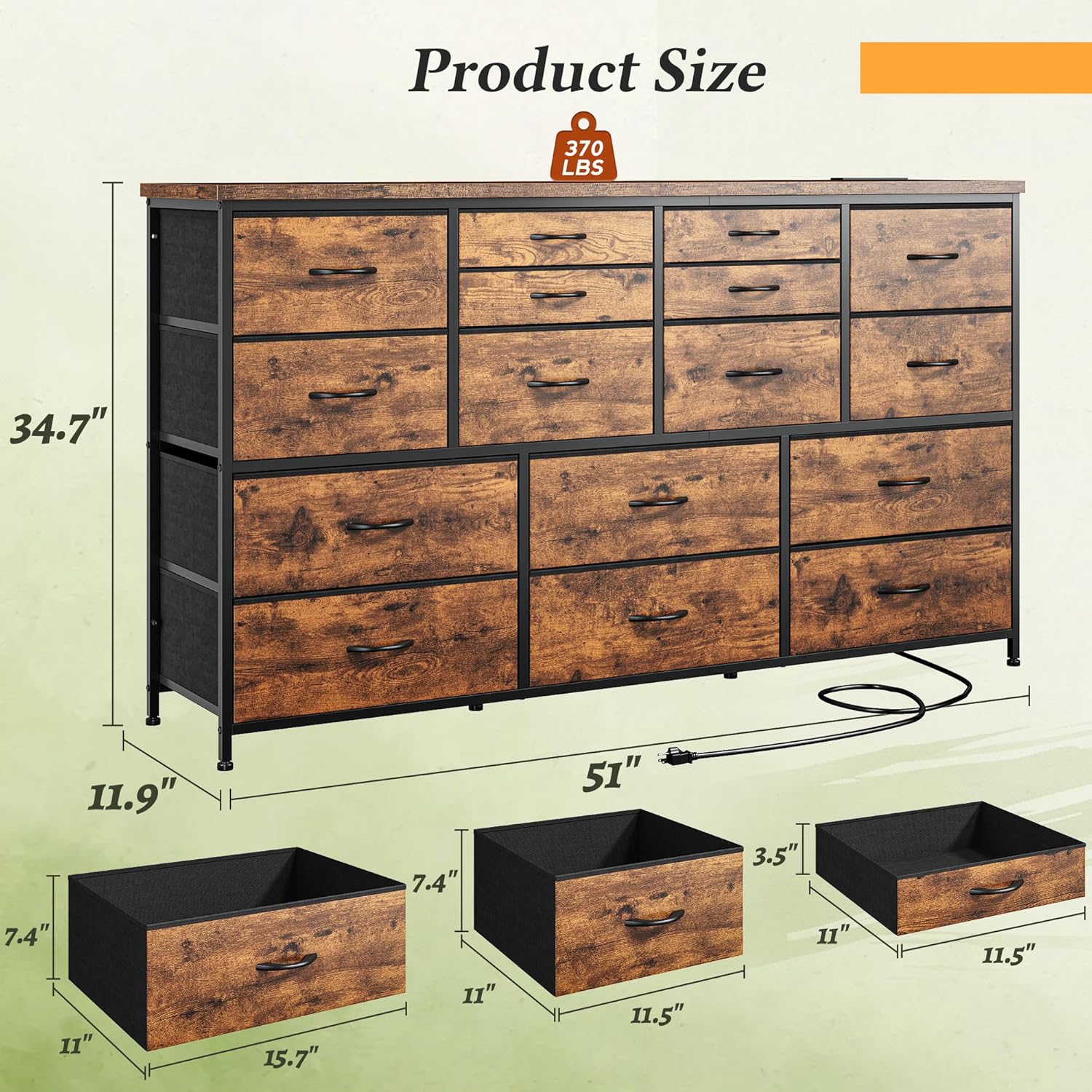
Image: Visual representation of the dresser's dimensions (11.9"D x 51"W x 34.7"H) and its top weight capacity of 370 lbs.
Warranty and Support
Warranty Information
Please refer to the product packaging or the seller's website for specific warranty details and terms. Keep your proof of purchase for any warranty claims.
Customer Support
If you encounter any issues during assembly, operation, or maintenance, or if you have questions about your Romorgniz Dresser, please contact our customer support team. Contact information can typically be found on the product packaging or the official Romorgniz website.