
1. Introduction
This manual provides detailed instructions for the assembly, operation, and maintenance of your PRAISUN 66 Inch L-Shaped Computer Desk. This versatile desk can be configured as an L-shaped unit or a long straight desk, featuring integrated power outlets, LED lighting, and various storage solutions. Please read this manual thoroughly before assembly and use to ensure proper function and safety.
2. Safety Information
- Ensure all components are present and undamaged before assembly. Do not proceed with assembly if any parts are missing or broken.
- Assemble the desk on a soft, clean surface to prevent scratches.
- Always use the provided tools or appropriate hand tools. Do not overtighten screws.
- Keep small parts and packaging materials away from children.
- Do not overload the desk. Refer to the specifications for weight limits.
- Ensure the power outlets are properly grounded and used with compatible devices. Do not exceed the rated electrical capacity.
- Avoid direct contact of liquids with electrical components.
3. Package Contents
Before beginning assembly, verify that all parts listed in the included assembly guide are present. The package typically includes:
- Desk panels (engineered wood)
- Metal frame components
- Power outlet strip with USB ports
- RGB LED light strip
- Fabric drawers
- Monitor stand components
- Mesh CPU stand
- Adjustable feet
- Hardware pack (screws, bolts, Allen wrench)
- Assembly instructions manual
4. Setup and Assembly Instructions
The PRAISUN 66 Inch L-Shaped Computer Desk is designed for flexible configuration, allowing setup as an L-shaped desk or a long straight desk. Follow the detailed step-by-step instructions provided in the separate assembly guide included with your product. All parts are labeled for easy identification.
4.1 Configuration Options
- L-Shaped Configuration: Ideal for corner spaces, providing a spacious work area measuring approximately 66.1 inches by 47.2 inches.
- Long Straight Configuration: Suitable for larger rooms or multi-person use, extending to approximately 94.9 inches in length with a depth of 18.5 inches.
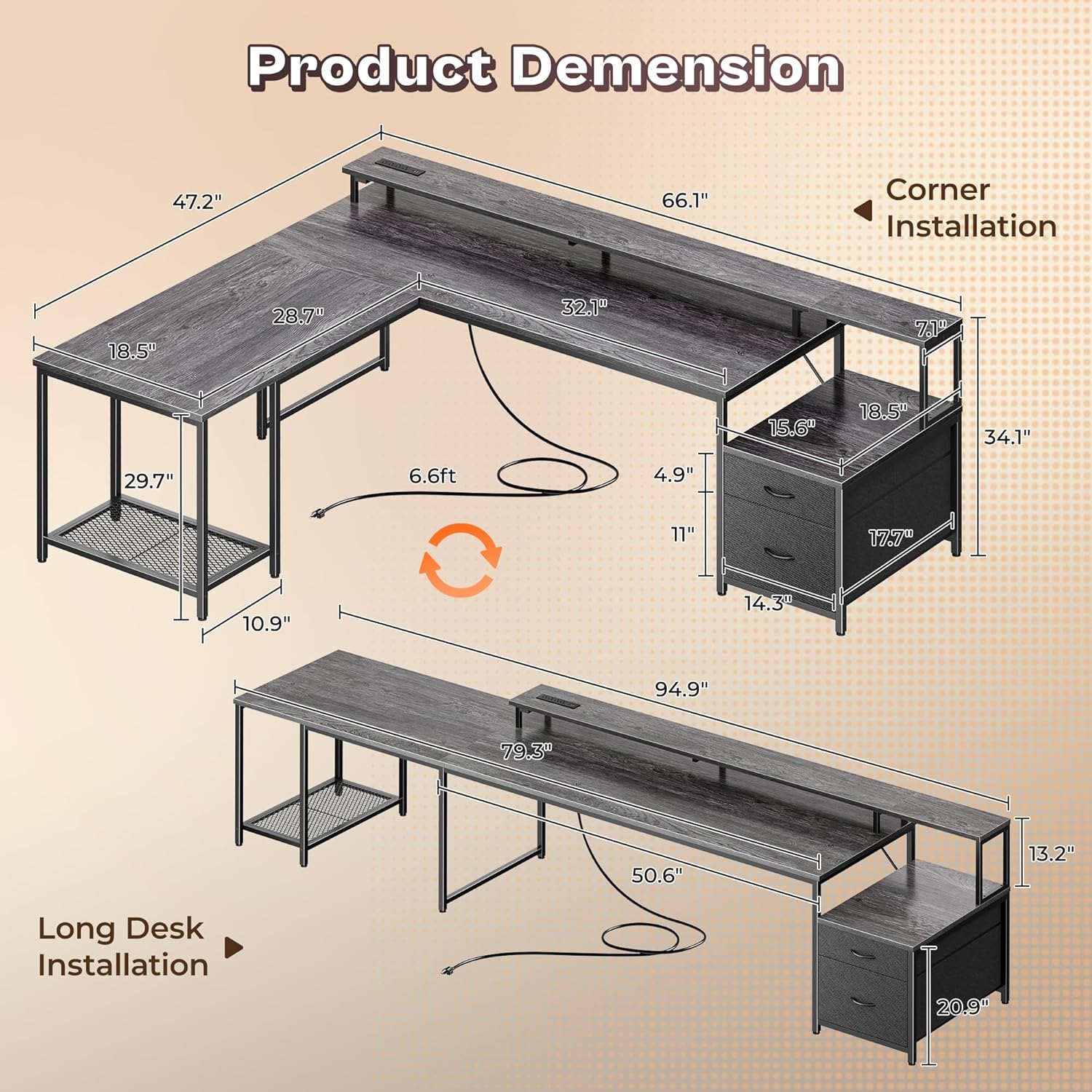
Image: Product dimensions for both L-shaped and long desk configurations, showing measurements for each setup.

Image: Diagram illustrating the desk's multi-functional design, capable of being assembled as an L-shaped or a long straight desk.
5. Operating Instructions
5.1 Integrated Power Outlets
The desk includes a built-in charging station for convenient power access. This station features:
- 4 AC Outlets (125V/12A)
- 2 USB-A Ports (5V/3A)
- 1 USB-C Port (5V/3A)
To use, simply plug the desk's main power cord into a wall outlet. Then, connect your devices to the appropriate ports. Ensure devices are compatible with the specified voltage and current ratings.

Image: Close-up view of the desk's integrated power strip, highlighting the 4 AC outlets, 2 USB-A ports, and 1 USB-C port for charging multiple devices.
5.2 RGB LED Lights
The desk features an RGB LED light strip for customizable ambient lighting. Control the lights using the included smart controller or a dedicated mobile application.
- Smart Controller: Use the physical buttons to switch the lights on/off, select from 12 dynamic modes, and adjust brightness and speed.
- Mobile App Control: Download the recommended app (refer to the assembly guide for details) to unlock over 60,000 colors, access additional dynamic modes, and utilize features like mic mode (lights react to sound) and timing mode (schedule on/off times).
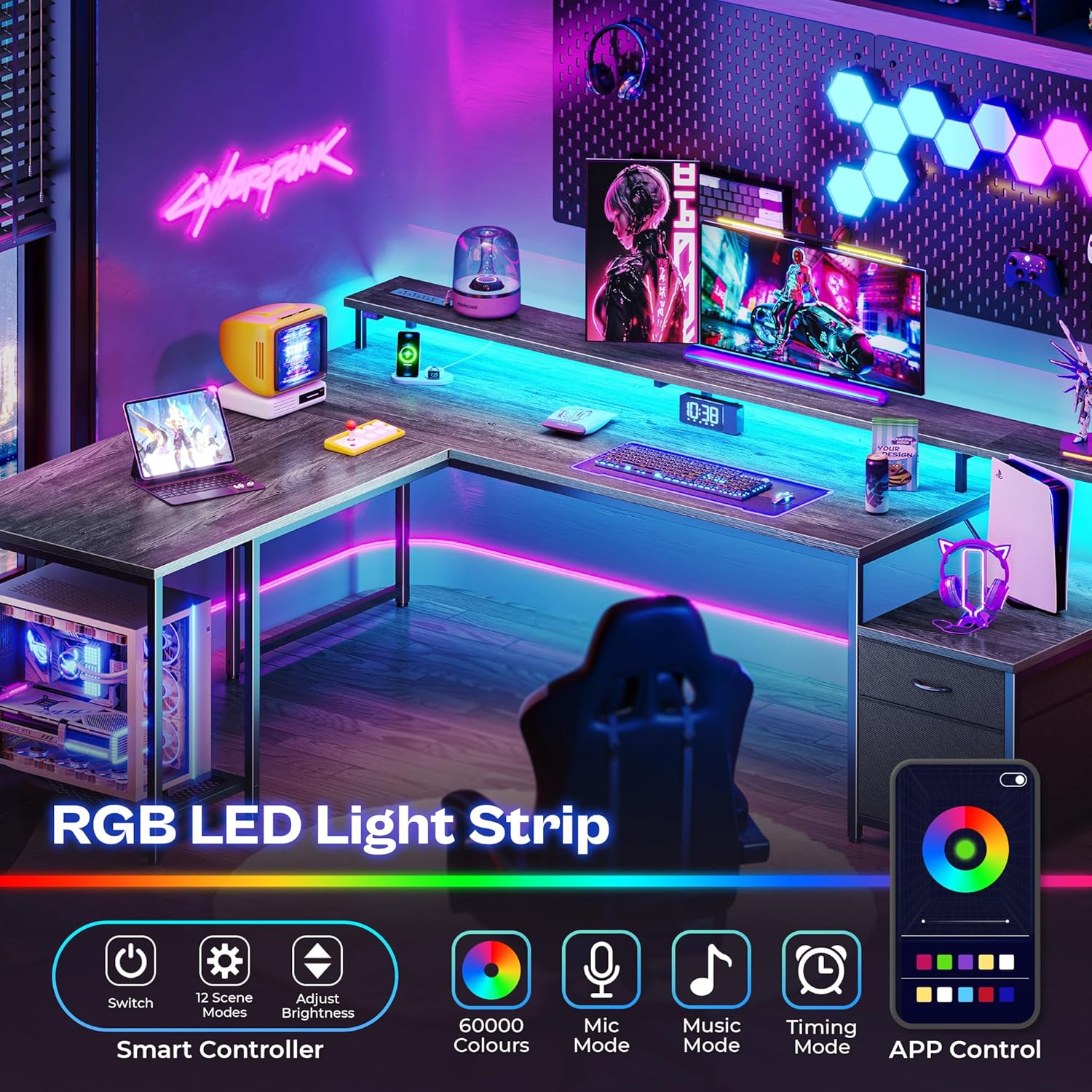
Image: The desk illuminated by RGB LED lights, demonstrating various color options and control methods via a smart controller and mobile application.
6. Features Overview
6.1 Spacious Desktop and Monitor Stand
The desk provides ample surface area for multiple monitors, peripherals, and work materials. An extended monitor riser helps elevate screens to eye level, promoting ergonomic posture and reducing neck strain. This riser also offers additional storage space underneath.

Image: An illustration demonstrating how the ergonomic monitor stand helps maintain proper posture and provides extra storage space.
6.2 Storage Solutions
- Printer Stand: A dedicated stand designed to accommodate most standard printers. The top shelf of the printer stand is detachable, allowing for larger devices if needed.
- Fabric Drawers: Two spacious fabric drawers (one large, one small) are included for organizing documents, office supplies, and personal items. These drawers are designed for durability and ease of use.
- Mesh CPU Stand: A durable metal mesh stand is provided to keep your computer tower off the floor, improving airflow and protecting it from dust and moisture.

Image: The printer stand with its detachable upper shelf and two fabric drawers, illustrating storage capacity.

Image: A mesh CPU stand designed to hold a computer tower, providing ventilation and protection.
6.3 Durable Construction
The desk is constructed from high-quality engineered wood panels and a robust metal frame, ensuring stability and longevity. The desktop surface is water-resistant and scratch-resistant for daily durability. Adjustable feet are included to ensure stability on uneven floors.

Image: Close-up of an adjustable foot, designed to stabilize the desk on uneven surfaces.
7. Maintenance
- Cleaning: Wipe the desk surfaces with a soft, damp cloth. Avoid abrasive cleaners or harsh chemicals that may damage the finish.
- Spills: Immediately wipe up any liquid spills to prevent damage to the engineered wood and electrical components.
- Hardware: Periodically check and tighten all screws and bolts to maintain desk stability.
- Electrical Components: Keep the power strip and LED lights free from dust. Do not attempt to disassemble or repair electrical components yourself.
8. Troubleshooting
| Issue | Possible Cause | Solution |
|---|---|---|
| Desk is wobbly | Uneven floor; loose hardware | Adjust the leveling feet; tighten all assembly screws. |
| LED lights not working | Power connection issue; faulty light strip/controller | Ensure the LED strip is securely plugged into the power source. Check the controller for battery issues if applicable. Contact support if the issue persists. |
| Power outlets not charging | Desk not plugged in; overloaded circuit; faulty outlet strip | Verify the desk's main power cord is securely plugged into a functional wall outlet. Ensure the total power draw does not exceed the strip's rating. Test with another device. |
| Fabric drawers difficult to slide | Overloaded drawer; misalignment | Reduce contents in the drawer. Ensure the drawer is correctly seated in its compartment. |
9. Specifications
- Brand: PRAISUN
- Model: B0FCFMKPCT
- Material: Engineered Wood (desktop, base), Metal (frame)
- L-Shaped Dimensions (D x W x H): 47.24" x 66.14" x 34"
- Long Straight Dimensions (W x D): 94.9" x 18.5" (approximate, based on feature bullet)
- Power Outlets: 4 AC (125V/12A), 2 USB-A (5V/3A), 1 USB-C (5V/3A)
- Special Features: RGB LED Lights, Monitor Stand, Printer Stand, Fabric Drawers, Mesh CPU Stand, Adjustable Feet
- Assembly Required: Yes
10. Warranty and Support
For warranty information, please refer to the documentation included with your purchase or contact PRAISUN customer support. If you encounter any issues not covered in this manual or require further assistance, please reach out to PRAISUN customer service through the retailer's platform or the official brand website.