
iSunirm XH-PSDBH-47CXL-B
iSunirm Gaming Desk Instruction Manual
Model: XH-PSDBH-47CXL-B
Product Overview
The iSunirm Gaming Desk is designed for an enhanced gaming and work experience, offering a robust structure, integrated features, and ample storage. This desk includes a monitor stand, reversible storage shelves, built-in LED lighting, and a power strip with USB charging ports.
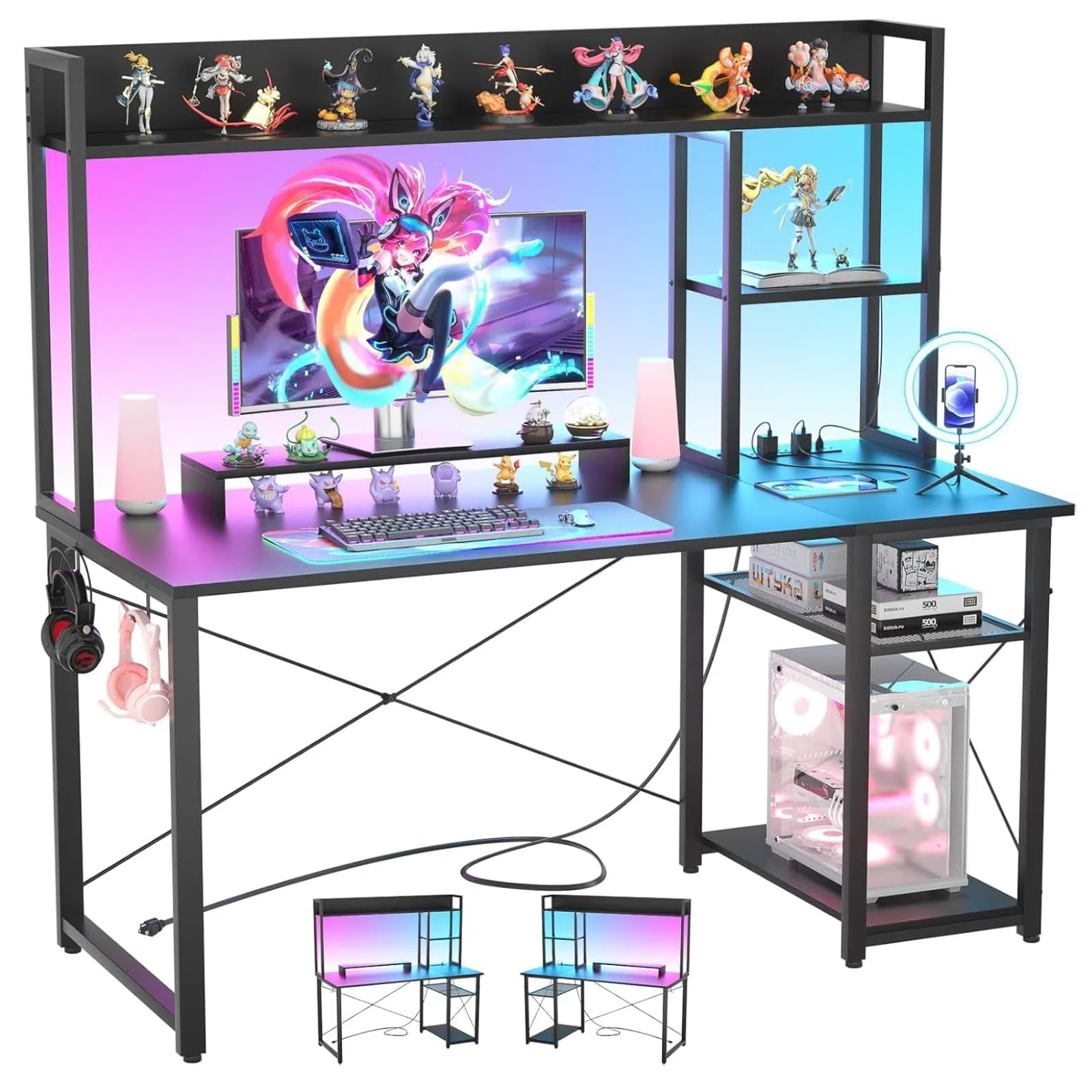
Image: Overall dimensions of the iSunirm Gaming Desk, showing a width of 120 cm, depth of 50 cm, and total height of 147 cm, including the monitor stand and upper shelves.
- Dimensions: 120 cm (Length) x 50 cm (Width) x 147 cm (Height)
- Material: High-quality MDF panel and metal frame
- Special Features: Integrated RGB LED lights, 2 AC outlets, 2 USB ports, monitor stand, reversible storage shelves
- Color: Black
Safety Information
Please read all safety warnings and instructions carefully before assembly and use. Failure to follow these instructions may result in injury or damage to the product.
- Ensure all components are securely fastened during assembly. An improperly assembled desk may be unstable.
- Do not overload the desk or shelves. Refer to specifications for weight limits.
- Keep liquids away from electrical outlets and USB ports to prevent electric shock.
- Place the desk on a flat, stable surface to prevent tipping.
- Keep small parts away from children during assembly.
Package Contents
Verify that all parts are present before beginning assembly. If any parts are missing or damaged, contact customer support.
| Part | Description | Quantity |
|---|---|---|
| Desk Panels | Main desktop, monitor stand, shelf panels | Various |
| Metal Frame Components | Legs, support bars, X-bars | Various |
| Power Strip Unit | Integrated outlets and USB ports | 1 |
| LED Strip Lights | RGB LED lighting for shelves | 1 set |
| Hardware Kit | Screws, bolts, Allen wrench (assembly tools included) | 1 set |
| Instruction Manual | Assembly guide | 1 |
Note: While assembly tools are included, a Phillips head screwdriver may be helpful for some steps.
Setup and Assembly
Follow these steps carefully to assemble your iSunirm Gaming Desk. It is recommended to have two people for assembly.
- Unpack Components: Lay out all parts on a clean, soft surface to prevent scratches. Identify each part using the provided parts list.
- Assemble the Main Frame: Attach the desk legs to the main desktop panel using the provided screws. Ensure all connections are firm but do not overtighten initially.
- Install Crossbars: Secure the X-shaped crossbars to the back of the desk frame for added stability.
- Attach Monitor Stand: Mount the monitor stand to the main desktop.
- Assemble Storage Shelves: Construct the upper storage shelves and attach them to the desk frame. Note that these shelves are reversible, allowing for left or right side configuration.
- Integrate Power Strip: Install the power strip unit into its designated slot on the desk. Connect the power cable.
- Apply LED Lights: Adhere the RGB LED strip lights to the designated area on the storage rack. Connect them to the power source.
- Final Tightening: Once all components are in place, carefully tighten all screws and bolts.

Image: An assembled iSunirm Gaming Desk with a monitor, keyboard, and mouse, showcasing the integrated LED lighting and upper storage shelves. This image illustrates a typical setup after assembly.

Image: A visual representation of the reversible storage shelves, demonstrating how they can be configured on either the left or right side of the desk to suit user preference and room layout.
Operating Instructions
Power Outlets and USB Ports
The desk features an integrated power strip with 2 AC outlets and 2 USB ports for convenient charging and powering of devices.
- Plug the desk's main power cable into a standard wall outlet.
- Use the AC outlets (10-240V) for devices like monitors, PCs, or lamps.
- Use the USB ports (5V/2A) to charge smartphones, tablets, or other USB-powered accessories.

Image: A close-up view of the integrated power strip, showing two AC outlets and two USB ports, with devices plugged in for charging.
LED Lighting System
The RGB LED strip lights offer customizable illumination for your gaming setup.
- Connect the LED strip to its power source as per assembly instructions.
- Control the LED lights using the provided remote control or a compatible mobile application (if applicable).
- Adjust colors, brightness, and lighting modes to create your desired ambiance.

Image: A gaming desk setup featuring a monitor on the elevated stand, surrounded by vibrant RGB LED lighting from the integrated strips, enhancing the gaming atmosphere.
Monitor Stand and Ergonomics
The elevated monitor stand helps maintain an ergonomic posture.
- Place your monitor on the elevated stand to raise it to eye level.
- This design helps reduce neck and back strain during prolonged use.
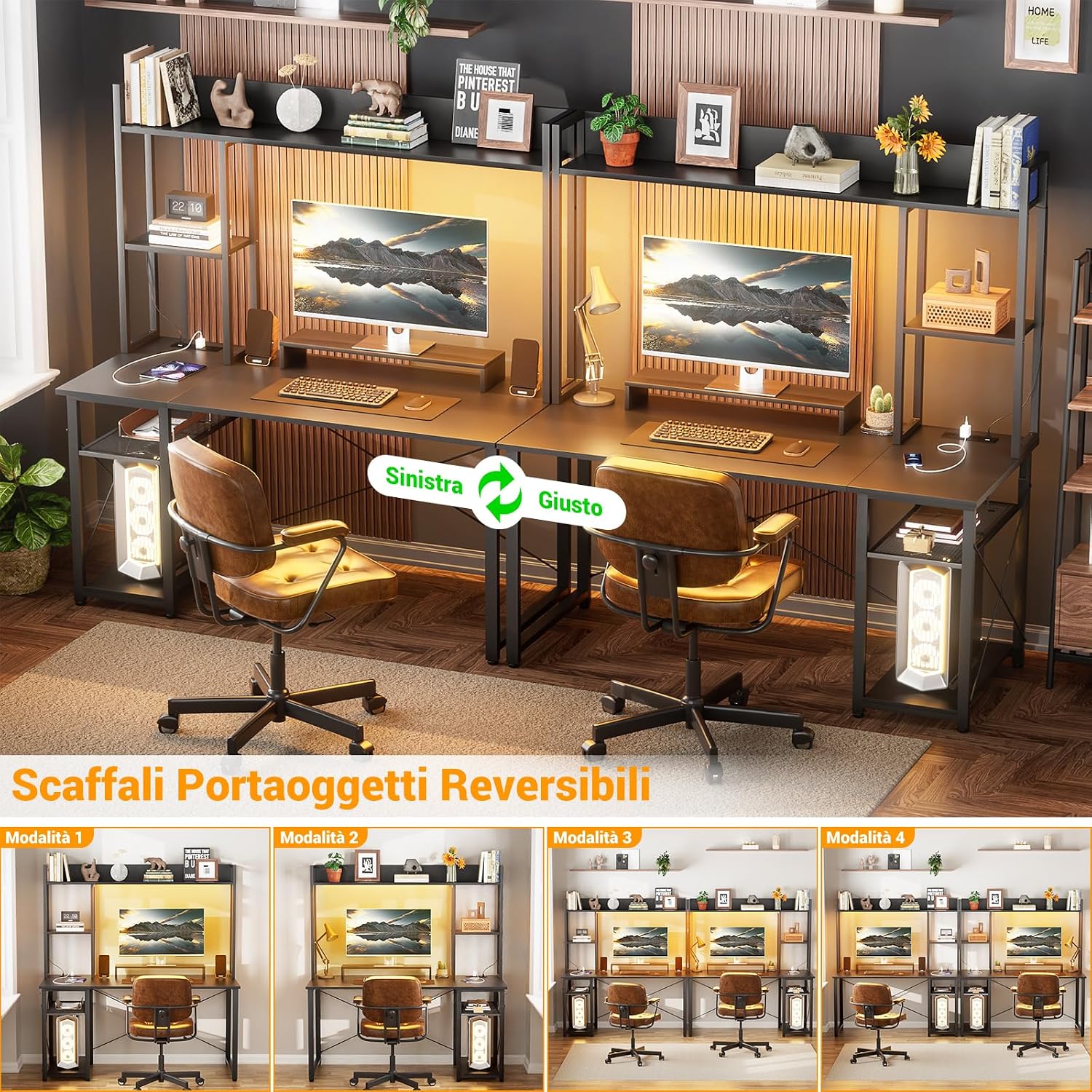
Image: An illustration demonstrating the correct ergonomic posture when using a monitor stand, showing how it helps align the user's neck and back for comfort and health.
Maintenance
Proper maintenance will ensure the longevity and appearance of your iSunirm Gaming Desk.
- Cleaning: Wipe surfaces with a soft, damp cloth. Avoid harsh chemicals or abrasive cleaners that may damage the finish.
- Spills: Clean up spills immediately to prevent staining or damage to the wood panel.
- Hardware Check: Periodically check all screws and bolts to ensure they remain tight. Retighten if necessary.
- Electrical Components: Ensure the power strip and LED lights are kept dry and free from dust. Do not attempt to repair electrical components yourself.
Troubleshooting
| Problem | Possible Cause | Solution |
|---|---|---|
| Desk is wobbly/unstable | Loose screws or uneven surface. | Ensure all assembly screws are tightened. Place the desk on a level surface. Adjust leveling feet if present. |
| LED lights not working | Power connection issue, faulty strip, or remote battery. | Check if the LED strip is properly connected to power. Ensure the main desk power cable is plugged in. Replace remote control batteries. |
| Power outlets/USB ports not working | Desk not plugged in, circuit breaker tripped, or faulty unit. | Verify the desk's main power cable is securely plugged into a working wall outlet. Check your home's circuit breaker. If issues persist, contact customer support. |
| Missing parts during assembly | Packaging error. | Carefully re-check all packaging materials. If parts are genuinely missing, contact customer support with your purchase details. |
Specifications
- Model: XH-PSDBH-47CXL-B
- Brand: iSunirm
- Overall Dimensions (L x W x H): 120 cm x 50 cm x 147 cm
- Desktop Material: MDF (Medium-Density Fiberboard)
- Frame Material: Metal
- Color: Black
- Power Outlets: 2 x AC (10-240V)
- USB Ports: 2 x USB (5V/2A)
- Special Features: RGB LED lighting, Monitor Stand, Reversible Storage Shelves, Headphone Hooks
- Assembly Required: Yes
- Number of Shelves: 5
Warranty and Support
Limited Warranty
This iSunirm Gaming Desk comes with a limited warranty. Please refer to your purchase documentation or contact customer support for specific warranty terms and conditions. The warranty typically covers manufacturing defects under normal use.
Customer Support
For any questions, missing parts, or assistance with assembly or operation, please contact iSunirm customer support. Have your model number (XH-PSDBH-47CXL-B) and purchase information ready when contacting support.
You can often find contact information on the retailer's website or within your purchase confirmation emails. For general inquiries, you may visit the iSunirm Store on Amazon.
Ask a question about this manual
Ask about setup, troubleshooting, compatibility, parts, safety, or missing instructions. Manuals+ will review the question and use this page’s manual context to help answer it.