1. Safety Information
Please read all instructions carefully before installation and use. Retain this manual for future reference.
- Ensure power is disconnected at the circuit breaker before installation or maintenance.
- All wiring must be in accordance with national and local electrical codes. If you are unsure, consult a qualified electrician.
- The ceiling fan must be mounted to a ceiling joist or support structure capable of safely supporting the fan's weight.
- Do not insert any objects into the fan blades while the fan is in operation.
- This appliance is not intended for use by young children or individuals with disabilities without supervision.
2. Package Contents
Verify that all components are present before beginning installation:

Image: Overview of the FUMLTP 51-inch Ceiling Fan components, including motor housing, blades, light kit, remote, and mounting hardware.
- Mounting Bracket
- Canopy
- Remote Control & Bracket
- Wood Screws (4)
- Expansion Screws (2)
- Engine Support
- Blades (6)
- Lamp Cover
- Balancing Kit
- Wiring Caps (3)
- Receiver
- Downrod (Bar)
- Extension Bar (optional)
- Decorative Element
- User Manual
3. Installation
This section provides a general guide for installation. For detailed visual instructions, please refer to the official installation video.
Video: Official installation guide for the FUMLTP 51-inch Ceiling Fan, demonstrating step-by-step assembly and wiring.
3.1. Pre-Installation Considerations

Image: Guide for selecting the appropriate fan size based on room square footage and suggested ceiling height (8 to 10 ft). This 51-inch fan is suitable for 160-220 sqft rooms.
Ensure your ceiling can support the fan's weight and is suitable for ceiling mount installation. The fan can be installed on flat ceilings. For sloped ceilings, ensure the angle is less than 15 degrees.
3.2. Step-by-Step Assembly
- Attach Blades: Secure the six fan blades to the motor housing using the provided screws. Ensure they are firmly attached.
- Assemble Downrod: Thread the electrical wires from the motor through the chosen downrod (standard or extension). Attach the downrod to the motor housing, securing it with the pin and screws.
- Install Mounting Bracket: Secure the mounting bracket to the ceiling electrical box. Ensure it is firmly attached to a ceiling joist or support structure.
- Hang Fan Assembly: Carefully lift the fan assembly and hang it on the mounting bracket.
- Electrical Wiring: Connect the fan's electrical wires to the household wiring according to the wiring diagram in the user manual. Ensure all connections are secure and insulated with wiring caps.
- Install Receiver: Place the receiver unit within the mounting bracket, ensuring wires are not pinched.
- Attach Canopy: Slide the canopy up to the ceiling and secure it to the mounting bracket with screws.
- Install Light Kit: Connect the light kit wires to the fan motor wires. Secure the light kit to the bottom of the fan.
- Attach Lamp Cover: Twist or snap the lamp cover onto the light kit until it is securely in place.
4. Operating Instructions
4.1. Remote Control Functions
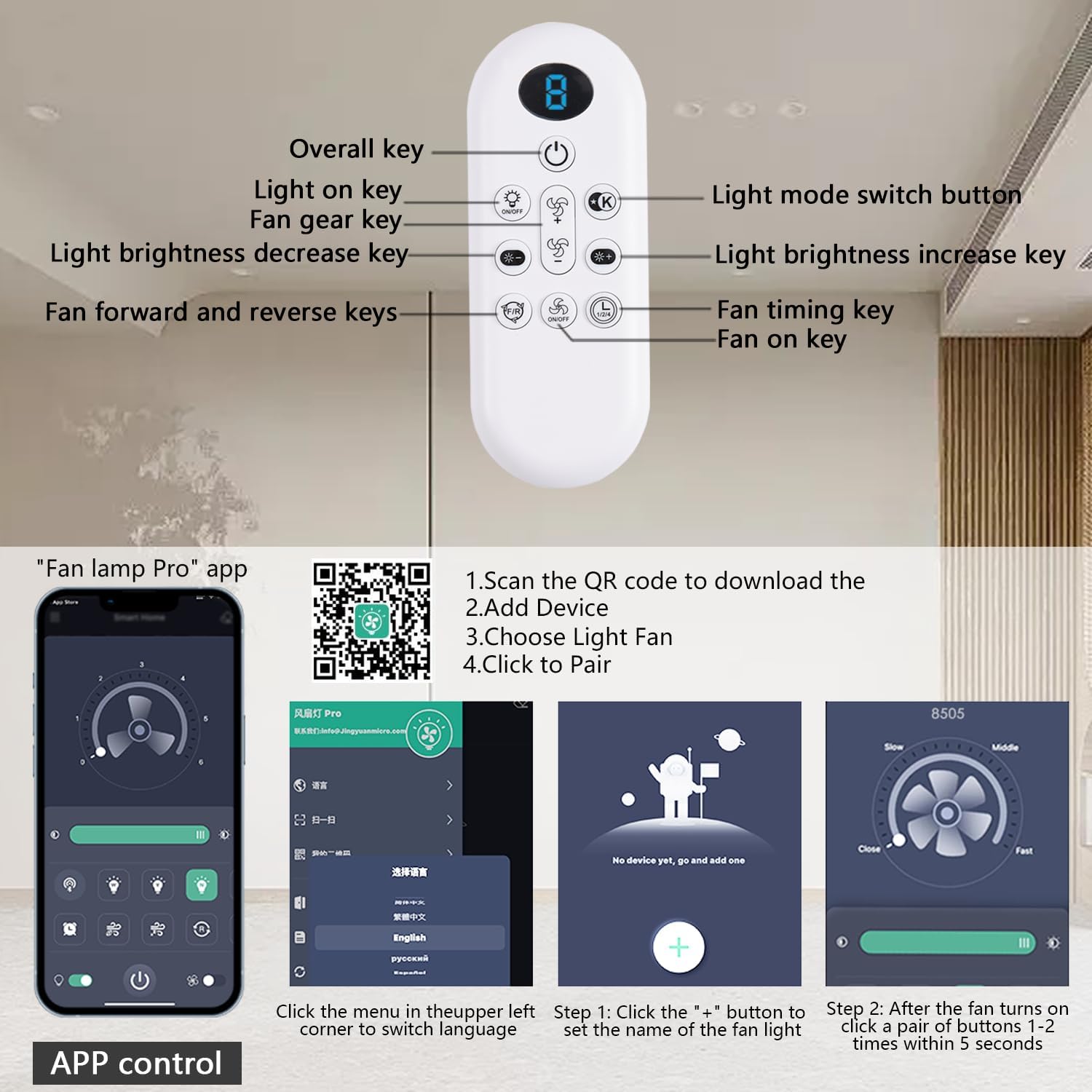
Image: Detailed layout of the remote control for the FUMLTP Ceiling Fan, showing buttons for power, light, fan speed, color temperature, dimming, and timer functions.
- Power Button: Turns the fan and light On/Off.
- Light On/Off: Toggles the light On/Off independently.
- Fan Speed +/-: Adjusts fan speed (6 levels).
- Light Mode Switch (K): Cycles through 3 color temperatures (3000K Warm Light, 4500K Natural Light, 6500K Cool White Light).
- Light Brightness +/-: Dims or brightens the LED light (10%-100%).
- Fan Forward/Reverse: Changes the direction of blade rotation for summer (downdraft) or winter (updraft) modes.
- Timer Function: Sets the fan to turn off automatically after 1, 2, 4, or 8 hours.
- Night Light Mode: Activates a low-brightness light setting.
4.2. App Control Functions
The FUMLTP ceiling fan can also be controlled via a smartphone app. Scan the QR code below or visit the provided link to download the 'Fan Lamp Pro' app.
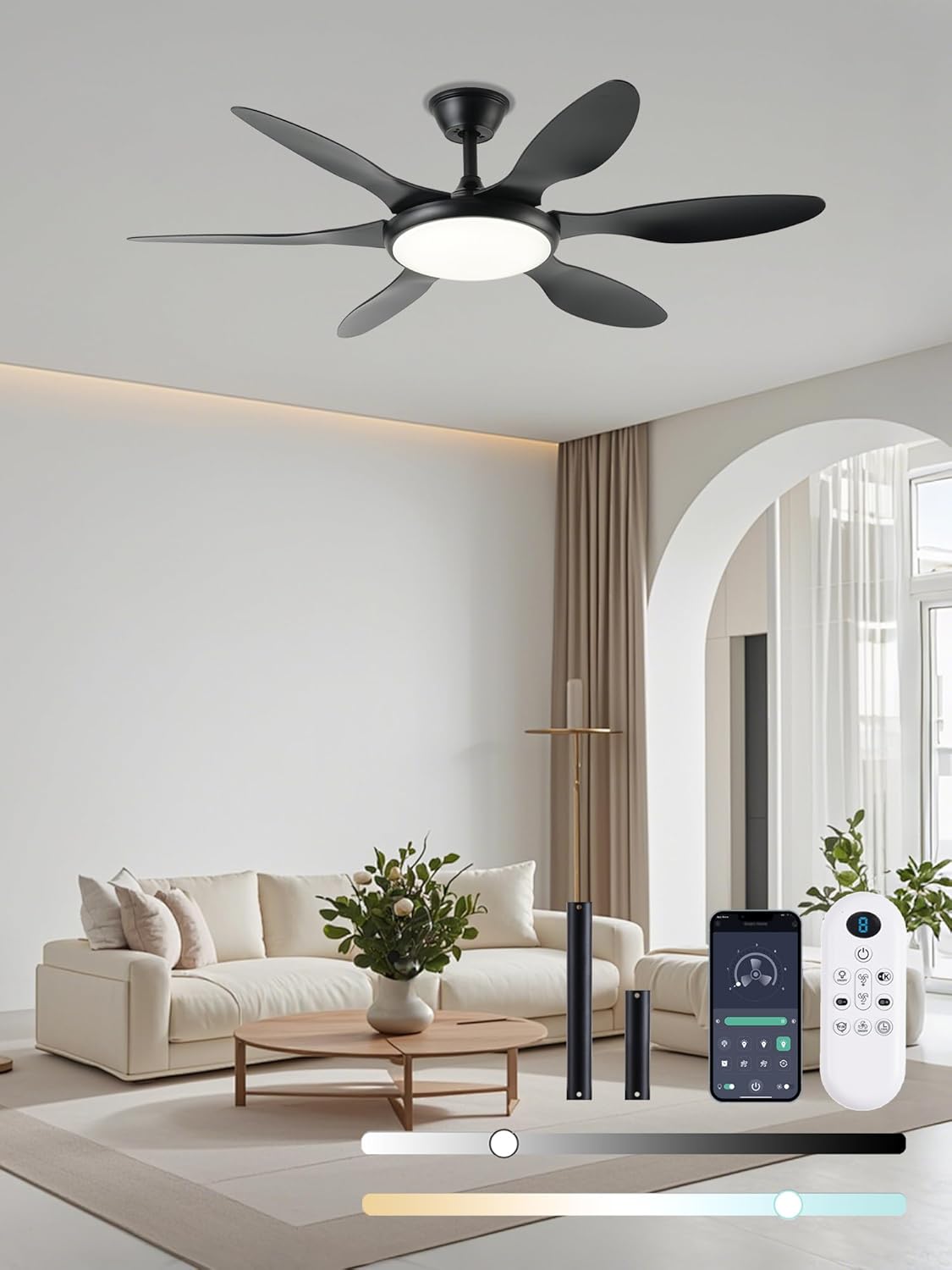
Image: Screenshot of the 'Fan Lamp Pro' app interface, showing controls for fan speed, light color temperature, and brightness.
Download the 'Fan Lamp Pro' app: https://www.jasonghost.com/fanlamppro/
- Download & Install: Scan the QR code or visit the link to download the 'Fan Lamp Pro' app.
- Enable Bluetooth: Ensure your phone's Bluetooth is turned on.
- Pairing: Within 5 seconds of powering on the fan, tap the pairing button in the app. The light will flash twice to confirm successful pairing.
- Control: Use the app to adjust fan speed, light color temperature, brightness, set timers, and switch fan direction.
5. Maintenance
- Cleaning: To clean the fan, wipe with a soft, damp cloth. Do not use abrasive cleaners or solvents.
- Blade Cleaning: Periodically clean the fan blades to prevent dust buildup, which can affect performance.
- Tighten Screws: Check all screws and connections periodically to ensure they are secure.
6. Troubleshooting
| Problem | Possible Cause | Solution |
|---|---|---|
| Fan does not operate | No power to the fan; Loose wiring; Remote not paired. | Check circuit breaker; Verify all wire connections; Re-pair remote control. |
| Light does not work | Loose wiring; Faulty LED panel. | Check light kit wiring connections; Contact customer support if LED panel is faulty. |
| Remote control not working | Dead batteries; Remote not paired; Obstruction. | Replace batteries; Re-pair remote control; Ensure no obstruction between remote and receiver. |
| Fan wobbles | Loose blades; Unbalanced blades; Loose mounting. | Tighten all blade screws; Use balancing kit to balance blades; Ensure mounting bracket is secure. |
| Excessive noise | Loose screws; Motor issue. | Check and tighten all screws; If noise persists, contact customer support. |
7. Specifications
| Feature | Detail |
|---|---|
| Brand | FUMLTP |
| Model Name | ceiling fans |
| Item Model Number | SY36L-Black |
| Size | 51 Inches |
| Color | Black |
| Motor Type | DC (Reversible) |
| Number of Blades | 6 |
| Number of Power Levels | 6 |
| Light Type | LED (3CCT, Dimmable 10%-100%) |
| Color Temperatures | 3000K / 4500K / 6500K |
| Control Method | App, Remote |
| Noise Level | 35 Decibels |
| Indoor/Outdoor Usage | Indoor, Outdoor (Note: Avoid direct exposure to rain) |
| Power Source | AC/DC |
| Voltage | 110 Volts |
| Wattage | 60 watts |
| Item Weight | 14.72 pounds |
| Product Dimensions | 52"D x 52"W x 11.8"H |
8. Warranty and Support
For warranty information or technical support, please refer to the contact details provided with your purchase or visit the FUMLTP official website. Keep your purchase receipt for warranty claims.