
Introduction
This manual provides essential information for the safe and efficient operation of your BOSYTRO 24V 50A 1200W DC Switching Power Supply (Model SJK-24V-1200W). This unit converts AC mains power to a stable DC 24V output, suitable for a wide range of applications. Please read these instructions thoroughly before installation and use.
Safety Information
WARNING: Improper installation or use can lead to electric shock, fire, or damage to the power supply and connected devices. Always follow these safety guidelines:
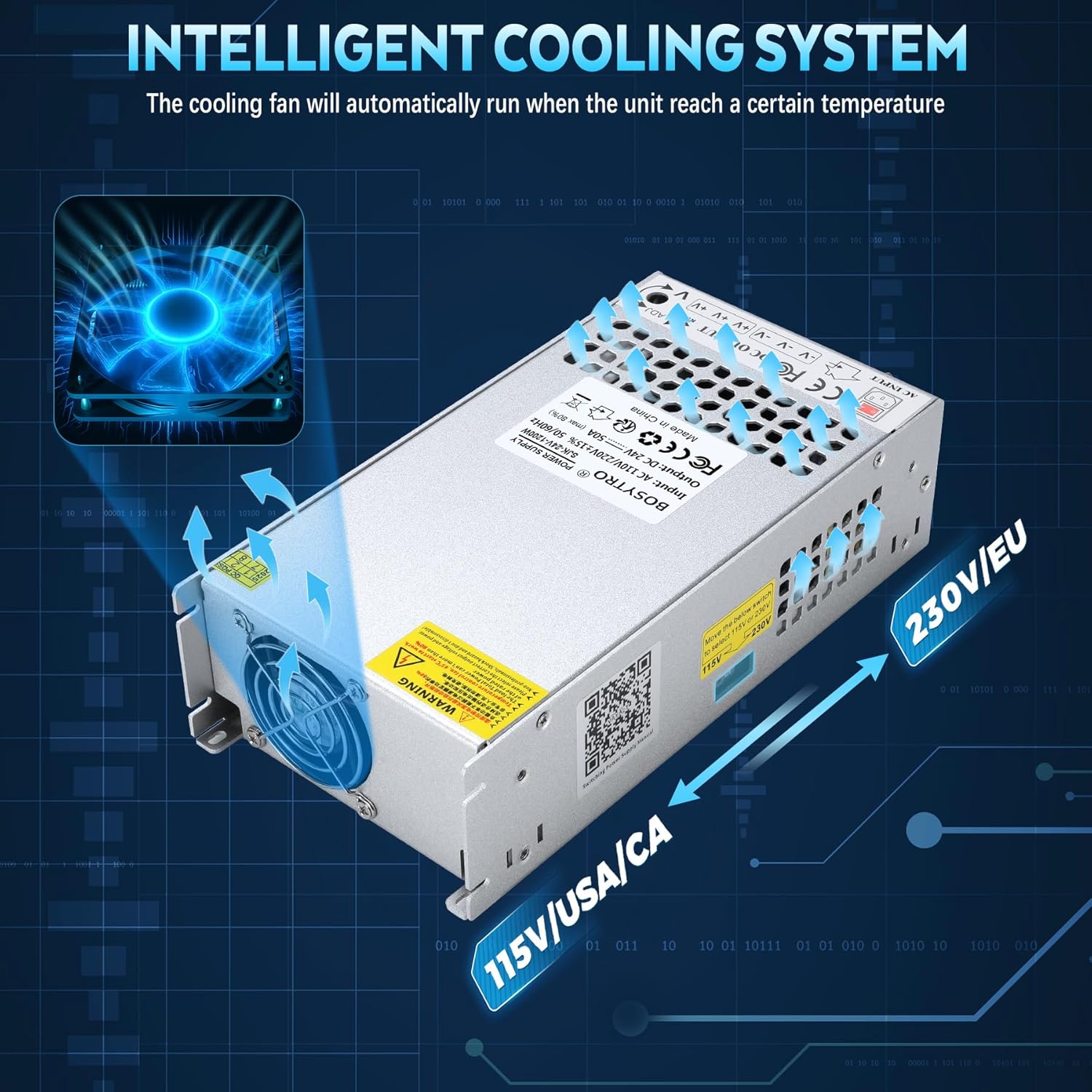
- Ensure the input voltage switch (115V/230V) is set correctly for your local power grid before connecting the power cord. Incorrect voltage selection will damage the unit.
- This power supply is designed for indoor use only. Do not expose it to water, high humidity, or extreme temperatures.
- Ensure proper ventilation to prevent overheating. Do not block the cooling fan or vents.
- All wiring should be performed by qualified personnel, adhering to local electrical codes.
- Connect positive (+) and negative (-) terminals correctly to avoid damage to the power supply and connected devices.
- Do not overload the power supply. Ensure the total current draw of your devices does not exceed 50A and total wattage does not exceed 1200W.
- The unit features multiple protection functions including overload, over-voltage, over-heat, short circuit, and earth leakage protection for enhanced safety.

Product Overview
The BOSYTRO SJK-24V-1200W is a robust DC switching power supply designed for reliability and performance. It features an upgraded output port with a power cord for easier connection and an intelligent cooling system.
Key Features
- High Power Output: Provides 24V DC at up to 50A, with a maximum power of 1200W.
- Adjustable Voltage: Output voltage is adjustable within a ±10% range (21.6V-26.4V).
- Universal Input: Supports AC 110V/220V input, selectable via a switch.
- Efficient Cooling: Features a porous metal aluminum casing and an intelligent temperature-controlled fan for stable heat dissipation. The fan activates only when a certain operating temperature is reached.
- Multiple Output Channels: Three output channels are available for connecting multiple load devices.
- Enhanced Connectivity: Upgraded output port includes a power port and power cord, along with installation bracket and connection terminal accessories.
- Comprehensive Protection: Built-in safeguards against overload, over-voltage, over-heat, short circuit, and earth leakage.


Specifications
| Feature | Specification |
|---|---|
| Brand | BOSYTRO |
| Model Number | SJK-24V-1200W |
| Input Voltage | AC 110V/220V (Switchable) |
| Output Voltage | DC 24V (Adjustable ±10%, 21.6V-26.4V) |
| Output Current | 50A Max |
| Output Wattage | 1200W Max |
| Efficiency | ≥ 80% |
| Operating Temperature | 14°F - 140°F (-10°C - 60°C) |
| Item Dimensions (L x W x H) | 9.6 x 4.9 x 2.56 inches |
| Item Weight | 1.3 Kilograms |
| Material | Aluminum Shell |
Setup and Installation
Follow these steps for safe and correct installation of your power supply.
1. Select Input Voltage
Before powering on, verify the input voltage switch on the side of the unit is set to match your local power supply (115V for US/CA, 230V for EU). Incorrect selection will damage the power supply.

2. Check the Power Supply
Before connecting your device, perform a quick check of the power supply. Plug in the power cord, turn on the switch, and observe the red and green indicator lights. If both lights are on, the unit is functioning normally. After checking, turn off the switch and unplug the power cord before proceeding.

3. Connect Your Device
Connect the output terminal wiring from the power supply to your device. Ensure the positive (V+) and negative (V-) terminals are connected correctly. Cable lugs are provided to facilitate a more convenient and secure wire connection.


4. Start Your Project
After all connections are securely made and verified, plug in the power cord and turn on the power switch to energize your project.

Wall Mounting
The power supply comes with a bracket and screws for optional wall mounting. Ensure the mounting location is stable and allows for adequate ventilation around the unit.

Operating Instructions
Output Voltage Adjustment
The output voltage of the power supply can be fine-tuned within a ±10% range (21.6V-26.4V). To adjust, use a small screwdriver to carefully turn the 'ADJ' potentiometer located near the output terminals. Turn clockwise to increase voltage, counter-clockwise to decrease.

Applications
This versatile 24V DC switching power supply is suitable for a wide array of applications, including but not limited to:
- LED Strips and LED Advertising Displays
- 3D Printers
- CCTV and Security Monitoring Systems
- DC Motors and Robotics
- Ham Radios
- Car Audio Systems
- Medical Equipment
- Industrial Automation Equipment

Maintenance
To ensure the longevity and optimal performance of your BOSYTRO power supply, consider the following maintenance tips:
- Keep Vents Clear: Regularly check that the cooling fan and ventilation holes are free from dust and obstructions. Blocked vents can lead to overheating and reduced lifespan.
- Operating Environment: Operate the power supply within its specified temperature range (14°F - 140°F). Avoid excessively hot, humid, or dusty environments.
- Cleanliness: Use a soft, dry cloth to clean the exterior of the unit. Do not use liquid cleaners or solvents.
- Secure Connections: Periodically check all wiring connections to ensure they remain tight and secure.
Troubleshooting
If you encounter issues with your power supply, consider these common troubleshooting steps:
- No Power Output:
- Check if the power cord is securely plugged into both the power supply and the wall outlet.
- Ensure the power switch on the unit is in the 'ON' position.
- Verify the input voltage switch (115V/230V) is set correctly for your region.
- Check for tripped circuit breakers or blown fuses in your electrical system.
- Output Voltage Incorrect:
- Use a multimeter to measure the output voltage.
- Adjust the 'ADJ' potentiometer as described in the 'Operating Instructions' section.
- Overheating:
- Ensure the power supply's ventilation holes and fan are not blocked.
- Reduce the load connected to the power supply to ensure it is not overloaded.
- Verify the ambient operating temperature is within the specified range.
- Intermittent Power:
- Check all wiring connections for looseness or damage.
- Ensure the total current draw of your devices does not exceed the power supply's maximum rating.
If these steps do not resolve the issue, please contact customer support.
Warranty and Support
Warranty Information
BOSYTRO offers a warranty for quality issues, allowing for returns or exchanges. Please refer to your purchase documentation for specific warranty terms and duration.
Customer Support
For technical assistance, warranty claims, or any questions regarding your BOSYTRO power supply, please contact the seller or BOSYTRO customer service through the platform where you made your purchase.
What's in the Box
Your BOSYTRO 24V 50A 1200W DC Switching Power Supply package includes:
- 1 x BOSYTRO 24V 50A 1200W DC Switching Power Supply (Model SJK-24V-1200W)
- 1 x Power Cord
- 1 x Installation Bracket
- Connection Terminal Accessories (Cable Lugs, Screws)
